Pandao CMS Pro 8 - Multilingual PHP CMS with Page Builder
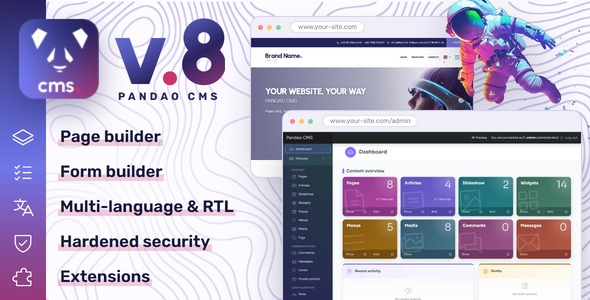

Live demo · Admin demo (login admin, password admin123) · Documentation

Pandao CMS is a complete content management system in PHP for professional websites: pages built block by block, a blog, widgets, forms, media and menus, in as many languages as you need, with an administration your clients understand at first sight. Ideal for web agencies and freelancers who deliver sites quickly, and for businesses that run their own.

Version 8: a new generation
Version 8 is rebuilt for PHP 8.2 to 8.5: hardened, extensible and easier to use every day, with a page builder, a form builder, popups, a media library with folders, drafts kept as you type, a trash and extensions. Buyers of version 7 download it from their Downloads page and import their site into it in a few clicks. See what is new.

Build pages without code
Compose each page with PageFlow 2, the built-in page builder: drag blocks and ready-made sections, adjust each block, and see the page as your site shows it, on a computer, a tablet or a phone. Then place widgets around it: slideshow, banners, parallax and video backgrounds, article grids, testimonials. Every block stands at the same distance from the next, and your logo and your two colours dress the whole site.


An administration your clients understand
Clear forms with a tab per language, a dashboard of what changed, and nothing lost: drafts kept as you type, a trash to restore, editing locks between colleagues. Every page in every language, right to left included, with clean addresses for the search engines.


Secure and extensible
Prepared queries, protected forms, strict security headers, limited login attempts, a cookie banner with “Reject all” and a privacy policy page. Extensions add whole features without touching the core: our hotel booking engines are sold as add-ons, Multi Resorts for several hotels and Panda Resort for a single hotel.


Easy to install, well documented
An installation wizard, a Diagnostic screen that checks your server, scheduled tasks with or without a cron job, and a complete documentation with screenshots of every screen.


Features
Content
- Pages in a tree, each with its model: text page, blog, contact, search, legal notices, privacy policy
- Page builder (PageFlow 2): drag and drop 25+ blocks and ready-made sections, see the page as on your site on a computer, tablet or phone, and fine-tune each block, with layers, undo and copy-paste
- Articles with their own page, tags, publication and end dates, and featured articles
- Widgets in every position of the theme: slideshow, banners, parallax and video backgrounds, article grids, testimonials, check lists, contact details, menus
- Form builder: text, e-mail, phone, number, date, list, checkbox and radio fields, answers sent by e-mail and kept in the administration
- Popups on the pages you choose, with publication dates
- Comments with ratings, published once you accept them
- Media library with folders, images resized for every screen with a lighter WebP copy, and a focal point on each image
Website
- Responsive theme dressed with your logo and your two brand colours, set in the settings
- Child theme for deeper changes, which updates never overwrite
- Unlimited languages, right-to-left ones included, with a language selector; every text and e-mail translatable
- SEO: clean addresses in each language, title tags and descriptions, canonical and hreflang tags, sitemap, old addresses redirected
- Privacy: cookie banner with “Reject all”, privacy policy page, members who delete their account, invisible reCAPTCHA v3
- Search of the site across its pages and articles, with or without accents
- Maintenance mode with your own message
Administration
- Dashboard with the content of the site, the latest activity, the drafts and the messages
- Drafts kept as you type, trash with restore, editing locks
- Users and roles: administrator, manager, editor and registered members
- Diagnostic screen that checks PHP, the database, the server and the scheduled tasks, with a report for support
- Administration in English, French, Spanish, Portuguese, Dutch, Russian and Turkish
- Import of a version 7 site: content, accounts, media and settings, with their addresses
For developers
- Extensions with their own modules, pages, widgets, settings, roles, scheduled tasks and database updates, installed and updated from the Extensions page
- Hooks, routes and migrations, documented step by step
- Templates in plain PHP, overridden file by file in a child theme
- Command line for the scheduled tasks, the extensions and the import of a version 7 site
Requirements
- PHP 8.2 to 8.5, with the curl, dom, fileinfo, gd, mbstring, openssl, pdo and pdo_mysql extensions (intl advised)
- MySQL 5.7 or later, or MariaDB 10.3 or later
- Apache with mod_rewrite, or IIS with URL Rewrite
- HTTPS and a cron job are advised
What’s included
- Pandao CMS 8, ready to upload, PHP libraries included (no Composer needed)
- Installation wizard and sample content in English and French: pages, articles, widgets, menus, photos and a video you may keep
- Complete documentation, also online
Upgrading from version 7
Version 8 is a new generation: it is installed as a new site, beside your version 7 site, and imports it in a few clicks from its settings: languages, pages, articles, menus, widgets, slides, media, comments, messages, accounts, texts and settings, each page keeping its address, so that links and search rankings follow. Your old site is only read and keeps working until you point your domain to the new one. The steps are described in the documentation.
Support
We answer through the Support tab of this page. Item support comes with your purchase for 6 months and can be extended to 12 months. Include the report of the Diagnostic screen in your request: it tells us everything about your server, without any password.
Changelog
Version 8.4.1
- The installation wizard accepts database names that contain a hyphen, as some hosts create them
Version 8.4.0
- New page builder, PageFlow 2: pages are edited as the site shows them, on a computer, a tablet or a phone, with settings for each block (margins, colours, visibility, column widths for each screen size), ready-made sections, layers, undo, copy-paste, and pictures you drop or paste into a page saved straight to the media library. Pages made with the previous builder open as they were
- Removing a picture block from a page no longer deletes its file
- The sign-up form speaks the language of the site, and says why it refuses a sign-up: a password under 12 characters, a failed anti-robot check, or too many sign-ups in an hour
- The site keeps a single home page, chosen with the house icon in the list of pages, after a confirmation
- The settings now ask for reCAPTCHA v3 keys: with v2 keys, every protected form is refused
Version 8.3.0
- Every page opens on hosts that run PHP as CGI or FastCGI: only the home page did, the others answered “No input file specified”
- The buttons and banners of the theme follow the highlight colour of Settings › Appearance, gradients included
- Right-to-left languages: the theme loads the right-to-left edition of Bootstrap, and its margins, columns, lists, forms and arrows change side
- The column of the social links no longer covers the logo or the start of the texts on laptop screens
- For extensions: a module of a single item opens its form without a list, and a hidden field of a module form keeps its value without showing
Version 8.2.1
- A disabled extension leaves no trace on the site: its pages leave the menus, the sitemap and the search, and its blocks the pages
- A block of a type that has nothing to show leaves neither its title nor an empty box
- “1 comment” in the singular on the blog, and the rating stars of the comments wherever comments show
Version 8.2.0
- A new generation of Pandao CMS for PHP 8.2 to 8.5
- Hardened security: rewritten routers, prepared queries, protected forms, security headers, limited login attempts
- Extensions, with their pages, modules, widgets, settings, roles, scheduled tasks and database updates, and an Extensions page
- Page builder, form builder, popups, media library with folders, focal points and WebP copies, trash, drafts and editing locks
- Widgets in every position of the theme, evenly spaced on every page, right-to-left languages, cookie banner with “Reject all”, privacy policy page
- Diagnostic screen, scheduled tasks run by the visits when the server has no cron job, command line
- Icons, fonts and sample photos under open licences, and real sample texts in English and French
- Import of a version 7 site, with its content, accounts, media and settings, keeping its addresses
- Search of the site across its pages and articles, with or without accents
Credits
Sample photos: CC0 (StockSnap); sample video: public domain (NASA); all included. The photos of the live demo are shown for preview only and are not included. Icons: Phosphor Icons (MIT). Fonts: Rubik and Urbanist (SIL Open Font License). The licences of every library are listed in the documentation.
$49 |
Download |
4.3 average based on 53 ratings.

| Last Update | 2026-10-17 |
| Created | 2015-03-18 |
| Sales | 403 |
| Discussion | Comments |
| Compatible Browsers | Firefox Safari Opera Chrome Edge |
| Software Version | PHP 8.x PHP 7.x MySQL 8.x MySQL 5.x |
| High Resolution | Yes |
| Software Framework | |
| Files Included | JavaScript JS JavaScript JSON HTML XML CSS PHP SQL |
| Video Preview Resolution |


