Palette Picker | Color Generator App for Windows


Palette Picker | Color Generator App for Windows
Palette Picker is a desktop color palette application for Windows, built for designers, developers, brand professionals, and UI makers who want a fast way to create, refine, save, and export professional color systems.
Generate color palettes instantly, explore harmony modes, check accessibility, copy values, save your favorite palettes, and export your work in practical formats for real design and development workflows.
Key Features
- Instant Color Palette Generation – Generate fresh color palettes quickly with a single click.
- Multiple Harmony Modes – Explore analogous, complementary, monochromatic, triadic, tetradic, split complementary, and more.
- Up to 15 Colors Per Palette – Create compact palettes or larger color systems depending on your project.
- One-Click Copy – Copy color values in Hex, RGB, and HSL formats.
- Accessibility Checks – View WCAG contrast guidance at a glance while building your palette.
- Reorder Colors – Adjust the visual balance of your palette by rearranging colors.
- Save Favorite Palettes – Build a reusable local library of your best color combinations.
- Multiple Export Options – Export palettes as CSS variables, Tailwind classes, JSON, PNG.
- Dark Mode Support – Work comfortably whatever your preference.
- Local Storage – Saved palettes are stored locally on your device.
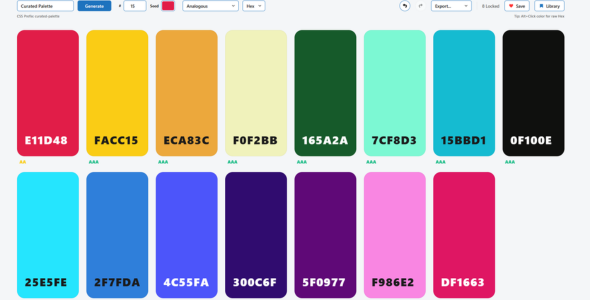
Built For Practical Creative Workflows
Palette Picker helps reduce the need to jump between multiple browser tools when creating color systems. It brings generation, refinement, accessibility checking, saving, copying, and exporting into one focused Windows desktop app.
Whether you are designing a website, building a web app, preparing a brand concept, or creating UI assets, Palette Picker gives you a simple and reliable way to create usable color palettes.
Export Formats
- CSS Variables
- Tailwind Classes
- JSON
- PNG
- UI Snapshot
Technical Requirements
- Operating System: Windows 10 or Windows 11
- Architecture: 64-bit Windows
- Storage: 200MB available space recommended
- Memory: 4GB RAM minimum recommended
- Internet Connection: Not required for core app features
- Framework: Built with Electron. Electron desktop runtime included with the application package.
Included Files
- Palette Picker Windows application package
- User documentation
- License information
Demo Video
Watch the demo video here:
Palette Picker Demo Video
Ideal For
- Web designers
- UI designers
- Frontend developers
- Brand designers
- Template creators
- Digital product makers
Support
If you need help with Palette Picker, please use the item support section on CodeCanyon.
0 average based on 0 ratings.
.jpg)
| Last Update | 2026-05-16 |
| Created | 2026-05-16 |
| Sales | 0 |
| Discussion | Comments |
| Application Runtime | Native |
| High Resolution | |
| Compatible OS Versions | Windows 11 Windows 10 |
| Video Preview Resolution | 1900x990 |


