PageFlow | Drag and Drop Page Builder for Bootstrap 5
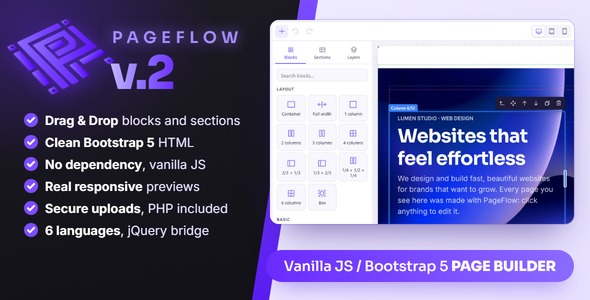


PageFlow is a drag and drop page builder you add to your own website, CMS or web application in two lines of JavaScript. The people who write your pages drop blocks and ready-made sections into a frame that shows the styles of your site; you get clean, responsive Bootstrap 5 HTML, to save in your database and show with your theme. No dependency, no framework, no external service.

Drag, drop, done
Drag a block or a whole section into the page: one clear line shows where it goes. Click a block to add it where the selection is, tap it on a phone, or drop a picture from your desktop. Then write right on the page with PageFlow’s own text editor, and style each block with a click.


Responsive for real
The page is edited in a frame with the styles of your site, so the breakpoints of Bootstrap work: the desktop, tablet and phone previews show the real layout. Drag the edge of a column to resize it, and give each column its width on each screen size.

Clean HTML, and an API for developers
PageFlow writes readable, indented Bootstrap markup, without any trace of the editor. It imports the pages you already have: what it recognizes becomes blocks, and everything else stays untouched. One script, as an ES module or a global, with options, methods and events, your own blocks and fields, and a bridge for jQuery.


Safe by default
Everything that enters the page is cleaned, whether it is typed, pasted or imported. Pictures are uploaded to your server, never stored in the page, and the included PHP handler checks each one from its content and writes it again.


Features
Editing
- Drag and drop from the palette, or click to add; touch screens supported
- One drop line, computed from the pointer, in containers, boxes and columns
- Its own text editor: paragraph styles, bold, italic, links, lists, alignment and tables
- Clean paste from Word, Google Docs and web pages
- A toolbar on each block: select the parent, move, duplicate, delete
- Undo and redo (100 steps) and keyboard shortcuts
- Copy and paste of blocks between pages and browser tabs
- Layers: the outline of the page, to reach any block
- Saved blocks, reused on the next pages
- Drafts kept in the browser and offered back after a crash
- Code view: edit the HTML, and PageFlow finds its blocks again
- Preview without the editing guides, and full screen
Blocks and sections
- Layout: containers, full width, rows of 1 to 6 columns, 2/3 + 1/3, 1/3 + 2/3, 1/4 + 1/2 + 1/4, boxes
- Basic: headings, text, quotes, lists, buttons, separators, spacers and icons
- Media: images with links and captions, YouTube, Vimeo and MP4 videos, embeds and maps
- Components: tables, cards, accordions (FAQ) and raw HTML
- 13 ready-made sections: two heroes, features, image and text, call to action, cards, testimonials, pricing, FAQ, key figures, team, contact and gallery
- Your own blocks, fields and sections
Style and responsive
- Spacing, colors of your theme or your own, background pictures, corners, shadows and borders, all written as Bootstrap 5 classes
- Desktop, tablet and phone previews with the real layout of your theme
- Column widths for each screen size, and columns resized with the mouse
- Blocks hidden on the screen sizes you choose
- Anchors and CSS classes on any block
Pictures and media
- Upload from the settings, drop from the desktop or paste a picture
- Secure PHP upload handler included; any other server language works
- Your own upload function or media library, through one option
- YouTube videos on youtube-nocookie.com
For developers
- Plain JavaScript without any dependency, about 100 KB gzipped
- ES module or global script; CSS injected by the script, or loaded by your page
- Options, methods and events; works in forms, with a field written after each change
- Your stylesheets in the canvas, so that the page looks like your site
- Another text editor can be plugged in
- jQuery bridge with the syntax of PageFlow 1; React, Vue or any framework
- Works under a strict Content Security Policy (nonce)
- Interface in English, French, Spanish, German, Italian and Portuguese; add your own language
- Light, dark or automatic theme; right-to-left content
Security
- No scripts, no event attributes and no javascript: links in the page, whatever its source
- Uploads checked from their content, written again, with random names, in a folder where scripts never run
- CSRF token, same-origin check and a limit of uploads per hour
- Removing a block never deletes a file on your server
Requirements
- A recent browser: Chrome, Edge, Firefox, Safari 15+, Opera
- The CSS of Bootstrap 5 on the pages you show (no Bootstrap JavaScript needed)
- For the included upload handler: PHP 7.4 or later with GD
What’s included
- PageFlow 2, built (minified and not) and as sources (ES modules) with their build scripts
- Seven examples: a basic editor, a form, the options, the styles of a site, a custom block, jQuery and PHP (upload and save)
- The secure PHP upload handler
- Complete documentation, also online
Support
We answer through the Support tab of this page. Item support comes with your purchase for 6 months and can be extended to 12 months.
Changelog
Version 2.0.0
- First release on CodeCanyon: a complete rewrite in plain JavaScript, without dependency
- Pages written with PageFlow 1 are imported unchanged, and its jQuery syntax still works
Credits
Icons: Phosphor Icons (MIT). Bootstrap 5 (MIT) is loaded from jsDelivr by default and is not bundled. The placeholder pictures of the sections are drawn by PageFlow. The photos of the live demo are shown for preview only and are not included.


