Order Approval for WooCommerce

What is it:
Order Approval for WooCommerce lets the store admin approve or reject orders placed by customers before payment is taken.
Why use this extension:
The main use of “Order Approval for WooCommerce” is to reduce refund requests caused by “Out of Stock” items and to filter genuine orders before you accept payment. You can require approval for every order, or skip it for specific customer roles, shipping methods or order totals.
When a customer places an order, the admin gets an email notification. The admin checks the order and approves or rejects it. If the order is approved, the customer receives an email with a link to complete the payment. If the order is rejected, the customer receives a rejection email with the reason, and the reserved stock is put back. Orders that are not reviewed in time can be rejected automatically.
What’s included:
- Manual order approval and rejection from the order screen
- Custom “Waiting for approval”, “Approved” and “Rejected” order statuses
- NEW Auto-rejection of orders not approved within 1 to 48 hours
- NEW Optional rejection reason, sent to the customer by email
- NEW Choose which payment gateways the customer can use for each approved order
- NEW Stock is restored automatically when an order is rejected
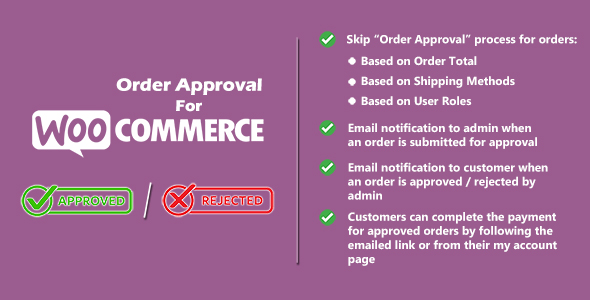
- Skip the “Order Approval” process for orders:
- Based on Order Total
- Based on Shipping Methods
- Based on User Roles
- Email notification to admin when an order is submitted for approval
- Email notification to customer when an order is waiting, approved or rejected (HTML and plain text)
- Customers can complete the payment for approved orders by following the emailed link or from their My Account page
- All texts and emails editable from the settings, with placeholders such as {order_number}, {payment_link} and {rejection_reason}
- Email templates can be overridden from your theme
- Compatible with WooCommerce High-Performance Order Storage (HPOS)
- Compatible with the WooCommerce Cart & Checkout blocks and the classic checkout
- Translation ready (.pot file included)
Requirements:
- WordPress 5.8 or later (tested up to 7.1)
- WooCommerce 7.1 or later (tested up to 11.2)
- PHP 7.4 or later
How it works:
- The customer places an order with the “Pay after admin approval” payment method.
- The order status becomes “Waiting for approval” and the customer and admin are notified.
- The admin opens the order and clicks Approve (choosing the allowed payment gateways) or Reject (with an optional reason).
- Approved: the customer gets an email with a “Pay Now” link. After payment the order moves to Processing as usual.
- Rejected: the customer gets an email with the reason and the stock is restored.
- If no action is taken within the auto-rejection time, the order is rejected automatically.
To get started, install and activate the plugin, then go to WP Admin Dashboard > WooCommerce > Order Approval Settings and configure your settings. No coding is required.
Setup and Configuration:
Admin Settings

You can find the plugin settings by navigating to WP Admin Dashboard > WooCommerce > Order Approval Settings
General
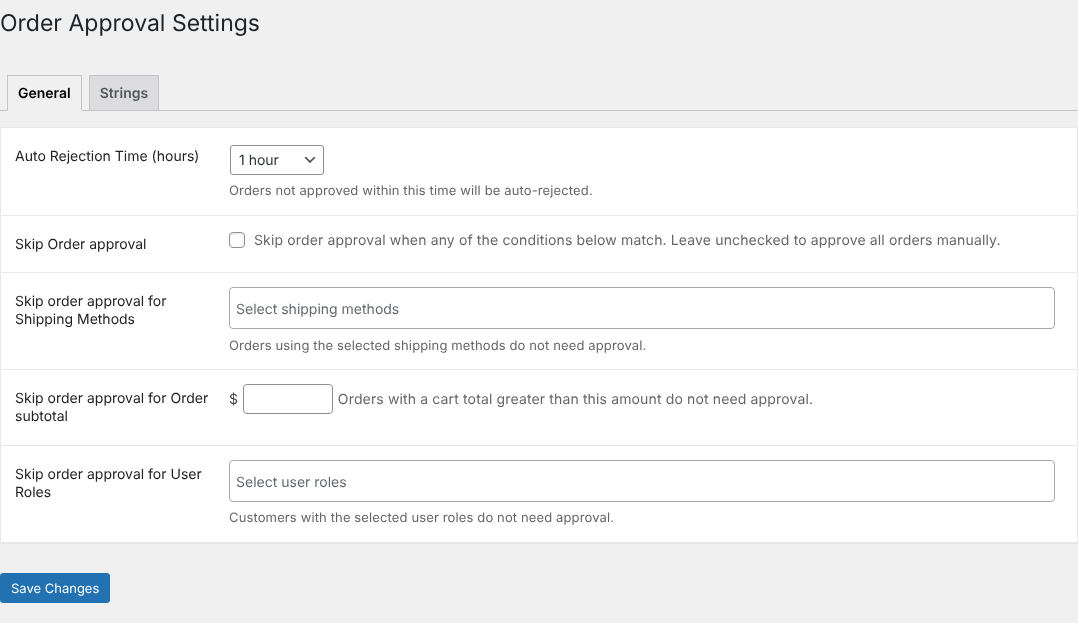
- Auto Rejection Time (hours): Orders not approved within this time are rejected automatically. Choose “Never” to turn it off.
- Skip Order approval: Tick this to skip the approval process when any of the conditions below match.
- Skip order approval for Shipping Methods: Orders using the selected shipping methods do not need approval.
- Skip order approval for Order subtotal: Orders with a cart total greater than this amount do not need approval.
- Skip order approval for User Roles: Customers with the selected user roles do not need approval.
Strings

- PAYMENT GATEWAY: Title and description of the payment method at checkout.
- THANK YOU PAGE: Custom text shown on the thank you page.
- CUSTOMER EMAIL AFTER PLACING THE ORDER (WAITING FOR APPROVAL): Custom text for the order confirmation email to the customer.
- CUSTOMER EMAIL AFTER ORDER APPROVED: Custom text for the order approved email, including the {payment_link}.
- CUSTOMER EMAIL AFTER ORDER REJECTED: Custom text for the order rejected email, including the {rejection_reason}.
- ADMIN EMAIL AFTER A NEW ORDER (WAITING FOR APPROVAL): Custom text for the new order email to the admin.
Approving and rejecting orders
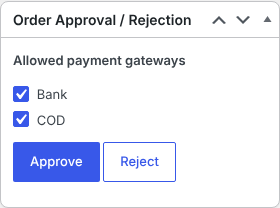
Open any order with the status “Waiting for approval”. In the Order Approval / Rejection box, tick the payment gateways the customer may use and click Approve, or click Reject and enter an optional reason.
Updates & Changelog
= 1.1.1 - 2026.10.22 = * New: Support for the WooCommerce Cart & Checkout blocks. * New: Stock is restored when an order is rejected or auto-rejected. * New: {rejection_reason} placeholder for the rejected order email. * Fix: Auto-rejection now runs reliably, in batches. * Fix: Approval box now shows on stores using HPOS. * Fix: Approved orders move to Processing after payment. * Fix: Plain-text emails. * Fix: Skip-approval order total now accepts decimal amounts. * Fix: No duplicate order notes when saving an order. * Security: Improved permission checks, validation and escaping. * Tweak: Uninstall now removes plugin settings. * Tweak: Updated translation file, texts and documentation. * Compatibility: Tested with WordPress 7.1 and WooCommerce 11.2. = 1.1.0 - 2026.02.06 = * Added auto-rejection timer with admin configuration. * Added rejection reason field for manual rejections. * Improved admin workflow and email notifications. * HPOS compatibility improvements. = 1.0.1 - 2023.04.23 = * Fixed the issue with the SUMO Payments plugin. * Compatibility check with WooCommerce 7.6. = 1.0.0 - 2021.09.30 = * Initial release!
$29 |
Download |
0 average based on 0 ratings.

| Last Update | 2026-10-23 |
| Created | 2021-09-30 |
| Sales | 5 |
| Discussion | Comments |
| Compatible Browsers | IE11 Firefox Safari Opera Chrome Edge |
| Software Version | WordPress 7.0.x WordPress 6.9.x WordPress 6.8.x WordPress 6.7.x WordPress 6.6.x WordPress 6.5.x WordPress 6.4.x WordPress 6.3.x WordPress 6.2.x WordPress 6.1.x WordPress 6.0.x WordPress 5.9.x WordPress 5.8.x WordPress 5.7.x WordPress 5.6.x WordPress 5.5.x WordPress 5.4.x WordPress 5.3.x WordPress 5.2.x WordPress 5.1.x WordPress 5.0.x WordPress 4.9.x |
| Compatible With | WooCommerce 10.x.x WooCommerce 9.x.x WooCommerce 8.x.x WooCommerce 7.x.x WooCommerce 6.x.x |
| Gutenberg Optimized | |
| High Resolution | |
| Files Included | JavaScript JS HTML CSS PHP |
| Video Preview Resolution |


