NumWord Crunch | HTML5 Math & Word Search Game
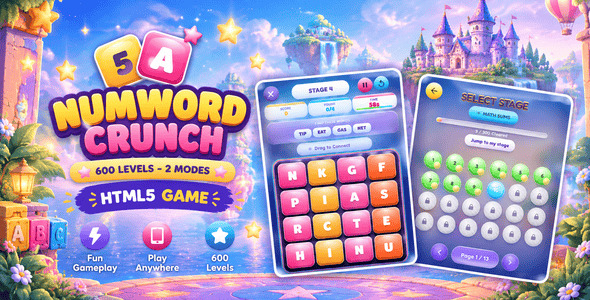

NumWord Crunch is a self-contained HTML5 arcade puzzle game built with HTML5, CSS3, and vanilla JavaScript. It needs no engine, build step, installation, or server-side service. Open main_file/index.html directly, or upload the complete main_file folder to a static host.
Players drag across neighboring tiles to build number sums or spell out words, racing a 60-second clock to match every target on the board. With two full game modes, 600 hand-tuned stages, twelve difficulty tiers, real-time audio feedback, and a bright arcade aesthetic, NumWord Crunch turns simple tile-connecting into a fast, focused challenge.
How to Play
Drag across neighboring tiles (horizontally, vertically, or diagonally) to build a chain. In Math Sums mode, connect numbers to reach one of the target sums shown in the banner above the board. In Word Search mode, connect letters to spell a valid 3+ letter word. Release to submit — a correct chain clears its target and adds to your score, a wrong one costs you 2 seconds. Match every target before the 60-second timer runs out to clear the stage.
Core Gameplay
- 600 stages across 2 game modes — 300 Math Sums stages and 300 Word Search stages, each with its own progress, unlocks, and difficulty curve.
- Twelve difficulty tiers — grids grow from 4×4 to 6×6, targets rise from 8 to 85 (Math) and from 3-letter to 8-letter words (Word), and each tier caps how long a chain can be.
- Zero audio files — every tone is synthesized live with the Web Audio API. No MP3s or audio downloads are needed.
- Deterministic level generation — each stage is seeded by its mode and number, so the same board, the same targets, and the same starting numbers/letters always return the same way. Replay never randomizes the level.
- Anti-repeat target pool — a rolling history keeps recently used sums and words out of new stages, so back-to-back levels always feel fresh.
- Combo system — chaining successful matches builds a combo bonus of up to ×5, shown live in the HUD.
- 1–3 star rating per level based on how much time was left on the clock when you cleared it — faster clears earn more stars.
- Pause, restart, or jump to Stage Select at any time from the in-game menu.
- Animated feedback — golden connector trails, particle bursts on matches, floating score popups, and a board that visibly glows hotter as your combo climbs.
- Loading screen on every visit with an animated logo, sun-ray glow, and gradient progress bar.
Progression & Replayability
- Stage-by-stage unlock — each stage unlocks only after the previous one is cleared, with stage 1 of both modes always available.
- Best-star tracking — replaying a stage with fewer stars never lowers your saved rating.
- Persistent progress — unlocked stages, cleared stages, star ratings, and the target history are saved via
localStorage. - Replayable by design — deterministic seeds mean you can return to any stage and it plays exactly the same way every time.
- Two independent modes — progress in Math Sums and Word Search is tracked separately, so switching between them never costs you anything.
Visual Presentation
- Bright arcade theme — a sky-blue to soft-pink gradient background with yellow, magenta, cyan, and green tile accents.
- Custom inline SVG artwork for the favicon, help badge, sound buttons, and win/lose/pause modal medals — all original and drawn in code.
- Animated tile feedback — tiles lift on hover, shrink into a gold glow when selected, and pop with a bounce when their value changes after a successful match.
- Blurred background image on every screen except the lobby, where it stays sharp behind the logo and menu.
- Responsive layout — the board auto-scales to fit the smaller of viewport width or height, and the HUD and modals shrink gracefully on phones; test on your target devices before release.
- Titan One + Fredoka + Nunito typefaces — loaded via Google Fonts CDN on first visit.
Technical Specifications
- Built with: Pure HTML5, CSS3, and vanilla JavaScript (DOM-based rendering)
- Runtime libraries: None. Titan One, Fredoka, and Nunito are third-party fonts loaded from the Google Fonts CDN; the project does not bundle font files.
- Responsive: Designed for phones, tablets, and desktop; test your target devices
- Browser support: Minimum supported version floors: Chrome 105+ (desktop & Android), Safari 15.4+ (macOS & iOS), Firefox 121+ (desktop & Android), Edge 105+, and Opera 91+. Requires modern browser support for HTML5, CSS3 (including
:has()for background blur transitions), JavaScript (ES6+), Local Storage, and the Web Audio API. - Touch & mouse support: Both work seamlessly for tile dragging and button presses
- Internet requirement: Needed to request Google Fonts unless you self-host those fonts. If unavailable, system fonts are used. Gameplay itself has no other network dependency.
- Storage:
localStorage(~3–8 KB) under keysnumword_crunch_save_v1(unlocked stages, cleared stages, and target cache) andnumword_sound_enabled(audio toggle). Inspect or clear via browser DevTools (Application > Local Storage). - Audio: All sounds synthesized with the Web Audio API. No external audio files.
Setup & Customization
- Keep
index.htmlbeside itsassetsfolder. - Open the HTML file in a browser, or upload the entire
main_filefolder to a static web host. If local-file restrictions cause missing styles or scripts, run it from a local web server. - For basic branding, replace background image with your own licensed artwork while keeping the same filename and format. Game content, functionality, and visual styling can be customized through the project files. JavaScript customization requires development knowledge — the game logic, tier definitions, word list, and audio engine all live in JavaScript file.
Third-Party Services & Licensing
- Google Fonts (CDN): Titan One, Fredoka, and Nunito are third-party resources delivered through Google’s CDN, outside the author’s control. An internet connection is required to fetch them unless they are replaced with local copies.
- Font Licensing: The fonts are under the SIL Open Font License (OFL), which permits commercial use and redistribution with software subject to its terms. Font files may not be sold by themselves; include their copyright notice and OFL text when redistributing the font files, and follow any Reserved Font Name restrictions for modified fonts.
- Other Dependencies: No Chart.js, jsPDF, three.js, html2canvas, or external API is included.
Buyer FAQ
- Can I embed it in an iframe? The game has no built-in iframe restriction. Embedding depends on the host’s frame/security headers and the parent page; test on your target host.
- Does it work on phones and tablets? The layout responds to screen size and accepts touch and mouse input. Portrait and landscape are supported; no specific orientation is required.
- Does it work offline? The game logic works locally, but Google Fonts are normally requested online. Self-host the fonts for fully offline use.
- Can I disable a mode or screen? There is no built-in feature switch. Edit the game logic in
script.js; development knowledge is recommended.
No build tools, no installation, nothing to compile.


