Novora | eCommerce and SaaS Flutter Admin Template
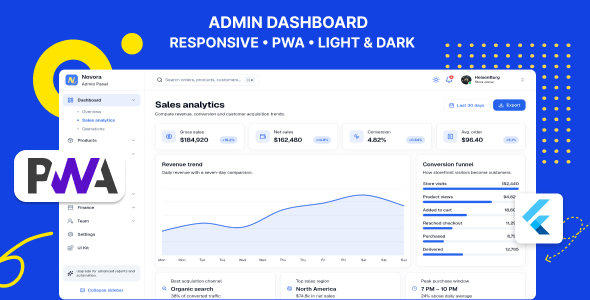

Novora | eCommerce Flutter Admin Template
Build professional eCommerce administration experiences faster with Novora.
Novora is a premium, responsive Flutter admin template created for developers, agencies, startups, and product teams building modern eCommerce, SaaS, retail, and business management applications.
Designed primarily for Flutter Web, Novora combines a polished shadcn-inspired interface with responsive layouts, reusable components, realistic commerce workflows, smooth interactions, theme support, and a modular feature-first project structure.
The template includes 39 routed pages and experiences covering dashboards, products, inventory, orders, customers, customer support, marketing, finance, team management, settings, authentication, and system states.
Important: Novora is a frontend Flutter administration template. A backend, database, hosting service, payment gateway, and production authentication service are not included.
Why Choose Novora?
Novora is not simply a collection of disconnected dashboard screens. It provides a consistent administration experience with coordinated navigation, responsive behavior, reusable UI components, practical forms, dashboards, tables, charts, profile pages, settings sections, and system states.
Its organized source code makes it easier to update branding, remove unnecessary modules, connect a backend, customize layouts, and extend individual features.
Key Features
- Premium shadcn-inspired Flutter interface
- 39 routed pages and administration experiences
- Complete eCommerce administration workflow
- Responsive desktop, tablet, and compact layouts
- Expanded sidebar, collapsed navigation, and mobile drawer
- Light, Dark, and System theme modes
- Locally persisted appearance preferences
- Feature-first modular source structure
- Manual Riverpod state management without Riverpod code generation
- GoRouter navigation with shell branches and deep-link support
- Reusable widgets and administration components
- Responsive charts, tables, forms, cards, and dialogs
- Smooth professional animations and transitions
- Realistic deterministic demo data
- No backend required to explore the included demo
- Detailed installation and customization documentation
- Troubleshooting and common build-error guidance
- Non-technical branding customization instructions
Dashboard Experiences
Novora includes multiple dashboard layouts designed for different analytical and operational requirements.
- eCommerce overview dashboard
- Sales analytics dashboard
- Business operations dashboard
- Revenue and order summaries
- Sales and revenue charts
- Recent order and transaction activity
- Performance and conversion metrics
- Activity and notification panels
- Responsive metric cards
- Realistic loading, empty, and data states
Product and Catalog Management
Build complete product and catalog workflows using professionally designed pages, responsive forms, and reusable commerce components.
- Product listing
- Product details
- Create-product form
- Edit-product form
- Product categories
- Inventory overview
- Stock and availability information
- Product status indicators
- Product image presentation
- Pricing and sales information
- Responsive product forms
- Search and filtering interfaces
Order Management
Novora includes essential interfaces for managing modern commerce operations and fulfilment workflows.
- Order overview
- Searchable order listing
- Order details
- Order status presentation
- Returns and refund management
- Abandoned checkout management
- Customer and delivery information
- Payment summaries
- Order timeline presentation
- Responsive operational layouts
Customer Management
Give administration and support teams clear access to customer information, activity, order history, and account details.
- Customer directory
- Customer search and filtering
- Customer profiles
- Contact information
- Order history
- Customer activity
- Customer statistics
- Notes and profile information
- Responsive customer views
Customer Support Chat
The included customer-support interface adapts across large, medium, and compact screen sizes.
- Three-column desktop chat layout
- Adaptive tablet layout
- Compact single-panel conversation experience
- Conversation list
- Active conversation view
- Customer information panel
- Message composer
- Media-rich customer profiles
- Message timestamps and status indicators
- Clean empty and selected states
- Route-aware compact navigation
Marketing Management
Create modern marketing administration experiences using ready-made screens and reusable performance components.
- Marketing overview
- Campaign management
- Campaign performance
- Coupons and discounts
- Product review moderation
- Promotion summaries
- Conversion information
- Marketing metrics
Finance and Reporting
Present financial and business performance through responsive reports, transaction interfaces, metric cards, and visual charts.
- Finance overview
- Revenue information
- Transaction ledger
- Financial reports
- Payment summaries
- Revenue charts
- Financial statistics
- Responsive reporting layouts
- Report and export action interfaces
Team and Access Management
Manage internal users, roles, permissions, and access-related information using structured administration screens.
- Team overview
- Team member directory
- Member profiles
- Invitations
- Role management
- Permission summaries
- Access information
- Member status indicators
- Responsive team layouts
Authentication Pages
Novora includes a complete authentication presentation flow with responsive forms and polished system feedback.
- Sign in
- Sign up
- Forgot password
- Reset password
- Email verification
- Two-factor authentication challenge
- Locked-workspace screen
- Responsive authentication layouts
- Form-validation presentation
- Loading and error states
Settings Management
Novora includes a comprehensive settings workspace composed of reusable profile, store, appearance, security, notification, and billing sections.
- User profile
- Store profile
- Profile image update interface
- Appearance settings
- Light, Dark, and System themes
- Notification preferences
- Security settings
- Billing interface
- Responsive settings navigation
- Locally persisted appearance preferences
System and Status Pages
Professionally designed application states help provide a consistent experience during loading, errors, restricted access, and maintenance.
- Splash screen
- Loading states
- Empty states
- 403 access-restricted page
- 404 not-found page
- 500 server-error page
- Maintenance page
- Locked-workspace state
- Reusable error presentation
Flutter UI Kit
The included UI-kit gallery allows developers to inspect, test, and reuse the visual components used throughout the template.
Included component examples:
- Buttons
- Cards
- Badges
- Text inputs
- Select fields
- Dialogs
- Tables
- Tabs
- Alerts
- Dropdown menus
- Form controls
- Typography
- Navigation elements
- Loading indicators
- Progress components
- Common administration widgets
Responsive Flutter Admin Layout
Novora uses semantic responsive breakpoints designed specifically for administration interfaces. Layout behavior adapts according to the available width instead of relying on one fixed desktop composition.
Compact Layout
Optimized for mobile devices and narrow browser windows.
- Compact drawer navigation
- Single-column page layouts
- Adaptive cards
- Responsive forms
- Mobile-friendly content presentation
- Card alternatives for wide data tables
Medium Layout
Designed for tablets, portrait displays, and smaller laptops.
- Balanced page spacing
- Two-column content where appropriate
- Adaptive navigation
- Responsive forms and data presentation
- Contextual side panels and sheets
Expanded and Large Layouts
Designed for desktop displays and large administration workspaces.
- Full administration sidebar
- Collapsed navigation mode
- Multi-column dashboards
- Wide tables and charts
- Expanded detail panels
- Spacious professional page composition
Light and Dark Theme Support
Novora provides a complete theme-aware interface with locally persisted appearance preferences.
- Light mode
- Dark mode
- System or automatic mode
- Locally persisted theme preference
- Theme-aware components
- Theme-aware charts
- Theme-aware navigation
- Theme-aware forms
- Theme-aware system pages
Application colors, typography, surfaces, borders, and foreground styles are consumed from the active theme to make global branding changes more consistent.
Source Code Architecture
Novora uses a practical feature-first source structure that separates feature data from presentation concerns while keeping shared application systems easy to locate.
lib/ ├── app/ │ ├── admin_shell.dart │ ├── app.dart │ ├── sidebar.dart │ └── top_bar.dart ├── core/ │ ├── constants/ │ ├── responsive/ │ ├── router/ │ └── theme/ ├── features/ │ ├── authentication/ │ ├── catalog/ │ ├── chat/ │ ├── customers/ │ ├── dashboard/ │ ├── finance/ │ ├── marketing/ │ ├── orders/ │ ├── overview/ │ ├── products/ │ ├── settings/ │ ├── splash/ │ ├── system/ │ ├── team/ │ └── ui_kit/ ├── shared/ └── main.dartArchitecture Benefits
- Clear feature ownership
- Easy module discovery
- Reusable shared administration widgets
- Centralized router and theme management
- Manual Riverpod providers
- Easy replacement of demo repositories
- Straightforward backend integration
- Maintainable responsive behavior
Technology Stack
Novora is built with established Flutter packages and modern application-development practices.
- Flutter
- Dart
- shadcn_ui
- Flutter Riverpod
- GoRouter
- fl_chart
- flutter_animate
- Lucide Icons for Flutter
- shared_preferences
- intl
- Semantic responsive layout utilities
- Deterministic remote demo imagery
Backend Integration
The included screens run with local demo repositories, allowing buyers to inspect the complete interface without configuring an external service.
For production use, the demo repositories can be replaced with integrations such as:
- REST APIs
- GraphQL APIs
- Firebase
- Supabase
- Custom authentication services
- WebSocket or real-time services
- Cloud storage and upload providers
The frontend source does not include a production backend, database schema, hosted API, payment processor, or server-side permission system.
Detailed Documentation Included
The package includes documentation designed for both developers and non-technical buyers.
- System requirements
- Installation and first-run instructions
- Project folder explanation
- Architecture overview
- Navigation and route guide
- Responsive breakpoint explanation
- Backend integration guidance
- Branding customization guide
- Theme customization instructions
- Build and deployment guidance
- Common Flutter build-error solutions
- Troubleshooting and FAQ section
- Annotated workflow diagrams
- Third-party package and asset information
- Support policy and contact instructions
Ideal For
- eCommerce administration panels
- SaaS dashboards
- Retail administration systems
- Inventory interfaces
- Order management applications
- Customer-support dashboards
- Business analytics interfaces
- Agency client projects
- Startup MVPs
- Flutter Web administration projects
Package Includes
- Complete Flutter source code
- Responsive administration layouts
- 39 routed pages and experiences
- Light, Dark, and System theme modes
- Reusable UI components
- Dashboard charts and metric cards
- Demo repositories and realistic sample data
- Feature-first source structure
- Flutter UI-kit gallery
- HTML documentation
- PDF documentation
- Installation and customization instructions
Important Notes
- This item is a Flutter frontend administration template.
- A production backend and database are not included.
- Payment gateway integration is not included.
- Production authentication must be connected by the buyer.
- Demo images and data should be replaced before production deployment.
- Backend-enforced authorization is required for protected production features.
- Platform folders may need to be generated for the buyer’s selected targets.
Support
Support is available for verified template issues, installation guidance, and clarification of included functionality.
Custom backend development, new feature development, hosting administration, server configuration, and heavily modified source-code debugging are not included with standard item support.
Author: orkitt.dev
Support: support@orkitt.dev
$39 |
Download |
0 average based on 0 ratings.

| Last Update | 2026-08-07 |
| Created | 2026-08-07 |
| Sales | 1 |
| Discussion | Comments |
| Software Version | Flutter 3.x |
| Files Included | Dart YAML |
| Video Preview Resolution |


