MyStock - Offline POS System for Windows - Point of Sale, Stock & Inventory Management


Introduction
MyStock is a complete offline-first Point of Sale (POS) and Inventory Management System for Windows — built for retail businesses that need speed, simplicity, and full control — no internet required, no server required, and no monthly fees.
Perfect for:
- Grocery stores & Supermarkets
- Convenience shops
- Fast food
- Pharmacies
- Hardware stores
- Bottle stores
- Warehouses
- Bakeries
- Butcheries
- Boutiques & clothing stores
- Cosmetics
- Electronics
- Auto Parts
- and any general retail..
Features Overview
1. Point of Sale (POS)
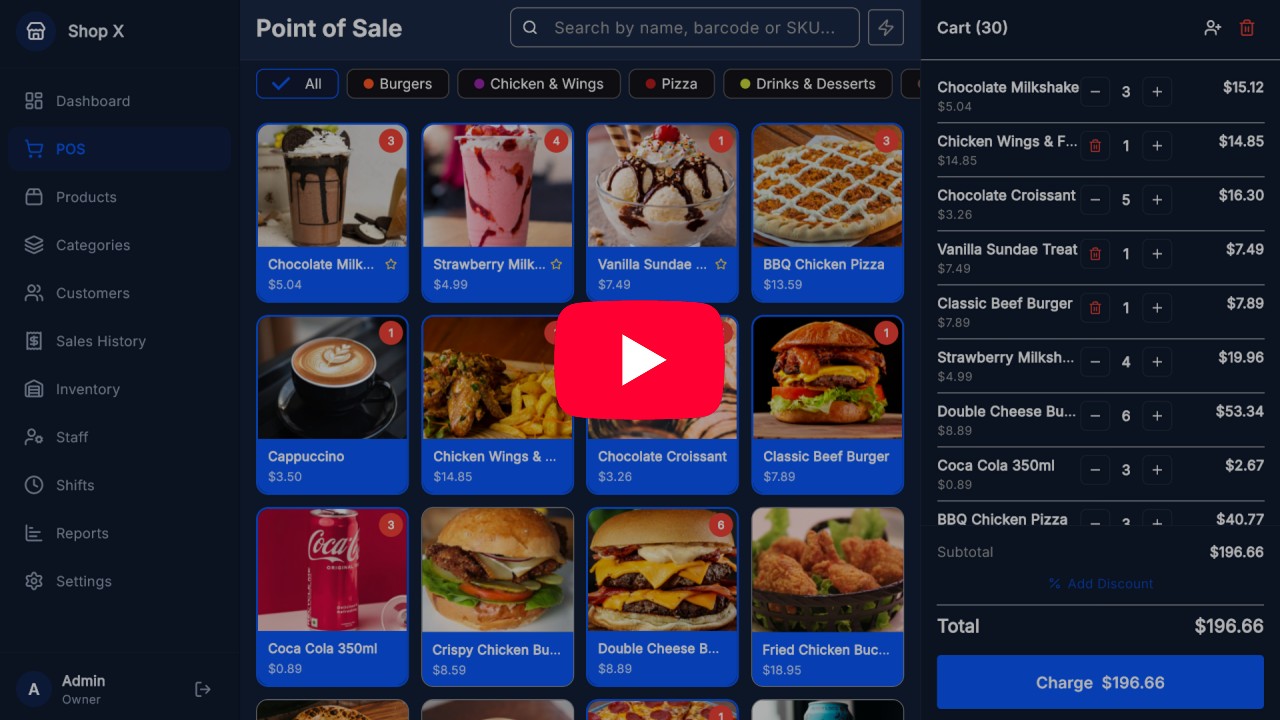
MyStock’s Point of Sale was designed to be intuitive even for those who have never used a sales system. The product grid makes navigation easy, category filters and search find any product in seconds.
- Barcode scanning
- Sales receipt printing via: Bluetooth, USB & Ethernet
- Payment methods (Cash, POS (Card), and other methods you define…)
- Quick sale of extra Items/Services without stock
- And much more..
2. Product Management
Register and organize your complete catalog with categories, barcodes, selling price and cost price.
- Barcode, SKU etc
- Sale by unit, kg, liter or meter
- Favorite products for quick sale at the POS
- Products with custom colors for display at the POS
- Bulk Import/Export template with Excel
- And much more..
3. Stock & Inventory Management
Control inventory in real time with low stock alerts and adjustments options with reason.
- Low stock and out-of-stock alerts
- Adjustments: purchase, sale, damage, correction
- Stock movements filters
4. Customer Management
Customer with purchase history, contacts and quick search.
- Name, phone, email and address etc.
- Purchase history per customer
- Bulk Import/Export template with Excel
- And much more..
5. Staff/Employee Management
Every employee in their place — control and define what each staff member can see and do in the system with detailed roles and permissions.
- 4 roles: Owner, Admin, Manager, Cashier
- Secure login with PIN (4 digits)
- Individual permissions per module
- And much more..
6. Shift Management
Open and close shifts with cash control, reconciliation and complete shift history.
- Cash opening and closing
- Reconciliation: expected vs. counted amount
- Cash movements: tracked inflows and outflows
- Active banner with real-time statistics
- View details of open/closed shifts
- General shift history list
- Export shifts details with Excel
7. Sales Reports
Analyze your business performance with reports by period, best-selling products and profit metrics.
- Period filters: Daily, Weekly, Monthly or custom range
- Total revenue, profit and average sale value
- Best-selling products with visual bars
- Detailed list by payment method
- Export sales details with Excel
8. System Settings
Be in full control of your system settings.
- General business information
- Pre-configured special discounts management
- Accepted payment methods management
- POS devices management for shift tracking: Terminal 1, Terminal 2, etc.
- Supported printers management: Bluetooth, USB & Ethernet
- Backup & restore management
- Multi-PCs using LAN network support
- Multi-Language support
- Dark & Light theme support
- And much more…
Explore each module with real POS system screenshots below;

Demo Video – See MyStock in Action
Watch our demo video to see MyStock’s features and how it can simplify the management of your business.
Download MyStock Demo App

Which License Should I Buy?
Quick Answer
- Buying for your own shop → Regular License
- Building or selling to a client → Extended License
1. Regular License
→ For personal use (single project)
Buy this if you want to install it for your own store.
- ✓ One-time payment
- ✓ Use on your own PC(s)
- ✗ Not allowed to resell or distribute
2. Extended License
→ For commercial use (one client / one project)
Buy this if you want to build or deliver a custom solution for a client.
- ✓ Use for one client (single project)
- ✓ Rebranding and customization allowed
- ✗ Not valid for multiple clients
- ✗ No redistribution (as-is or slightly modified)
→ One license is valid for a single end project, client, or installation.
Project Requirements
- Latest Flutter v3.41.x or above
- Latest Visual Studio Code (VS Code) to edit the source code.
- Latest Visual Studio (Community) required to run and build your Windows desktop app.
- Latest Inno Setup to build your Windows app installer.
Refund Policy
Please note that refunds are not available once the source code has been downloaded.
We strongly recommend testing the demo application and reviewing all features carefully before making a purchase. Buyers are expected to have a basic understanding of Flutter, Dart, and the other required tools described on this page in order to set up and build the project successfully.
If you are not familiar with these technologies, we offer a Build & Branding Setup Service to help you get your app ready for production. If you’re interested, just contact us via WhatsApp or Email.
Pre-Sale Questions
If you have any Pre-Sale inquiries, please feel free to Chat with us on WhatsApp or send your inquiries to our email: mystock@ajbds.com
About Support
Note: we don’t provide bug fixes support via comments or WhatsApp. If you are facing any issue with our source code, please make sure to send your issue details to our email address for support: mystock@ajbds.com
Changelog
Current Version: v1.0.0
Release Type: Initial Release
v1.0.0 — Initial Release
- First public release of MyStock
- Offline-first POS system for Windows desktop
- Sales and billing workflow
- Product, stock, and inventory management
- Staff and shift management
- Reports and dashboard features
- Barcode scanner and receipt printer support
0 average based on 0 ratings.

| Last Update | 2026-04-09 |
| Created | 2026-04-09 |
| Sales | 7 |
| Discussion | Comments |
| Software Version | Flutter 3.x |
| Files Included | Dart |
| Video Preview Resolution |


