MoodVerse - AI Mood Journal | Full Android App | Jetpack Compose
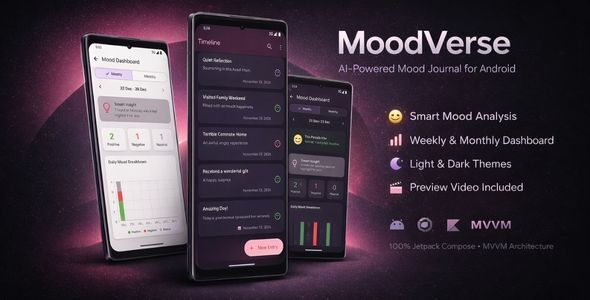


MoodVerse: The Complete AI-Powered Android Journal App
MoodVerse is a complete, feature-rich, and ready-to-publish Android application. It’s the perfect starting point for your next project, built with the latest modern technologies like Jetpack Compose, MVVM, and Hilt.
This isn’t just a template; it’s a full-featured application designed to save you hundreds of hours of work. The code is clean, easy to understand, and built for scalability, making customization simple.

Core Features
- AI-Powered Sentiment Analysis: A smart, offline AI (TensorFlow Lite model) suggests a mood (Positive, Negative, or Neutral) based on your text. Note: The user can always manually select the correct mood.
- Rich Journal Entries: Attach a photo to any entry to bring your memories to life (includes permission handling dialogs).
- Beautiful Timeline: See your history at a glance with an emoji-powered timeline.
- Stunning Dark & Light Theme: The UI automatically adapts to the phone’s system settings for a comfortable viewing experience.

Full Control & Safe Management:
- Swipe-to-Delete: Intuitively delete entries with a simple swipe gesture.
- Bulk Deletion: Easily select and delete multiple entries at once.
- Confirmation Dialogs: Smart pop-ups prevent accidental data loss.
Powerful & Interactive Analytics Dashboard
The heart of MoodVerse is its dashboard, turning data into meaningful insights. It’s not just a report; it’s an interactive tool for self-discovery.

- Weekly & Monthly Views: Instantly switch between short-term patterns and long-term trends.
- Jump to Any Date: A beautiful calendar allows users to navigate to any past week or month.
- Smart Insights: Get simple, human-readable insights based on your mood data.
- Interactive Charts: Tap directly on the chart bars to see a detailed tooltip with exact mood counts and emojis.
A Truly Adaptive Chart
Our custom chart implementation is built to be robust, reliable, and visually perfect under any data load.

- Intelligent Y-Axis Scaling: The chart’s Y-axis automatically adapts its steps (0, 1, 2… or 0, 2, 4…) to keep the view clean and readable.
- Smooth & Consistent: Our solution guarantees a smooth and visually correct experience.
Technology Stack & Compatibility
This project is a showcase of a modern and powerful Android technology stack, ensuring high performance, scalability, and easy maintenance.
- Language: 100% Kotlin
- UI: 100% Jetpack Compose (with Material 3)
- Architecture: MVVM (Model-View-ViewModel)
- Asynchronous: Kotlin Coroutines & StateFlow
- Database: Room (for offline-first support)
- Dependency Injection: Hilt
- Charts: Vico (with a custom `AxisItemPlacer`)
- AI / Machine Learning: TensorFlow Lite (offline model)
Compatibility & Google Play Readiness:
- Minimum SDK: API 24 (Android 7.0 Nougat) – covers over 98% of all Android devices.
- Target SDK: API 35 (Android 15) – meets the latest Google Play requirements.
- 100% Google Play Compliant: Ready to publish.
Easy Customization (Reskin Guide)
Changing the app to fit your brand is incredibly simple. Full details are in the included documentation, but here are the key steps:
- Change App Name: Edit the
app_namestring inapp/src/main/res/values/strings.xml. - Change Package Name: Update the
applicationIdinapp/build.gradleand refactor the package structure. - Change App Icon: Use Android Studio’s “Image Asset” tool to generate all icon sizes from your file.
- Change Colors: Simply edit the color codes in
app/.../ui/theme/Color.kt. The Dark & Light themes will update automatically.
A detailed step-by-step guide is included in the documentation file!
Frequently Asked Questions (FAQ)
Q: Does this app require Firebase or any external server?
A: No. MoodVerse is a 100% offline-first application. No server costs for you and enhanced privacy for your users.
Q: How does the AI Sentiment Analysis work?
A: It’s also 100% offline, using a built-in TensorFlow Lite model. It does not send any user data to the internet.
Q: Can I add other languages?
A: Yes. The project is built for easy localization. All text is in the strings.xml file.
Q: How are database updates (migrations) handled?
A: We’ve made this easy and transparent for you. The project is initially set up for rapid development using a setting (fallbackToDestructiveMigration) that simplifies database changes. However, for a live app on the Google Play Store, this must be replaced with a proper Migration strategy to ensure your users’ data is never lost during an update.
To guide you, we have included a detailed, commented-out, working example of a proper database Migration directly inside the DatabaseModule.kt file. The included documentation also explains this simple but important step.
0 average based on 0 ratings.
| Last Update | 2026-01-08 |
| Created | 2026-01-08 |
| Sales | 0 |
| Discussion | Comments |
| Software Version | Kotlin 1.x Android 15.0 Android 12.0 Android 11.0 Android 10.0 Android 9.0 Other |
| Files Included | .java |
| Video Preview Resolution |


