MiroTalk BRO: Live Video & Audio Broadcasting with Screen Sharing

MiroTalk BRO – Self-Hosted Live Broadcasting You Own
Stream to unlimited viewers with WebRTC. Self-hosted, low-latency live broadcasting – no monthly fees, no viewer caps.

► Try the Live Demo – No signup required
Your Own Live Streaming Platform
YouTube Live, Twitch, and Vimeo control your stream, your audience, and your data. MiroTalk BRO puts you in charge. One-time purchase, runs on your server, with zero viewer limits.
- ✘ No viewer caps
- ✘ No monthly subscriptions
- ✘ No platform dependency
- ✔ One-time payment, lifetime ownership
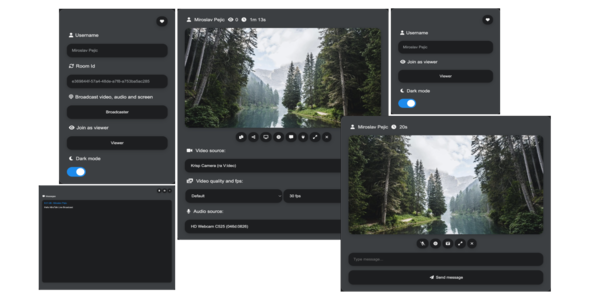
See It In Action

Broadcaster View

Viewer Experience

What’s Inside the Package
- ✔ Full source code – customize anything, white-label ready
- ✔ REST API with documentation
- ✔ Docker support – deploy in minutes
- ✔ Iframe integration – embed in any website or app
- ✔ Step-by-step documentation
- ✔ Free lifetime updates
- ✔ Priority support via CodeCanyon + Discord
Why MiroTalk BRO
- ✔ WebRTC-powered – sub-second latency, not HLS delay
- ✔ Self-hosted – your server, your rules, your data
- ✔ No downloads – works in any modern browser
- ✔ No vendor lock-in – you own the entire codebase
- ✔ Unlimited rooms – create as many broadcasts as you need
- ✔ Cross-platform – desktop, tablet, and mobile
- ✔ Built-in signaling – no external services required
- ✔ One-time license – pay once, use forever
Built for Every Industry
- Live Events – concerts, conferences, product launches
- Webinars – present to hundreds of live viewers
- Education – lecture streaming for students
- Corporate – CEO town halls and company-wide broadcasts
- Customer Support – live product demos
- SaaS Platforms – embed broadcasting into your app
Dual Architecture: P2P + SFU
MiroTalk BRO gives you two streaming modes out of the box – choose the right one for your audience size and use case.
P2P Mode (Default)
The default Peer-to-Peer mode connects the broadcaster directly to each viewer with zero server relay. Ideal for small to medium audiences where simplicity and minimal server load matter most.
- ✔ Direct connection – stream flows straight from broadcaster to viewer
- ✔ Ultra-low latency – no intermediary server in the media path
- ✔ Minimal server resources – only signaling passes through the server
- ✔ Zero configuration – works out of the box, no extra setup needed
SFU Mode (Large Audiences)
For large-scale broadcasts, switch to the SFU (Selective Forwarding Unit) mode. The SFU server receives the broadcaster’s stream once and selectively forwards it to all viewers – keeping bandwidth low and performance high, even with thousands of concurrent viewers.
- ✔ Scalable by design – the broadcaster uploads a single stream; the SFU distributes it to all viewers
- ✔ Low broadcaster bandwidth – upload once, reach thousands
- ✔ Sub-second latency – real-time WebRTC delivery, not buffered HLS
- ✔ Server-side efficiency – media is forwarded, not transcoded, minimizing CPU load
- ✔ Horizontal scaling – add server capacity as your audience grows
- ✔ Adaptive streaming – viewers receive quality suited to their connection
Start with P2P for quick, lightweight broadcasts. Scale up to SFU when your audience grows – no code changes, just a configuration switch.
Embed Anywhere in 30 Seconds
Drop this into any HTML page, CMS, or web app:
<iframe allow="camera; microphone; speaker-selection; display-capture; fullscreen; clipboard-read; clipboard-write; web-share; autoplay; picture-in-picture" src="https://your-domain.com" style="height:100vh;width:100%;border:0;"> </iframe>
Server Requirements
Runs on any modern Linux VPS. Deploy with Node.js or Docker.
- ✔ VPS or Dedicated server (2 vCPU, 2 GB RAM minimum)
- ✔ Ubuntu 22.04 LTS
- ✔ Node.js v22+ or Docker
- ✔ Domain with DNS + SSL
- ✔ STUN/TURN server (recommended for NAT traversal)
Online in Under 5 Minutes
Skip the manual setup. Our automation scripts handle everything for you – just insert your domain name and run a single command.
- ✔ SSL certificates – auto-provisioned via Let’s Encrypt
- ✔ Nginx reverse proxy – configured and optimized
- ✔ Dependencies – installed and configured
- ✔ Production-ready – from zero to live in minutes
No DevOps experience needed. Insert your domain, run the script, and you’re online.
API
- API Documentation – REST API for programmatic room creation
Support & Community
- ✔ CodeCanyon support with fast response
- ✔ Discord community – get help, share ideas
- ✔ Comprehensive documentation included
Buyer FAQ
Is this subscription-based?
No. It is a one-time CodeCanyon purchase under the selected license.
Can I white-label and customize?
Yes. Full source code is included for branding and custom development.
Can all apps run on one server?
Yes. Subdomain deployment is supported.
Can I charge end users for my final product?
Yes, with the CodeCanyon Extended License.
Ready to Launch Your Live Streaming Platform?
One-time purchase. Full source code. Lifetime updates. Deploy today.
5 average based on 4 ratings.


