Memory Sequence - Flutter Game with Admob Support
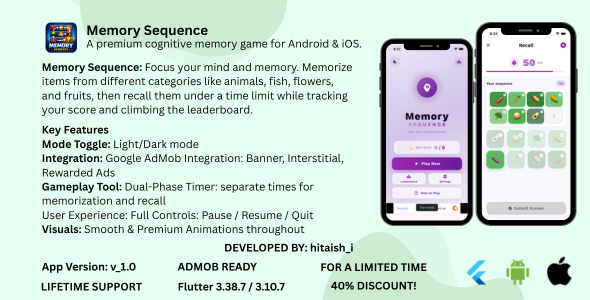

Memory Sequence
A premium cognitive memory game for Android & iOS. Memorize a sequence of 8 images, then recall them in the correct order — track your best score and climb the leaderboard.
Flutter 3.38.7 Dart 3.10.7 AdMob Ready Android + iOS v1.0.0 ⬇ Download APK Demo <!This item integrates with third-party services that may require account registration and/or incur additional costs beyond the purchase price:
- Google AdMob: Displaying live ads requires a free Google AdMob account. AdMob revenue and policies are subject to Google’s terms of service. Development test ads work without an account.
- Online Leaderboard: The leaderboard in this release is stored locally on the device (SharedPreferences). No external server or account is required. Available with all license types.
Project Overview
Memory Sequence is a polished, production-ready Flutter game template built for CodeCanyon distribution. It challenges players to memorize 8 shuffled brand images displayed in a 4×4 grid, then recall the exact positions from memory under a countdown timer. The result screen delivers a detailed accuracy comparison and celebrates new personal bests with a gold NEW BEST! badge.
The project ships with complete Google AdMob integration (Banner, Interstitial & Rewarded ads), a top-10 leaderboard, full Dark/Light mode theming, pause/resume game state, and a step-by-step SETUP.md guide — everything a buyer needs to publish immediately.
Key Features
Sequence Memory Challenge
Memorize 8 randomly shuffled branded images in a 4×4 grid within a 15-second countdown, then tap them in order during the 60-second recall phase.
⏱️Dual-Phase Timer
Separate timers for Memorize (15s) and Recall (60s) phases. Timer turns red when running critical. AnimatedSwitcher ensures smooth digit transitions.
5-Tier Accuracy Rating
Score calculated by exact positional match (0–8). Five performance tiers from Perfect Memory to Keep Practicing with emoji and progress bar.
Shuffle & Recall
After memorization, images shuffle into a new random order. Players must tap them back in their memorized sequence from a numbered slot row.
Leaderboard & Best Score
Top-10 local leaderboard sorted by score with player name, accuracy %, and date. Gold/silver/bronze highlights for the top 3. Best Score persisted on Home Screen. Available with all license types.
⏸️Pause / Resume / Quit
Full game-state control. Pause dialog blurs the grid (opacity 0.1). Quit confirmation prevents accidental navigation during an active game.
Dark & Light Mode
Global theme toggle persisted to SharedPreferences. Deep purple dark palette with glassmorphism cards; soft lavender light background with white cards.
Premium Animations
Glowing pulsing brain icon, staggered fade-slide entry animations, scale-press button feedback, animated splash screen, and smooth result card entrance.
<!How to Play
- Launch & Start: Open the app. The Home Screen shows your current best score (X /
 . Tap Play Now to begin a new game session.
 - Memorize Phase (15 s): Study the 4×4 grid of 8 numbered brand images. Remember the order — 1 through 8 — before the timer runs out. You can Pause or quit at any time.
- Recall Phase (60 s): The images shuffle to new positions. Tap them one by one in the order you memorized (1 → . Your selection fills the slot row at the top. Tap again to deselect.
- Submit: When all 8 slots are filled, the Submit Answer button lights up green. Tap it — or let the timer expire — to end the recall phase.
- Results: See your score, accuracy percentage, and a side-by-side comparison grid showing ✓ / ✗ per position. A gold NEW BEST! badge appears on a record-breaking run. Watch a Rewarded Ad to reveal the correct sequence.
Scoring Levels
8/8 — Perfect Memory! 6–7/8 — Excellent 4–5/8 — Good Job 2–3/8 — Fair 0–1/8 — Keep Practicing <!Google AdMob Integration
Memory Sequence ships with a complete, centralized AdMob setup. All ad unit IDs live in a single file for easy configuration before publishing to production.
Banner
320×50 anchored banner displayed at the bottom of the Home Screen and Result Screen.
Interstitial
Full-screen interstitial shown automatically after every game result is saved to the leaderboard.
Rewarded
Optional ad on the Result Screen. Completing it reveals the correct sequence animation as a reward.
- Test Mode: Google’s official test Ad Unit IDs are used automatically when
kDebugMode == true— no AdMob account needed to run locally. - Centralized IDs: Replace placeholder IDs in a single class (
AdIdsinlib/services/ad_service.dart). - Auto-reload: All ad types reload automatically after being shown or dismissed.
- Platform-aware: Separate Android and iOS ad unit ID fields in the same class.
- iOS ATT Ready:
NSUserTrackingUsageDescriptionkey pre-configured inInfo.plistfor App Store compliance.
UI & User Experience
| Feature | Detail |
|---|---|
| Theme | Dark Mode default — #0A0015 bg, #9C27B0 accent. Full Light Mode with lavender palette. |
| Splash Screen | Animated gradient splash with brain icon and app title; smooth fade-out to Home Screen. |
| Home Screen | Glowing pulsing brain icon, staggered fade-slide entry animations, best score card, Play/Leaderboard/Settings buttons. |
| Best Score Card | Glassmorphism card shows personal best (X /  with gradient text and purple glow on Home Screen. with gradient text and purple glow on Home Screen. |
| Result Screen | Emoji + tier label, large score display, linear progress bar, sequence comparison grid, NEW BEST badge, Rewarded ad button. |
| Leaderboard | Top-10 entries with gold / silver / bronze rank styling, player name, score, accuracy %, and date. |
| Countdown Timer | Turns red when ≤ 5 s (Memorize) / ≤ 10 s (Recall). AnimatedSwitcher for smooth digit changes. |
| Responsive | SafeArea-aware layout. Adapts to all modern Android and iOS screen sizes. |
Technical Highlights
- Architecture: Screen-based with singleton services (
AdService,GameService) for a clean separation of concerns. - State Management:
ChangeNotifier+ListenableBuilder— lightweight and reactive, no external state packages required. - Persistence:
SharedPreferencesstores best score, full leaderboard (JSON-serialized), and dark mode preference. - Ad Lifecycle:
AdServicesingleton manages load, show, dispose and automatic reload for all three ad formats. - Release Signing: Android release signing via
key.properties(fully documented inSETUP.md). - iOS ATT: App Tracking Transparency permission configured in
Info.plistfor App Store submission compliance.
Dependencies
| Package | Version | Purpose |
|---|---|---|
google_mobile_ads | 7.0.0 | Banner, Interstitial & Rewarded ads |
shared_preferences | 2.3.2 | Persist scores, leaderboard, settings |
cupertino_icons | ^1.0.8 | iOS-style icons |
What’s Included
- Full Flutter source code — production-ready and well-commented
- 7 complete screens: Splash, Home, Memory Phase, Recall Phase, Result, Leaderboard, Settings
- Complete AdMob integration — Banner, Interstitial & Rewarded ad formats
- Centralized
AdServicesingleton with automatic test/production ID switching - Top-10 local leaderboard with persistent JSON storage (available with all license types)
- Dark and Light mode theming system, toggle persisted to SharedPreferences
- Pause / Resume / Quit confirmation dialogs with game-state preservation
- Animated splash screen, glowing brain icon, staggered entry animations
- Android release signing setup via
key.properties - iOS App Tracking Transparency configured in
Info.plist - 10 rich image categories — Animals, Flowers, Fruits, Vegetables, Birds, Trees, Insects, Fish & Sea, Crops, and more
- Comprehensive
SETUP.md— AdMob config, signing, build steps for both platforms
Platform Support
Android
Minimum SDK: API 21 (Android 5.0) and above.
Release signing via key.properties fully documented. Build APK or App Bundle for Google Play.
iOS
Minimum: iOS 13.0 and above.
App Tracking Transparency (ATT) permission configured in Info.plist for App Store submission compliance.
| Platform | Status | Notes |
|---|---|---|
| Android | ✅ Supported | API 21+ (Android 5.0+) |
| iOS | ✅ Supported | iOS 13.0+ |
| Web | ❌ Not Supported | google_mobile_ads is mobile-only |
| macOS / Windows / Linux | ❌ Not Supported | Mobile-only game template |
Requirements
| Item | Detail |
|---|---|
| Flutter | 3.38.7 (stable channel) |
| Dart | 3.10.7 |
| Android SDK | Min API 21, Target API 35 |
| Xcode | 15.0+ (for iOS builds) |
| AdMob Account | Required for production ads (test IDs included for development) |
Quick Start
After purchasing the item, follow these steps to get the app running:
- Purchase & Download: After purchase on CodeCanyon, download and extract the source code ZIP file.
- Open the Project: Open the extracted
Memory-Sequencefolder in your IDE (e.g. VS Code or Android Studio). - Clean the Project: Run
flutter cleanin the terminal to ensure a fresh build environment. - Get Dependencies: Run
flutter pub getto install all required packages. - Run the App: Connect a device or start an emulator, then run
flutter run.
flutter clean flutter pub get flutter run
The app runs immediately using Google’s official test Ad Unit IDs in debug mode — no AdMob account required for development.
To configure production ads, open lib/services/ad_service.dart and replace the placeholder IDs in the AdIds class with your real Ad Unit IDs from the AdMob console. Full instructions are in SETUP.md.
Support
- Support is provided through the Envato comment section on the item page.
- Please include your Flutter version (
flutter --version) and the full error log with any bug reports. - Specify the device model and OS version where the issue occurs.
- Full documentation is included —
SETUP.mdcovers AdMob setup, Android signing, iOS ATT, and common troubleshooting steps.
Memory Sequence v1.0.0 · Built with Flutter 3.38.7 / Dart 3.10.7
Developed by hitaish_i · © 2026 All rights reserved.
<!0 average based on 0 ratings.


