MemberKeep - Flutter Client and Membership Manager App Template
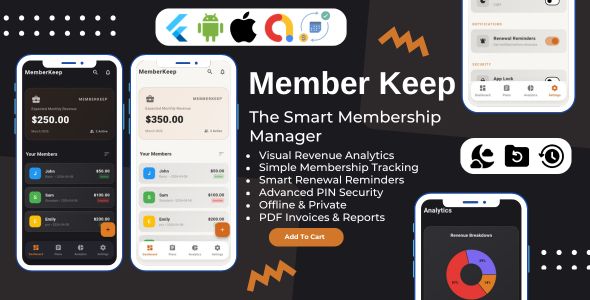


MemberKeep is a premium, offline-first Flutter membership manager app template for Android and iOS. It helps gyms, clubs, coworking spaces, coaches, freelancers and software sellers track members, plan templates, renewal dates and monthly revenue, with no server and no monthly cloud bill. Member data stays on the device in an encrypted database.
The template has four main parts: a revenue dashboard with member search, plan templates with daily, weekly, monthly and yearly billing, a member profile screen with renewal tracking, and an analytics tab with a revenue chart. Use it to launch your own membership app, or as a solid base for a client project.
Version 2.0.0 is a major update. It moves the app to Flutter 3.47, Dart 3.13 and Riverpod 3, fixes renewal-date, reminder and backup bugs, and adds English and Spanish, 37 currencies, biometric unlock and password-protected backups. Existing users keep their data, because the app migrates it on first launch.
Download Live Preview APK
Web Live Preview
Quick Setup Guide
Complete Setup Guide

Core Features of the MemberKeep Flutter Membership Manager App Template
Revenue Dashboard and Member Search
The dashboard shows your expected monthly revenue from active members, so you can see how the business is doing without opening a spreadsheet. Every billing cycle is converted to a monthly amount, so weekly, daily and yearly plans add up correctly.
- Expected monthly revenue and the number of active members on one card
- Search members by name, email, phone or plan
- Sort by name, price or renewal date
- Add a member from the dashboard; if no plan exists yet, the app asks you to create one first
- Dark and light themes, switched in Settings

Subscription Plan Templates with Daily, Weekly, Monthly and Yearly Billing
Create plan templates once, then attach members to them. There is no limit on the number of plans in the code.
- Billing cycles: daily, weekly, monthly or yearly
- Each plan has a name, price, category, colour and optional description
- The plan list shows how many members each plan has
- Deleting a plan that is in use asks which plan to move its members to
- Changing a plan’s billing cycle recalculates its members’ renewal dates, and warns you first

Member Profiles with Renewal Tracking and Auto-Renew
Each member has a profile with contact details, plan, join date and next renewal. Renewal dates are counted from the join date, so month-end dates stay correct (a member who joined on Jan 31 renews on Feb 28, then Mar 31).
- Tap to call or email from the profile
- Optional price override for a single member; leave it blank to use the plan price
- Renewal status such as “Tomorrow” or “Overdue by 5 days”
- Renew Now moves the date forward by one billing cycle
- Auto-renew per member: overdue dates move forward when the app starts
- Mark a member inactive without deleting them, and confirm before any delete
- Generate a PDF invoice for a member, with an invoice number

Revenue Analytics and Renewal Reminders
The Analytics tab shows a donut chart of monthly revenue by plan category, with the percentage and amount for each. An Upcoming Renewals list shows active members due in the next 30 days.
- Revenue by category with percentage and amount
- Weekly, daily and yearly prices converted to a monthly amount
- Local renewal reminders, with no push server needed
- Choose when to be reminded: on the day, or 1, 3 or 7 days before, at a time you pick
- Reminders update when you renew, edit, deactivate or delete a member

Offline Privacy, PIN and Biometric App Lock, Encrypted Backups
MemberKeep has no backend, and the code contains no analytics. Members, plans and settings are stored in an AES-encrypted Hive CE database on the device. The key is kept in the system secure storage (Keychain or Keystore).
- App Lock with a 4 or 6 digit PIN, stored as a salted PBKDF2 hash
- Lockout after 5 wrong attempts: 30 seconds, doubling up to 30 minutes
- Fingerprint or face unlock where the device supports it
- The app locks again after 30 seconds in the background
- Password-protected backups (.mkbkp, AES-256-GCM) that restore on any device, with a preview before restore and a rollback if it fails
- Export all members to CSV, or a printable PDF report
- “Forgot PIN?” offers to erase the data and start over

Languages and Currencies
- English and Spanish, with System, English and Español options in Settings
- Money and dates are formatted for the chosen language
- A currency picker with 37 common currencies, plus a custom symbol option
- Add another language by adding one .arb file and its code to the config
What’s New in Version 2.0.0

- Fixed: Renew Now now follows the plan’s cycle, month-end renewal dates no longer drift, reminders fire at local time and survive a reboot, backups restore after an app restart, and the dashboard total matches the chart.
- Changed: Flutter 3.47, Dart 3.13, Riverpod 3 and Hive CE (same storage format). Android targetSdk 36 and iOS 15 minimum. PDF reports now work offline.
- Added: English and Spanish, 37 currencies, biometric unlock with PIN lockout, password-protected backups, CSV export, per-member auto-renew, a Google consent form for ads, and a startup recovery screen.
- Your users’ data is migrated automatically on first launch.
Technical Specifications for Flutter Developers

- Framework: Flutter 3.47 and Dart 3.13 (sdk: ^3.13.0), Material 3, null safety
- State management: Riverpod 3 with riverpod_generator and typed models
- Database: Hive CE with AES-encrypted boxes; the key is held in flutter_secure_storage
- Key packages: fl_chart, flutter_local_notifications, local_auth, pdf, printing, file_picker, cryptography, google_mobile_ads
- Platforms: Android (minSdk 24, targetSdk 36) and iOS 15.0 and up
- Fonts: Roboto is bundled, so the app and PDF reports work offline
- Monetization: AdMob interstitial ads with a Google UMP consent form; one switch, AppConfig.enableAds, turns ads off completely
- Quality: 55 unit and widget tests and a GitHub Actions workflow
- Web demo: the web preview shows the interface. Ads, local notifications, biometrics and secure storage need a real Android or iOS device.
Easy to Customize and Rebrand Your Flutter Membership App
- App name, default currency symbol, support email, developer name, ad limits, languages and the lock timeout live in app_config.dart
- Brand colours are in app_colors.dart, with a warm amber palette for dark and light themes
- AdMob ad unit IDs go in app_config.dart; the AdMob app IDs go in android/gradle.properties and ios/Flutter/AdMob.xcconfig
- Text lives in lib/l10n ARB files, read with context.l10n
- Android release signing through android/key.properties
- Step-by-step HTML guides cover setup, customization and store release
Who Is This Flutter App Template For?
- Developers who want a ready-to-publish membership or subscription tracker for the app stores
- Freelancers and agencies building a client management app
- Gym, studio, club and coworking owners who want to track members and renewals
- Software sellers who manage seat-based or retainer customers
- Flutter learners who want a real project with Riverpod, Hive CE, encryption and tests
What Is Included in Your Purchase?

- Complete Flutter source code for Android and iOS
- Quick setup guide and complete setup guide (HTML)
- App icon, splash and bundled font assets
- English and Spanish translation files
- 55 tests and a GitHub Actions workflow
- Free updates and support
Your AdMob account, store listings and developer accounts are not included. You add your own ad unit IDs and signing keys.
Why Build With Stacklyn Labs?
Stacklyn Labs makes Flutter app templates that are documented, tested and kept up to date. MemberKeep 2.0.0 shows that approach: current toolchain, clear code and honest documentation. Questions before or after purchase? Email support@stacklynlabs.com.
Developed by Stacklyn Labs.
$29 |
Download |
0 average based on 0 ratings.

| Last Update | 2026-10-17 |
| Created | 2026-03-18 |
| Sales | 2 |
| Discussion | Comments |
| Software Version | Flutter 3.x |
| Files Included | Dart YAML JavaScript JSON .plist |
| Video Preview Resolution |


