Magento 2 Admin Payment Method

In some cases, the administrator of Magento website need to create the order in the backend that under Sales -> Orders -> Create New Order, but this process requires a payment method to be accessible. Admin Payment Method is a solution in this situation by giving a universal payment method which can be only used in the backend for creating any order when other payment methods cannot afford.
How It Works
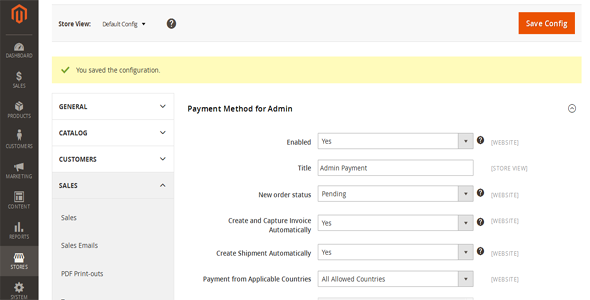
Simply install and configure the extension. Go to Store -> Configuration -> Sales -> Payment Method: Payment Method for Admin to configure the options. After enabling the payment method you can select it on the “Create New Order” screen.Features List:
- Compatible on all Magento 2 versions 2.1.x, 2.2.x- Support to choose a new order status.
- Support to create invoices automatically after creating a new admin order.
- Support to create shipment automatically after creating a new admin order. This also sets the status Complete.
0 average based on 0 ratings.

Search plugins
Browse Categories


