Listora Maps

Requires the Listeo theme: Listora Maps is an addon for Listeo — Directory & Listings WordPress Theme. The parent theme is sold separately and must be installed and active to use this plugin.
Listora Maps — A Listing Map Addon for Listeo
Try all five Listora Maps layouts and choose the experience that suits your directory.
- Sidebar Left Demo — Listing cards on the left, map on the right.
- Sidebar Right Demo — Map on the left, listing cards on the right.
- Map on Top Demo — Full-width map above filters and listing results.
- Map on Bottom Demo — Responsive listing grid with the map below.
- Listing Slider Demo — Interactive map with an arrow-controlled listing carousel.
Listora Maps is a WordPress addon for the Listeo directory theme and Listeo Core. It turns your existing listings into an interactive map explorer with search filters, nearby discovery, clear listing cards and a responsive carousel.
Help visitors find restaurants, accommodation, services, events and other places in your directory. They can search a listing name or address, browse categories, find places near their location and check which businesses are open now. A connected map and listing view makes it easier to compare places before opening the full listing page.
Add [listora_maps] to a WordPress page or an Elementor Shortcode widget. Choose a layout, adjust your settings and publish your Listeo listing map.
Choose a different layout on each page with a shortcode
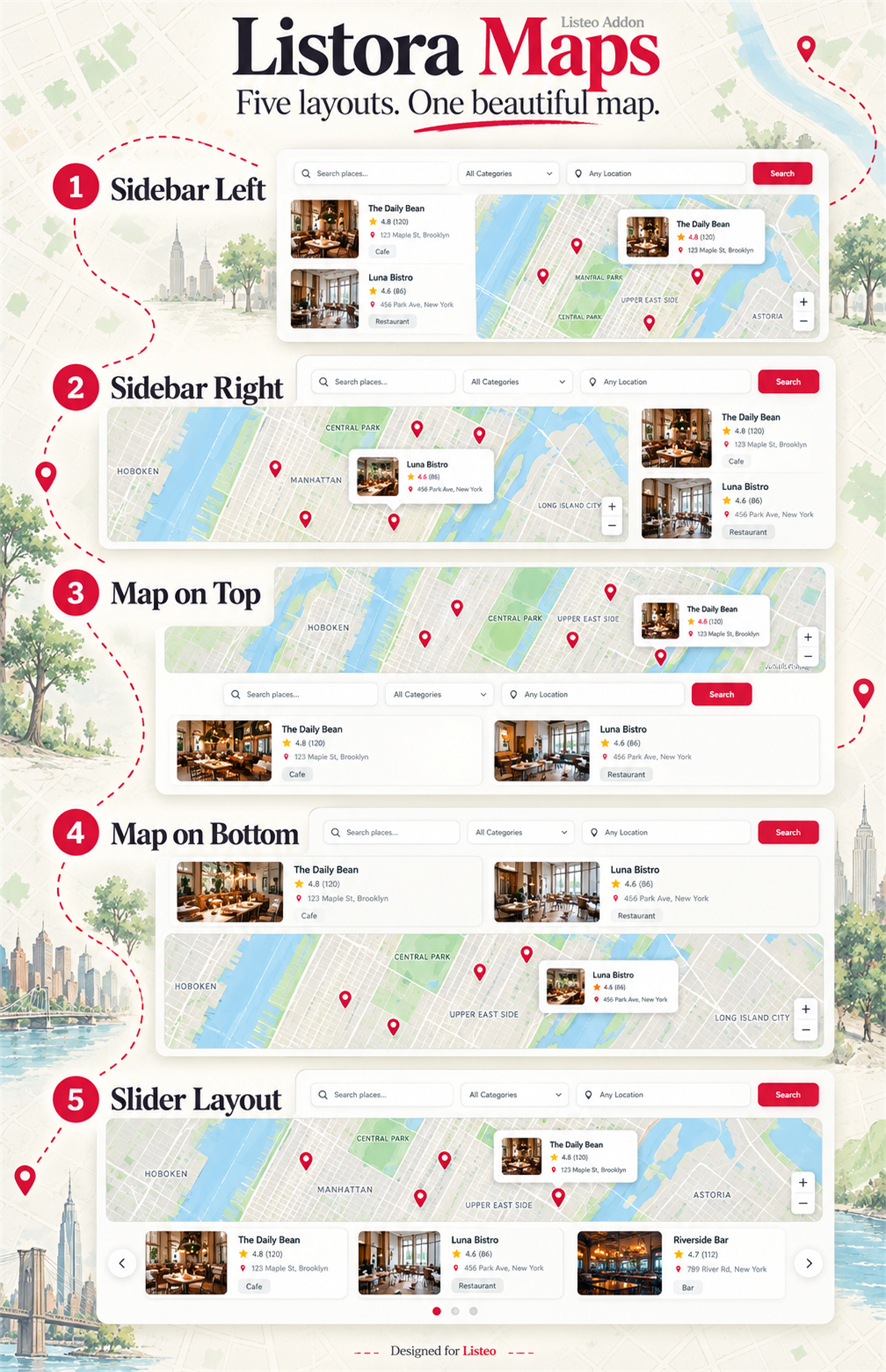
Five Beautiful Layouts for Your Listeo Directory
Interactive Maps That Match Your Brand
Modern Listing Popups and Details
Responsive Layouts and Smooth Listing Slides
Find Nearby Places with Smart Search Filters
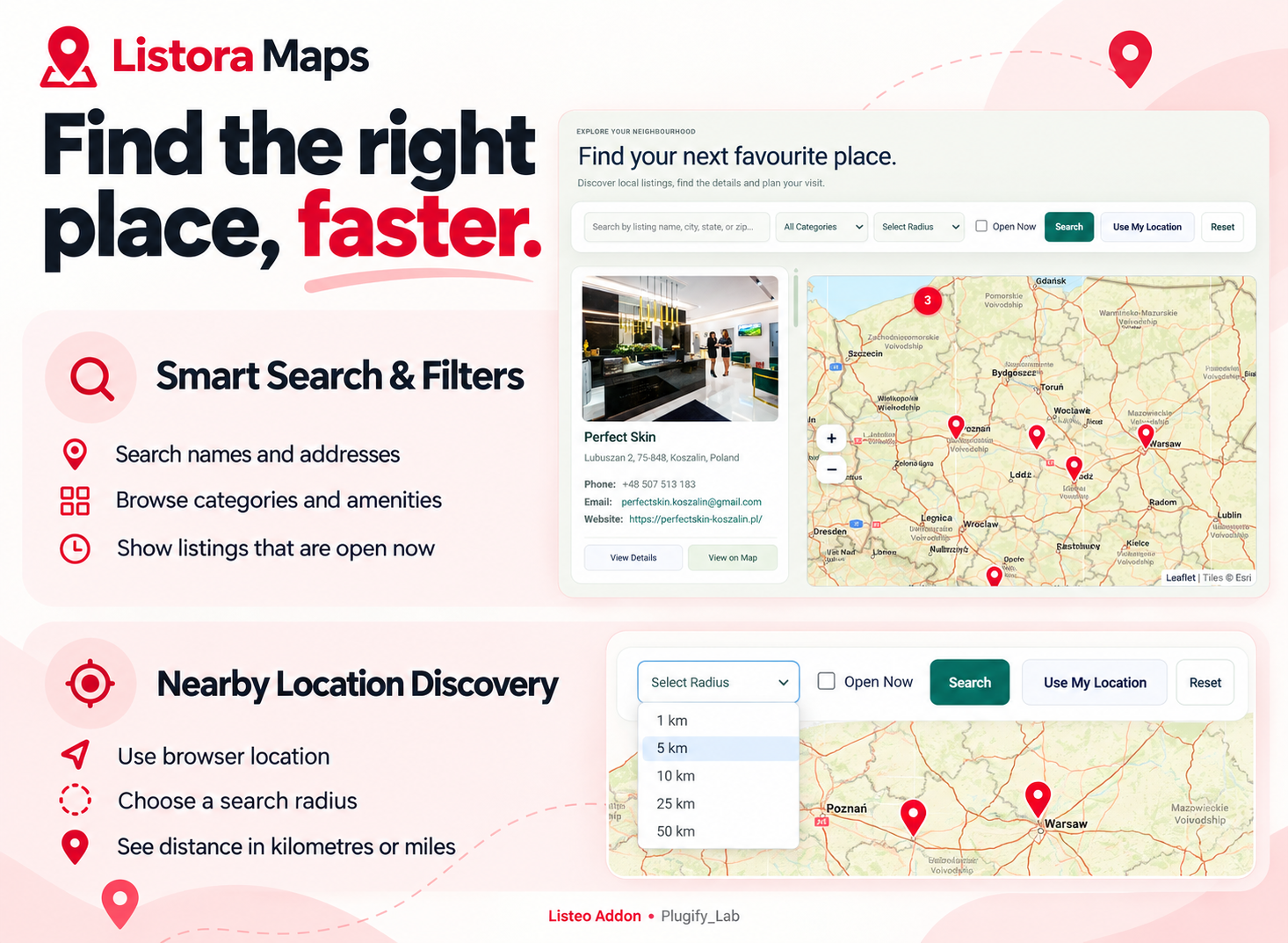
Listing Search, Category Filters & Nearby Discovery
- Listing and address search: help visitors search names and address-related information.
- Category filters: browse standard listing categories and registered categories for custom Listeo listing types.
- Amenities filter: narrow results using Listeo listing features and amenities.
- Open Now: find listings with a schedule that includes the current site time.
- Use My Location: use browser coordinates to discover nearby listings.
- Radius search: limit results to the selected distance from the search location.
- Distance badges: show calculated distance in kilometres or miles.
- Reset filters: clear the current search, filters and stored search location.
- Search loading indicator: give visitors clear feedback while results are fetched.
- Choose your controls: enable or hide supported frontend search fields from the admin settings.
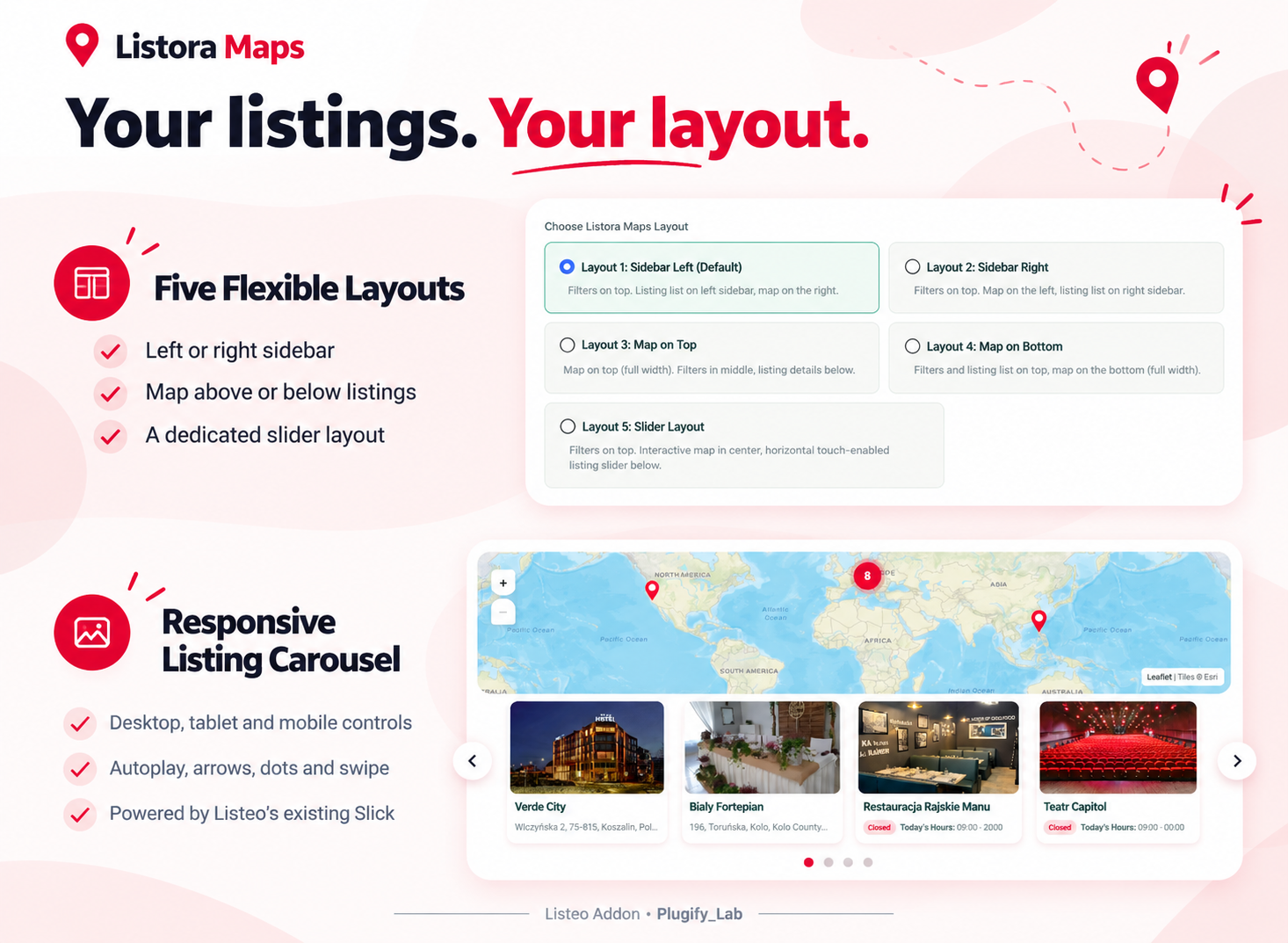
Five Responsive Listing Map Layouts
- Sidebar Left: compact listing cards on the left with the map on the right.
- Sidebar Right: map on the left with listing cards on the right.
- Map on Top: full-width map, filters in the middle and listings below.
- Map on Bottom: filters and listings first, followed by the map.
- Slider Layout: an interactive map with a horizontal listing carousel.
- List or grid presentation: choose the supported result style for applicable layouts.
- Compact sidebar photography: responsive featured images in cards sized for the sidebar.
- Mobile and tablet views: switch between Map and Listings, with compact filters over the map.
Responsive Listeo Listing Carousel
The Slider layout uses Listeo’s existing Slick script. Listora Maps does not bundle another Slick library.
- Set visible listings separately for desktop, tablet and mobile.
- Choose how many listings advance with each slide on each device.
- Configure tablet and mobile breakpoints.
- Control autoplay, arrows for each device profile.
- Set autoplay delay, transition duration and looping.
- Pause playback on hover or keyboard focus.
- Enable touch swiping and mouse dragging.
- Use adaptive height for supported single-card views.
- Customize navigation positions and supported arrow colours.
- Keep the current slide when another result batch is appended.
- Respect reduced-motion preferences, with readable static cards if Slick is unavailable.
Listing Cards, Map Popups & View Details
- Display listing titles, featured images, addresses, phone numbers, email addresses and websites.
- Show supported opening status, today’s hours, temporary closure information and amenities.
- Hide empty contact rows and placeholder values such as null.
- Wrap long website URLs to keep cards readable.
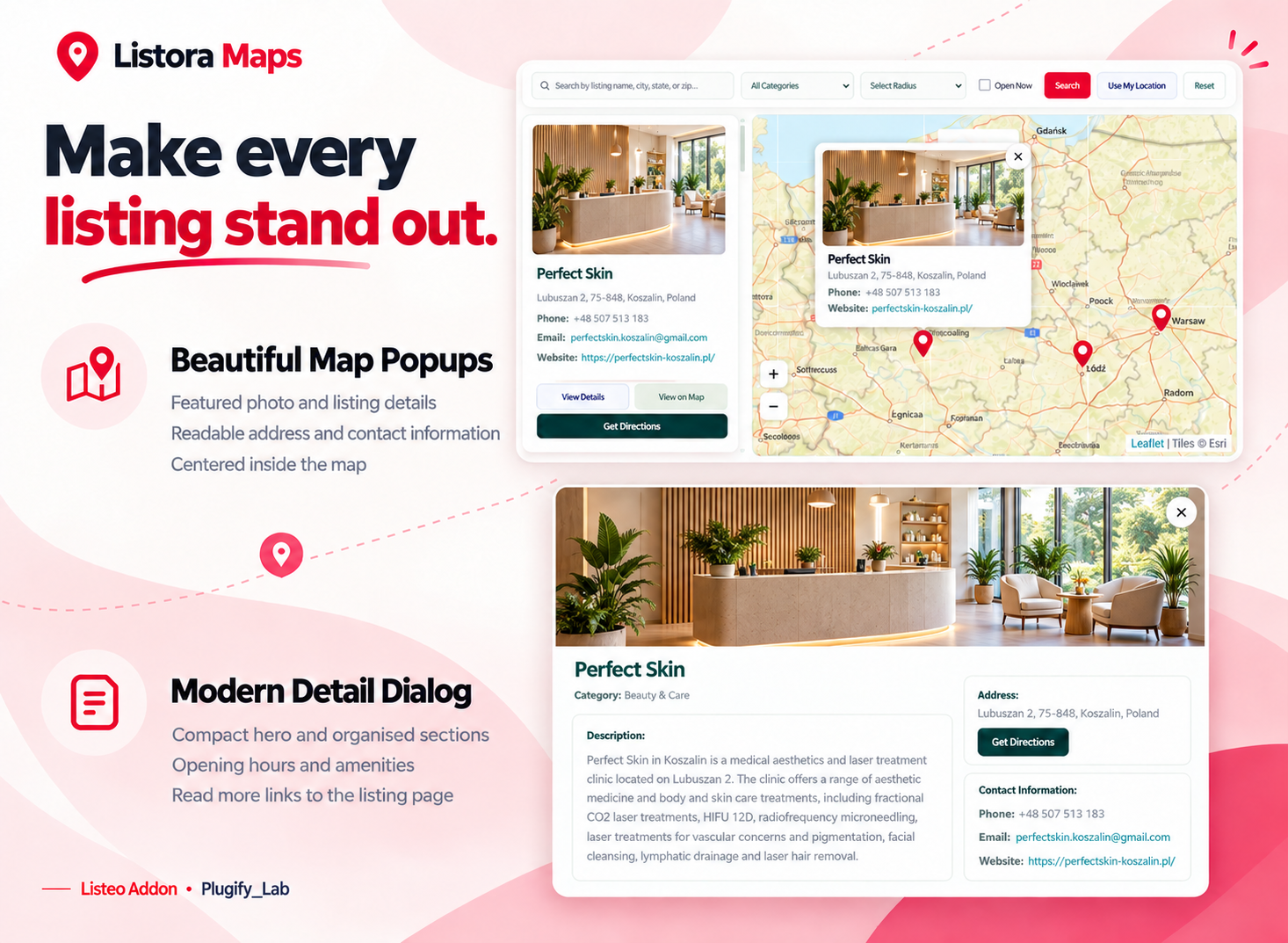
- Use consistent listing information and photo styling in marker popups across layouts.
- Center opened popups within the available map area.
- Highlight the related listing when its marker is selected.
- Open a modern View Details dialog with a compact hero image and organised information sections.
- Show descriptions, contact information, addresses, amenities, weekly hours and configured custom details.
- Use two detail columns on desktop and stacked sections on smaller screens.
- Open the full listing page through the dialog’s Read more button.
- Offer View on Map and Get Directions actions on listing cards.
- Support keyboard focus management and Escape to close the details dialog.
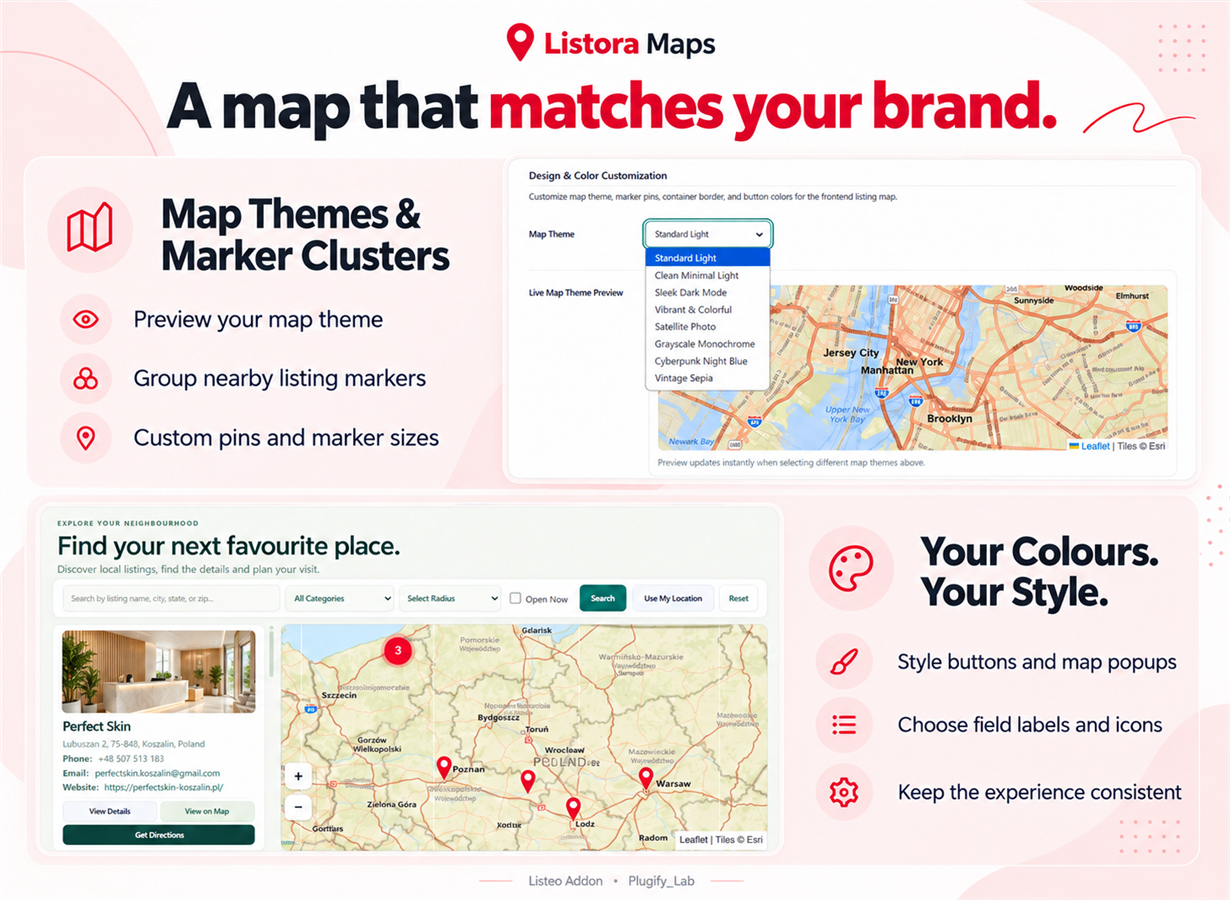
Map Themes, Custom Markers & Brand Styling
- Select a map theme and preview it in the settings screen.
- Set the default map center and zoom level.
- Group nearby locations with marker clustering.
- Adjust default marker size, colour and supported pin style.
- Use custom pins or marker images for individual listings.
- Customize map borders and supported action button colours.
- Adjust popup background, border, radius, status and link colours.
- Choose supported button visibility preferences.
- Use text labels, icons or both for supported contact fields.
- Refresh map dimensions when views change and limit excessive zoom-out.
Native Listeo Listings & Custom Type Categories
Listora Maps reads your existing Listeo listings instead of creating a second listing directory. Titles, featured images and listing page links use WordPress core data. Native field mapping lets you connect customized address, coordinate and contact keys.
- Use Listeo’s existing listing post type.
- Read native addresses, coordinates, phone numbers, email addresses and websites.
- Configure native field keys for customized installations.
- Read standard categories and Listeo listing features.
- Discover registered category taxonomies for custom listing types.
- Group type-specific categories in the filter dropdown.
- Keep categories with matching slugs in different taxonomies separate.
- Save map-specific coordinate overrides without changing native Listeo coordinates.
Opening Hours & Temporary Closures
- Read configured Listeo opening-hours data and supported daily opening/closing fields.
- Use Listora schedule overrides for the map explorer when needed.
- Support daily schedules, split intervals, lunch breaks and overnight hours.
- Display current status, today’s hours and a weekly hours table where available.
- Mark listings temporarily closed and add a closure reason.
- Treat missing schedules as unknown instead of assuming the listing is open.
Pagination, Load More & Infinite Scroll
- Numbered pagination: compact pages with ellipses and previous/next controls.
- Load More: append another result batch on demand.
- Infinite Scroll: load more near the end of the list or carousel.
- None: show the first configured batch without loading controls.
- Apply pagination, Load More and Infinite Scroll to Layouts 1–4. Slider Layout uses carousel controls only.
- Configure result batch size separately from visible carousel cards.
- Configure carousel looping independently from result loading modes.
Focused Queries for Larger Directories
Listora Maps uses bounded result pages, cached totals and reusable filter results. Location searches read coordinate metadata, while Open Now searches read schedule fields rather than every field on every listing.
- Cache candidate IDs and relevant discovery data.
- Reuse filtered results across result pages.
- Invalidate discovery caches when relevant listing data, taxonomy assignments or settings change.
- Reuse recent browser responses and prefetch the next numbered page.
- Include AJAX query/render timing headers for diagnostics.
Loading time depends on hosting, database size, cache state, network conditions and external services. First-time searches can take longer than cached searches. No fixed response time is promised.
Clear Admin Settings & Listing Controls
- Manage the plugin under Listings → Listora Maps.
- Use five settings sections: Map & discovery, Visual identity, Page layout, Labels & icons, and Listing details.
- Configure slider settings in grouped desktop, tablet, mobile, playback and navigation cards.
- Choose supported listing editor fields and add custom detail fields.
- Geocode listing addresses or enter map coordinates.
- Keep the native Listeo listing editor and category tools available.
- Copy the shortcode from the admin settings.
Requirements & Important Notes
- Requires WordPress 5.8 or newer and PHP 7.4 or newer.
- Designed for the Listeo theme with Listeo Core active.
- The listing carousel requires the theme’s registered Slick script.
- Map markers require valid listing latitude and longitude.
- Browser location requires permission and normally a secure HTTPS page.
- Map tiles, address geocoding and directions use external services; provider availability and usage requirements apply.
- Optional uninstall cleanup retains native Listeo listings, fields and taxonomies.
Support
Need help? Email us at wpthemestoreuk24@gmail.com with your purchase code – we’re happy to assist!
Item Support Includes:
- Fast response from the plugin author
- Help with bugs or plugin issues
- Guidance on plugin setup and configuration
- Clarification of existing features
= 1.0.0 = 12-10-2026 * [+] Initial release.
0 average based on 0 ratings.

| Last Update | 2026-10-13 |
| Created | 2026-10-13 |
| Sales | 0 |
| Discussion | Comments |
| Compatible Browsers | IE10 IE11 Firefox Safari Opera Chrome Edge IE10 IE11 Firefox Safari Opera Chrome |
| Software Version | WordPress 7.0.x WordPress 6.9.x WordPress 6.8.x WordPress 6.7.x WordPress 6.6.x WordPress 6.5.x WordPress 6.4.x WordPress 6.3.x WordPress 6.2.x WordPress 6.1.x WordPress 6.0.x |
| High Resolution | Yes |
| Files Included | JavaScript JS HTML CSS PHP JavaScript JS HTML CSS |
| Video Preview Resolution |


