Jini CRM | Telemarketing Flutter App
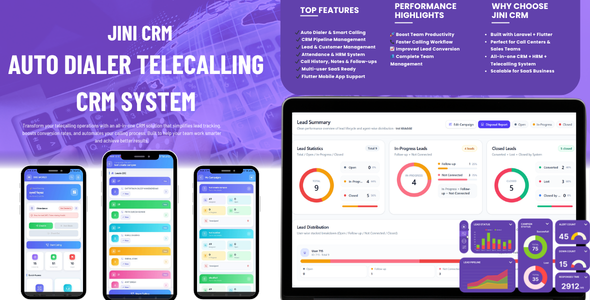

Jini CRM | Telemarketing Flutter App
Jini CRM is a complete CRM and telemarketing solution built for call centers, telesales teams, service businesses, and growing companies that need one platform to manage leads, calls, follow-ups, teams, attendance, and business operations.
It combines a Laravel web application with a Flutter mobile app to help businesses handle telemarketing workflow, pipeline tracking, team management, and daily operations in a simple and organized way.
Version 1.1.0 Update NEW
Jini CRM v1.1.0 includes new productivity and update management features for better lead importing, WhatsApp campaigns, user management, and future upgrade handling.
- Google Sheet Integration: Connect Google Sheets from the company panel, select a campaign, and import leads into the selected campaign. NEW
- WhatsApp Template Image/Video Support: Create WhatsApp templates with text, image, or video from the admin panel and open them from the Flutter mobile app for the selected lead. NEW
- Full User Edit Page: Admin can edit complete user details including name, username, email, mobile number, role, status, and password. NEW
- Demo CSV Download: Lead upload page now includes a sample CSV download option to help users prepare the correct import format. NEW
- Admin Update ZIP Installer: Future updates can be installed from the SaaS super admin panel using an update ZIP, including code files and SQL updates when provided. NEW
Main Features
- Auto Dialer support using native SIM
- Lead Management
- Google Sheet lead import integration NEW
- CRM Pipeline Management
- Follow-up Management
- Call Log and Call History
- Task Management
- WhatsApp message support through phone
- WhatsApp template image and video support NEW
- In-App Notifications
- Attendance Management
- HRM Management
- Team and Agent Management
- Reports and Dashboard with Excel and PDF export
- Role based access control
- SAAS-ready multi-tenant architecture
- SaaS admin update ZIP installer NEW
- Subscription Plans with multiple payment methods (Razorpay, Stripe, Offline)
- Flutter Mobile App support
Web Application Features
- Modern admin dashboard
- Lead creation and assignment
- Google Sheet integration with campaign selection for lead import NEW
- Pipeline stage tracking
- Follow-up reminders and notes
- Call activity management
- Team performance monitoring
- Attendance overview
- HRM tools for staff management
- Business reports and analytics
- Excel (XLSX) and PDF export for all major reports
- Subscription plan management
- Company and user management
- Full user details edit page with role, status, and password update NEW
- Demo CSV download on lead upload page NEW
- Future update ZIP upload from SaaS super admin panel NEW
New Add-on Features in v1.1.0 NEW
- Google Sheet Lead Import: Company users can connect Google Sheets, choose the target campaign, and import sheet leads into the CRM workflow. NEW
- WhatsApp Media Templates: Admin can create WhatsApp templates with image or video media and users can launch them from the Flutter app for lead communication. NEW
- Complete User Edit: User records can now be edited with complete profile and account details, not only password changes. NEW
- Demo CSV File: A ready sample CSV file is available on the lead upload screen so users can follow the correct column format. NEW
- Update ZIP Installer: Super admin can upload future update packages from the SaaS admin panel and apply code/database updates more easily. NEW
Mobile App Features
- Executive login with mobile number
- Lead and customer access on mobile
- Call updates and follow-up access
- Task and status tracking
- Auto Dialer using device’s native SIM
- WhatsApp quick message launch
- WhatsApp template media support for image and video campaigns NEW
- Useful for field staff and telemarketing teams
Payment Methods Supported
Jini CRM includes a built-in subscription system that supports three payment methods, allowing companies to subscribe to plans flexibly based on their region and preference:
- Razorpay: Online payments through Razorpay payment gateway. Best suited for businesses in India, supporting UPI, credit/debit cards, net banking, and wallets. Requires a Razorpay merchant account.
- Stripe: Online payments through Stripe payment gateway. Suitable for international businesses, supporting credit/debit cards in over 40 countries. Requires a Stripe merchant account.
- Offline / Manual Payment: Allows companies to pay through bank transfer, UPI, cheque, or any offline method. The super admin can manually approve the payment after receiving funds. Useful for businesses that prefer offline transactions or where online gateways are not available.
Note: Razorpay and Stripe accounts are not included with this product. The buyer must create their own merchant accounts to enable online payments. Standard transaction fees from Razorpay and Stripe apply (charged directly by the payment provider, not by this app).
Demo Access
Demo URL: https://demo.cloudfzs.com
Super Admin Login
- User Name: demo@admin.com
- Password: 12345678
Company Login
- User Name: demo@company.com
- Password: 12345678
Mobile App Executive Login
- User Name: 9988228899
- Password: 12345678
Mobile App Download


Support
For any questions, technical support, bug reports, or customization requests, please raise a support ticket through our official support portal:
Support Portal: https://doc.cloudfzs.com/support/
We provide 6 months of free support with every purchase.
Technical Requirements
- PHP Version: 8.1 or higher
- MySQL Version: 5.7 or higher (MySQL 8.0 recommended)
- Flutter SDK Version: 3.10 or higher
- Dart SDK Version: 3.0 or higher
- Laravel Version: 10.x
- Web Server: Apache 2.4+ or Nginx 1.18+
- Composer: 2.0 or higher
- Node.js: 16.x or higher
Compatible Web Browsers
- Google Chrome (latest 2 versions)
- Mozilla Firefox (latest 2 versions)
- Microsoft Edge (latest 2 versions)
- Safari 14 or higher
- Opera (latest version)
Compatible Mobile Operating Systems
- Android: Android 6.0 (Marshmallow) or higher
- iOS: iOS 12.0 or higher
Important Third-Party Cost Disclosure
Please read carefully before purchasing: Jini CRM is a complete software solution. Some features depend on services already available on the user’s mobile device or require basic hosting and account setup. The buyer is responsible for any costs related to these services.
Auto Dialer – Uses Native SIM Only
Jini CRM’s Auto Dialer uses the device’s native SIM card to make calls directly through the phone’s built-in dialer.
- No external VoIP service is used
- No Twilio, Plivo, or any paid calling API is required
- No additional API or per-call costs from this app
- Standard mobile carrier call charges from the user’s SIM provider will apply (as per their mobile plan)
- Calls are made through the phone’s native dialer using the installed SIM card
WhatsApp Messaging – Uses Installed WhatsApp App
WhatsApp messages are sent through the WhatsApp application already installed on the user’s phone. The system opens WhatsApp with the customer’s number pre-filled and supports text templates as well as image/video template media where supported by the installed WhatsApp app.
- Uses the user’s existing WhatsApp account on their device
- Supports WhatsApp text, image, and video templates from the admin panel NEW
- No WhatsApp Business API integration is included or required
- No per-message charges from this app
- The user must have WhatsApp installed on their phone
In-App Notifications
- The application includes a built-in in-app notification system
- Notifications are managed from the app and admin panel workflow
- No external notification service setup is required for the built-in notification feature
- No separate third-party notification API account is included or required for this feature
Payment Gateway Accounts (Optional, Not Included)
- Razorpay Account: Required only if you want to accept online payments through Razorpay. Free to create. Razorpay charges standard transaction fees as per their pricing.
- Stripe Account: Required only if you want to accept online payments through Stripe. Free to create. Stripe charges standard transaction fees as per their pricing.
- Offline Payment: No third-party account is needed. Companies pay directly to the super admin and the admin manually approves payments.
Summary of Costs NOT Included
The following costs are not included with this product and are the buyer’s responsibility:
- Mobile carrier call charges (Auto Dialer uses the user’s SIM)
- Razorpay or Stripe transaction fees (only if you enable online payments)
- Web hosting, domain name, and SSL certificate
- Google Play Store and Apple App Store developer account fees
Note: By purchasing this product, the buyer acknowledges responsibility for any third-party service costs listed above. The seller is not responsible for these external charges.
Why Choose Jini CRM?
- Complete telemarketing business solution with web and mobile in one product
- Built-in subscription system with Razorpay, Stripe, and Offline payment support
- Auto Dialer uses native SIM, no expensive VoIP or per-call API charges
- WhatsApp messaging through the user’s installed app, no WhatsApp Business API needed
- New Google Sheet import, WhatsApp media templates, user edit page, demo CSV, and update ZIP installer included in v1.1.0 NEW
- SAAS-ready multi-tenant architecture, ideal for agencies and resellers
- Excel and PDF export for all major reports
- Combines CRM, Auto Dialer, Attendance, HRM, Reports, and Subscription billing in one system
- Suitable for call centers, telesales teams, sales agencies, and growing service businesses
- Clean Laravel and Flutter codebase, easy to customize
- 6 months of free support included with every purchase
$168 |
Download |
0 average based on 0 ratings.

| Last Update | 2026-06-30 |
| Created | 2026-06-16 |
| Sales | 1 |
| Discussion | Comments |
| Software Version | Flutter 3.x |
| Files Included | Dart YAML JavaScript JSON .java .kotlin .h .storyboard .plist .swift JavaScript JS CSS PHP HTML |
| Video Preview Resolution |


