iOS Authentication Template - Firebase, Google & Apple Sign-In | SwiftUI
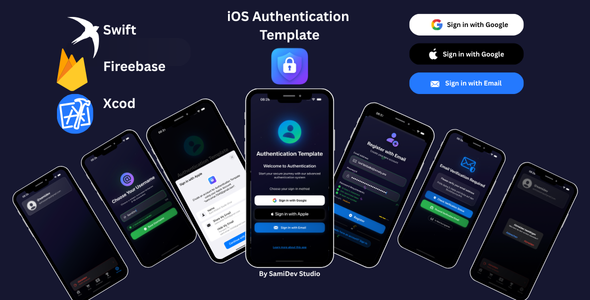

iOS Authentication Template – complete SwiftUI sign-in
A professional, production-ready authentication system for iOS. Email & password, Google Sign-In and Apple Sign-In, email verification, password reset and username selection – all built with SwiftUI and Firebase. Skip weeks of development and start every new app with a secure login.
Documentation: Complete setup guide & documentation
Every sign-in method your users expect
Email and password with real-time validation, Google Sign-In and native Apple Sign-In for maximum privacy. New users verify their email, pick a username with a live availability check, and can reset their password at any time.
Modern SwiftUI design, ready for your brand
A dark theme with smooth animations and a responsive layout for iPhone and iPad. Colors, fonts and settings live in central configuration files, so you can match your brand in minutes.
Built for international apps
English, German and Arabic are included – with full right-to-left support. Add your own languages through the localization files.
Here are the key features of the template:
- Email/password authentication – with real-time validation
- Google Sign-In – seamless Firebase setup
- Apple Sign-In – native iOS experience and privacy
- Email verification – with resend function
- Password reset – secure email flow
- Username selection – real-time availability check
- SwiftUI + MVVM – clean, commented code
- Dark theme – fully customizable colors
- Multi-language – English, German, Arabic (RTL)
- Accessibility – follows iOS guidelines
- Security best practices – input validation
Easy customization
- AppConfig.swift – app settings and features
- AppTheme.swift – colors, fonts and styling
- Localization files – your own translations
- Asset catalog – your logo and icons
What’s included
- Complete Xcode project – ready to build and customize
- Firebase configuration guide – step by step
- Online documentation website with screenshots
- Customization examples and troubleshooting guide
Quick setup
- Open the project in Xcode 15+
- Create your Firebase project following the documentation
- Enable the sign-in providers (Google, Apple)
- Adjust colors and branding in the configuration files
- Build, test and ship
F.A.Q.
- Do I need a Mac?
Yes. iOS apps are built with Xcode, which runs on macOS. - Do I need my own Firebase project?
Yes. The template connects to your own Firebase project – creating one is free and the documentation guides you through every step. - Does it work on iPad?
Yes, iPhone and iPad are supported (iOS 15+). - Can I add this login to my existing app?
Yes. The code is modular (MVVM), so you can use it as the starting point of a new app or move the screens into your project. - Can I change the design?
Yes. Colors, fonts and texts are set in AppTheme.swift, AppConfig.swift and the localization files.
Requirements
- Mac with Xcode 15 or newer (Xcode 16 recommended)
- iOS 15.0+ · Swift 5.9+
- Firebase project (free to create)
- Apple Developer account for Apple Sign-In and App Store publishing
Changelog
v1.0.0 [July 2025]
Initial release on CodeCanyon
Support
Questions before or after buying? Use the Comments tab of this item or write to support@samidevstudio.com. More templates: SamiDevStudio portfolio.
0 average based on 0 ratings.


