InvisoSurf | Anti Detect Browser and Multi Chrome Profile Manager Windows App
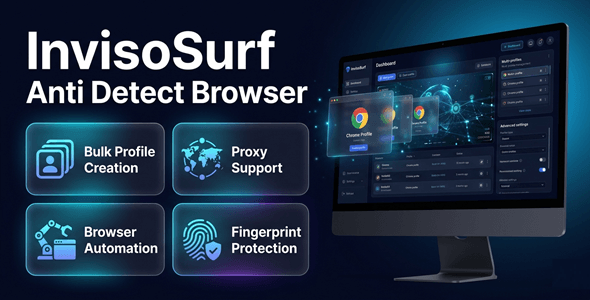

Run Unlimited Chrome Profiles — Fully Isolated, Fully Undetected
Managing multiple accounts is risky without the right tools.
One fingerprint leak can get everything banned instantly.
InvisoSurf gives you fully isolated Chrome profiles
with unique fingerprints, proxies, and automation — all in one dashboard.
Stop losing accounts. Start scaling safely.

Perfect For
✔ Digital marketers running multiple ad accounts
✔ Agencies managing client social media profiles
✔ E-commerce sellers operating multiple storefronts
✔ Social media automation teams
✔ Traffic teams and affiliate marketers
✔ Web automation and scraping professionals
Features
 | Isolated Chrome Profiles Each profile runs in a completely separate environment. No data, cookies, or fingerprints ever shared between profiles. |
| Advanced Fingerprint Generation & Validation Generate unique, realistic browser fingerprints for every profile. Built-in validator confirms each profile passes detection checks. |
| Proxy Management & Proxy Tester Assign dedicated proxies per profile with one click. Built-in tester confirms proxy health before you launch. |
| Automation Workflow Builder Build powerful browser automations without coding. Schedule tasks, repeat actions, and run workflows silently in the background. |
| Profile Warm-Up & Aging Simulation Simulate real human browsing behavior to age new profiles safely. Reduce ban risk dramatically before running any campaigns. |
| Anti-Detection Health Dashboard Monitor the detection risk score of every profile at a glance. Smart alerts warn you before a profile becomes vulnerable. |
| WebRTC Leak Protection Prevent IP leaks through WebRTC — a common detection vector. Every profile stays fully masked, even under deep inspection. |
| Bulk Profile Creation Create dozens of fully configured profiles in seconds. Assign fingerprints, proxies, and groups automatically. |
| Chrome Extension Loader Load any Chrome extension into individual profiles. Customize each environment exactly as needed. |
| Session Logging & Monitoring Track every session, action, and event per profile. Full audit trail for agencies and automation teams. |
| Profile Groups & Tagging Organize hundreds of profiles with custom groups and tags. Find, filter, and launch exactly what you need in seconds. |
| Modern Premium Dark UI A sleek, distraction-free dark dashboard built for power users. Manage everything from one clean, professional interface. |
Why You Need This
❌ Your accounts keep getting banned for no clear reason
❌ Platforms detect you’re running multiple profiles from one machine
❌ Manual proxy switching wastes hours every week
❌ You have no way to test if a profile is safe before using it
❌ Building warm profiles from scratch takes forever
InvisoSurf solves all of this in one place.
Every profile gets its own fingerprint, proxy, and session history.
Platforms see completely different, real-looking users — not one person with many tabs.
The health dashboard flags risk before it becomes a ban.
You don’t just get privacy — you get full operational control.
How You Can Profit
✔ Run Facebook, Google, and TikTok ads across unlimited isolated accounts
✔ Manage 10, 50, or 500 client social media profiles without overlap
✔ Operate multiple Amazon, eBay, or Etsy storefronts from one machine
✔ Automate repetitive account tasks and free up hours every day
✔ Offer multi-account management as a paid agency service
✔ Test ad creatives and audience targeting across accounts simultaneously
This is not just a browser — it’s the infrastructure behind scaling online businesses.
⚡ Fast Results
No complicated setup. No technical expertise required.
Install, create a profile, assign a proxy, and launch in minutes.
Bulk creation means 50 profiles can be ready in under 5 minutes.
Automation workflows run silently while you focus on other work.
Most users are fully operational within their first session.
Simple 3-Step Setup
 | Step 1 — Install & Launch Download and install InvisoSurf on your Windows PC. Open the dashboard and activate your license. |
 | Step 2 — Create Your Profiles Add new Chrome profiles individually or in bulk. Assign unique fingerprints, proxies, and groups automatically. |
 | Step 3 — Launch & Automate Open any profile with one click — fully isolated and ready. Set up automation workflows and let InvisoSurf do the work. |
- Version 1.0.0 – Initial release with full feature set including isolated profiles, fingerprint engine, proxy manager, automation builder, warm-up simulation, health dashboard, and premium dark UI.
 | What operating system does InvisoSurf support? InvisoSurf is a Windows desktop application. It is compatible with Windows 10 and Windows 11. |
| Does it require an API key or third-party subscription? No. InvisoSurf works completely standalone. No API key or external service subscription is required. |
| How many profiles can I create? Profile limits depend on your license tier. Bulk creation tools let you generate dozens of profiles in seconds. |
| Do I need to supply my own proxies? Yes. InvisoSurf includes a full proxy manager and tester. You bring your own proxies and assign them per profile with one click. |
| Will this protect me from fingerprint-based detection? Yes. Each profile gets a unique, validated browser fingerprint. WebRTC leak protection and health monitoring add additional layers of safety. |
| Is technical knowledge required to use it? No. The dashboard is designed for non-technical users. Setup takes minutes and no coding is required. |
0 average based on 0 ratings.

| Last Update | 2026-05-14 |
| Created | 2026-05-14 |
| Sales | 2 |
| Discussion | Comments |
| Application Runtime | Native |
| High Resolution | |
| Compatible OS Versions | Windows 11 Windows 10 |
| Video Preview Resolution |


