Impersonation Plugin for RISE CRM – Login as Staff or Customers

Note: This is a plugin designed for RISE – Ultimate Project Manager & CRM . It is not a standalone script.
Description
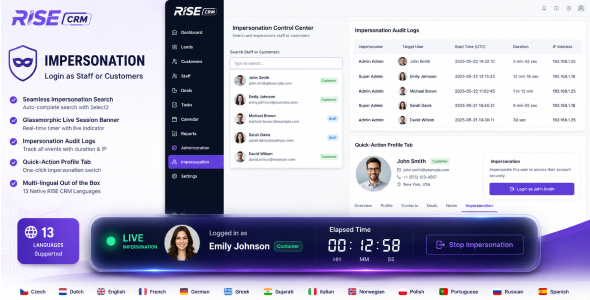
Impersonation Plugin is a secure and professional login-switching solution built exclusively for Rise CRM. It enables administrators to instantly impersonate staff members or customers for support, troubleshooting, account management, and workflow verification.
The module includes advanced live session tracking, detailed audit logging, modern glassmorphic interface components, and complete multi-language support for all native Rise CRM languages.
Key Features:
-
Instant User Impersonation – Securely login as staff members or customers directly from the admin panel.
-
Quick Profile Access – Adds a dedicated impersonation tab inside Staff and Customer profile pages.
-
Glassmorphic Live Session Banner – Modern floating live session interface with blur effects and active status indicator.
-
Live Elapsed Timer – Displays real-time impersonation session duration with smooth timer updates.
-
Comprehensive Audit Logs – Track impersonator, impersonated user, IP address, start time, and total duration.
-
Secure Session Management – Easily switch back to the original administrator account anytime.
-
Select2 Smart Search – Fast autocomplete search system for locating staff and customers instantly.
-
Clean Modular Architecture – Developed without modifying Rise CRM core files.
-
Multi-language Support – Includes all 13 native Rise CRM language translations.
Supported Languages:
- English
- French
- German
- Spanish
- Italian
- Portuguese
- Polish
- Russian
- Dutch
- Greek
- Czech
- Norwegian
- Gujarati
Requirements:
- RISE CRM (latest version recommended)
- PHP 8.0 or higher
- MySQL Database
Demo URL and Credentials:
Explore the live demo of the Impersonation Module:
- Demo URL: Live Demo
- Admin Login:
- Email: admin@example.com
- Password: 123456
Installation Guide:
- Log in to RISE – Ultimate Project Manager & CRM as Administrator.
- Navigate to Settings > Plugins.
- Upload the upload.zip file downloaded from CodeCanyon.
- Enter your valid purchase code.
- Click Install and then Activate.
- Navigate to the Impersonation Module from the admin panel.
- Start impersonating staff members or customers securely.
Customer Support
We provide dedicated support to ensure a smooth experience with the module.
- Support Hours: Monday – Saturday
- Response Time: Within 12–24 hours
- Support Portal: Submit a Ticket
Change Log
Version 1.0.0
- Initial release
.png)


