HTML5 Video Player with Multiple Skins
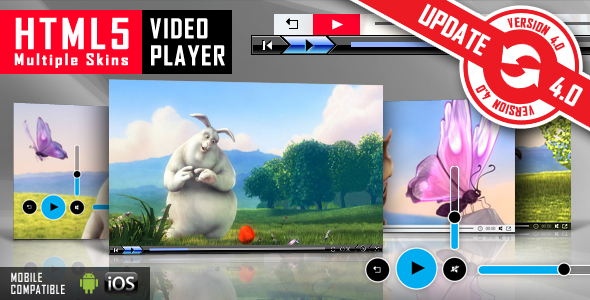



VERSION V 4.0 IS AVAILABLE. CHECK LIVE PREVIEW!




NEED THE WORDPRESS PLUGIN FOR THIS PRODUCT? YOU CAN DOWNLOAD IT FROM HERE: http://codecanyon.net/item/html5-video-player-wordpress-plugin/1613464
It plays .MP4 video files and .WEBM (on browsers which don’t have MP4 support)
FEATURES:
 RESPONSIVE DESIGN
The video player if fully responsive. Parameter to enable or disable responsive behavior.
MULTIPLE SKINS INCLUDED
You can choose from 6 skins. To choose the skin just set “skin” parameter.
Ex: skin: universalBlack
MULTIPLE INSTANCES
You can insert the player multiple times in the same page with the same skin or using a different skin.
FULLSCREEN
It supports full screen, having all the controllers usable in full screen mode. You can enter on fullscreen mode by clicking the button or by double clicking on the video
AUTOHIDE FOR CONTROLLERS
The controllers will auto hide on mouse out, showing the entire movie
PREVIEW IMAGE – OPTIONAL
A preview image can be defined by setting “poster” parameter
VOLUME CONTROL
You have a complete sound control. You can also set the initial volume
AUTOPLAY – OPTIONAL
LOOP – OPTIONAL
DESCRIPTION FOR VIDEO – OPTIONAL. It can be DISABLED
You can set a Title and Description for the video. Supports HTML & CSS formated text.
CLICK LISTENER
You can also click on the video to play/pause the video.
LIGHTWEIGHT
The JS has around 12KB
EASY IMPLEMENTATION
The setup takes up to 60s.
HELP FILE
A complete help file is included
Note for IOS/Android (restrictions imposed by Apple/Google) and other browsers:
- it autoplays on IOS/Android only if the video is muted. When you set autoPlayOnMobile:true, the video will mute automatically for mobile devices.
- volume controls will not work on IOS/Android. You’ll have to adjust the volume with physical buttons of the mobile device.
Note for Safari, Chrome & Firefox (restrictions imposed by Apple & Google):
- Starting with Safari 11 and Chrome 66 the autoplay will not work because Apple & Google disabled autoplay feature and it can’t be controlled from JS. It autoplays only if the video is muted
- Starting with the version 66 of Firefox, autoplay was blocked, You can revert to the old behavior from browser settings, when autoplay was allowed.

OTHER RECOMMENDED PLAYERS



Keywords: html5, html5 video player, autoplay, clean, customizable, fullscreen, jquery, skin, multiple skins, media, player, resizable, video, webm, mp4, H.264
If you need additional information don’t hesitate to contact us at office@lambertgroup.ro. We’ll try to answer you as quickly as possible.
Enjoy!
UPDATES / RELEASE LOG
***Version 5.2.2 Release Date: October 16, 2023 - updates for 2023 ***Version 5.2.1 Release Date: February 09, 2022 - updates for 2022 ***Version 5.2.0 Release Date: July 03, 2021 - js libraries update ***Version 5.2 Release Date: May 21, 2021 - bug fix when the controls were set to always be visible ***Version 5.1 Release Date: March 15, 2021 - for mobile devices, the controls will hide after the play button is pressed ***Version 5.0 Release Date: November 12, 2020 - "use strict" mode on - updates to be compatible with jQuery 3.5+ ***Version 4.5.3.1 Release Date: July 04, 2020 - css modifications ***Version 4.5.3.0 Release Date: January 15, 2020 - updates for 2020 ***Version 4.5.3 Release Date: August 20, 2019 - added player display delay ***Version 4.5.2 Release Date: June 25, 2019 - replaced the .click(), .mouseover(), .mouseoout() etc functions with the equivalent .on() ***Version 4.5.1 Release Date: March 15, 2019 - updates for HTTPS compatibility ***Version 4.5 Release Date: January 25, 2019 - 'centerPlugin' parameter was added. By setting it 'true' the player will center on the page ***Version 4.4 Release Date: December 16, 2018 - autoplay on Chrome - fullscreen feature fix ***Version 4.3.4.0 Release Date: December 12, 2018 - screenfull.min.js library updated to the latest version ***Version 4.3.4 Release Date: May 02, 2018 - when initial volume is set to 0 the html5 video tag is also set to muted ***Version 4.3.3 Release Date: October 17, 2017 - code improvements ***Version 4.3.2 Release Date: August 29, 2017 - auto-play option added for IOS devices ***Version 4.3.1 Release Date: January 26, 2017 - code improvements ***Version 4.3.0.1 Release Date: December 15, 2016 - code improvements ***Version 4.3 Release Date: January 20, 2016 - bug fix: Fullscreen feature for IE11 ***Version 4.2 Release Date: May 19, 2015 - play button has been removed for iPhone - minimal skin ***Version 4.1 Release Date: April 10, 2014 - code improvements ***Version 4.0 Release Date: August 15, 2013 - feature: responsive behavior - feature: real FullScreen for browsers which support it: Firefox, Chrome, Opera and Safari - feature: full width and full browser parameters - feature: parameter to keep controllers always visible ***Version 3.0 Release Date: April 15, 2013 - feature: improved the playback on Android devices ***Version 2.0 Release Date: February 8, 2013 - feature: updated the product to be compatible with jQuery 1.9 - feature: removed the support for .ogv files ***Version 1.5 Release Date: March 26, 2012 - feature: replaced $() alias with jQuery() ***Version 1.4 Release Date: March 10, 2012 - feature: enabled "ESC" for leaving full screen state. ***Version 1.3 Release Date: February 1, 2012 - feature: extended the usage of jquery from 1.4.2 to 1.7.1 ***Version 1.2 Release Date: January 11, 2012 - feature: updated the .webm support ***Version 1.1 Release Date: December 1, 2011 - feature: update the css for preview and the help documentation ***Version 1.0 Release Date: November 28, 2011
4.5 average based on 50 ratings.


