VidGorilla | Bulk Videos and Playlist Downloader for YouTube | Windows App
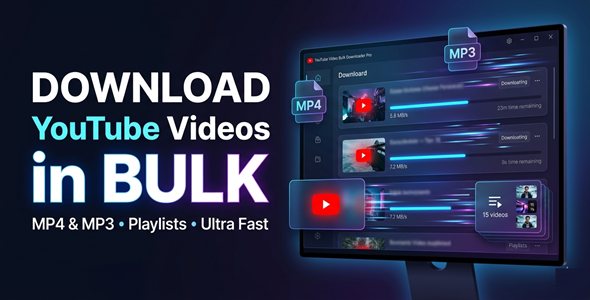

Download Entire YouTube Playlists in One Click — No Browser Needed
Tired of downloading videos one by one?
VidGorilla lets you bulk download videos, playlists, and audio files in minutes — right from your Windows desktop.
No subscriptions. No browser extensions. No limits.
One powerful app. One-time purchase.



✅ Perfect For
✔ Content creators and YouTubers
✔ Marketers collecting reference videos
✔ Students saving educational content offline
✔ Podcasters extracting audio from video
✔ Researchers building video libraries
Features
 | Bulk Video Download Paste a list of URLs and download them all at once. No more clicking through videos one by one. |
| Full Playlist Download Drop in a playlist URL and grab every video automatically. Perfect for saving entire channels or course libraries. |
| MP4 & MP3 Output Download as video or extract audio only. Ideal for offline viewing or podcast-style content. |
| Quality Selection Up to 1080p Choose the resolution that fits your needs. Full HD downloads with no quality loss. |
| Import URLs from Text Files Have a list ready? Import it directly from a TXT file. Save time — no manual pasting required. |
| Real-Time Progress Tracking See speed, ETA, and status for every download live. Always know exactly what’s happening. |
| Download Queue System Add items to a queue and let VidGorilla handle the rest. Walk away and come back to finished downloads. |
| Fast & Stable Download Engine Built for speed and reliability on Windows. Handles large batches without crashing or slowing down. |
| Clean, Simple Interface No cluttered menus or confusing settings. Anyone can use it from the first launch. |
| One-Time Purchase — No Subscriptions Pay once and use it forever. No monthly fees, no hidden costs. |
Why You Need This
❌ Online downloaders are slow, ad-heavy, and limit your downloads
❌ Browser extensions break constantly and can’t handle playlists
❌ Downloading one video at a time wastes hours of your day
❌ Streaming isn’t always available — no internet means no content
❌ There’s no easy way to extract MP3 audio from video in bulk
VidGorilla solves all of this in one lightweight Windows app.
Paste your URLs, select your format, and hit Start.
The app handles the rest while you focus on what matters.
No technical skills needed. No browser required.
Productivity and Research Use Cases
✔ Save educational videos for offline learning and study sessions
✔ Organize playlists for personal reference and content management
✔ Collect publicly available videos for market research and trend analysis
✔ Archive video resources for presentations, tutorials, and internal research
Every download saves you time — and time is money.
This is not just a downloader — it’s a content production accelerator.
⚡ Fast Results
Add your URLs.
Hit Start.
Done — before you finish your coffee.
No waiting for slow web tools.
No failed downloads from browser limits.
No wasted time clicking through pages.
Example:
Download a 50-video playlist in under 10 minutes — fully automated.
️ Simple 3-Step Setup
 | Step 1 — Install the App Download and run the Windows installer. |
 | Step 2 — Paste Your URLs Paste video or playlist URLs directly into the app. Or import a TXT file with your full URL list. |
 | Step 3 — Choose Format & Download Select MP4 or MP3 and your preferred quality. Add to queue and hit Start — VidGorilla does the rest. |
⚙️ System Requirements
| OS | Windows 10 or Windows 11 |
| RAM | 4 GB or higher recommended |
| Internet | Active connection required for downloading |
Package Contents
✔ Windows application (.exe installer)
✔ PDF user guide and setup documentation
✔ Full feature set — no upsells or hidden paywalls
- Version 1.0.0 – Initial release with all core download and conversion features
 | Does this work on Mac or Linux? No. VidGorilla is a Windows-only desktop application. It supports Windows 10 and Windows 11. |
| Can I download full playlists? Yes. Paste a playlist URL and the app downloads every video automatically. No need to grab individual links one by one. |
| What formats can I download in? You can download as MP4 video or extract audio as MP3. Quality options go up to 1080p for video. |
| Is there a limit on how many videos I can download? No hard limit is built into the app. You can queue as many URLs as you need and download them all. |
| Is this a one-time purchase? Yes. Pay once and use it forever. There are no monthly fees or recurring charges. |
0 average based on 0 ratings.

| Last Update | 2026-05-08 |
| Created | 2026-04-22 |
| Sales | 0 |
| Discussion | Comments |
| Application Runtime | Native |
| High Resolution | |
| Compatible OS Versions | Windows 11 Windows 10 |
| Video Preview Resolution |


