Forma - Premium ATS Resume Templates
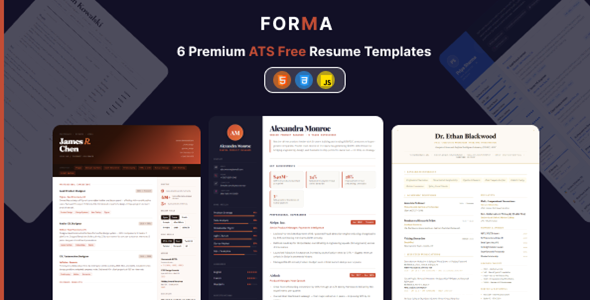

Forma — Premium ATS Resume HTML Templates
Forma is a collection of 6 professionally designed, ATS-optimized resume templates built with pure HTML & CSS. No frameworks, no build tools, no dependencies — just open a file and start editing. Export a pixel-perfect PDF in seconds directly from your browser.
Whether you’re a corporate executive, a creative professional, an academic researcher, or a minimalist at heart — Forma has a template crafted for your story.
“Built for humans. Parsed by machines. Designed to get you hired.”
Why Forma?
Most resume templates are either beautiful but ATS-unfriendly, or machine-readable but visually dull. Forma solves both. Every template is engineered to pass automated applicant tracking systems while looking exceptional in the hands of a real recruiter.
- Zero setup friction — No npm install, no Webpack, no terminal. Open the HTML file, edit your content, done.
- ATS-first architecture — Semantic HTML, logical reading order, and clean markup ensure every ATS parser can read your resume accurately.
- One-click PDF export — Chrome’s print engine produces publication-quality PDFs at A4 and US Letter size.
- CSS variables customization — Change colors, fonts, and spacing globally in seconds without touching template markup.
- 6 distinct aesthetics — From dark-mode noir to clean academic, there’s a design for every industry and personality.
Templates Included
1. Executive
A commanding corporate layout with a structured sidebar, navy and rust color palette, and skill progress bars. Built for senior professionals, managers, and C-suite candidates who need gravitas on the page.
2. Creative
A bold, gradient-led design with warm tones and high visual impact. Perfect for designers, marketers, art directors, and anyone in a creative field who wants their resume to reflect their craft.
3. Minimal
Clean lines, generous whitespace, centered layout, and a restrained monochromatic palette. Elegant understatement for consultants, lawyers, and professionals where clarity speaks louder than color.
4. Noir (Dark Mode)
A sleek, modern dark-mode template with glowing accents and a contemporary card-based layout. Ideal for tech professionals, developers, and UX designers who live in dark mode.
5. Infographic
A visually rich layout that uses icons and structured data visualization to highlight achievements at a glance. Great for data professionals, project managers, and roles where metrics matter.
6. Academic
A structured, publication-ready Format with dedicated sections for research, publications, and academic history. Designed for researchers, professors, PhD candidates, and postdoctoral applicants.
Key Features
- 6 Premium Resume Templates — Executive, Creative, Minimal, Noir, Infographic, Academic
- 100% ATS-Optimized — Passes automated screening with semantic, machine-readable markup
- Print-Ready PDF Export — One click in Chrome/Chromium exports a perfect A4 or US Letter PDF
- Pure HTML & CSS — Zero JavaScript frameworks, zero npm packages, zero build steps
- CSS Variables System — Customize colors, fonts, and spacing globally from a single tokens file
- No Dependencies — Works entirely in any modern browser, runs offline
- Fully Responsive — Looks great on desktop, tablet, and mobile
- Semantic HTML5 — Proper ARIA labels, roles, and accessible structure throughout
- 3 Google Font Families — Playfair Display, DM Sans, and DM Mono included
- Complete Documentation — Step-by-step guide covering setup, customization, PDF export, and ATS tips
- Lifetime Updates — All future templates and improvements included with purchase
- Works Offline — Fully functional without an internet connection (fonts load from CDN when online)
What’s Included
- 6 Resume Template HTML Files — One per design, self-contained and ready to edit
- Landing Page (
index.html) — Gallery to browse and preview all templates - Documentation Page (
docs.html) — Comprehensive guide with code examples and customization reference - CSS Design Tokens (
tokens.css) — Central file for all colors, typography, and spacing variables - Modular CSS Architecture — Base, shell, toolbar, print, and per-template stylesheets
- Favicon Set — SVG, ICO, and PNG variants for all devices
Customization
Forma uses a CSS custom properties (variables) system that makes global changes trivially easy. To change your accent color across all elements, edit one line:
--color-primary: #c84b31; /* Change this to any color */The same applies to font families, font sizes, spacing scales, and layout dimensions. No design skills required — just edit, save, and refresh.
ATS Optimization
Forma templates are built from the ground up to pass ATS (Applicant Tracking System) screening:
- Semantic
<article>,<section>,<header>, and<h1>–<h3>hierarchy - Logical top-to-bottom, left-to-right reading order
- No images used for text content
- No tables, floats, or layout hacks that confuse parsers
- Contact details, job titles, and dates in machine-readable plain text
- Skills listed as plain text, not graphics-only elements
PDF Export
Every template includes a built-in Save PDF toolbar button. Click it in Chrome or any Chromium-based browser (Edge, Brave, Arc) and the browser print engine renders a pixel-perfect, print-ready PDF.
- Supports A4 and US Letter paper sizes
- Custom
@media printstyles hide the toolbar and optimize layout for paper - No third-party PDF libraries or server-side processing required
Technical Details
- HTML Version: HTML5
- CSS: CSS3 with Custom Properties, Grid, Flexbox, and @media print
- JavaScript: Minimal vanilla JS (toolbar interactions only) — no frameworks
- Fonts: Google Fonts — Playfair Display, DM Sans, DM Mono
- Build Tools Required: None
- Package Manager Required: None
- External Libraries: None
- Version: 1.0.0
Browser Support
- Chrome 90+ — Full support, recommended for PDF export
- Microsoft Edge 90+ — Full support, Chromium-based PDF export
- Brave / Arc — Full support, Chromium-based PDF export
- Firefox 90+ — Full support for viewing and editing (PDF export via Chrome recommended)
- Safari 14+ — Full support for viewing and editing
Getting Started in 3 Steps
- Download & Extract — Unzip the package to any folder on your computer.
- Edit Your Content — Open any template HTML file in a text editor (VS Code, Sublime, Notepad) and replace the placeholder text with your own details.
- Export as PDF — Open the template in Chrome, click Save PDF, and your resume is ready to submit.
Documentation
Forma includes a comprehensive documentation page (docs.html) covering:
- File structure reference
- Step-by-step getting started guide
- Complete content editing field reference
- CSS variables customization guide with examples
- Typography and font pairing guide
- Color and theming reference
- Print and PDF export instructions
- ATS optimization tips and best practices
- Full CSS variable reference table
- HTML structure guide
- FAQ section
Changelog
Version 1.0.0 — March 2026
- Initial release
- 6 templates: Executive, Creative, Minimal, Noir, Infographic, Academic
- Complete documentation included
- ATS optimization built-in across all templates
- Print-ready PDF export via browser
- CSS variables customization system
- Full ARIA accessibility support
Support
All questions and issues are handled through the ThemeForest comments section. We respond to all support requests and are committed to keeping Forma updated with new templates and improvements over time.
All purchases include lifetime updates. Future templates added to the Forma collection will be available to existing buyers at no additional cost.
0 average based on 0 ratings.


