Foodlay KDS | Kitchen Display System Desktop Add-on
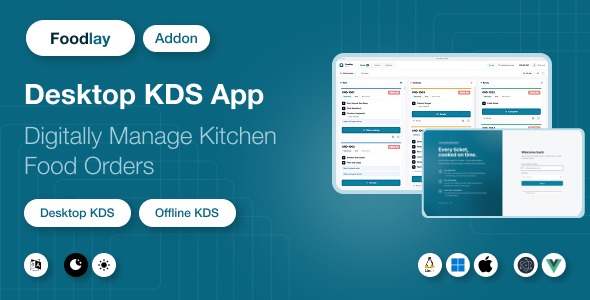

Foodlay KDS — Kitchen Display System Desktop App
Foodlay KDS is a desktop Kitchen Display System for restaurants, cafes, cloud kitchens, and food businesses. It runs as a native app on Windows, macOS, and Linux and turns any kitchen screen into a live order board: orders from every channel — POS counter, website, and mobile app — land on a three-column board (New → Cooking → Ready) with one-tap bumping, new-order chimes, ticket-age timers, an all-day batch view, and KOT thermal printing. Every ticket is mirrored into a local SQLite database, so the board survives restarts and network drops, and status bumps queue locally and sync back the moment the connection returns.
⚠️ Requires the Foodlay Admin & Web Panel (separate purchase). This item is the kitchen display client only. It connects to a running installation of the Foodlay Admin & Web Panel — the Laravel-based server product, which is a separate purchase and is not included in this package. Without that server, the KDS cannot log in or receive orders. The documentation includes a dedicated “Connecting to Your Server” guide covering every configuration value with concrete examples.
Key Features
- Live order board — a three-column New / Cooking / Ready board that polls your server and diffs every cycle: new tickets chime and pulse until a chef acknowledges them, and status changes made elsewhere (admin panel, a second kitchen screen) reconcile automatically
- One-tap bumping — Accept → Start cooking → Ready → Complete, with the correct ending per order type (takeaway is picked from the counter, dine-in is delivered, delivery tickets wait for the rider). One-step Recall undoes an accidental tap, and any of today’s finished tickets can be recalled from History
- Cancellations you can’t miss — a cancelled order stays on the board under a red alarm overlay with its own distinct sound until a chef dismisses it; it is never silently removed while food may still be on the stove
- Ticket-age timers — each ticket ages neutral → amber → red at thresholds you set, and the clock is the server’s, so a kitchen PC with a wrong system time can’t hide a late order
- All-day view — aggregated item totals across every new and cooking ticket, so the line can batch-cook “14 × Chicken Biryani” instead of reading twenty cards
- Offline-resilient — the full board lives in a local SQLite mirror; when the network drops the screen keeps working, bumps are queued, and everything pushes automatically on reconnect with a clear connection pill on screen
- KOT thermal printing — clean kitchen tickets in large type (no prices), with variants, add-ons, and customer notes, printed on demand or auto-printed the moment an order arrives
- Priced invoice printing — a full customer receipt (items, add-ons, discounts, taxes, service charges, payment method and paid/unpaid state) pulled fresh from the server at print time, with the business name and address taken from your admin panel
- Branch scoping & filters — pick the kitchen’s branch and see only its orders (optionally including unassigned ones); filter by order type (delivery / takeaway / dine-in) and by source (POS / Web / App) so a station only sees what it cooks
- Built for a kitchen screen — fullscreen mode, three text-size steps for reading from across the pass, adjustable alert volume with repeating alerts for unacknowledged tickets, and a mute toggle
- Keyboard shortcuts —
Aall-day panel,Mmute,Ffullscreen,Rsync now - 6 UI languages — English, Bengali, Spanish, Arabic (full RTL), Hindi, French. The chosen language is also sent to your server, so item and add-on names print on tickets in the kitchen’s own language
- Admin or employee sign-in — sign in with an admin account, or with a limited kitchen-staff employee account that can only read orders and update their status. Optional two-factor step supported. The token stays in the app’s secure main process and never touches the browser layer
- White-label ready — app name, application ID, icons, and accent color are all configurable; the brand color re-themes the running app live from Settings
Technical Specifications
- Desktop shell: Electron 33
- Frontend: Vue 3.5 (Composition API), Pinia 2, Vue Router 4
- Language: JavaScript (modern ES modules) — clean, readable, unminified source
- Styling: Tailwind CSS 3
- Local database: SQLite via better-sqlite3 11 (WAL mode)
- Printing: node-thermal-printer 4 (ESC/POS — Epson, Star, and compatibles) over network (TCP), USB / serial device, CUPS queue, or Windows printer share
- Networking: Axios with JWT bearer authentication
- Build tooling: electron-vite 2 + electron-builder 25
- Build targets: Windows portable ZIP (unzip and run — no installer or admin rights needed), macOS (.dmg / .zip), Linux (.deb / .AppImage)
- Supported OS: Windows 10+, macOS 11+, Ubuntu 20.04+ (and other modern distros via AppImage)
- Security: context isolation on, node integration off, sandboxed IPC surface, strict CSP; the auth token is bound to the server it was issued for
What You Receive
- The complete, unobfuscated source code of the kitchen display application
- One-command build scripts that produce a ready-to-run app for Windows (.zip), macOS (.dmg / .zip), and Linux (.deb / .AppImage) — every script runs on any host OS, including Windows
- Offline HTML documentation covering: step-by-step installation for each platform written for non-technical users, the full server connection guide, the kitchen-staff account and permission setup, feature walkthroughs, a white-labeling guide (app name, icons, accent color, receipt behavior), thermal printer setup for every connection type, troubleshooting and FAQ, and a developer reference (consumed API endpoints, local SQLite schema, extension points)
- A plain-text quick-start README
A note on builds: your server’s address is compiled into the app at build time, so each kitchen builds its own copy — a copy-paste process of five documented commands that only needs Node.js installed. Kitchen screens need nothing but the finished build.
Requirements
- Foodlay Admin & Web Panel (separate purchase) installed, running, and reachable from your kitchen screens
- An admin account on that server — or a kitchen employee account granted online order: read + status update (plus POS: read for the branch picker)
- At least one branch with orders flowing in from your POS, website, or app
- To build the app: Node.js 18+ on any one computer (Windows, macOS, or Linux)
- Optional: an ESC/POS-compatible thermal printer for kitchen tickets and invoices
- A screen the kitchen can see — the board is designed for a wall-mounted monitor or touchscreen in fullscreen
Important Notice — What This Item Is
Foodlay KDS is a display and status client, not a standalone ordering system. It does not create orders, take payments, or store your menu — orders are created by your POS, website, or mobile app and read from your Foodlay Admin & Web Panel. The KDS shows them, lets the kitchen advance their status, and prints kitchen tickets and receipts. No payment gateway, merchant account, or third-party payment service is involved in this item; the invoice it prints simply reports the payment state your server already recorded.
Orders reach the board by regular polling of your server’s API (the interval is configurable), so the kitchen screen only needs normal network access to your panel — no websocket server, message broker, or extra infrastructure to install.
Documentation & Support
Full offline documentation is included in the download — from download to the first ticket on the board on every platform, with troubleshooting for failed server connections, permission errors, undetected printers, and platform-specific installation issues. Questions or stuck at any step? Contact us at thedayonesoft@gmail.com — we’re happy to help you get to a working kitchen screen.


0 average based on 0 ratings.

| Last Update | 2026-10-30 |
| Created | 2026-09-12 |
| Sales | 2 |
| Discussion | Comments |
| Compatible Browsers | |
| Software Version | Node.js |
| High Resolution | No |
| Files Included | JavaScript JS JavaScript JSON HTML |
| Video Preview Resolution |


