Flex Home | React Native Real Estate Mobile App


Flex Home | React Native Real Estate Mobile App
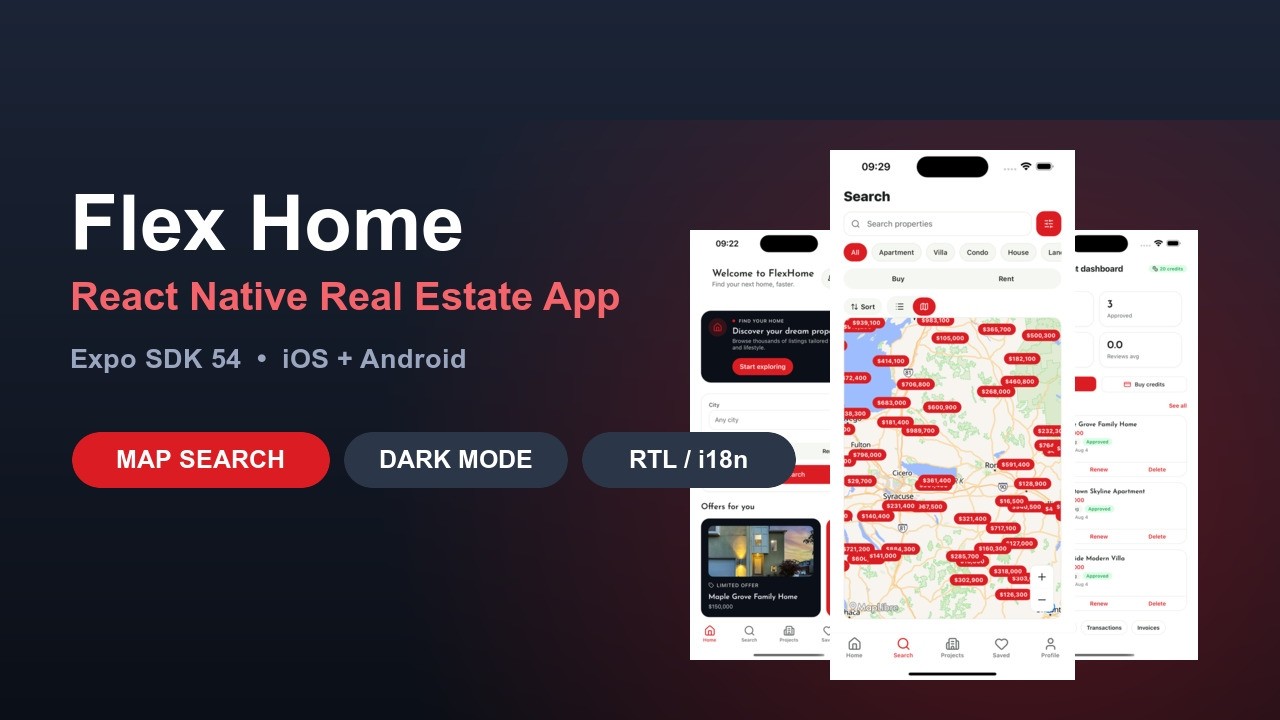
Flex Home is a React Native (Expo SDK 54) mobile app for real-estate businesses. It is the mobile client for a Botble real-estate backend: properties, projects, agents, saved listings, consultations and account data all come from your existing site over its REST API. One codebase builds both iOS and Android.
It is aimed at agencies, property marketplaces and independent agents who already run a Botble real-estate site and want their listings on phones. Every piece of brand identity – name, bundle id, scheme, colours, fonts – lives in a single .env file, with neutral defaults in the source, so you can rebrand it without touching code.
Flex Home mobile app costs $20.30 on our own store
Flex Home mobile app – React Native Real Estate Mobile App. Buying direct from the team that builds it means $20.30 rather than $29, with lifetime updates and 6 months support.

Please read this before buying. This is a mobile app only – it is not a standalone system.
The app has no database and no admin panel of its own. It reads everything (properties, projects, agents, consultations, accounts) from a Laravel backend over that backend’s REST API. You must already own, or buy separately, one of our Laravel real-estate scripts before this app is of any use to you:
Both ship the real-estate plugin and expose the same API, so the app works with either. Buying this item on its own gives you an app with nothing to display. If you are not sure whether your site qualifies, ask us before you buy.

Demo Video
A full walkthrough of home, search and filters, map search, property detail, projects, saved listings, the agent portal and dark mode:
Try it on your own phone
A demo APK is available if you would rather install the app and click around yourself. It is built against our Homzen demo backend, so the properties, agents and projects you see are the demo site’s data.
Download the demo APK (Android)
Android only – Apple does not allow installing an iOS build outside the App Store or TestFlight.
Demo & Resources
- Demo video: https://youtu.be/wKgCv2cl_Sg
- Demo APK (Android): https://drive.google.com/file/d/1vgwTmEk-A3rz4LzM1pNcNAEW0pJgmrgY/view?usp=sharing
- Backend demo: https://homzen.botble.com
- Admin demo: https://homzen.botble.com/admin (admin / 12345678)
- Landing page: https://landing.botble.com/real-estate-mobile-apps
- Documentation: https://docs.botble.com/real-estate-mobile-apps
- Support: https://botble.ticksy.com
Which backend do I need?
The app talks to the real-estate plugin’s REST API rather than to one specific site, so it runs against any Botble real-estate backend. You need one of these Laravel scripts, sold separately:
Set API_BASE_URL to your site, enable the API under Settings > API in the Botble admin, and the app connects. No other backend will work – the app is built against this specific API.
Third-party services you may need
Please read this before buying. Several optional features in this app connect to services that are not ours and are not included in the purchase price. Enabling them requires you to register your own developer or merchant accounts with those providers, accept their terms, and pay any fees they charge. We do not control their pricing, approval processes or availability in your country.
The app runs without any of them. Each feature below is switched off until you supply your own credentials, and nothing else in the app depends on it.
Social login (Google, Apple, Facebook)
- Each provider needs its own developer account and an app registered in that provider’s console, where you generate the client IDs and secrets the app uses
- Google: a Google Cloud / Firebase project and an OAuth client. Free at the volumes a normal app produces, but subject to Google’s terms
- Apple: Sign in with Apple requires membership of the Apple Developer Program, which is a paid yearly subscription (currently 99 USD/year). Apple also requires Sign in with Apple on any iOS app that offers third-party social login, so plan for this cost if you ship to the App Store
- Facebook: a Meta for Developers account and a Facebook app. Meta requires App Review before login works for the public, and may ask for business verification
- Providers you leave unconfigured simply do not appear on the sign-in screen. Email and password sign-in always works
Payment gateways (agent credit packages)
- Payments are processed by your Laravel backend, not by this app. The app opens your site’s existing hosted checkout in a WebView, so whichever gateways you have enabled on the backend are the ones agents can pay with
- Every gateway (Stripe, PayPal, Razorpay, Paystack, Mollie and so on) requires your own merchant account with that provider, plus their onboarding and identity checks
- Gateways charge their own transaction fees and, in some cases, monthly or payout fees. Those fees are set by the provider and are entirely separate from the price of this item. Availability also varies by country
- Some gateways are sold as separate plugins for the Laravel backend rather than shipping with it
- If you do not sell credit packages, you do not need any gateway at all
Push notifications (Firebase)
- Push delivery uses Firebase Cloud Messaging, so you must create your own Firebase project and add google-services.json and GoogleService-Info.plist to the project
- Firebase is a Google service with its own terms. The free tier covers normal messaging volumes, but heavy usage or other Firebase products can require a paid Google Cloud plan
- Push is simply switched off until you configure it. Everything else in the app works without it
Maps
- The default map engine is MapLibre with OpenStreetMap, which needs no API key, no billing account and no Google account
- Apple Maps and Google Maps are optional alternatives. Choosing Google Maps requires your own Google Cloud project with billing enabled and a Maps SDK key, and Google bills map usage above their free monthly allowance
App store accounts
- Publishing to the stores is done under your own developer accounts: the Apple Developer Program (paid yearly subscription) and a Google Play Developer account (one-off registration fee). Both are Envato-independent and charged by Apple and Google
- An Expo account is also needed for EAS cloud builds. Its free tier is enough to build and submit the app
Key Features
Property and project discovery
- Browse and search properties and projects
- Filter by type (buy/rent), category, city or state, price, bedrooms, bathrooms and features
- Full-screen photo gallery with zoom
- Specs, features, facilities and customer reviews on each listing
- Map view with property pins and a location-based “near me” search
- OpenStreetMap by default, so no Google Maps API key and no billing account are required. Apple and Google Maps are supported if you prefer them
- Nearby facilities (schools, hospitals, transport) on property detail
- Similar-property suggestions
Buy or rent listings
- Properties for sale at a one-off price, or for rent at a per-period rate
- Buy/Rent badges and rent-period display
- Project listings with units, investor and facilities
Consultations and inquiries
- Consultation form with custom fields defined on the backend
- Contact the listing agent by call, WhatsApp or email
- “My inquiries” history for signed-in users
Mortgage calculator
- Monthly-payment estimate on every property
- Down payment, interest rate and term inputs, with defaults from the backend
Property comparison
- Compare specs, price and features side by side
Multi-currency
- Currency picker with server-side conversion and live exchange rates
Agent portal
- Dashboard with listing counts, credits and stats
- Create, edit, delete and renew listings through a multi-step form with images, a map picker, features and facilities, and custom fields
- Buy credit packages through a hosted WebView checkout, so every payment gateway on your backend works without a native SDK
- Transactions and invoices, with PDF download
- Incoming leads (consultations on the agent’s own listings) and reviews received
- Approval and blocked-account gating
Account, auth and security
- Email and password sign-in with email verification
- Social login through Google, Apple and Facebook (Botble social-login plugin)
- Biometric unlock with fingerprint or face recognition
- Laravel Sanctum bearer auth, with the token held in Expo SecureStore
- Profile editing, avatar upload, saved properties and public-profile visibility toggles
Push notifications
- Firebase Cloud Messaging, with the device token registered on sign-in
- In-app inbox with unread badges and mark-all-read
- Tapping a notification deep-links to the right screen, including from a cold start
Reviews
- Rate a property from 1 to 5 stars and leave a comment
- Reviews shown on property detail
Refer and earn
- Every user gets a shareable referral code
- New users can enter a code at sign-up, and the referrer earns listing credits on their first package purchase
Languages and right-to-left
- English, Vietnamese, Arabic and French included
- Full right-to-left layout – the whole interface mirrors for Arabic, not just the text
Dark mode and feel
- Dark mode across every screen, set to light, dark or follow-system, including a dark map style
- Animations, haptics and React Query caching, so lists and pins survive an app restart
- Deep linking and native share for properties and projects
White-labeling
- Brand identity comes from
.env: app name, bundle id, scheme, slug, colours and fonts - Nothing is hardcoded in the source – the defaults are deliberately neutral
- Mortgage calculator, map search and compare can each be switched off
Installation
Setup steps
- Download and extract the source code package
- Open the project directory in a terminal
- Run
npm install --legacy-peer-deps - Copy
.env.exampleto.envand setAPI_BASE_URLto your Botble backend - Set your brand:
APP_NAME,APP_BUNDLE_ID,APP_SCHEME, colours and fonts - Run
npm run iosornpm run androidto build and launch - For store releases, build and submit with EAS (
eas build --profile production)
Note: the app uses native modules (Firebase Cloud Messaging, MapLibre, Google Sign-In), so it needs a development build. The Expo Go sandbox app cannot run it.
Technical Specifications
Architecture
- Framework: React Native 0.81 with Expo SDK 54 (New Architecture)
- Language: TypeScript in strict mode
- Navigation: Expo Router v6, file-based
- Server state: React Query (TanStack Query) with a persisted cache
- Client state: React Context, 7 contexts
- Styling: NativeWind v4 (Tailwind for React Native) over a token-based design system
- Maps: MapLibre with OpenStreetMap by default; Apple and Google Maps optional
- i18n: react-i18next, 4 locale files, full RTL
- Storage: AsyncStorage for preferences, Expo SecureStore for the auth token
By the numbers
- Screens: 44, covering both the customer and agent flows
- Components: 100+, including a 13-piece shared UI kit
- Contexts: 7
- Hooks and services: 26 hooks over 24 API service modules
- Languages: 4
- Tests: 49 test files covering services, hooks and utilities
Tooling
- Type checking with
npm run typecheck - Jest test suite with coverage,
npm test - Translation key extraction and a locale-consistency check,
npm run i18n:check - Fast refresh in development
- EAS build profiles for production APK and IPA
What’s Included
- Full React Native (Expo SDK 54) source code
- 44 screens and 100+ reusable components
- Online documentation
- Installation, configuration and customization guides
- Social login setup guides for Google, Apple and Facebook
- Push notification setup guide
- 6 months support
- Free updates
Requirements
- A Botble real-estate Laravel script – Homzen or Flex Home – bought separately, with the API enabled. This app does not work without one
- Node.js 20+ LTS
- Xcode 16+ for iOS, Android Studio for Android
- An Expo account for EAS builds
- A Firebase project, if you want push notifications
- Your own developer accounts with Google, Apple or Meta, if you want social login – see Third-party services you may need above
- Your own merchant account with a payment gateway, if you want agents to buy credit packages. The gateway’s transaction fees are separate from this item
- An Apple Developer Program membership and a Google Play Developer account to publish to the stores. Both are paid and charged by Apple and Google
Support & Updates
- 6 months support included with your purchase
- Free updates
- Help with installation and configuration
- Bug fixes
- We reply to support tickets within one business day
Use the support tab on this item’s page, or our support centre at botble.ticksy.com.
Changelog
Version 1.0.0 – Initial Release
- React Native (Expo SDK 54) real-estate mobile app, built with TypeScript, React Query and NativeWind - Property and project browsing, search, filtering and sorting - Map search with MapLibre and OpenStreetMap, no Google Maps API key required - Optional Apple and Google Maps engines, pin clustering and price-bubble markers - Property detail with gallery, specs, features, facilities, nearby places and reviews - Mortgage calculator with defaults from the backend - Side-by-side property comparison - Saved properties synced to the account - Consultation requests with custom fields, including guest submission - Agent directory, agent profiles, and contact by call, WhatsApp or email - Agent portal: dashboard, listing create/edit/delete/renew, image upload and map picker - Agent credit packages through a hosted WebView checkout - Agent transactions, invoices with PDF download, incoming leads and reviews received - Referral program with shareable codes and listing credits - Social login with Google, Apple and Facebook, plus biometric unlock - Firebase Cloud Messaging push notifications with an in-app inbox and deep links - Multi-currency with server-side conversion - English, Vietnamese, Arabic and French, with full RTL layout - Dark mode across every screen, including a dark map style - React Query cache persistence, so lists and pins survive a restart - White-labeling through environment variables, no brand hardcoded in the source - 44 screens and 100+ reusable components - 49 test files - iOS and Android from a single codebase - Documentation and setup guidesDocumentation and Support
Documentation
Covers environment setup, theme colours and fonts, the API base URL, translations, splash and loading screens, social login for all three providers, push notification setup, map configuration, and publishing to both stores. There is also a dedicated guide to backend configuration errors, which walks through the setup mistakes on the Laravel side that cause empty screens, 401 and 403 responses, missing images and failed uploads.
- Read Documentation
- Backend Configuration Errors – troubleshooting the backend side of the setup
- API Integration – endpoint reference
- Social Login Configuration – provider accounts and credentials
Support
We usually reply within 12 to 24 hours, and can help with setup, customization and troubleshooting.
Backend
You will need a Botble real-estate backend to run this app against. Homzen and Flex Home both ship the real-estate plugin.
About Botble
We are a Laravel and mobile development team. Botble CMS, and the themes and plugins built around it, are our main work on Envato.
$29 |
Download |
0 average based on 0 ratings.

| Last Update | 2026-08-12 |
| Created | 2026-08-12 |
| Sales | 0 |
| Discussion | Comments |
| Software Version | iOS 15 iOS 14 iOS 13 Android 15.0 Android 12.0 Android 11.0 |
| Files Included | JavaScript JS Sass HTML JavaScript JSON .apk .xml JavaScript JSON |
| Video Preview Resolution |


