FexCall – Smart AI Call Assistant & Lead Automation Module for Perfex CRM

Note: This is not a standalone module. It requires the Perfex CRM application, which can be purchased here.
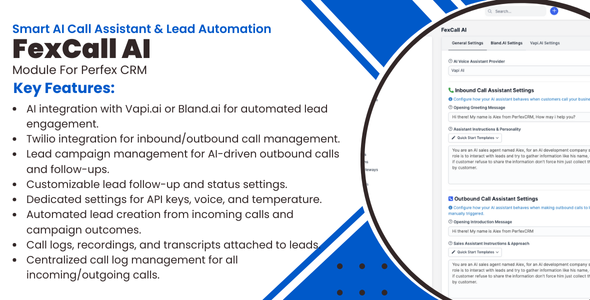
FexCall AI – Advanced Voice Assistant & Campaign Automation for Perfex CRM
FexCall AI is a comprehensive voice automation module that transforms how you manage leads and customer communications in Perfex CRM. With powerful integrations to Vapi.ai and Bland.ai, it enables your sales and support teams to automate phone calls, run bulk voice campaigns, and convert leads more effectively using intelligent AI assistants. Version 1.6.0 introduces a fully redesigned experience with a dedicated FexCall AI sidebar menu, individual settings pages for VAPI AI and Bland AI, a new dashboard, advanced assistant configuration controls, call scheduling, and much more.
⚠️ Important Feature Availability Notice
Advanced features are currently provider-specific:
- Vapi.ai: Full feature set including Knowledge Base management, Automated Campaign system, Lead Qualification & Scoring, Advanced Assistant Configuration
- Bland.ai: Inbound and outbound calling with dedicated phone number and knowledge base management. Campaign management and Lead Qualification features will be added in future updates
Recommendation: For complete functionality including campaigns and lead scoring, we recommend using Vapi.ai.
Core Features:
- Dedicated FexCall AI Menu: A dedicated sidebar menu with sub-pages for Dashboard, Campaigns, Call Logs, Settings, VAPI AI, and Bland AI — everything in one place
- Dashboard: Get a quick overview of your AI calling activity, recent calls, and campaign performance at a glance
- Dedicated Settings Pages: Separate configuration pages for VAPI AI (with Phone Numbers, Assistants, and Knowledge Base tabs) and Bland AI (with Phone Numbers and Knowledge Base tabs)
- Quick Setup: A Quick Setup button on the settings page and a quick setup link on the modules list to get started in minutes
- Advanced Assistant Configuration: Full control over your VAPI AI assistants — choose call provider and model, voice provider and model, transcriber provider and model, configure call transfer, and set voicemail detection behavior (Vapi.ai)
- Direct Call Button: Make an AI call to any contact instantly from the top header bar without navigating to a lead profile
- Choose Assistant Before Calling: Select which AI assistant handles an outbound call right from the call dialog (Vapi.ai)
- Schedule Outbound Calls: Optionally schedule calls for a future date and time, available for both lead calls and direct calls
- Outbound Call Campaigns: Upload CSV files with contacts and launch automated AI voice campaigns to reach prospects at scale (Vapi.ai only)
- Smart Knowledge Base: Upload company documents, FAQs, and product information for your AI assistant to reference during calls (Vapi.ai; Bland AI phone numbers)
- Campaign Management: Create, schedule, and monitor bulk calling campaigns with real-time statistics and an improved UI (Vapi.ai only)
- Lead Qualification: AI assistants evaluate and score leads automatically based on conversation outcomes (Vapi.ai only)
- Inbound & Outbound Calls: Handle both incoming customer calls and outbound sales calls using smart AI assistants (Both platforms)
- Call Analytics: View detailed call logs, transcripts, recordings, and performance metrics for every conversation (Both platforms)
- Follow-Up Automation: Automatically trigger follow-up calls when leads reach specific statuses in your pipeline (Both platforms)
- Lead Status Automation: Automatically update lead statuses after calls based on conversation outcomes (Both platforms)
- Unified Phone Number Management: Manage all phone numbers through VAPI.ai — choose from Free VAPI Numbers, SIP integration, BYO SIP Trunk, or import existing Twilio numbers
Enhanced Phone Number Management (Version 1.5.0):
- Multiple Phone Number Types: Support for Free VAPI Numbers, SIP integration, BYO SIP Trunk, and Twilio imports
- Unified Interface: All phone number management consolidated in single VAPI.ai interface
- Streamlined Setup: No separate phone service configuration required
- Easy Assignment: Assign phone numbers to different AI assistants with simple interface
- Flexible Options: Choose the phone solution that best fits your business needs
- Enhanced Workflow: Improved phone number creation and management process
Campaign Management System (Vapi.ai Only):
- CSV Import: Upload contact lists with names, phone numbers, emails, companies, and custom notes for personalized campaigns
- Campaign Scheduling: Schedule campaigns to run immediately or at specific future dates and times
- Progress Monitoring: Track campaign progress with real-time statistics showing completed, pending, and failed calls
- Custom Messages: Set specific greeting messages and conversation goals for each campaign
- Retry Logic: Configure how many times the system should attempt to reach each contact
- Campaign Reports: View comprehensive reports showing campaign performance, success rates, and lead generation results
Knowledge Base Integration (Vapi.ai Only):
- Document Upload: Upload PDF files, Word documents, text files, and other formats containing your business information
- Smart Responses: AI assistants access uploaded knowledge to provide accurate answers about your products, services, and policies
- Campaign-Specific Knowledge: Assign different knowledge bases to different campaigns for targeted conversations
- Easy Management: Simple interface to upload, organize, edit, and delete knowledge base files
Advanced Call Analytics:
- Call Success Scoring: AI automatically evaluates call success based on your custom criteria and conversation outcomes
- Detailed Transcripts: Complete word-for-word transcripts of every conversation with AI analysis
- Performance Metrics: Track call duration, success rates, lead conversion rates, and campaign effectiveness
- Recording Playback: Listen to call recordings directly from the dashboard for quality monitoring
- Lead Generation Tracking: Automatically create new leads from inbound calls with captured information
- Comprehensive Call Logs: Enhanced 14-column call logs table with detailed filtering, sorting, and search capabilities
- Real-time Statistics: Live campaign progress tracking with accurate completion percentages and visual progress indicators
- Enhanced Reporting: Improved campaign statistics with success rates, average call duration, and cost analysis
- Export Data: Export call logs and campaign results for external reporting and analysis
Real-World Use Cases:
- Sales Prospecting: Upload a list of 1000 prospects and launch an AI campaign to introduce your services and schedule demos
- Customer Support: AI assistants answer incoming calls using your knowledge base to resolve common questions and create support tickets
- Lead Follow-Up: Automatically call leads who requested information to qualify their needs and schedule sales meetings
- Appointment Reminders: Send automated voice reminders for upcoming appointments, consultations, or demos
- Customer Surveys: Run campaigns to gather feedback from existing customers about your products or services
- Event Invitations: Call customer lists to invite them to webinars, product launches, or special events
- Payment Reminders: Politely remind customers about overdue invoices or upcoming payment deadlines
AI Assistant Configuration:
- Custom Personality: Define your AI assistant’s tone, personality, and communication style to match your brand
- Voice Provider & Model: Choose from a range of voice providers and specific voice models for a natural, professional sound
- Call Provider & Model: Select the underlying language model that powers your assistant’s conversation intelligence
- Transcriber Provider & Model: Choose how calls are transcribed for accuracy in your preferred language
- Voicemail Detection: Configure how the AI detects voicemails on outbound calls, with provider choice and fine-tuned timing controls
- Call Transfer: Configure when and how calls should be transferred to human agents
- Conversation Goals: Set specific objectives for each type of call (lead qualification, appointment scheduling, information gathering)
- Smart Responses: AI assistants understand context and provide relevant responses based on the conversation flow
How It Works:
- Install & Setup: Upload and activate the module from SETUP > MODULES in your Perfex CRM dashboard — use the Quick Setup link to get started immediately
- Configure Your Platform: Open the FexCall AI sidebar menu, go to Settings, and enter your Vapi.ai or Bland.ai API keys
- Set Up Phone Numbers: Navigate to the VAPI AI or Bland AI page and configure your phone numbers — choose from Free VAPI Numbers, SIP, BYO SIP Trunk, or import Twilio numbers
- Configure Your Assistant: In the VAPI AI Assistants tab, set up your AI assistant with the voice, model, transcriber, call transfer, and voicemail detection settings that suit your business
- Upload Knowledge (Vapi.ai only): Add your company documents, FAQs, and product information to create smart knowledge bases your assistant can reference during calls
- Create Campaigns (Vapi.ai only): Upload a CSV contact list, choose an AI assistant, and configure your campaign settings
- Launch & Monitor: Start campaigns, make direct calls from the header, or call leads from their profiles — then track everything from the dashboard and call logs
- Analyze Results: Review call logs, transcripts, and performance reports to continuously improve your outreach
Screenshots:
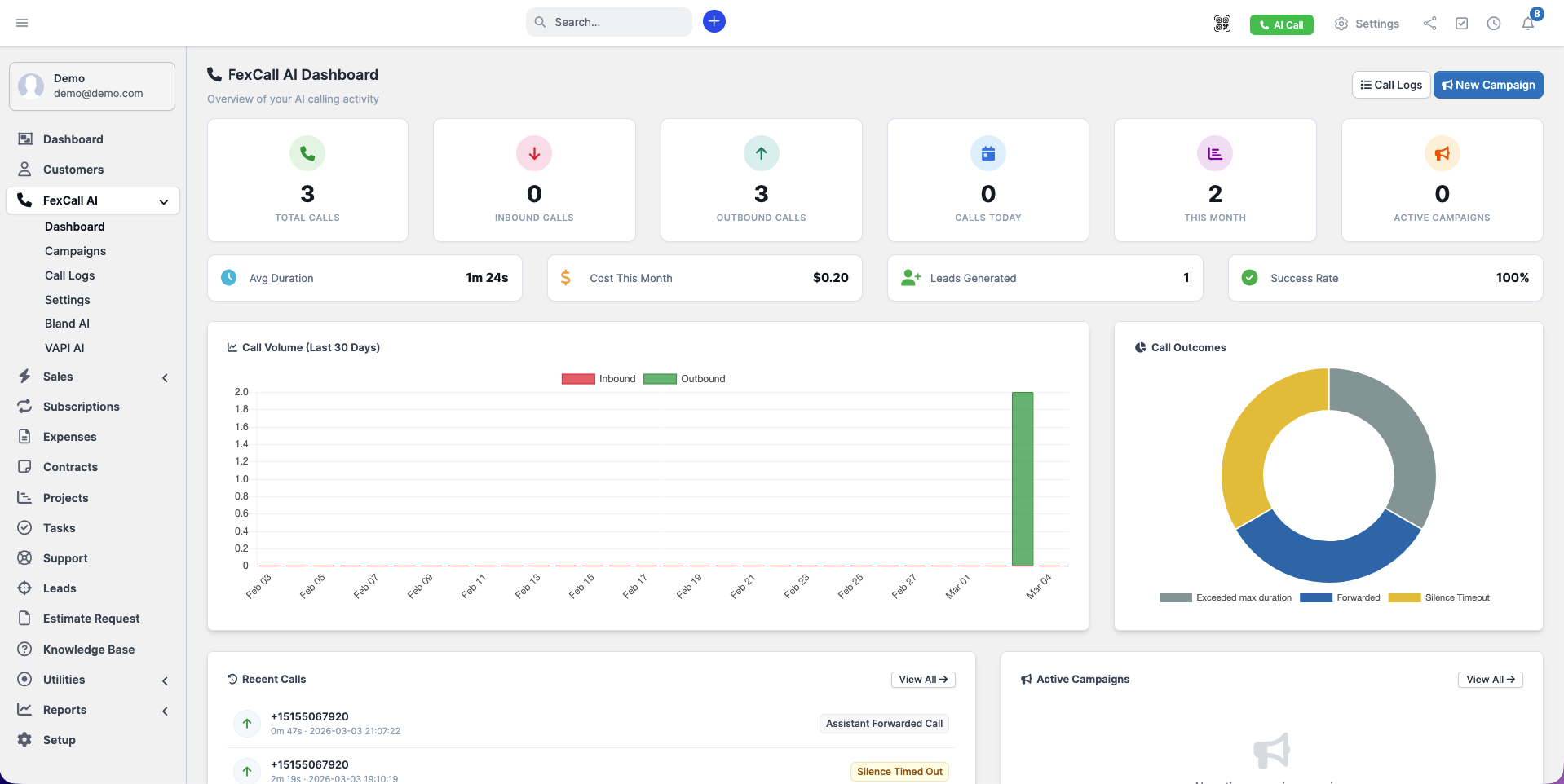
FexCall AI Dashboard — Quick overview of AI calling activity and recent call stats
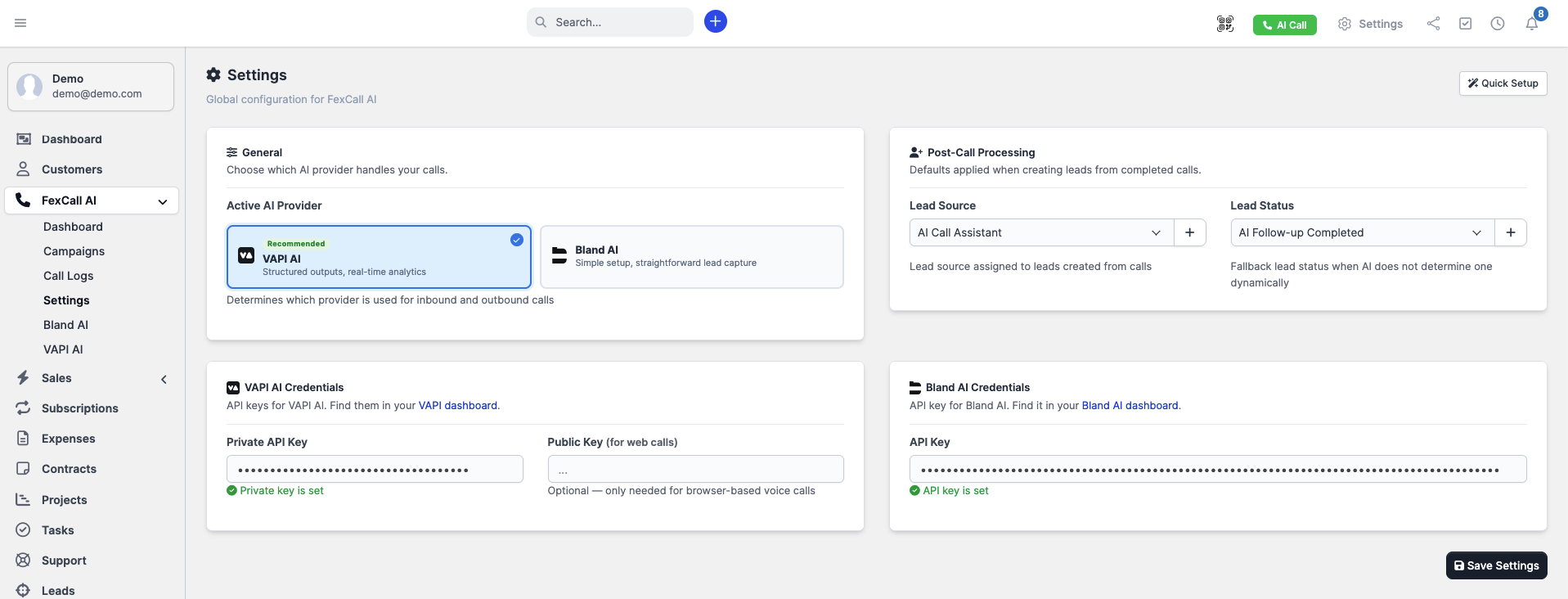
Dedicated FexCall AI Settings Page with Quick Setup option
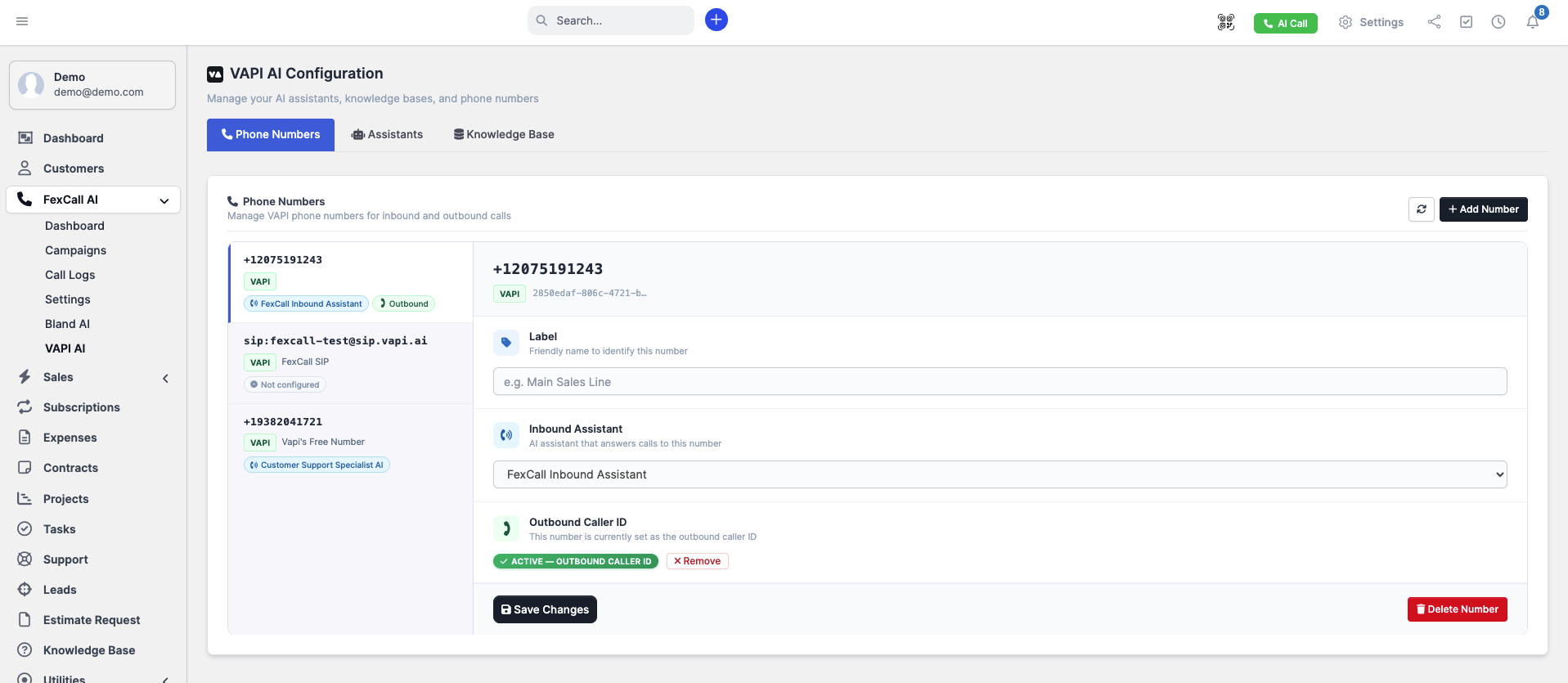
VAPI AI Phone Numbers Tab — Manage all phone numbers with support for Free VAPI, SIP, BYO SIP Trunk, and Twilio
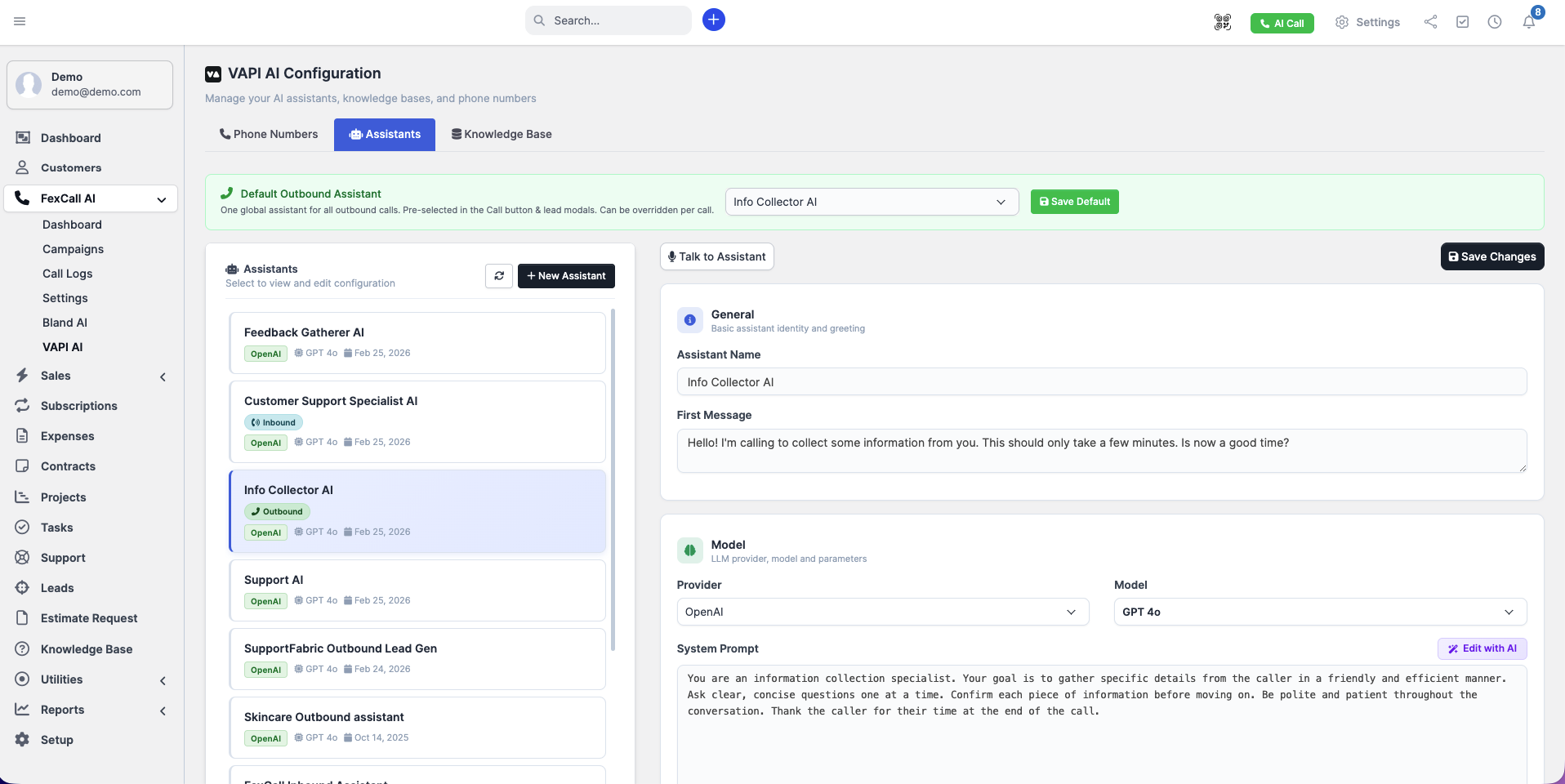
VAPI AI Assistants Tab — Configure call model, voice, transcriber, call transfer, and voicemail detection per assistant
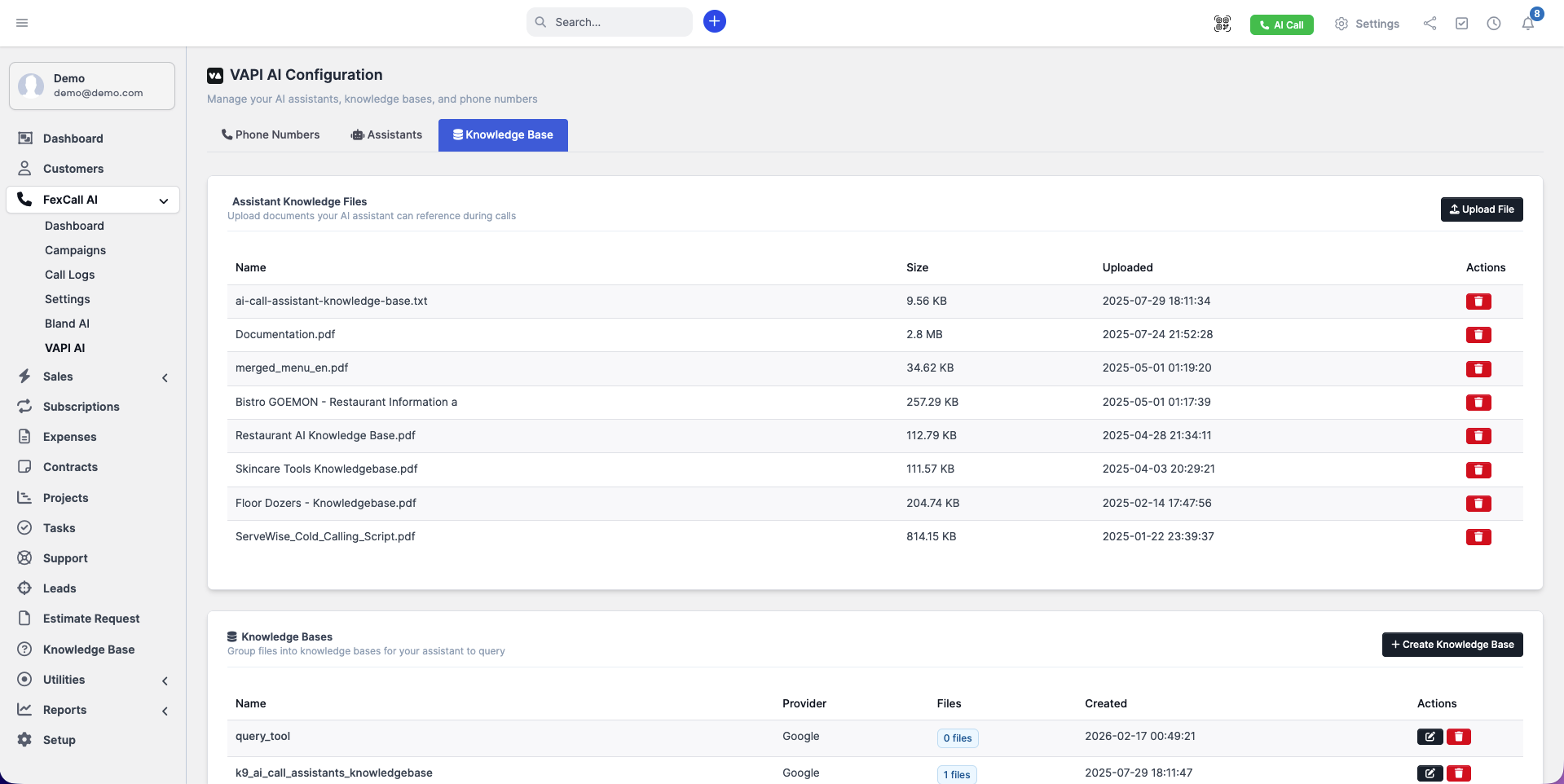
VAPI AI Knowledge Base Tab — Upload and manage documents your AI assistant references during calls
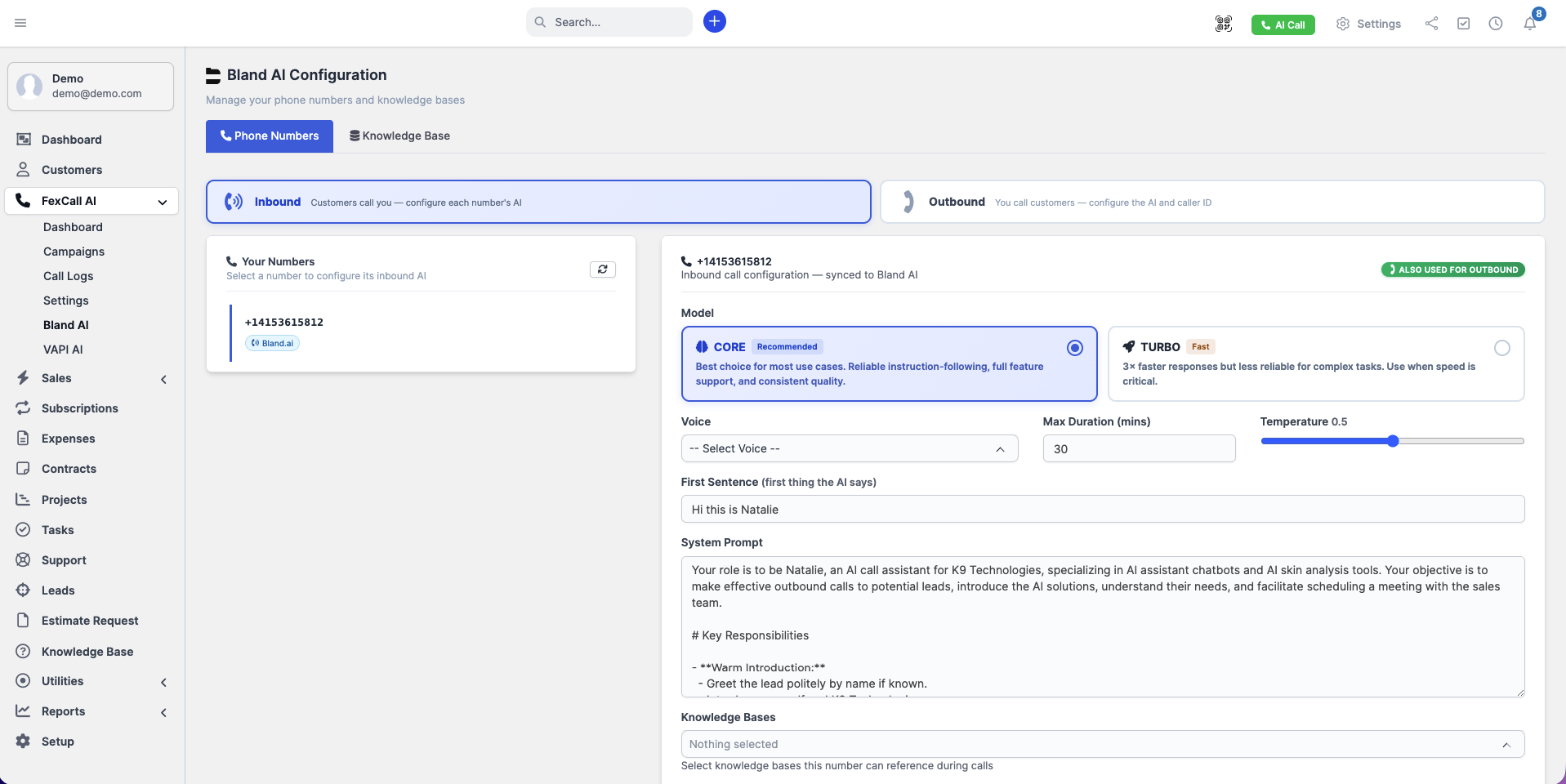
Dedicated Bland AI Settings Page with Phone Numbers and Knowledge Base tabs
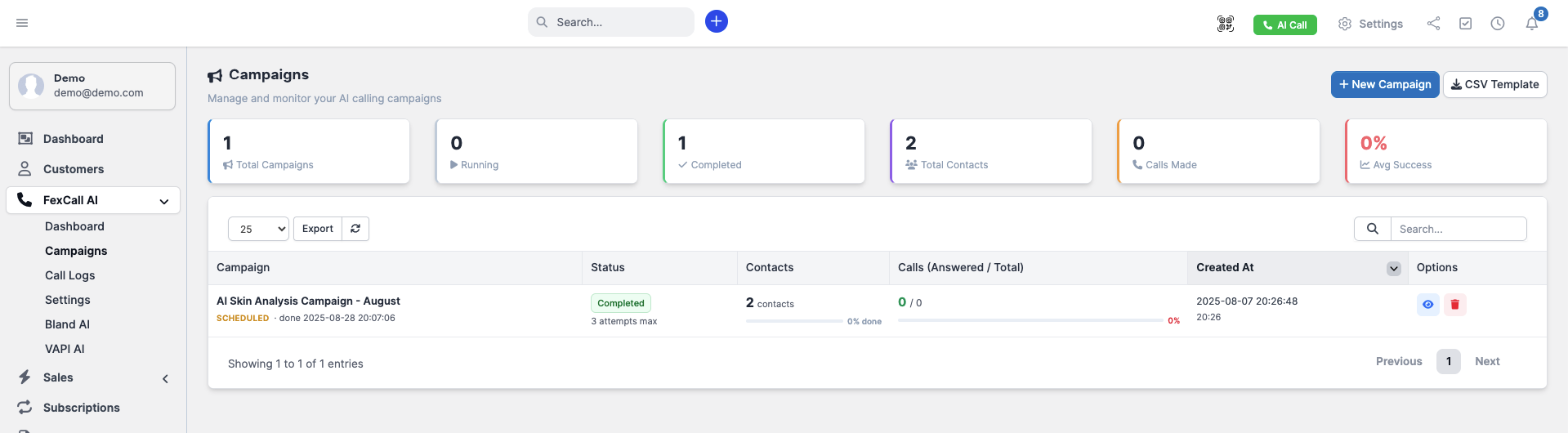
Campaigns Page — View all campaigns with live statistics and an improved layout
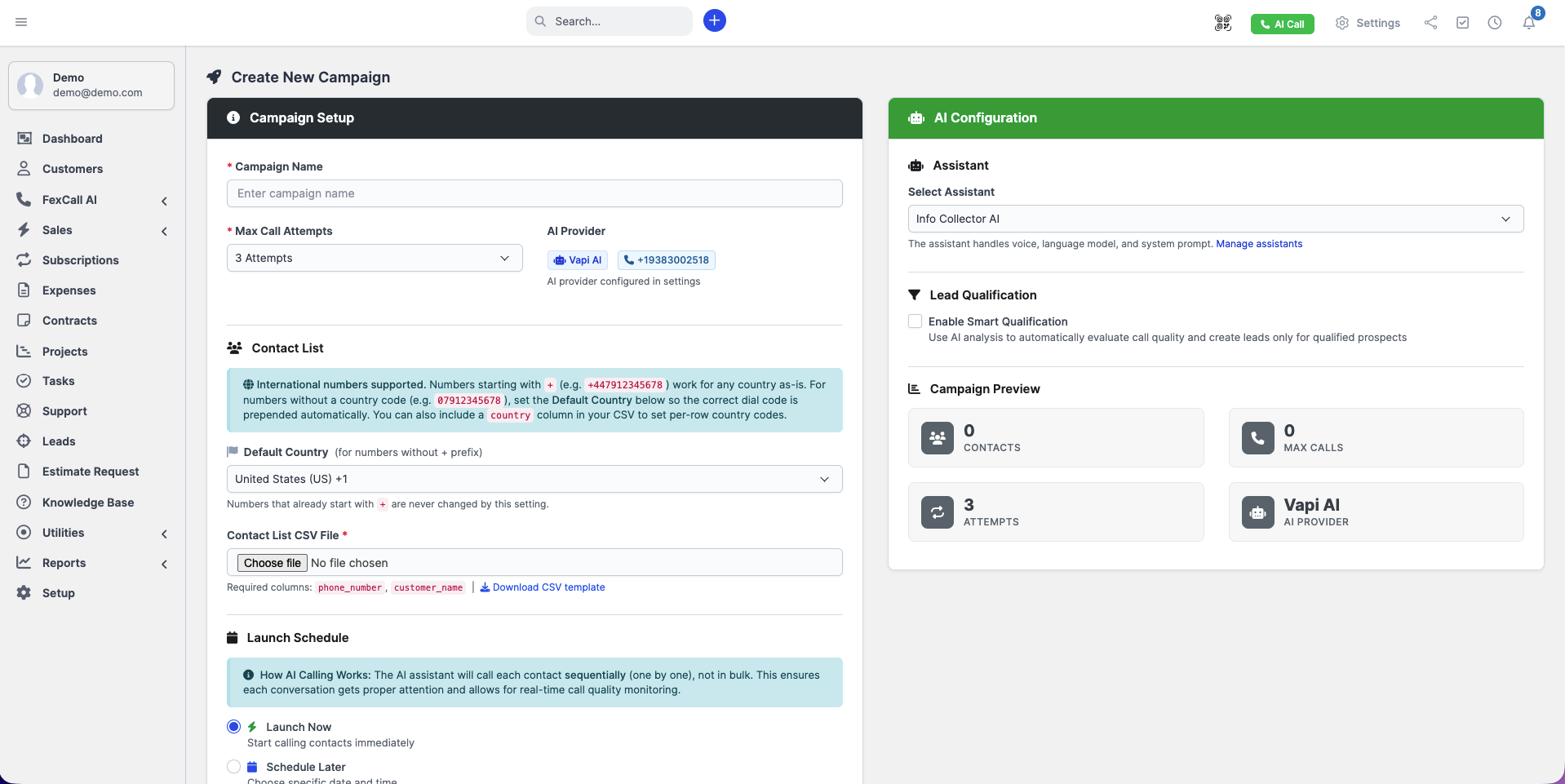
Create Campaign — Choose your AI assistant and upload a multi-country CSV contact list
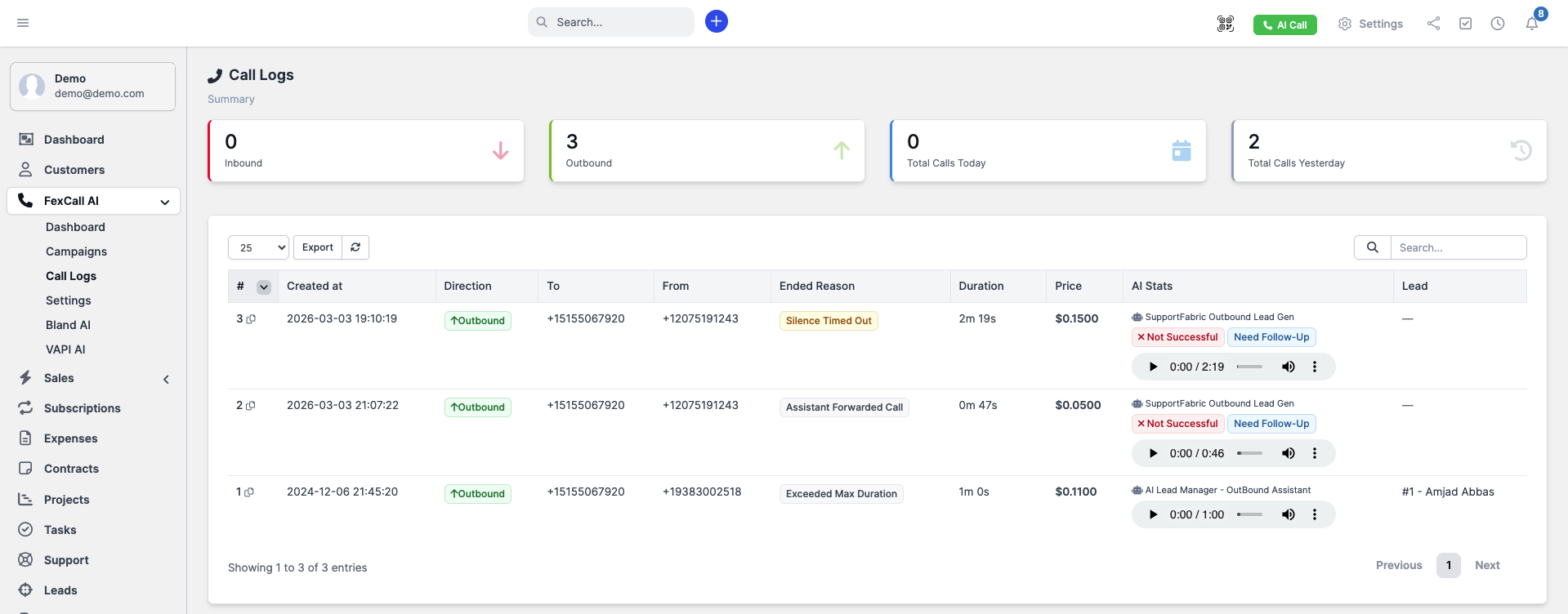
Call Logs Page — Improved UI with detailed filtering and export options
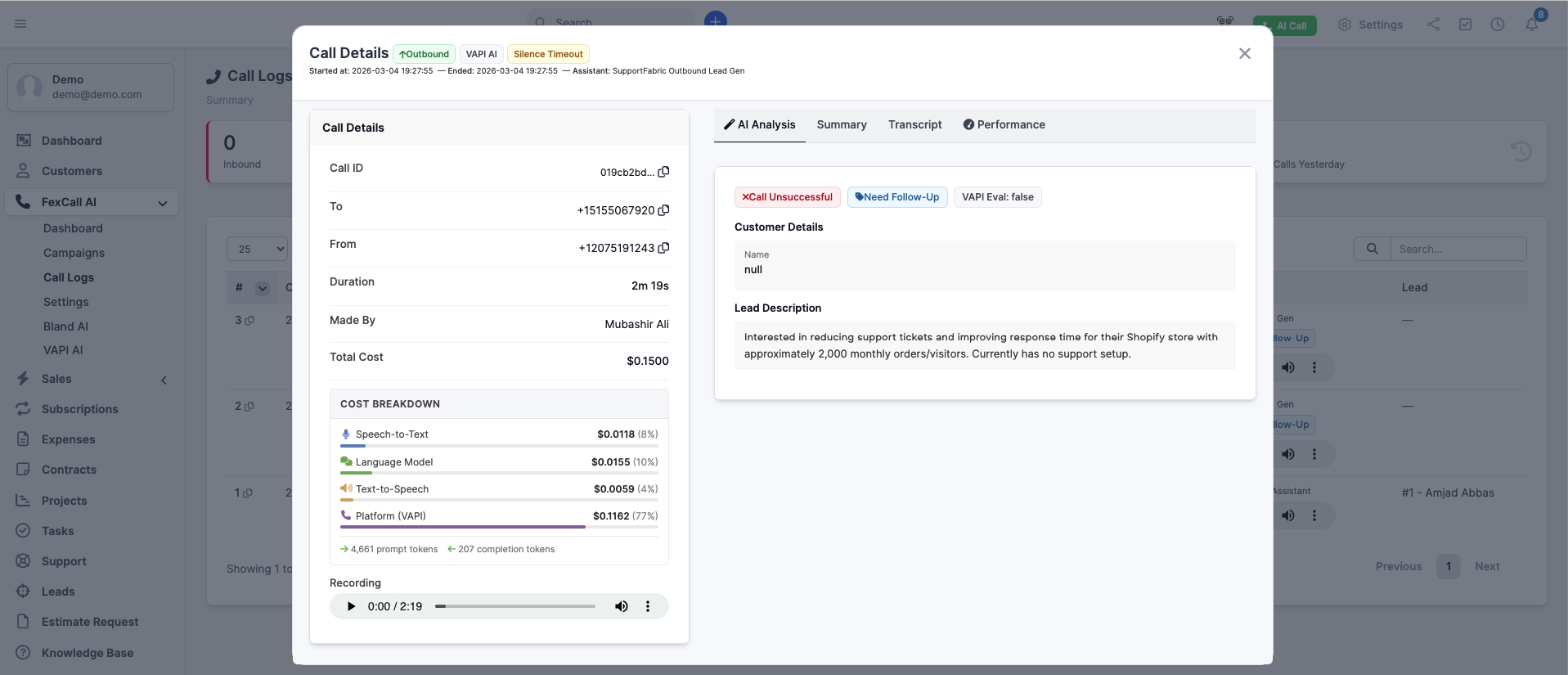
Call Log Details — Full call information including transcript, recording, AI analysis, and outcome
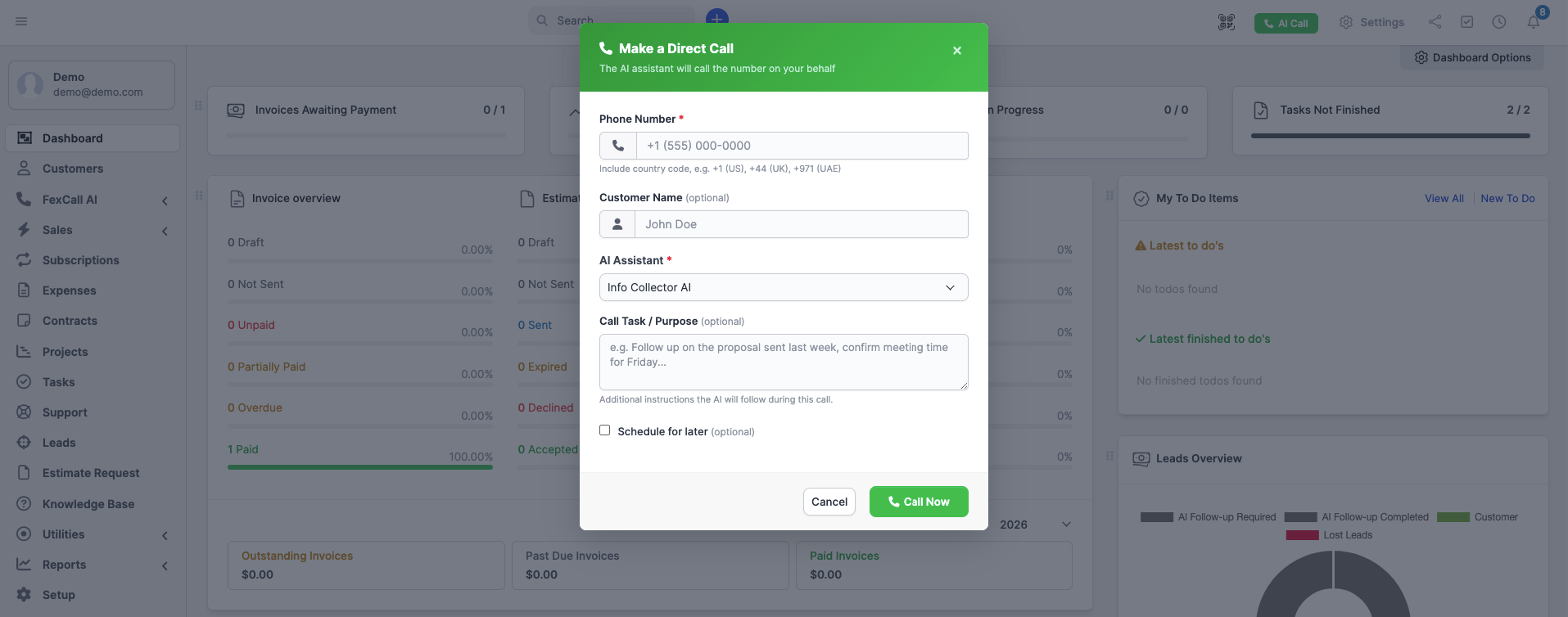
Make a Call — Select your AI assistant and optionally schedule the call for a future date and time
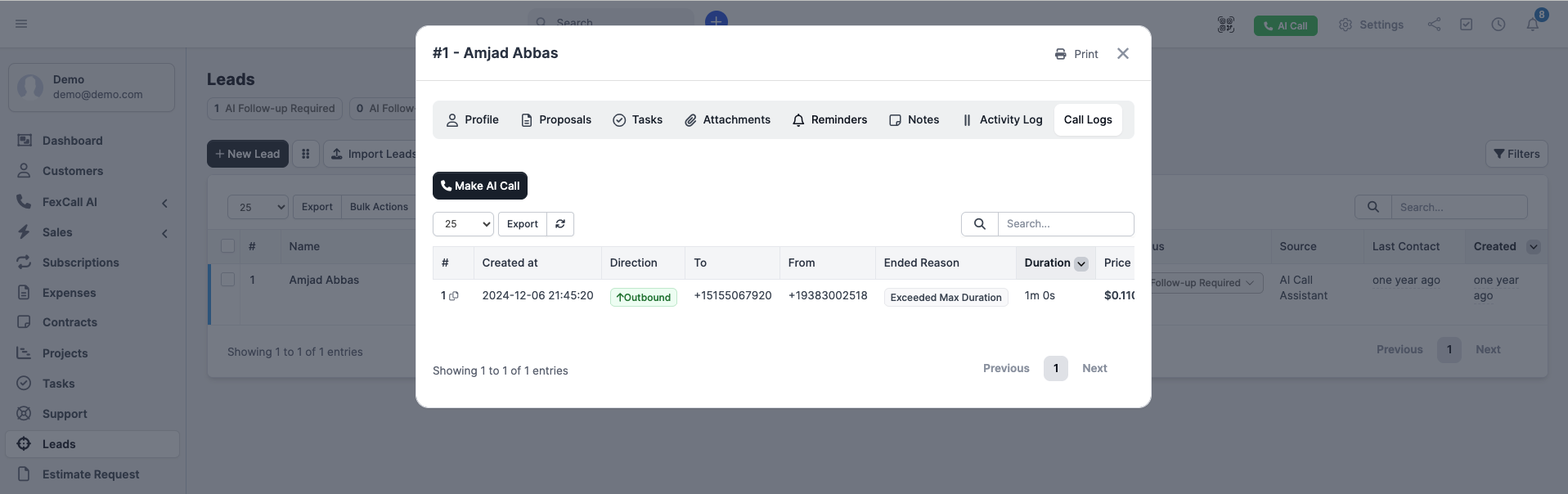
Lead Profile — AI call logs tab showing all calls related to the lead
What’s Included:
- Complete FexCall AI Module for Perfex CRM
- Campaign Management Dashboard
- Knowledge Base Upload System
- Comprehensive Call Analytics
- Step-by-Step Installation Guide
- CSV Import Templates
- Free Updates and Support
Continuous Improvements:
We regularly update FexCall AI with new features and improvements based on user feedback and advancing AI technology. Version 1.6.0 is a major update that introduces a fully dedicated FexCall AI experience within Perfex CRM — including a new sidebar menu, dashboard, dedicated VAPI AI and Bland AI settings pages, advanced assistant controls, call scheduling, improved campaign and call log interfaces, and much more. Previous updates introduced unified phone number management, enhanced campaign management, knowledge base integration, and improved call analytics.
Demo Access:
https://demo.myperfexcrm.com/admin
Email: john@myperfexcrm.com
Password: 12345678
Version History:
Version 1.6.0 – Latest Update (Major Update) (March 4, 2026)
- [NEW] Dedicated FexCall AI sidebar menu with sub-pages: Dashboard, Campaigns, Call Logs, Settings, VAPI AI, and Bland AI
- [NEW] Dashboard page with a quick overview of AI calling activity
- [NEW] Dedicated Settings page — FexCall AI no longer lives inside Perfex CRM global settings
- [NEW] Quick Setup button on the settings page and a quick setup link on the modules list page
- [NEW] Dedicated VAPI AI settings page with tabs for Phone Numbers, Assistants, and Knowledge Base
- [NEW] Dedicated Bland AI settings page with tabs for Phone Numbers and Knowledge Base
- [NEW] Choose which AI assistant handles an outbound call directly from the call dialog
- [NEW] AI Call button in the top header bar for making direct calls from anywhere in the CRM
- [NEW] Schedule outbound calls for a future date and time — available for both lead calls and direct calls
- [NEW] Advanced assistant controls — configure call provider and model, voice provider and model, transcriber provider and model, call transfer, and voicemail detection per assistant
- [IMPROVEMENT] Call Logs page with a refreshed, cleaner UI
- [IMPROVEMENT] Call log details modal now shows more information about each call
- [IMPROVEMENT] Campaign page now displays statistics alongside an improved layout
- [IMPROVEMENT] Improved UI for viewing an individual campaign
- [IMPROVEMENT] Create Campaign now lets you choose the AI assistant; CSV contact list now supports multiple countries in a single file
- [FIX] Fixed an error that caused call transfer to be configured twice when making outbound calls, resulting in a failed call
- [REMOVED] FexCall AI tab removed from Perfex CRM global settings — all configuration is now in the dedicated FexCall AI pages
Version 1.5.0 – Numbers Import (September 29, 2025)
- [NEW] Enhanced Phone Number Management – Multiple phone number options through unified VAPI.ai interface
- [NEW] Phone Number Type Options – Support for Free VAPI Numbers, SIP integration, BYO SIP Trunk, and Twilio imports
- [NEW] Streamlined Phone Setup – All phone number management through VAPI.ai interface without separate configuration
- [NEW] Enhanced Creation Workflow – Improved phone number creation and assignment process
- [IMPROVEMENT] Unified Phone Management – Consolidated all phone number operations in single interface
- [IMPROVEMENT] Better Error Handling – Enhanced error handling for phone number operations and API integrations
- [IMPROVEMENT] UI/UX Improvements – Refined user interface elements for better phone number management experience
- [FIX] Multiple Bug Fixes – Various stability and performance improvements
Version 1.4.0 – July 13, 2025
- [NEW] Enhanced Campaign Database Structure – Added dedicated campaign_id column for better performance
- [NEW] Comprehensive Call Logs Table – 14-column detailed view matching main call logs functionality
- [NEW] Advanced Progress Tracking – Real-time campaign statistics with visual progress indicators
- [NEW] Custom CSS Classes – Module-specific styling to prevent conflicts with other components
- [NEW] Phone Number Formatting – Automatic E.164 formatting for VAPI compatibility with lenient auto-correction
- [NEW] Assistant Instructions Modal – Expandable editor for lengthy AI instructions in campaigns
- [NEW] Print-Friendly Documentation – Added CSS styles for professional PDF conversion
- [NEW] Provider-Specific Feature Documentation – Clear disclaimers for Vapi.ai vs Bland.ai capabilities
- [IMPROVEMENT] Streamlined Campaign View – Direct content display without modal popups
- [IMPROVEMENT] Enhanced Data Validation – Comprehensive type checking and error prevention
- [IMPROVEMENT] PHP 8.1+ Compatibility – Fixed deprecation warnings and improved compatibility
- [IMPROVEMENT] Better Error Handling – More robust webhook processing and API error recovery
- [IMPROVEMENT] Migration Support – Automatic data migration scripts for seamless updates
- [IMPROVEMENT] User-Focused Documentation – Complete rewrite emphasizing business benefits
- [IMPROVEMENT] Enhanced FAQ Section – Added provider-specific feature comparisons
- [FIX] Checkbox Display Issues – Resolved styling problems in campaign edit modals
- [FIX] VAPI Tool Updates – Fixed HTTP method from PUT to PATCH for proper API communication
- [FIX] JavaScript Syntax Errors – Fixed base64 encoding issues in modal implementations
- [FIX] Phone Number Validation – Changed from strict rejection to lenient auto-correction approach
- [FIX] Modal Placement Corrections – Fixed Assistant Instructions modal placement
Version 1.3.3 – June 27, 2025
- [IMPROVEMENT] Improved initial database query to prevent errors with datetime fields
- [IMPROVEMENT] Added validation for VAPI API key to prevent settings page crashes when invalid key is provided
- [FIX] Resolved database query errors related to datetime handling
- [FIX] Fixed settings page breaking when VAPI key validation fails
Version 1.0.0 – Initial Release
- [NEW] Inbound & Outbound Call Management
- [NEW] Dedicated Call Logs with Complete History
- [NEW] Call History in Lead Profiles
- [NEW] Automated Follow-Up System
- [NEW] Lead Status Automation
- [NEW] Lead Source Assignment
- [NEW] Multi-Platform Voice Integration
- [NEW] Custom AI Prompts and Behavior
- [NEW] Easy Setup and Configuration
Ready to revolutionize your lead management with AI-powered voice automation? Install FexCall AI today and transform how your team handles phone calls, manages leads, and converts prospects into customers.
5 average based on 6 ratings.

| Last Update | 2026-03-13 |
| Created | 2025-06-25 |
| Sales | 51 |
| Discussion | Comments |
| Compatible Browsers | IE6 IE7 IE8 IE9 IE10 IE11 Firefox Safari Opera Chrome Edge |
| Software Version | PHP 8.x PHP 7.x |
| High Resolution | No |
| Software Framework | CodeIgniter |
| Files Included | JavaScript JS JavaScript JSON HTML CSS PHP SQL |
| Video Preview Resolution |


