Eventgoo | Native iOS App Event Management Platform With Admin Panel


iOS edition (iOS only)
This item is for iOS only. It contains the native iOS app (Swift, SwiftUI) and the Laravel website, organizer dashboard, admin panel and API it runs on. There is no Android app in this edition, and the documentation covers iOS only.
Eventgoo is a full-stack event platform: a native iOS app built with Swift and SwiftUI and a companion web platform built with the Laravel PHP framework (event website, organizer dashboard, admin panel and web checkout). It combines a calm, cover-first app with a production-ready backend: the included PHP / MySQL API (built with Laravel), Stripe with Stripe Connect for ticket payments and organizer payouts, Firebase for sign-in and push notifications, and RevenueCat for the Eventgoo Plus subscription.One platform runs three kinds of event: community events (free RSVPs, approvals, guest lists), ticketed events (paid tiers, a 10-minute seat hold, a waitlist and a rotating QR ticket that works offline) and conferences (agenda, speakers, sponsors, a call for speakers, matchmaking and Plan my day). Attendees find events by list, map or calendar and pay with Apple Pay, Google Pay or a card; organizers create events from a pasted message or a flyer, approve guests, scan tickets at the door even offline, announce to their guests and get paid through Stripe Connect. A platform fee on paid tickets, organizer plans and Eventgoo Plus for attendees pay for it.

Test card: tickets, Eventgoo Plus and organizer plans are paid through the default web payment provider you choose (Stripe, Paddle, Lemon Squeezy, Polar, Creem or Dodo Payments), and all six can be checked in test mode with card number 4242 4242 4242 4242, any future expiry date and any CVC.
Note: All supported payment services (Stripe and Stripe Connect, Midtrans, Duitku, Paddle, Lemon Squeezy, Polar, Creem and Dodo Payments) are third-party services and may charge transaction fees or other service fees depending on their pricing plans. Most require merchant account approval and verification before accepting live payments, and Stripe Connect requires you to onboard and verify each organizer you pay out. These services are not included in the purchase price, and buyers are responsible for creating their own accounts, completing any required approval processes, configuring API keys, and covering all applicable fees. In-app purchases of Eventgoo Plus on iOS go through Apple (via RevenueCat) and are subject to their store commissions; event tickets are physical-world services and are paid with Stripe, Apple Pay or Google Pay.
AI disclosure — Eventgoo AI features. The AI features use the open-source (MIT) laravel/ai package, which calls an external AI provider over the internet at runtime: Google Gemini by default, or OpenAI, Anthropic, Mistral, Groq, DeepSeek, OpenRouter or xAI if you choose one (Ollama runs on your own server instead). These are paid services: you need your own account and API key with that provider, and every AI request is billed to you by the provider. No AI credits are included. A monthly spending cap (US$20 by default, adjustable in Admin → AI) stops new AI calls once reached. Data sent to the provider is only the content of the feature in use: event text and flyer images (drafting, translation, moderation), search queries, questions about an event with that event’s public details, aggregated sales figures for the organizer’s insights, opted-in networking topics under anonymous references (no names or contact details), review text without names, and support-ticket text for reply drafts. Passwords, payment details and access tokens are never sent. End users are told in the app and on the website when an answer comes from AI, and the seeded privacy policy has an AI section. Without an AI key, nothing is sent and the AI features are simply unavailable.
RevenueCat. In-app subscriptions use RevenueCat. You must create your own RevenueCat account, accept RevenueCat’s own Terms of Service and use your own API keys; no author RevenueCat key or app identifier is included. The RevenueCat client SDK is not bundled: the app declares it as a dependency, and it is governed by RevenueCat’s MIT licence and terms, not by this item’s licence. No Facebook App ID or client token is included either, not even as a fallback; you add your own in the build settings.
Use of AI tools in making this item. AI tools were used to assist with parts of this item: writing and reviewing code, drafting the documentation, and some graphics (preview and marketing images). Everything was reviewed, edited and tested by the author.
Demo Instructions
Live demo — website, organizer dashboard and admin panel
https://eventgoo.laravelbeginner.net/en (website)
https://eventgoo.laravelbeginner.net/en/organizer/dashboard (organizer dashboard)
https://eventgoo.laravelbeginner.net/en/admin (admin panel)
Note: the live demo is a sandboxed, isolated installation with fictional demo data only — no real users, no real data and no real payments. Demo mode blocks changes to settings, API keys, payment credentials and users. The demo logins below are public on purpose.
Admin panel login
- URL: https://eventgoo.laravelbeginner.net/login
- Email:
admin@eventgoo.test - Password:
password123456
Example organizer logins (website and app) — password password for each:
- Owner (runs two organizers):
organizer@eventgoo.test - Team admin:
team-admin@eventgoo.test - Editor:
editor@eventgoo.test - Check-in staff (door scanner):
ana@eventgoo.test
Example attendee logins (website and app) — password password for each:
- Attendee:
luca.ferreira@example.com - Eventgoo Plus member:
sofia.schulz@example.com
Third-party services: important notice
This item connects to services run by independent companies. Each one operates under its own terms of service, its own account approval process and its own fee structure, and using them may involve costs entirely outside this item’s purchase price. You create every account yourself and pay every fee yourself. No author accounts, API keys, merchant ids, Firebase projects or measurement ids are included.
- Firebase (Google), required for the app: Authentication, Cloud Messaging (push), Remote Config, Crashlytics and Analytics. Requires your own Firebase project. Usage beyond the free Spark plan is billed by Google (Blaze plan) and is the buyer’s responsibility. The server uses
kreait/laravel-firebase(MIT) with your own service-account key. - Stripe and Stripe Connect: separate service with its own terms. Requires your own Stripe account, Stripe’s business verification before live payments, and Connect onboarding of every organizer you pay out. Stripe charges its own transaction, Connect and payout fees. You supply your own Stripe API keys and accept Stripe’s terms yourself, directly with Stripe (Stripe Services Agreement and the Connect terms).
- Paddle, Lemon Squeezy, Polar.sh, Creem.io, Dodo Payments, optional: separate merchants of record for plans on the website, each with its own terms, seller review and fees.
- Midtrans, Duitku, optional: regional payment gateways, each requiring your own approved merchant account and charging its own fees.
- RevenueCat, Apple App Store: required to sell Eventgoo Plus in the app; your own accounts, store registration fees, store commissions and RevenueCat’s own pricing above its free tier. You supply your own RevenueCat account and API keys; no author RevenueCat key or app id is included. The RevenueCat iOS SDK (
purchases-ios5.96.1) is MIT-licensed open source (LICENSE), so no separate commercial SDK licence is needed; it is not bundled (Swift Package Manager downloads it when you open the project). - AI providers, optional: the AI features are called through the open-source
laravel/aipackage (MIT, Packagist) and can use:- Google Gemini (default)
- OpenAI
- Anthropic
- Mistral
- Groq
- DeepSeek
- OpenRouter
- xAI
- Ollama (self-hosted, no account needed)
- Google Analytics 4, optional: the measurement id is not hardcoded. It is a buyer setting (
GOOGLE_ANALYTICS_ID) that ships blank; when blank, analytics never loads. - Facebook / Meta, optional: Facebook sign-in and Meta App Events with your own Facebook app; no app id ships (not even as a fallback), and without one the SDK never starts.
Backend (included)
The mobile app runs on the backend included in the package:
- Admin panel / Web API (built with Laravel) — the included
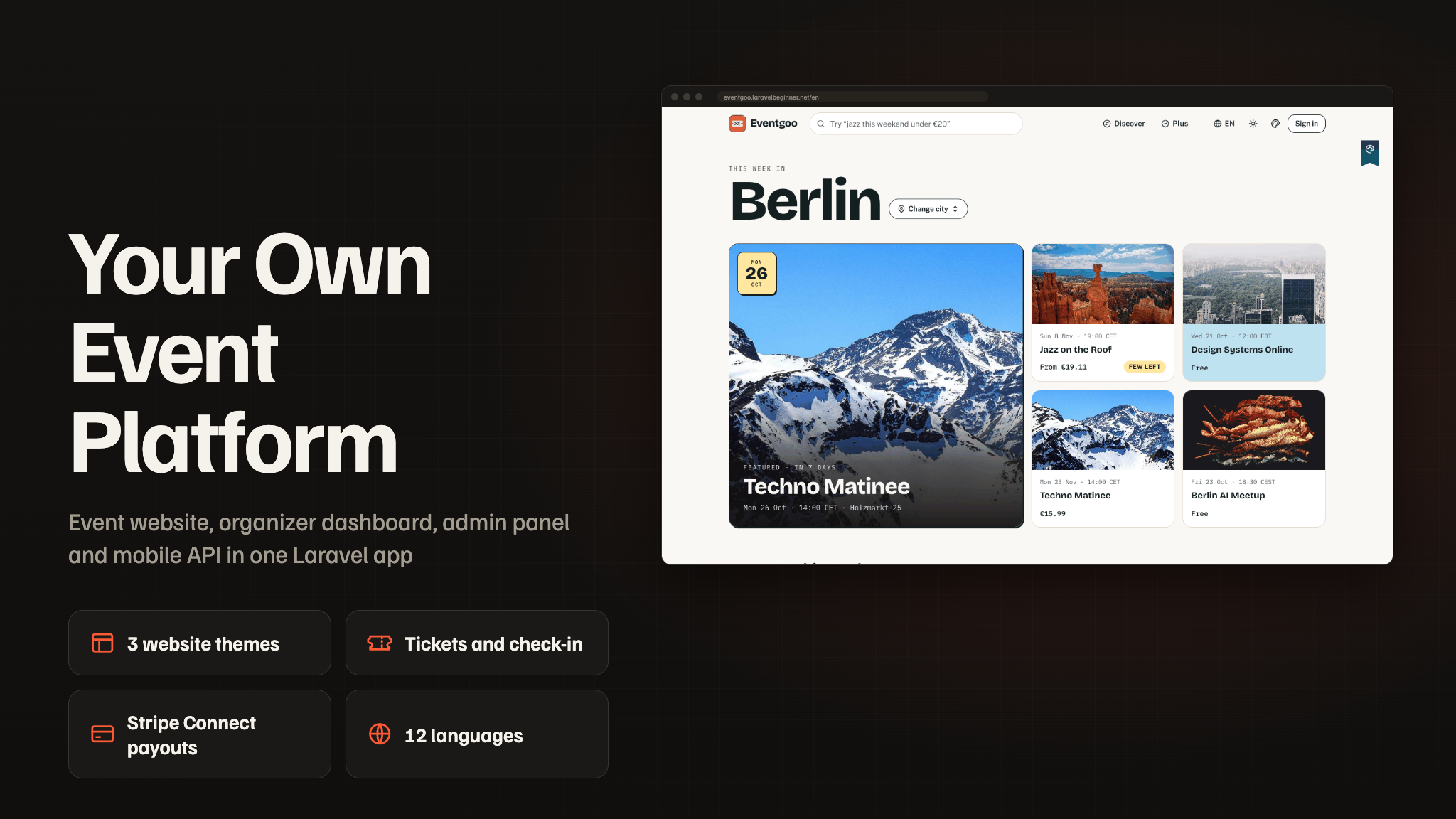
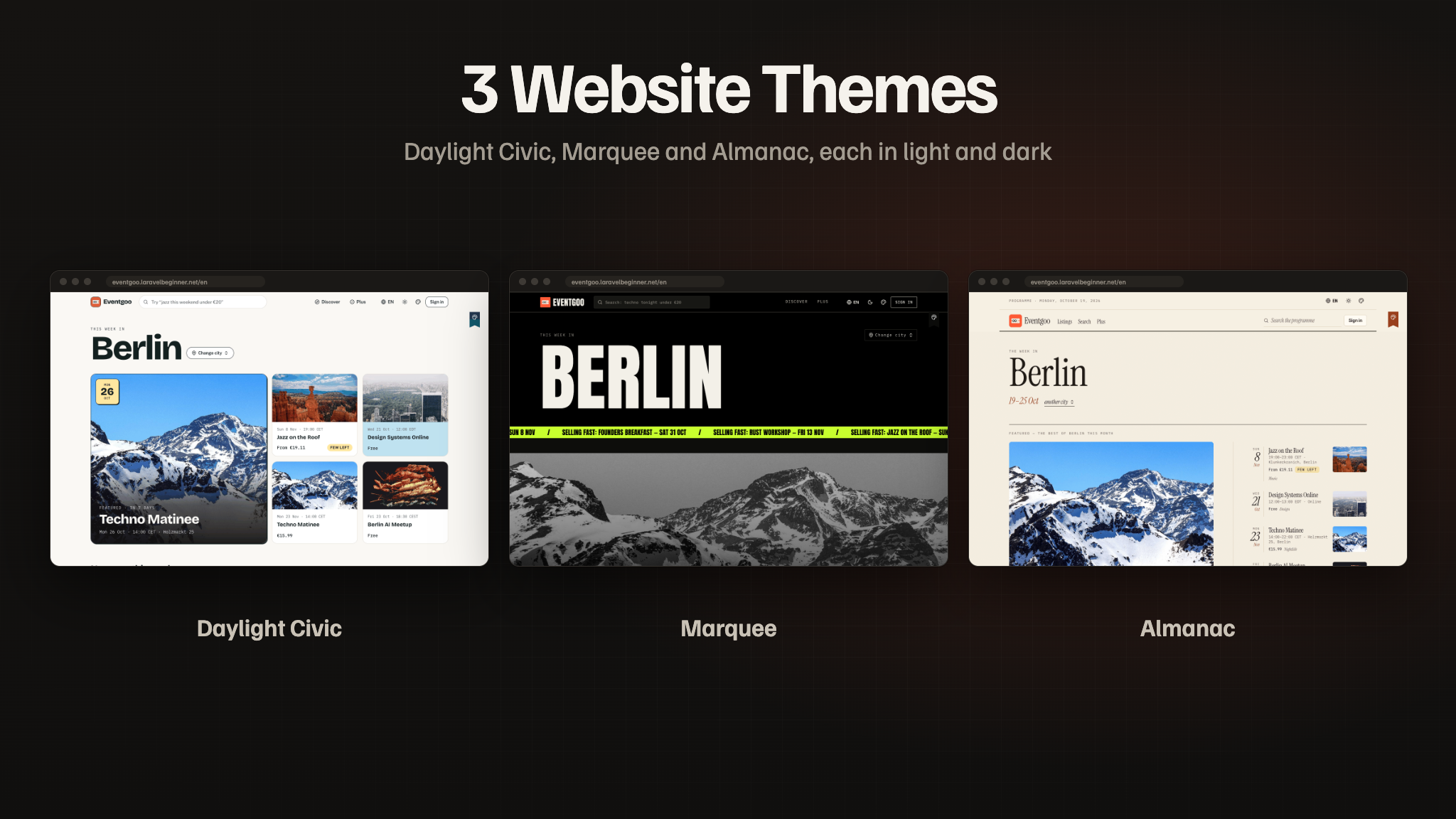
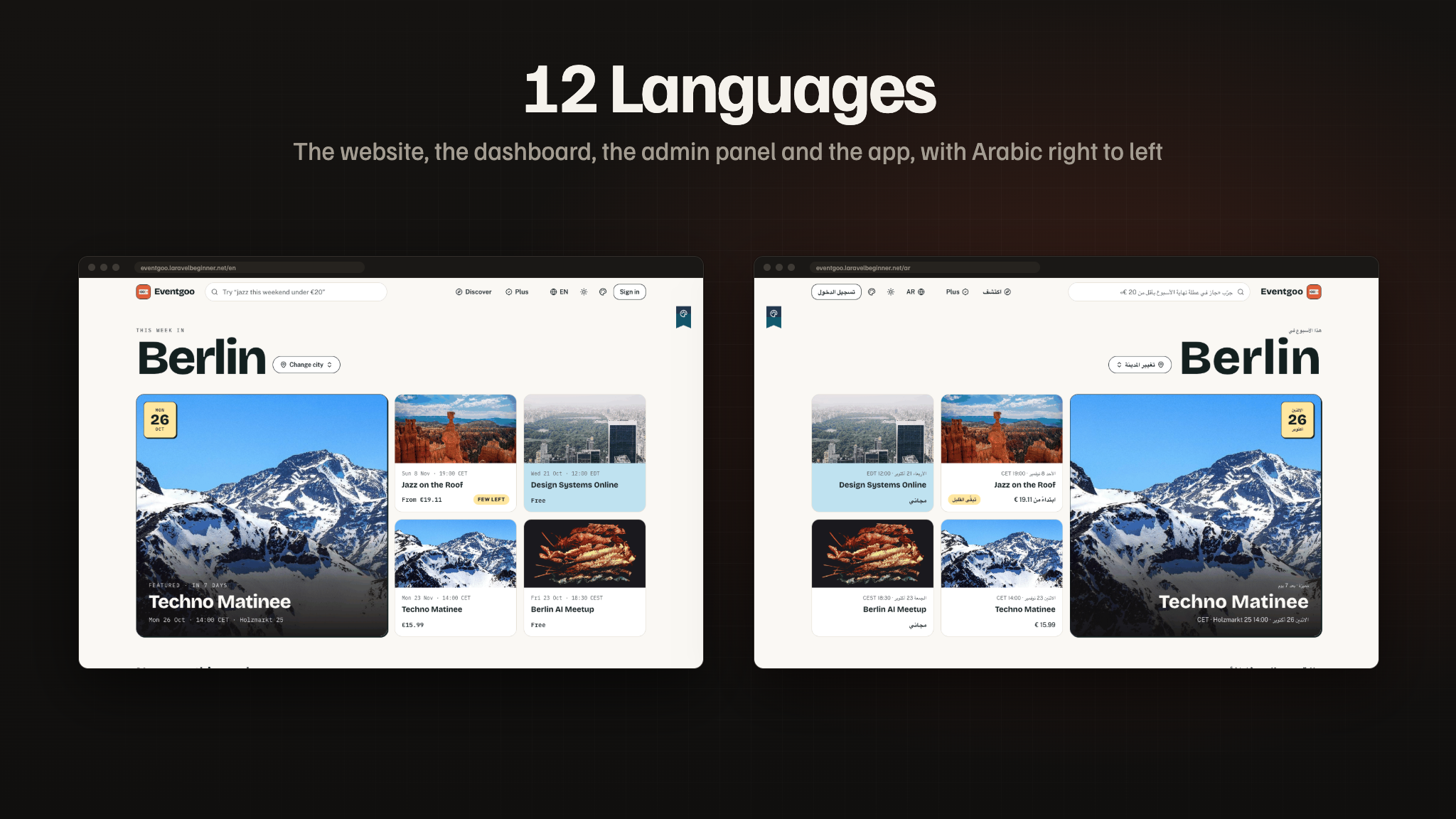
event-management-admin-panelplatform: a PHP web app built with the Laravel framework, with an admin dashboard and review queues, an organizer dashboard, database migrations + seeders, and the mobile REST API the app talks to. It also ships an event website in 12 languages (including Arabic, right to left) with three complete website themes, each in light and dark, ticket checkout through Stripe and two regional gateways, web checkout for Plus and organizer plans through six providers, a media library with CDN support, editable email templates, Apple and Google Wallet passes and Google and Facebook sign-in. Ideal if you already run on classic PHP/MySQL hosting or prefer the Laravel ecosystem.
Deploy the web project once and the app talks to that same origin. The queue runs on a VPS worker, or on Upstash QStash on shared hosting where no process can stay running; the scheduler needs one cron entry.
Note: all of our items are built on the same base project (built with Laravel) and use the same setup system, so this installation video applies to every one of them, including this one.
Key Value Propositions
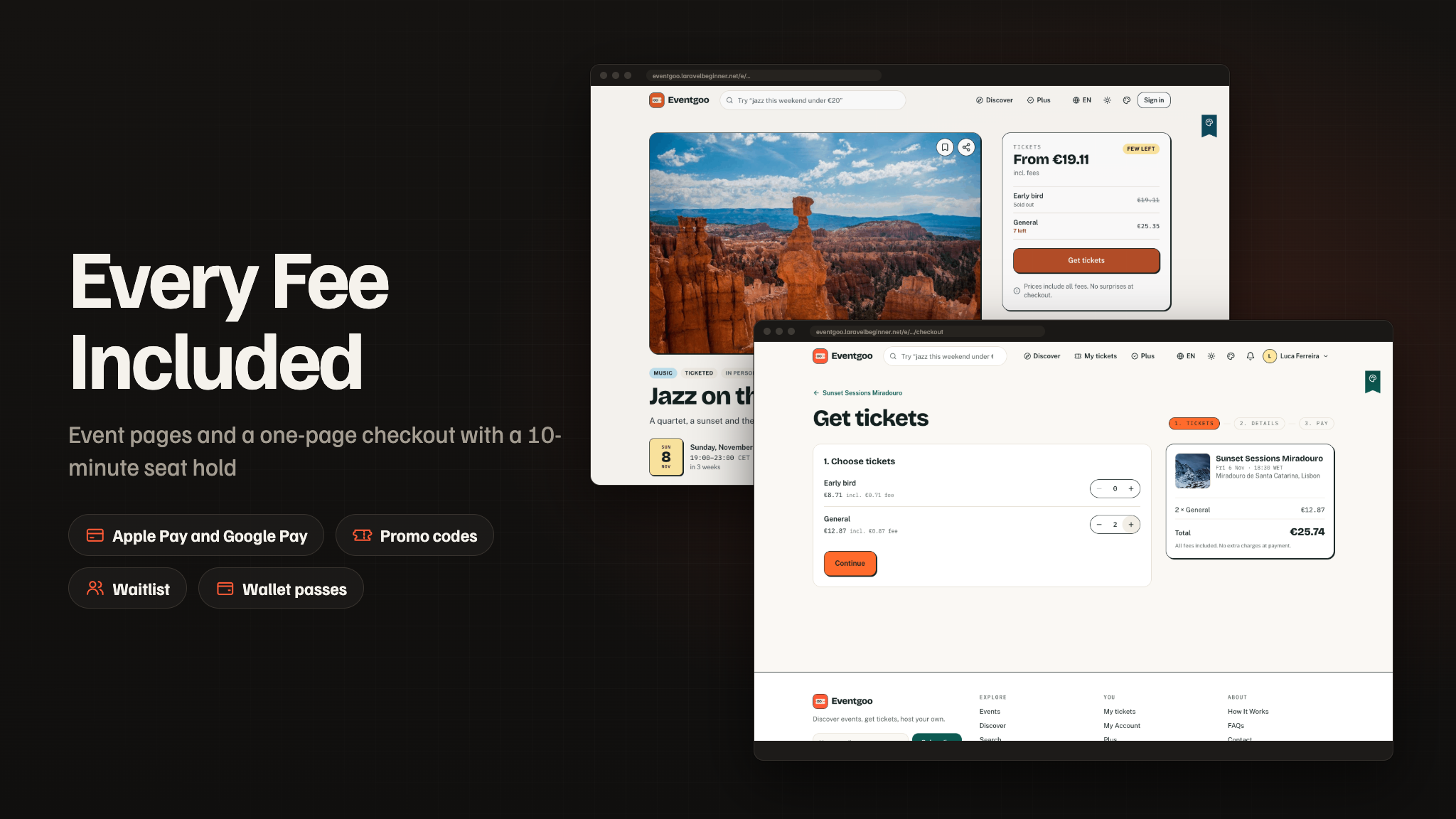
- For Attendees: what is on near them by list, map or calendar, search in plain words, the real price with every fee included, one-page checkout with Apple Pay or Google Pay, and a ticket that works offline and in Apple Wallet or Google Wallet.
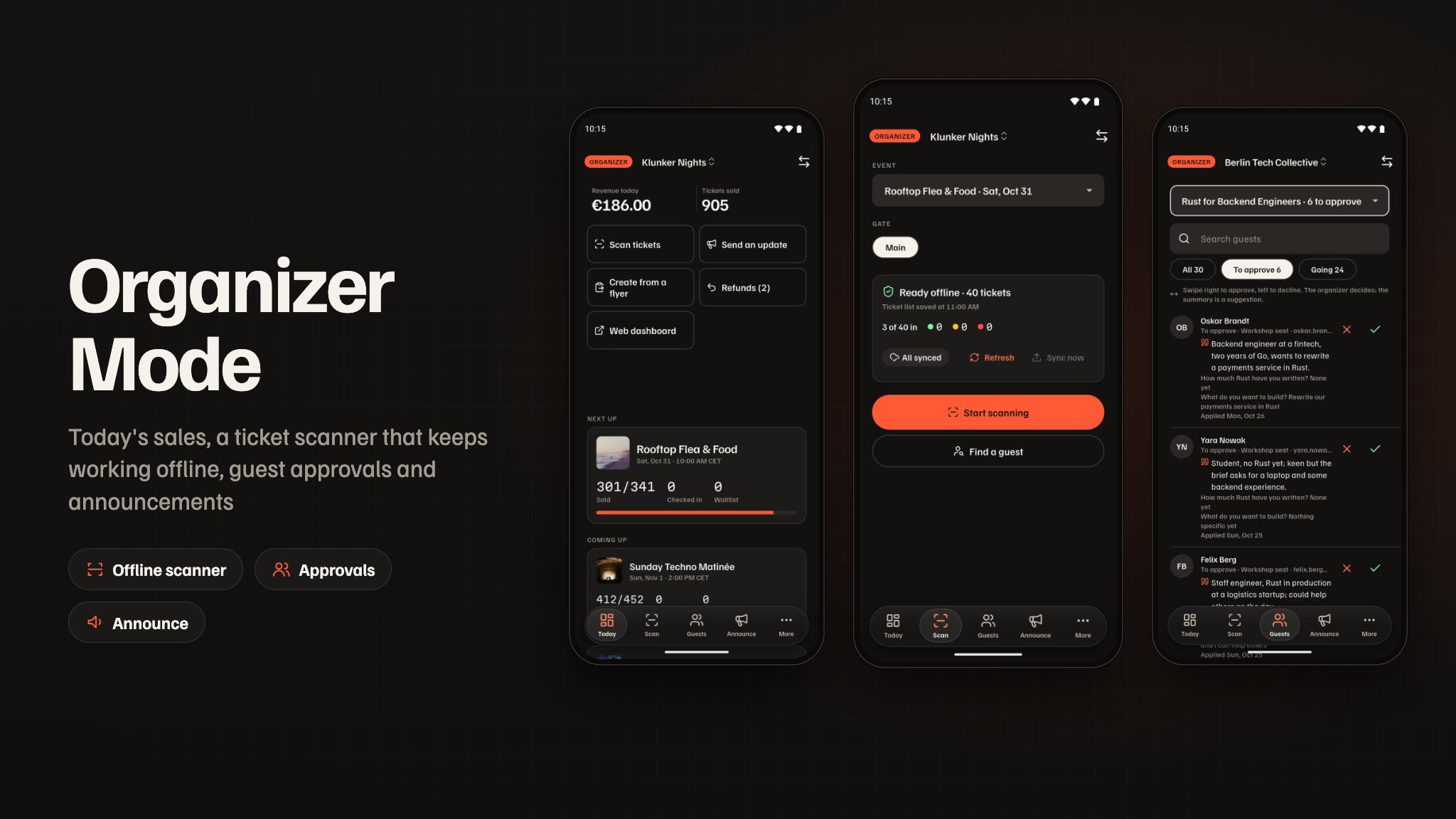
- For Organizers: a dashboard and an organizer mode in the app — create an event from a flyer, sell tiers, approve guests with AI summaries, scan tickets at the door even offline, announce to guests, see sales insights and get paid out through Stripe Connect.
- For Operators: a complete, monetizable event marketplace — a platform fee per paid ticket, organizer plans, Eventgoo Plus, a review queue with AI risk scores, fraud flags, live doors, refunds, payouts, push campaigns and AI caps — managed from one admin panel.
- For Developers: Laravel 13 + MySQL, a documented API and a public events API, one set of domain services for the site, the app and the panel, a headless theme layer for the website, and a native SwiftUI app (iOS 17+, Swift Package Manager).
Content Disclosure
Eventgoo ships as a complete event platform with demo content so you can run it end-to-end out of the box:
- The demo organizers, events, venues (names and street addresses) and people (Berlin, Lisbon and New York; nine organizers and about eighty events) are fictional and meant for local and staging installs only; they are never seeded in production. The demo event covers are free stock photos from picsum.photos, downloaded once into your media library.
- The categories, cities, plans, email templates, blog posts and the legal pages are original and editable in the admin panel; the interface is translated into all twelve languages.
- The legal pages (privacy policy, terms, refund policy) are starting templates, not legal advice; have them reviewed for the countries you operate in.
Running a ticketing marketplace makes you responsible for the events you allow, the organizers you pay out, refunds, and the consumer-protection, tax, privacy and data-protection rules of the countries and app stores you publish in. Eventgoo provides the app, the web platform, the backend and the moderation tools; the marketplace and its moderation are yours. You are also responsible for following each AI provider’s terms of use; AI provider accounts and their usage are up to you.
AI Usage Disclosure
Graphics. The feature banners in this description and the item preview images were composed from real screenshots of the product. The screenshots in the item gallery and the documentation are captures of the running app and website.
AI as a feature. Some features rely on a third-party generative AI service at runtime. The provider is not hard-coded — Gemini (default), OpenAI, Anthropic, Mistral, Groq, DeepSeek, OpenRouter, xAI and Ollama are supported, and you choose which one answers each feature. Every AI feature can be switched off:
- Paste-to-event: an event draft from a pasted message, a flyer photo or a link, with the uncertain fields marked for the organizer to check.
- Copy and translation: descriptions and announcements in a chosen tone, and translations into twelve languages.
- AI search and Ask about this event: a sentence turned into search filters; answers drawn only from the event’s own page.
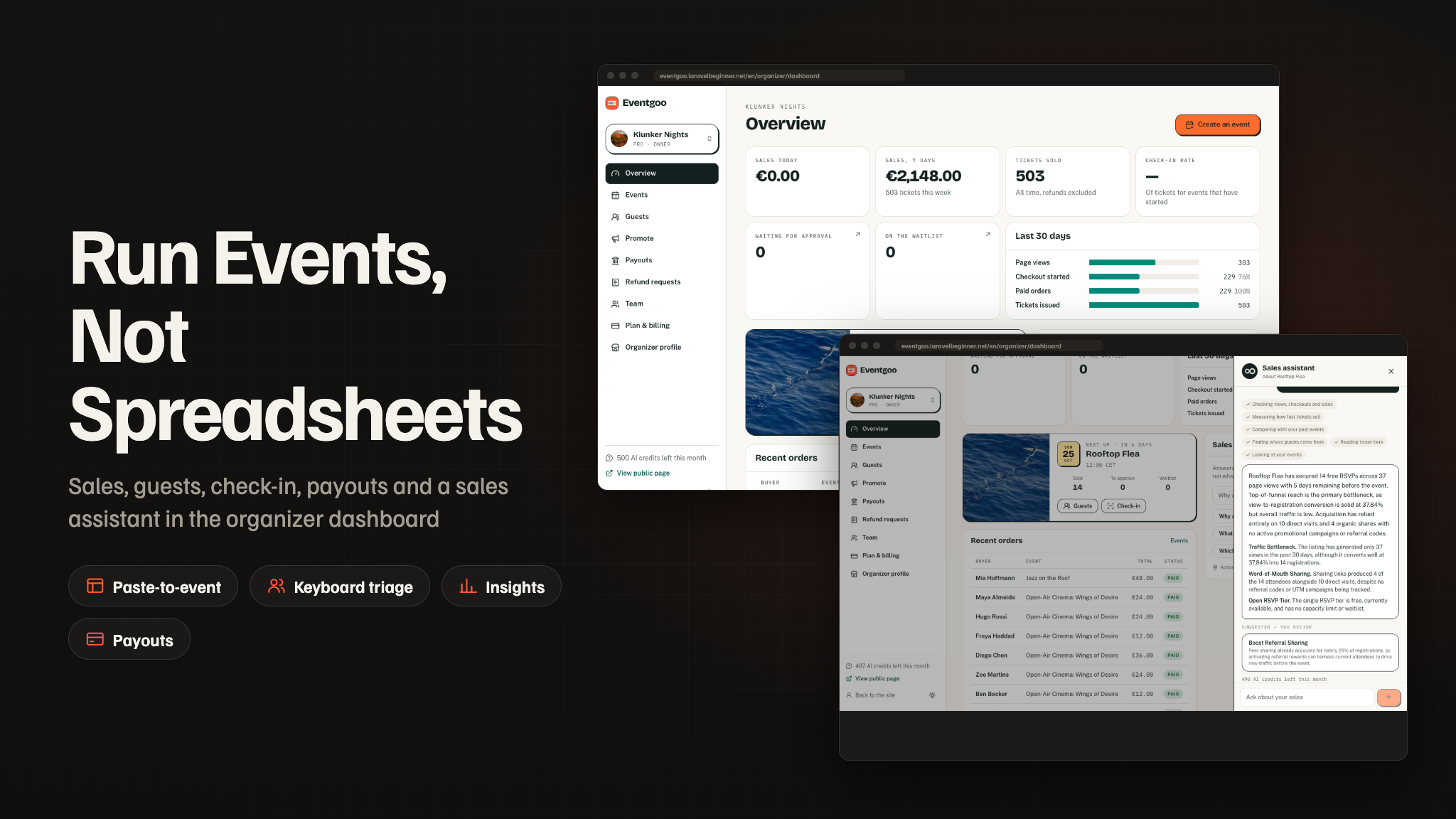
- Sales assistant and approval triage: findings and suggested actions from the organizer’s own numbers, which the organizer confirms; one-line summaries of applicants, never a decision.
- Moderation at publish: a risk score for scam wording, payment details and copied covers, sending risky events to a human review queue.
- Recommendations, matchmaking and Plan my day: “For you” with a reason, five opted-in guests to meet at a conference, and a conflict-free agenda proposal.
- Agenda builder, recaps, pricing hints and support drafts: drafts and suggestions for organizers and staff, never sent or applied without a person.
Everything the AI writes or judges is machine output and may be wrong: moderation and triage are a first opinion for a person, and drafts are edited before they are used. To use the AI features you must create your own account with the provider you choose and supply your own API key. Keys are read only on the server and never reach the app or the browser. Organizer features spend monthly AI credits from the organizer’s plan, attendee features have a daily allowance, and the operator sets monthly caps.
laravel/ai. The AI features run on laravel/ai, Laravel’s official open-source (MIT) package installed with Composer. It needs no Laravel Cloud, Forge or other Laravel subscription: requests go directly from your server to the provider you choose, and nothing passes through the author.
Required Third-Party Services and Costs (please read before buying)
Eventgoo depends on external services that are not included in the purchase. You create every account yourself, under your own name, and all fees, usage charges and approval processes are your responsibility. The package ships no author-owned accounts, API keys, merchant ids, analytics ids or other credentials: every key in .env.example is blank, the mobile app ships only example Firebase files, and no revenue or data is routed to the author.
- Firebase (required): a separate Firebase project is required for the app to function. You create your own project and add its
google-services.jsonandGoogleService-Info.plist. The app uses it for sign-in, push (FCM), Remote Config, Crashlytics and Analytics, and the server uses it (via the kreait/laravel-firebase SDK) to verify sign-ins and send push. The free Spark plan covers testing; production use can require the pay-as-you-go Blaze plan. - Stripe (required for paid tickets): your own Stripe account with Connect enabled, approved by Stripe, plus Stripe’s processing and Connect fees. Each organizer completes Stripe’s own onboarding.
- RevenueCat and Apple Developer Program (required to sell Plus in the app and to publish the app): your own accounts. Apple charges its membership fee and store commissions; RevenueCat may charge above its free tier.
- Web payment providers (optional): Paddle, Lemon Squeezy, Polar.sh, Creem.io, Dodo Payments, Midtrans and Duitku, each with its own approval rules, transaction fees and payout terms.
- AI providers (optional): the AI features need your own API key with Gemini, OpenAI, Anthropic, Mistral, Groq, DeepSeek, OpenRouter or xAI, billed per use by that provider, or a self-hosted Ollama.
laravel/aiis Laravel’s free open-source (MIT) package and needs no Laravel Cloud or other Laravel subscription. Without a key, the AI features stay off and the rest of the product works normally. - Apple Wallet and Google Wallet (optional): an Apple Pass Type ID certificate from your Apple Developer account and a Google Wallet issuer account.
- Google Analytics 4 (optional): reports to your own GA4 property. No measurement id is included; leave
GOOGLE_ANALYTICS_IDblank and no analytics loads. - Facebook / Meta (optional): your own Facebook app for sign-in and App Events. If you enable App Events, App Tracking Transparency compliance and App Store review are your responsibility.
- Other optional services: Mailchimp (newsletter sync, off by default, double opt-in), Pusher (live updates), Upstash QStash (queue on shared hosting), Cloudflare Turnstile or Google reCAPTCHA, Google and Facebook sign-in on the website, storage / CDN providers (Amazon S3 and S3-compatible storage), and your own map tile server for heavy traffic (OpenStreetMap’s public tiles have a usage policy). Each has its own terms and pricing.
- Hosting: PHP/MySQL hosting, a queue worker, email delivery (SMTP), bandwidth and storage costs are yours.
Privacy & Data
No telemetry. The package sends no data to the author and has no license phone-home. Every third-party identifier — Google Analytics, Firebase, Facebook / Meta, RevenueCat, Stripe and the AI keys — is blank and supplied by you, so the data each service collects goes to your own accounts. No advertising SDKs or ad-network IDs are included, and no ready-built APK or IPA is distributed.
App Tracking Transparency. The tracking prompt is used only for Meta App Events, appears only when you add your Facebook keys, and can be removed if you do not use them. You are solely responsible for your own ATT compliance, privacy labels, privacy policy and App Store review outcomes.
Disclaimer
This product is built to work with the included web API / admin panel (built with Laravel, MySQL) — plus third-party services: Firebase (Auth, Cloud Messaging push, Remote Config, Analytics, Crashlytics), Stripe (ticket payments, Apple Pay and Google Pay, and Stripe Connect for organizer payouts), RevenueCat (Eventgoo Plus in the app stores), an AI provider such as Google Gemini (your own API key), a queue service for shared hosting (Upstash QStash), optional Apple Wallet and Google Wallet passes, optional regional gateways (Midtrans, Duitku), and optionally a web payment provider for Plus and organizer plans (Stripe, Lemon Squeezy, Polar, Paddle, Creem or Dodo Payments). Hosting, payment processing fees, AI usage, queue usage, storage/CDN and wallet certificates are not included in the purchase — you will need to create your own accounts, configure API keys, and manage usage yourself. Every AI request is billed by the AI provider that answers it, to your account. Map tiles and venue geocoding use OpenStreetMap; a busy service should switch to its own tile provider and geocoder under OpenStreetMap’s usage policies. Mailchimp integration requires your own Mailchimp account and API key. A separate Firebase project is required for the app to function; the package contains no Firebase configuration files (google-services.json, GoogleService-Info.plist) and no service-account key, so you must create and configure your own Firebase project and provide your own credentials. Additional charges may apply depending on usage and the Firebase services you use. Basic familiarity with Swift, Xcode, Firebase, Stripe, PHP/MySQL hosting and App Store Connect setup is recommended before launching.
Laravel, Apple, iOS, Swift, Stripe and all other product names, logos and trademarks mentioned here belong to their respective owners. Eventgoo is an independent product built with these frameworks and is not affiliated with or endorsed by any of them.
What’s Included
- Full native iOS application source code in Swift / SwiftUI (
event-management-ios) - Web platform + organizer dashboard + admin dashboard + mobile Web API, built with Laravel (
event-management-admin-panel) — the backend for the app, with migrations and seeders - Seeded countries, currencies, 57 cities, 13 categories, the platform fee, Eventgoo Plus and the Free, Pro and Business organizer plans, email templates, blog posts and legal pages; plus a demo world with nine organizers and about eighty events for local and staging installs
- Ticketing: tiers, hidden tiers, promo codes, referral links, waitlists, approvals, rotating QR tickets, transfers, refunds, Apple and Google Wallet passes
- Check-in: an offline door scanner in the app, live doors and anomaly alerts
- Payments: Stripe with Stripe Connect payouts, Midtrans and Duitku, RevenueCat, and six web providers for Plus and organizer plans
- A notification system on Firebase Cloud Messaging with ten categories, action buttons, quiet hours and admin campaigns, plus email
- Fifteen Eventgoo AI features through your own AI provider keys
- One app design, dark with a light mode, tinted per event
- 12-language app and website (ar, de, en, es, fr, it, ja, ko, pt, ru, tr, zh), with a right-to-left layout for Arabic
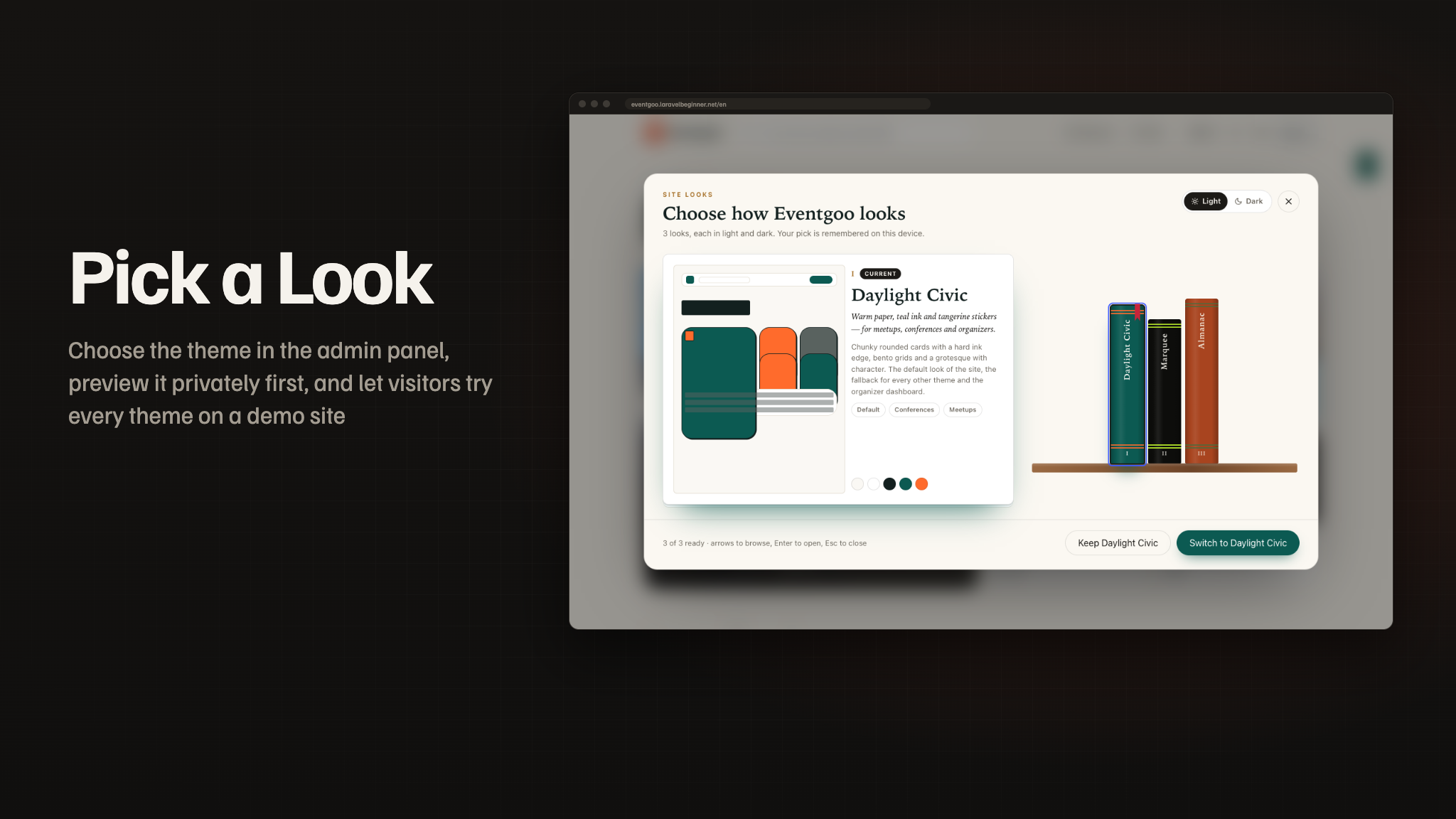
- 3 complete website themes (Daylight Civic, Marquee, Almanac), each in light and dark, chosen from the admin panel, with a per-organizer page look on paid plans
- A browser installer (
/setup), a one-command local setup script and a production doctor command - Complete detailed documentation — Firebase, the web platform / API, queues, Stripe and Stripe Connect, RevenueCat, wallet passes and store release
Key Features
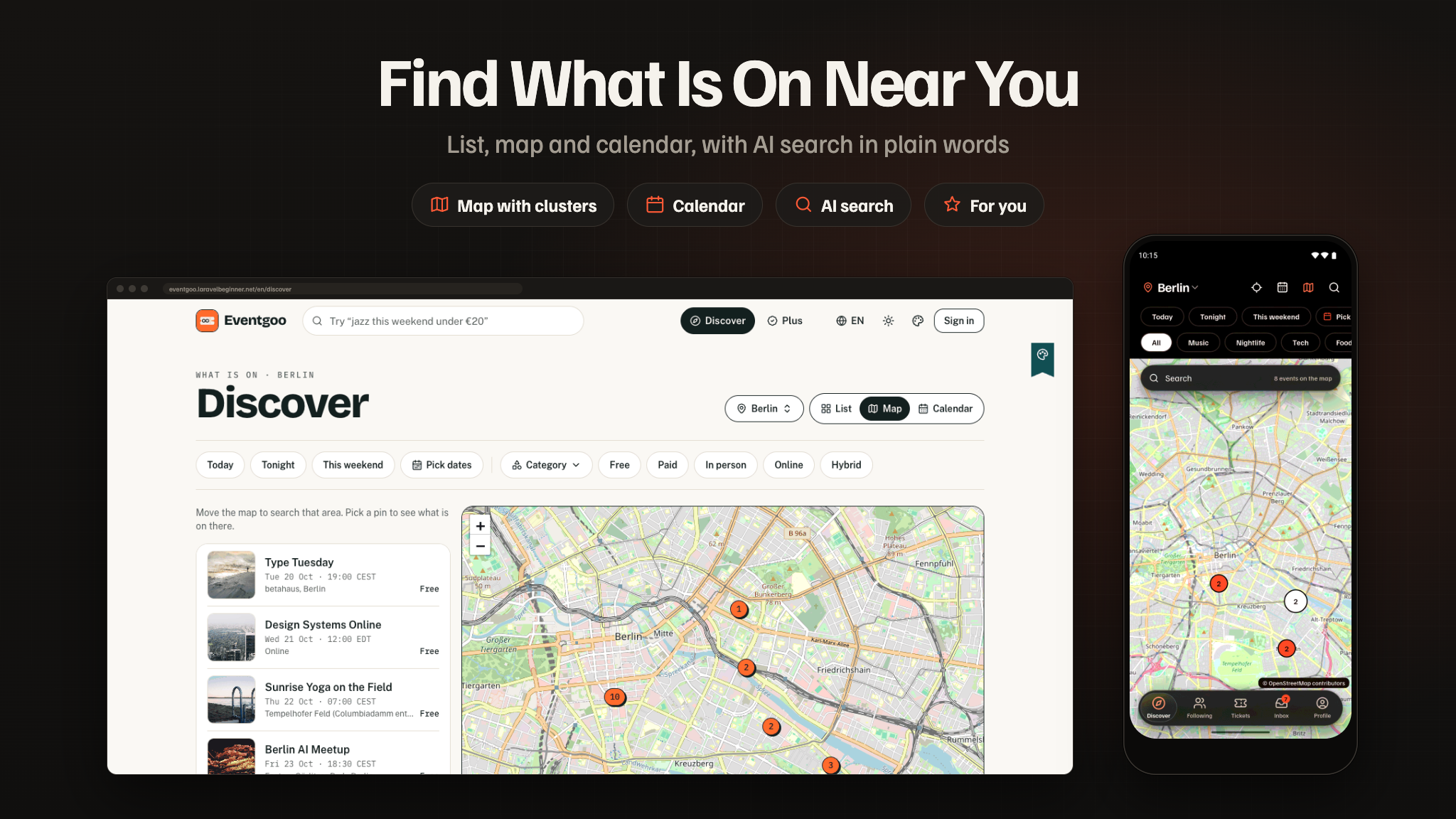
- Discovery: a city home with editable collections (rails, posters, rankings, this weekend, categories, organizers, a map card, friends going and “For you”), Discover by list, map with clusters and calendar, filters for date, category, price with fees, format and distance, and AI search in plain words.
- Three kinds of event: community events with RSVPs, approvals and questions; ticketed events with tiers, hidden tiers and a waitlist; conferences with an agenda, tracks and rooms, speakers, sponsors and a call for speakers. In person, online or hybrid; one-off or a weekly series.
- Honest prices: every price shown includes every fee, in every currency, with a fee breakdown at checkout.
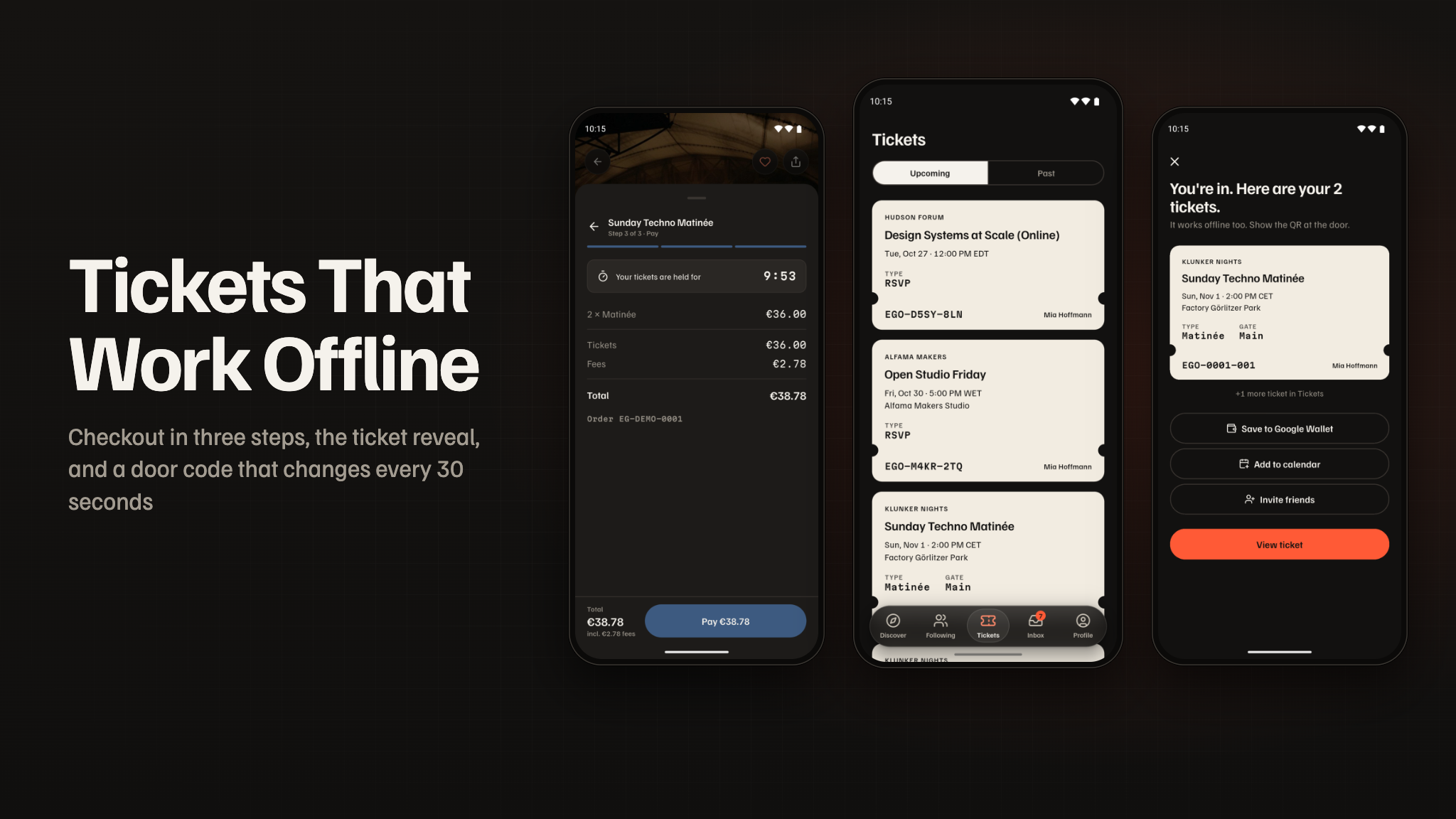
- One-page checkout: a 10-minute seat hold, Stripe PaymentSheet with Apple Pay and Google Pay, card checkout on the website, Midtrans (QRIS) and Duitku; tickets issued only by the signed webhook.
- Tickets that work offline: a door code that changes every 30 seconds, Apple Wallet and Google Wallet passes, transfer to a friend, refund requests, calendar files.
- Check-in at the door: organizer mode scans with the camera or by name, keeps working offline from a prepared list, and syncs later with the earliest scan winning; live doors and anomaly alerts.
- Organizer dashboard: an overview with today’s sales and the 30-day funnel, a sales assistant, a create wizard that drafts the event from a flyer, a ten-tab event editor, guest approvals from the keyboard, promo codes and referral links, payouts on Stripe Connect, refunds, team roles and plan & billing.
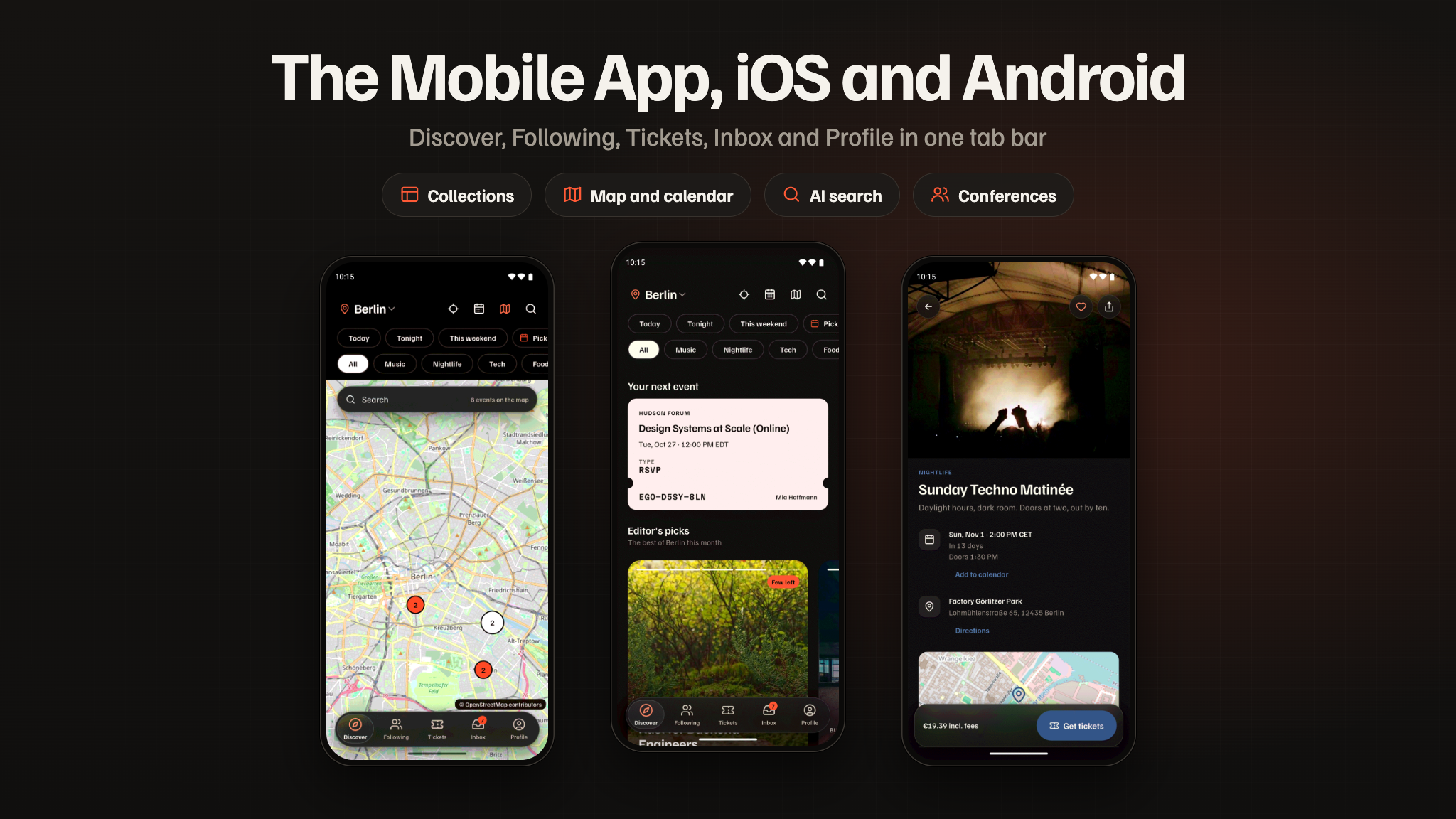
- Organizer mode in the app: Today, Scan, Guests, Announce and More — create from a flyer, payouts and refund requests on the go.
- Conferences: My agenda, Plan my day with walking time between rooms, opt-in matchmaking with five people to meet and meeting requests.
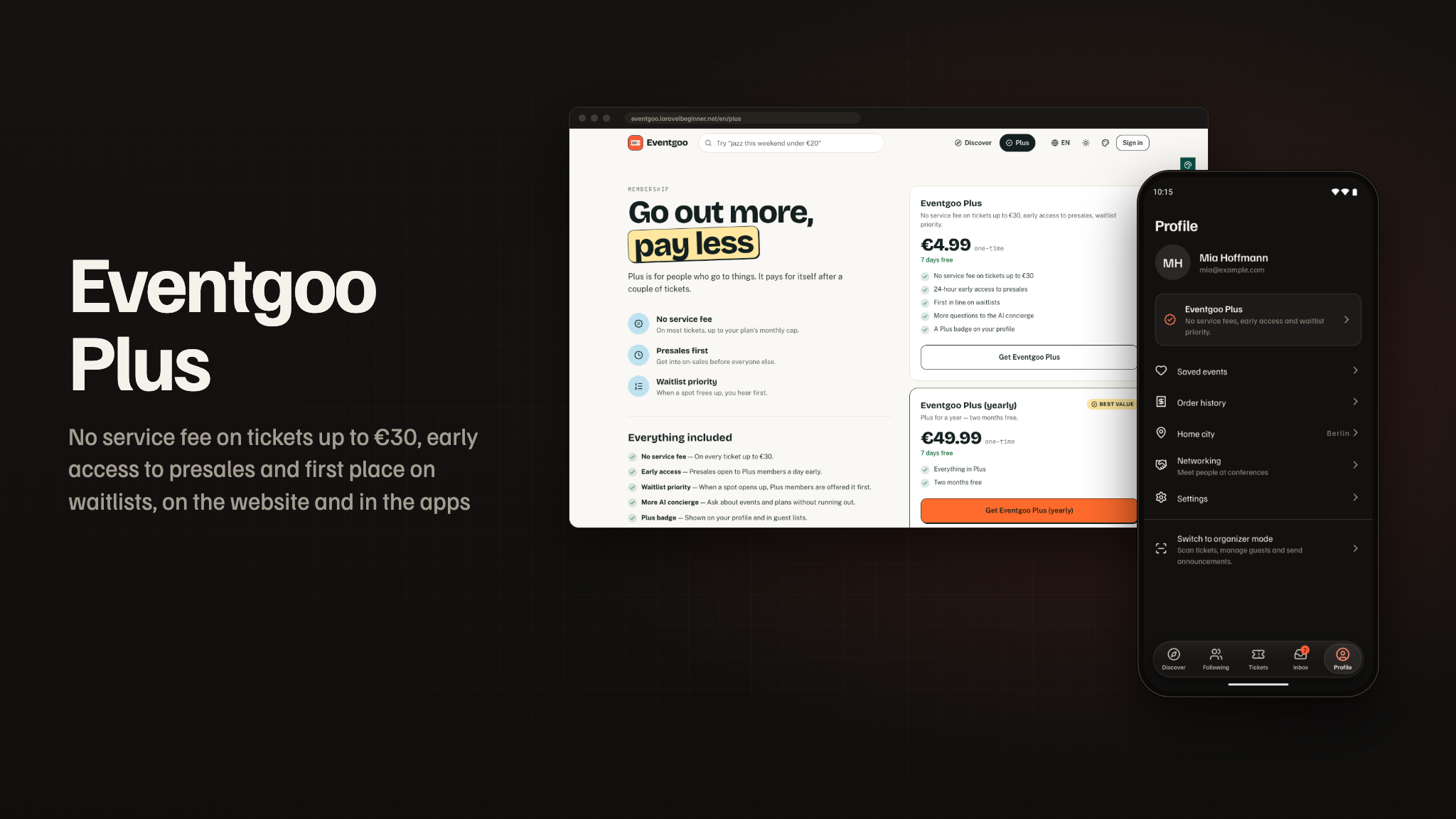
- Eventgoo Plus: no service fee on tickets up to €30, early access to presales, first place on waitlists, more AI questions and a badge — in the apps through RevenueCat and on the website.
- Organizer plans: Free, Pro and Business with lower fees, more team seats, a custom page look, more events and more AI credits — all editable.
- Notifications people control: tickets, reminders, waitlist, approvals, announcements, following, social, organizer, account and promotions — push with action buttons and email, quiet hours and muted organizers.
- Moderation and fraud: a risk score at publish with a human review queue, event reports, fraud flags for shared tickets, passbacks, forged codes and card testing.
- Sign-in: Google, Apple, Facebook and email; new installs start as guests and keep everything when they sign in.
- 3 Website Themes, Light and Dark: Daylight Civic (warm paper and teal ink), Marquee (a gig poster in black bands) and Almanac (a printed programme) — picked in Admin > Appearance > Themes, previewed privately first, and tried by visitors in a theme switcher on a demo site.
- 12 Languages: English, Arabic (right to left), German, Spanish, French, Italian, Japanese, Korean, Portuguese, Russian, Turkish and Simplified Chinese — on the website, in the dashboard, in the admin panel and in the app.
- AI Providers per Feature: Gemini, OpenAI, Anthropic, Mistral, Groq, DeepSeek, OpenRouter, xAI or Ollama, with a provider, a model and a monthly cap per feature.
- Agent-readable events: complete schema.org data on every event page and a public read-only events API for assistants, aggregators and calendars.
- Media Library with Storage Back Ends & CDN: keep covers on this server, Cloudflare R2, Amazon S3, DigitalOcean Spaces, Backblaze B2, Wasabi, Google Cloud Storage, MinIO or Bunny Storage, with any CDN in front and responsive WebP and AVIF variants.
- Runs on shared hosting: a browser installer, Upstash QStash instead of a queue worker, and a doctor command that checks the whole production setup without printing a secret.
Important Notice to Our Valued Customers
We are committed to building a reliable and continuous business system, with your satisfaction and the success of this product as our top priorities. Your feedback is crucial, and we encourage you to share any bugs, suggestions, or new feature ideas. Your input directly supports our ongoing improvement and innovation. We’re here to help — send us a message anytime through the CodeCanyon messaging system. Thank you for being part of our journey.
Warm regards,
The Morningstarcode Team
$19 |
Download |
0 average based on 0 ratings.

| Last Update | 2026-11-10 |
| Created | 2026-11-10 |
| Sales | 1 |
| Discussion | Comments |
| Software Version | iOS 15 iOS 14 iOS 13 |
| Compatible With | Swift |
| Files Included | Layered PNG JavaScript JS CSS PHP HTML |
| Video Preview Resolution |


