Deactivate Plugins Per Page - Improve WordPress Performance


Short Description
With “Deactivate Plugins Per Page” you can easily disable plugins on certain WordPress pages (or on all except a selected page).
This is useful for speeding up your site mainly because many front-end plugins will load their JavaScript and CSS assets on every page, even if you use them on one page.
How it works?
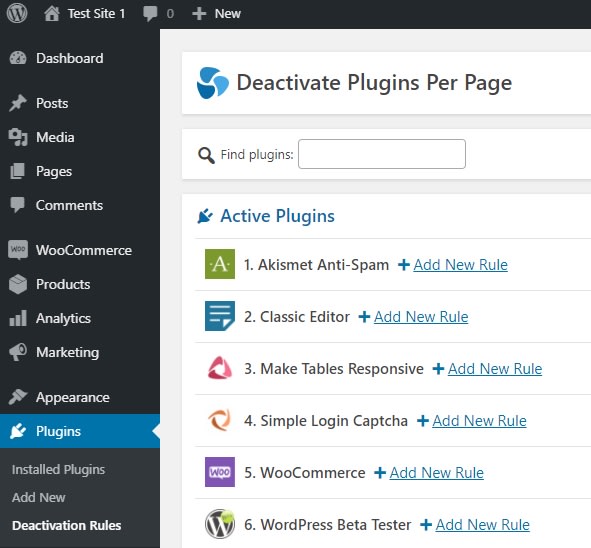
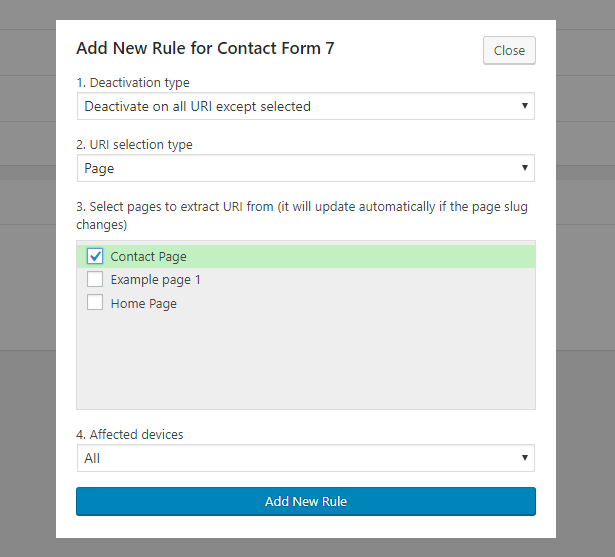
You can add deactivation rules for active plugins. For example for a contact form plugin, that you only use on the contact page, simply add a rule to deactivate it on all URI except on the contact page.
Deactivation Rules Options
1. Deactivation Type
- Deactivate on selected URI
- Deactivate on all URI except selected
2. URI selection type
- Page
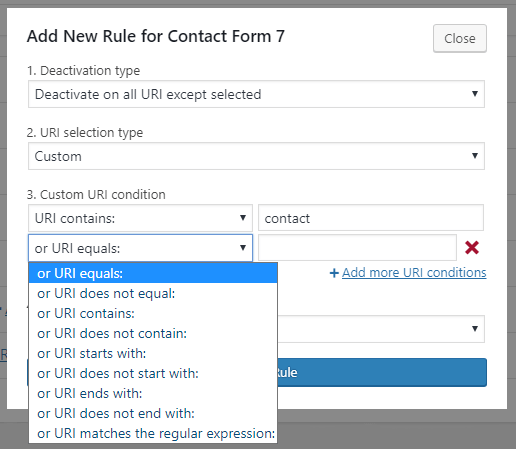
- Custom
3. [Page] Select pages to extract URI from (it will update automatically if the page slug changes)
3. [Custom] Custom URI condition
- URI equals …
- URI does not equal …
- URI contains …
- URI does not contain …
- URI starts with …
- URI does not start with …
- URI ends with …
- URI does not end with …
- URI matches the regular expression …
4. Affected devices
- All
- Desktop
- Mobile
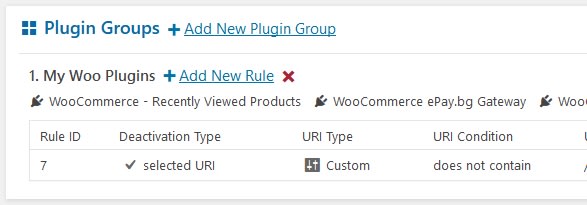
Plugin Groups
Create groups of multiple plugins in order to add deactivation rules that affect them all.
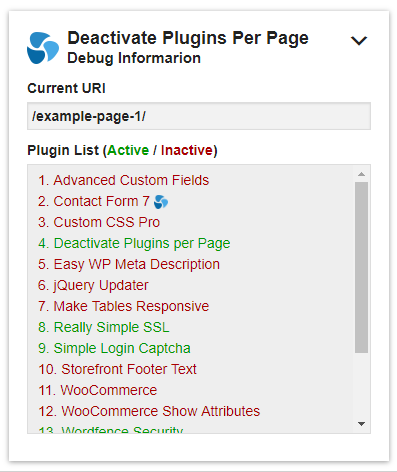
Debug Mode
Enable debug mode to see what is the URI and which plugins are active/inactive on the current page on the front-end. This will help you create rules and test current ones. A debug box will appear on the front-end if you are an administrator user.
Does it affect the Back-end?
There is an option (not enabled by default) that makes all rules with Custom URI selection to also affect the back-end. Some back-end pages will still not be affected in order to avoid problems, like the pages that control plugin activation, deactivation, updates, and installation.
Export/Import Rules and Settings

Since version 1.9.0 you can export all your deactivation rules and settings of the plugin and import them on another site. Rules with Page URI selection type, will be skipped if the same pages (both same ID and slug) do not exist on the destination site. In a multisite you can import into multiple sites at once.
Custom PHP function as condition
Since version 1.15.0 you can add the name of your own PHP function to a deactivation rule so it is used as an additional condition. The rule will only work if your function also returns true. The function must be loaded in a must use plugin so it is available before regular plugins load.
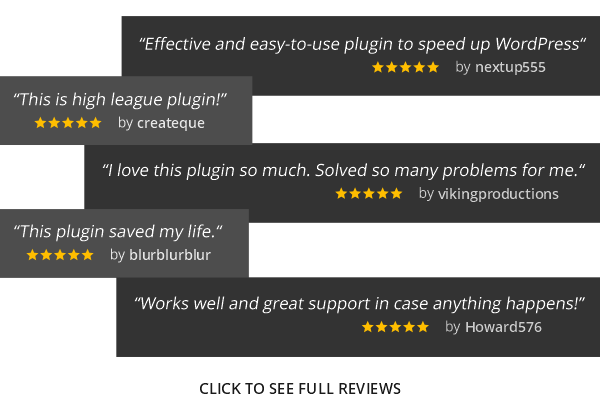
Client Reviews
Precautions
Group plugins that work together
If you have a plugin that requires another plugin to be active in order to work, you need to add these plugins in a plugin group, and add deactivation rules to that group. Deactivating only one of these could lead to errors or the global deactivation of the other plugin.
Don’t deactivate plugins required by your theme
Some themes require certain plugins in order to work properly. If you deactivate these plugins you may experience problems.
Deactivation hooks will not run
When plugins are deactivated via my plugin, the actual deactivation function is not called, and the deactivation hooks will not run. Instead, to make it work per page, plugins are just dynamically removed from the list of active plugins before the page loads. This means that if a plugin has some actions that it performs when it is deactivated, these actions will not run when it is deactivated via my plugin.
For example, some plugins add code to your ”.htaccess” file when they are activated, and when they are deactivated, they remove it. In this case if you add a deactivation rule with my plugin to stop the plugin on a certain page, the ”.htaccess” code will still be there and work on that page, even though the plugin will not be active on it.
Don’t use this plugin to hide sensitive data
It is not made to work securely for that. It is mainly made for site speed optimization and it can also be used for debugging or solving plugin compatibility issues.
Backup your site
Deactivating plugins per page is not a natural thing for WordPress, and plugin and theme developers are not expecting that. It works great in most cases, but sometimes can lead to problems, to other plugins being deactivated or settings being changed. Always have a recent backup of your site and if you can, test your changes in a staging site.
Feedback / Support / Questions
Use the support section (requires sign-in), or my email nikolay@nikolaydev.com
Tested Up To
 WordPress 7.1
PHP 8.4
Changelog
1.18.0 – 21 September 2026
 IMPROVED: Added more URL parameters to be ignored by custom rules.
 FIXED: Incorrect admin menu URLs and undefined array key PHP warnings when cached menus.
FIXED: Duplicate rule creation was possible in some cases when copying an older rule more than once from one plugin or group to another.
1.17.0 – 3 January 2025
 ADDED: An option to add an additional URL parameter to links to editing a post. The parameter holds the post type. This helps to target back-end edit post pages with rules based on post type.
ADDED: A message showing the number of deactivated plugins by rules on the current page in the debug box.
IMPROVED: Better compatibility with WP-Optimize. WP-Optimize is detecting the database table of this plugin as belonging to another free plugin that has copied code and the table name from this plugin. Now we hide this detection so users don’t delete the table by mistake.
FIXED: Incorrect form validation and error message on adding a rule in some situations after switching to custom URI type, choosing regex condition, and switching back to page URI type.
FIXED: The admin menu cache time setting was not set correctly in the recreate cache script.
 UPDATED: Language files.
1.16.0 – 19 June 2023
ADDED: Regular expressions can now be used as a custom URI condition. This allows for more advanced URI targeting that was impossible in previous versions. For example now it is possible to make a rule that only affects URIs that contain multiple separate keywords at the same time.
ADDED: An option to ignore only chosen URI parameters for page rules, for better compatibility with plugins that add URI parameters to pages. This is now the default setting.
ADDED: An option to change the admin menu cache expiration time (only used if back-end deactivation is enabled along with admin menu cache).
IMPROVED: Moved some settings in a separate section called Advanced Settings. For most users they will not need to be changed.
IMPROVED: Set some of the plugin settings to not be auto-loaded in the memory by WordPress, to slightly reduce server memory usage.
IMPROVED: Added the “v” parameter to be a chosen URI parameter by default so it is ignored by the rules. This parameter is added by WooCommerce if geolocation is enabled, and we don’t want the rules to consider it a different page when it changes.
FIXED: Incorrect admin menu links in certain cases when the cache is enabled and a conflicting plugin is back-end deactivated.
FIXED: We show an error when invalid custom condition value is entered, instead of just removing the invalid characters.
FIXED: Added higher priority styling rules for the title of the debug box in order to avoid styling bugs caused by some theme styles.
UPDATED: Language and documentation files.
1.15.0 – 2 January 2023
ADDED: The ability to add a custom PHP function as an additional condition for a rule.
ADDED: An option to choose if the deactivation rules affect the front-end visual editor pages of some popular visual editor plugins.
IMPROVED: Some hints are explaning the features in more details.
FIXED: Some spelling mistakes.
UPDATED: Language files.
1.14.3 – 14 April 2022
FIXED: The settings were not showing correct values in Firefox after importing new values due to Firefox trying to autocomplete the old values after page reload.
1.14.2 – 9 April 2022
FIXED: Assets not loading and incorrect paths when used in WAMP on Windows, due to incorrect directory separator. The PHP constant DIRECTORY_SEPARATOR has been removed now from the plugin.
1.14.1 – 16 January 2022
ADDED: An option to choose the priority of the hook we use to change the active_plugins option. In some cases changing this value will solve a conflict with another plugin (but may also cause a conflict with a different plugin).
REMOVED: The fix of the conflict with BuddyBoss plugin in combination with MemberPress Plus and MemberPress + BuddyPress Integration is removed by default. To enable it change the new option called “Priority” to 0.
UPDATED: Language files.
1.14.0 – 15 January 2022
ADDED: A new rule action that allows you to copy and paste rules from one plugin or group to another.
ADDED: An option to hide plugins with no rules if they are in at least one group.
FIXED: If there were skipped page rules when importing, the page IDs were not listed after the import.
FIXED: If an ajax request failed to be made due to a server error, it would show loading forever. Now shows an error.
FIXED: The plugin no longer works inside the visual editor screen of Elementor, Divi, and WPBakery Page Builder.
FIXED: A conflict with the BuddyBoss plugin in combination with MemberPress Plus and MemberPress + BuddyPress Integration.
FIXED: A conflict with Tutor LMS Pro in combination with the GeoDirectory plugin.
REMOVED: Support for custom REST-API address when trying to skip affecting it by our rules, was removed due to plugin conflicts.
UPDATED: Language and documentation files.
1.13.3 – 30 November 2021
FIXED: Conflict with plugins that use the REST API when a rule that deactivates on all except selected URIs is present.
FIXED: In some cases this error would occur: PHP Fatal error: Uncaught Error: Call to undefined function is_plugin_active().
1.13.2 – 7 September 21
IMPROVED: Compatibility with the Nitro Pack service. This version adds the “ignorenitro” URI parameter to our option with chosen URI parameters to be ignored by rules with custom URI selection. This way when the Nitro Pack bot visits your site to generate its cache, our deactivation rules will be applied correctly.
1.13.1 – 13 August 2021
FIXED: Could not create rules on version 1.13.0 unless you had installed a previous plugin version before updating to 1.13.0.
1.13.0 – 20 July 2021
ADDED: An option to add a note to each rule, so you are reminded what it is for.
IMPROVED: Added the new Update URI plugin header, so if a free plugin with the same name as this one is created in the WordPress repository, it doesn’t update and replace this one.
FIXED: The debug box in the customizer admin page now loads in the correct frame, and shows correct data.
FIXED: On some servers you would get a false error about an unexpected response after performing an action.
FIXED: If the icon of some plugin had changed, it would not load the new image. Now it detects it and gets the new one.
FIXED: The plugin no longer works inside the frame of the legacy widget blocks in WordPress 5.8.
FIXED: The plugin no longer works inside the front-end frame of the customizer.
UPDATED: Language files.
1.12.0 – 2 January 2021
ADDED: An option to show plugins that have rules before all other plugins in the Active / Inactive Plugins sections.
ADDED: Links to select all and deselect all pages when adding or editing rule, and the same for plugins when adding or editing a group. Also a counter for the number of currently selected.
ADDED: An option to enable Local Mode. In local mode all deactivations affect only your device, which is detected by a cookie.
IMPROVED: Some buttons now have a text description as well (instead of just an icon), so it is more clear what they do.
IMPROVED: The calculated list of active plugins after applying the deactivations is now cached in a global variable for the rest of the request to improve performance.
FIXED: A conflict with some plugins that change the active_plugins option would cause some plugins to be deactivated globally.
FIXED: When editing a rule, if there were pages that are not currently published but are selected, the background green selection color would not be there.
FIXED: If there was only one other plugin active, in the Active Plugins section it would show a message that there are no other plugins active.
UPDATED: Language files.
1.11.0 – 27 July 2020
ADDED: An option to show the plugin icon image next to its name in the Active Plugins and Inactive Plugins sections.
ADDED: An option to cache the admin menus of plugins deactivated on some back-end pages.
ADDED: In a WordPress Multisite you can import the plugin rules and settings into multiple sites at once.
ADDED: An option to enable the plugin debug mode only on the front-end or only on the back-end.
IMPROVED: New layout for the Settings section.
IMPROVED: Compatibility with plugins that change the back-end dashboard address from wp-admin to something else.
FIXED: The iPad device with a Firefox browser was not detected as a mobile device.
UPDATED: Language files.
1.10.0 – 30 January 2020
ADDED: In debug mode you can now perform quick plugin actions for the current URI: deactivate on the current URI, deactivate on all except the current URI, add a plugin to an existing group.
ADDED: A button in the top right of the debug box that reloads the page.
IMPROVED: A notice about caching plugins is shown when changing the affected devices menu in the add/edit rule box.
FIXED: When importing the rules and settings, an error about invalid import data sent was shown, if one of the plugins has a name starting with an empty space.
FIXED: When WP CLI is used, a warning was generated: Warning: in_array() expects parameter 2 to be array, null given…
UPDATED: Language files.
1.9.0 – 13 November 2019
ADDED: Global actions to export or import all rules, groups, and settings of “Deactivate Plugins Per Page”.
FIXED: The width of some drop-down boxes in WordPress 5.3.
UPDATED: Language files.
1.8.0 – 15 October 2019
ADDED: Five plugin (or group) actions: Front-end Deactivate, Back-end Deactivate, Start Plugin Rules, Pause Plugin Rules, Delete Plugin Rules.
ADDED: A text field to find pages when adding or editing a rule.
IMPROVED: Inactive plugins are now shown in red, when adding or editing groups.
IMPROVED: Removed this plugin from the active plugins section.
IMPROVED: Changed the icon for deleting a group, so it is different from the one for deleting rules.
IMPROVED: Better responsive design for some elements on the admin page.
IMPROVED: If enabled, the debug box is now visible on the back-end regardless of the setting for custom URI selection rules affecting the back-end.
UPDATED: Language and documentation files.
1.7.0 – 7 September 2019
ADDED: An option to ignore URI parameters when applying rules with custom URI selection. Popular tracking parameters like fbclid, fb_source, gclid, utm_medium, utm_source, and others are ignored by default.
ADDED: The sections in the admin page are now collapsible. You can show and hide them. The sections are: active plugins, inactive plugins, plugin groups, settings.
ADDED: An icon that indicates which plugins are already part of at least one plugin group, when creating or editing a group.
FIXED: On the plugin admin page, the back-end notices from other plugins were shown further down on the page (instead of at the top).
FIXED: A few spelling mistakes.
UPDATED: Language files.
1.6.0 – 9 August 2019
ADDED: An option to ignore all URI parameters (aka the query string) in the current page URI, when applying the deactivation rules with Page URI selection. This way when some tracking parameters are added to the URI (like for example ?utm_source=facebook&utm_medium=post) the page will still be recognised correctly by the plugin. Does not affect plain permalink structure. This will be enabled by default.
FIXED: In the 1.5.0 version, if debug mode was enabled and if we could not copy automatically the must-use plugin file to its folder, there was a PHP fatal error.
UPDATED: Language files.
1.5.0 – 5 August 2019
ADDED: An option to also affect the back-end dashboard area by all rules with Custom URI selection.
ADDED: An option to control the trailing slash of Page URIs used inside the deactivation rules.
IMPROVED: Changed some words in the admin area to be more clear.
UPDATED: Language files.
1.4.1 – 9 July 2019
FIXED: When editing a plugin group and some of the plugins are currently not installed, even though they show as selected (green and with a checked checkbox), they are not actually selected.
1.4.0 – 8 July 2019
ADDED: The action to edit a rule.
ADDED: The action to edit a plugin group.
UPDATED: Language and documentation files.
1.3.0 – 25 June 2019
ADDED: The ability to add multiple custom conditions in one rule. This makes it possible for example to deactivate a plugin on all URI except if: the URI contains something, or if it ends with something, or some other condition, etc.
ADDED: Links to filter pages by WPML language and also the ability to select pages from multiple languages in the Add New Rule box (if WPML is active).
ADDED: An option in the Add New Rule box to automatically select all translated pages with WPML of selected pages (if WPML is active).
ADDED: An option to show the Plugin Groups section before the Active Plugins.
IMPROVED: The URI values of pages are now updated when the permalink structure is re-saved, even if there are no actual changes to it. This is helpful when some plugin changes the URIs and says to re-save the permalinks. Then we will also catch the URI change made by that plugin.
IMPROVED: In the rules tables, the URI conditions and URI values are in one column now, with URI values in bold.
FIXED: Extracts incorrect URI of a page translated with WPML.
FIXED: Adding the same rule for the same plugin, but with pages selected in a different order, is no longer possible.
FIXED: A PHP warning about array_key_exists() expects parameter 2 to be array, bool given.
UPDATED: Language and documentation files.
1.2.0 – 4 June 2019
ADDED: A way to quickly find a plugin by typing a part of its name in a text field. The other plugins are filtered out temporarily.
ADDED: Global actions: pause all rules, start all rules, and delete all rules.
ADDED: The ability to create plugin groups. Group two or more plugins in order to add deactivation rules that affect them all.
ADDED: An option to remove all the data of this plugin upon its deletion (not for multisite).
ADDED: A warning in the plugin admin page if the version of the must-use plugin file does not match the version of the normal plugin.
FIXED: One confirmation message and also the URI condition in the rules tables were not translatable.
FIXED: The language files will be loaded even if they are only present in the “languages” folder inside the plugin folder and not present in the “wp-content/languages” folder.
FIXED: A small conflict with the Autoptimize plugin that caused an arrow in the debug box to be visible when it should be hidden.
UPDATED: Language and documentation files.
1.1.0 – 14 May 2019
FIXED: When selecting multiple pages for a rule that deactivates on all except selected, it would deactivate everywhere instead.
UPDATED: Language files.
1.0.0 – 13 May 2019
Initial release
5 average based on 24 ratings.

| Last Update | 2026-09-21 |
| Created | 2019-05-13 |
| Sales | 229 |
| Discussion | Comments |
| Compatible Browsers | Firefox Safari Opera Chrome Edge |
| Software Version | WordPress 7.0.x WordPress 6.9.x WordPress 6.8.x WordPress 6.7.x WordPress 6.6.x WordPress 6.5.x WordPress 6.4.x WordPress 6.3.x WordPress 6.2.x WordPress 6.1.x WordPress 6.0.x WordPress 5.9.x WordPress 5.8.x WordPress 5.7.x WordPress 5.6.x WordPress 5.5.x WordPress 5.4.x WordPress 5.3.x WordPress 5.2.x WordPress 5.1.x WordPress 5.0.x WordPress 4.9.x |
| Compatible With | |
| Gutenberg Optimized | |
| High Resolution | |
| Files Included | JavaScript JS CSS PHP |
| Video Preview Resolution | 1280x800 |


