CyberSource Microform v2 for WooCommerce


Card payments with CyberSource Microform v2
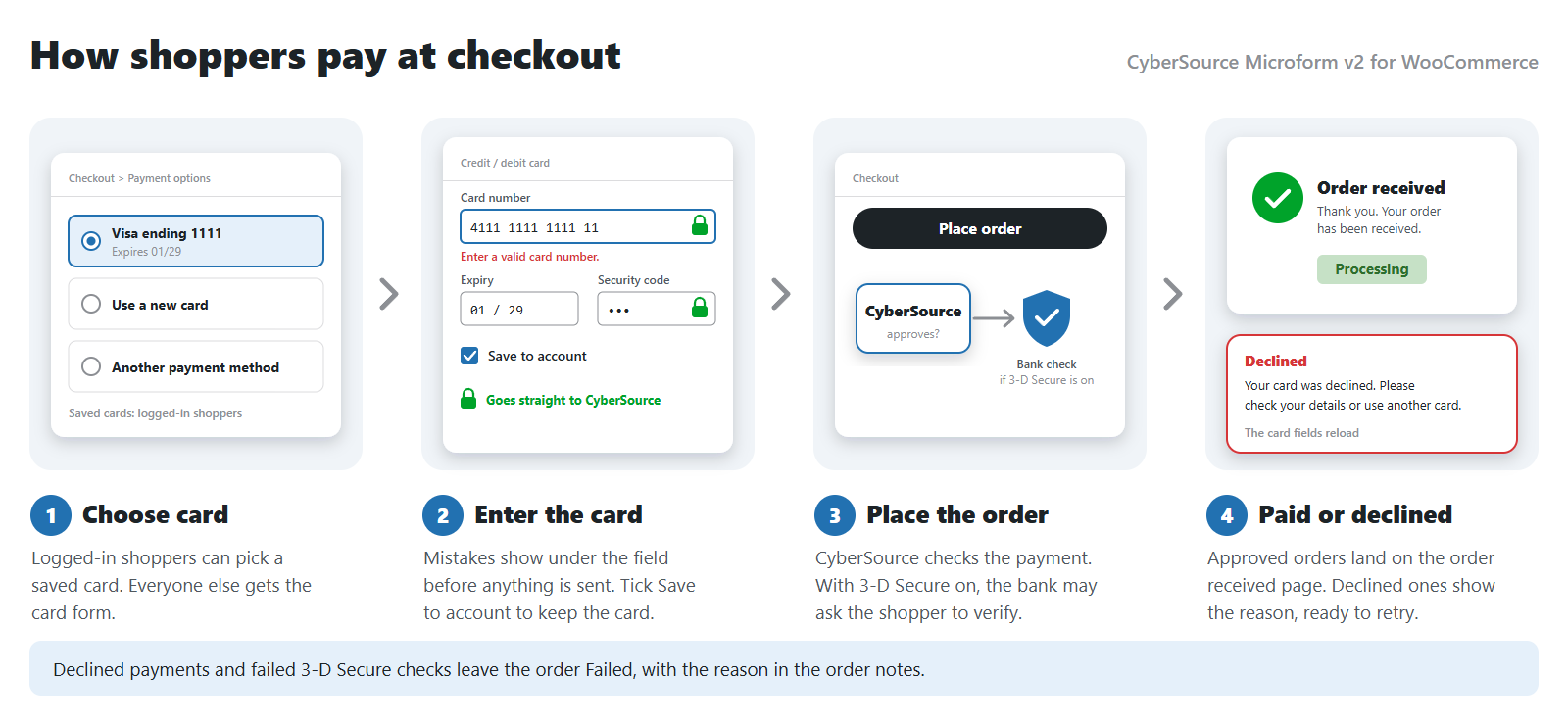
Take credit and debit card payments in WooCommerce through your CyberSource merchant account. The card number and security code are typed into fields hosted by CyberSource (Microform Integration v2), shown inside your own checkout. The shopper’s browser turns the card into a one-time token, and your store sends only that token to CyberSource, so card data never reaches your server.
The fields copy the look of your theme’s own inputs, so the form fits light and dark checkouts without extra styling.
Who it is for
- Stores that already have, or are opening, a CyberSource merchant account, directly or through a bank or reseller
- Stores that want hosted card fields in their own checkout, with no redirect to a payment page
Checkout
- Works with the Cart and Checkout blocks, the classic checkout and the pay-for-order page
- Visa, Mastercard, American Express, Discover, Diners Club, JCB, Maestro and UnionPay. Cards you don’t accept are refused in the card number field, and only the accepted brands’ icons are shown
- Errors appear under each field and are read out by screen readers
- A “Security note” under the card fields that you can reword or hide
Payments, captures and refunds
- Charge when the order is placed, or authorize only and capture later with the “Capture CyberSource authorization” order action
- Full and partial refunds from the order screen. A full refund of an uncaptured authorization voids it
- Every payment, capture, refund and void is written to the order notes with its CyberSource ID
- Orders held by CyberSource Decision Manager wait On hold for you to review
3-D Secure 2
- CyberSource Payer Authentication, including accounts set up for Cardinal Cruise Hybrid
- Most payments pass without the shopper doing anything; when the bank asks for a check, the shopper completes it and returns to your store
- Also runs for payments with a saved card
Saved cards
- Logged-in shoppers tick “Save to account” and pay with the saved card next time
- Cards are stored by the CyberSource Token Management Service. Your store keeps only CyberSource token IDs and the brand, last four digits and expiry date for display
- Shoppers add and delete cards in My Account > Payment methods; a deleted card is deleted at CyberSource too
WooCommerce Subscriptions
- The card is stored on the first payment, and renewals are charged automatically as merchant-initiated payments
- Free trials store the card with a $0 check, without charging it
- Shoppers change the card on a subscription, or on all of them at once; a failed renewal can be paid with a new card
- Amount and date changes, suspension, reactivation and cancellation
Setup and testing
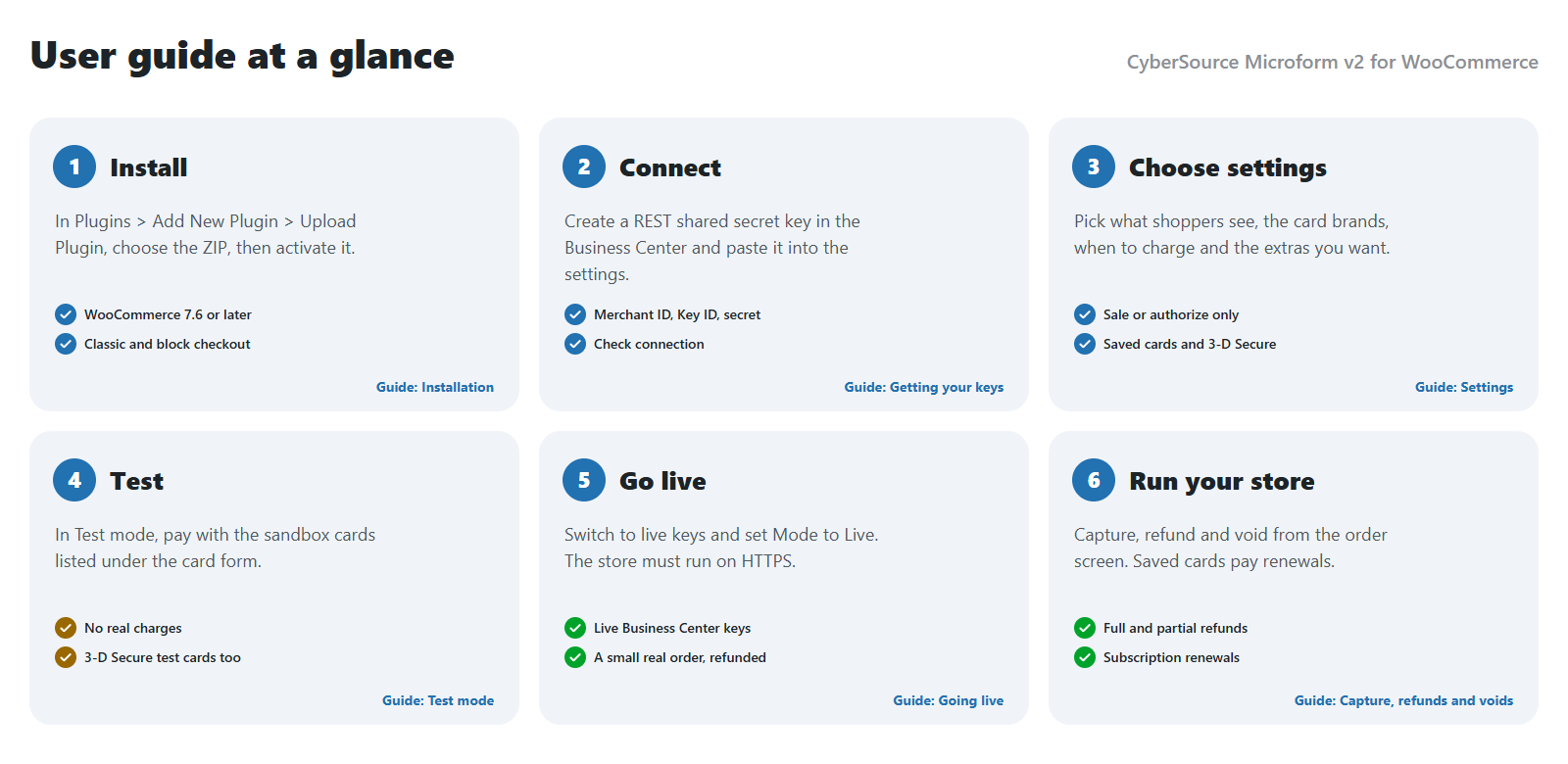
- One settings screen: Test or Live mode, merchant ID, key ID and shared secret
- A “Check connection” button that tests your keys and reports whether 3-D Secure and Token Management are on for your account
- Test mode uses the CyberSource sandbox and shows sandbox card numbers, including 3-D Secure test cards, at checkout
- An optional debug log in WooCommerce > Status > Logs
Built to fit your store
- High-Performance Order Storage (HPOS) compatible
- Translation ready, with a .pot file included
- Coded to the WordPress Coding Standards and checked with the WordPress Plugin Check tool
- Deleting the plugin removes its settings and cached data; orders and saved cards stay
Requirements
- WordPress 6.2 or later
- WooCommerce 7.6 or later
- PHP 7.4 or later, with the OpenSSL extension
- HTTPS on the live store
- A CyberSource merchant account with a REST shared secret key. A free CyberSource sandbox account is enough for testing
- For saved cards and Subscriptions: Token Management Service on your CyberSource account. For 3-D Secure: Payer Authentication. “Check connection” tells you which you have
External services
The plugin connects to CyberSource (the REST API and the Microform card fields) and, when 3-D Secure is on, to Cardinal Commerce. CyberSource and Cardinal Commerce are Visa companies. The data sent to each is listed in the documentation.
Documentation and support
A user guide in HTML and Word is included in the download. It covers getting your CyberSource keys, a checklist of the services to confirm with CyberSource, every setting, test cards, going live and troubleshooting. For help, use the Support tab on this page.
Changelog
1.3.4
- Changed: all text is translatable and escaped on output, including the expiry placeholder and the 3-D Secure device-check frame title
1.3.3
- Added: “Security note” setting to change or hide the line under the card fields
- Changed: block checkout shows “Save to account” inside the card form, worded as on classic checkout
- Fixed: the test card list no longer touches the “Save to account” box
1.3.2
- Fixed: an error when a paid order returned to the 3-D Secure page after the verification had expired
- Changed: WordPress Coding Standards clean-up, readme, translation template and uninstall cleanup
1.3.1
- Fixed: saved cards are stored even when Decision Manager holds the first payment for review
- Fixed: “Update all subscriptions” copies the card’s network transaction ID to every subscription
1.3.0
- Added: 3-D Secure, Cardinal Cruise Hybrid, saved cards and WooCommerce Subscriptions
1.0.0
- First release
CyberSource is a trademark of Visa. This plugin is made by RyanPlugins and is not affiliated with, endorsed by or sponsored by Visa or CyberSource.
$79 |
Download |
0 average based on 0 ratings.

| Last Update | 2026-11-26 |
| Created | 2026-11-26 |
| Sales | 0 |
| Discussion | Comments |
| Compatible Browsers | IE10 IE11 Firefox Safari Opera Chrome Edge |
| Software Version | WordPress 7.1.x WordPress 7.0.x WordPress 6.9.x |
| Compatible With | WooCommerce 10.x.x WooCommerce 9.x.x WooCommerce 8.x.x |
| Gutenberg Optimized | No |
| High Resolution | No |
| Files Included | JavaScript JS CSS PHP |
| Video Preview Resolution |


