Custom Select for Twitter Bootstrap 2
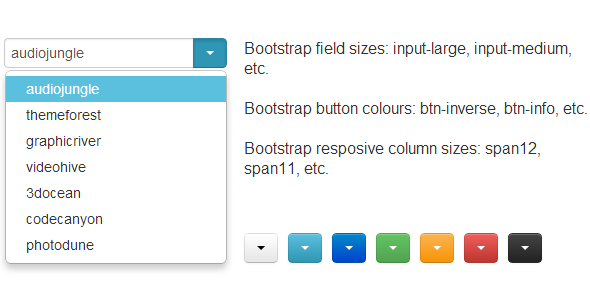

What is this?
This is a jQuery plugin extending the functionality of Twitter Bootstrap. It allows you to turn a default select input field into an element completely matching the style of Twitter Bootstrap with one line of JavaScript.
Why use it?
- applies Twitter Bootstrap style to a select input field
- preserves native select input field behaviour (you can use GET or POST methods to submit the selected value)
- easily stylable
- responsive (optionally)
- by default uses Twitter Bootstrap button styling and field sizing classnames, but this can be easily overridden by using custom ones
- accessible – supports keyboard tabbing very well (gaining and loosing focus)
Easy to use
Example:
<script> $(document).ready(function(){ $('.some_classname').bootstrapSelect(); }); </script> Please note: step-by-step explanation is in the docs.
This plugin requires
- jQuery JavaScript library
- Twitter Bootstrap 2 front-end framework
Changelog
v 1.0 (03 November 2013)
Restructured plugin and added public methods: change, get_value, set_value; Custom attributes on initial select element are copied to a generated HTML element
v 0.1 (21 September 2013)
Prevented form submit on caret/button click, autocomplete prevented on input field, typing and pasting prevented, added a new option – maximum items visible without a scrollbar
Initial release (16 May 2013)
0 average based on 1 ratings.

Search plugins
Browse Categories


