Crate Shift | Warehouse Puzzle HTML5 Game

 | | |
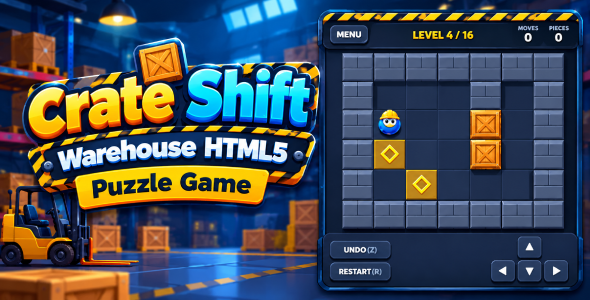
Crate Shift is a classic Sokoban-style warehouse puzzle game where players must carefully move crates onto designated target markers to complete each level.
Plan your moves, navigate around obstacles, and push every crate into the correct position. Be careful! You can push crates, but you cannot pull them. One wrong move can make a puzzle more challenging, but the Undo feature lets you retrace your steps.
With 16 handcrafted levels, smooth animations, touch-friendly controls, and a star-based scoring system, Crate Shift offers an enjoyable puzzle experience for casual and strategy game fans.
- Features
- - 16 Built-in Levels: Progress through 16 warehouse puzzle challenges.
- - Classic Sokoban Gameplay: Push crates onto all target markers to complete each level.
- - Progressive Challenges: Explore different warehouse layouts and crate arrangements.
- - Star Rating System: Earn up to 3 stars based on your move count.
- - Move Counter: Track the number of moves in each level.
- - Push Counter: Monitor how many times you push crates.
- - Unlimited Undo: Reverse previous moves to correct mistakes.
- - Restart Level: Start the current puzzle again at any time.
- - Level Selection: Choose previously unlocked levels.
- - Continue Option: Quickly continue from your current progression.
- - Progress Saving: Automatically saves completed levels, stars, and best move counts.
- - Sound Effects: Procedurally generated sounds for movement, pushing, undo, and winning.
- - Sound Toggle: Enable or disable game sounds.
- - Smooth Animations: Animated player and crate movements.
- - Responsive Canvas: Automatically adjusts the game board to fit the available screen.
- - Multiple Input Options: Keyboard, touch swipe, and on-screen directional controls.
- - Preloader Screen: Includes an animated loading screen.
- How to Play
- 1. Move your character around the warehouse.
- 2. Push crates toward the amber target markers.
- 3. Place every crate on a target marker to complete the level.
- 4. Plan your moves carefully because crates cannot be pulled.
- 5. Use Undo if you make a mistake.
- 6. Complete levels using fewer moves to earn more stars.
- 7. Unlock and play the next puzzle.
- Controls
- - Arrow Keys – Move the player.
- - W, A, S, D – Move the player.
- - Z – Undo the previous move.
- - Backspace – Undo the previous move.
- - R – Restart the current level.
- - Enter / Space – Continue after completing a level.
- - On-screen directional pad – Move the player.
- - Swipe on the game board – Move in the swipe direction.
- - Touch-friendly interface for mobile devices.
- Technical Details
- - Game Type: Puzzle / Sokoban / Strategy
- - Technology: HTML5, CSS3, JavaScript
- - Rendering: HTML5 Canvas
- - Audio: Web Audio API
- - Storage: Browser Local Storage
- - Input: Keyboard, Pointer Events, and Touch Swipe
- - Animation: RequestAnimationFrame
- - Responsive Design: Desktop and mobile layouts
- - Game Engine: No external game engine required
- Browser Compatibility
Designed for modern browsers:
- - Google Chrome
- - Mozilla Firefox
- - Safari
- - Microsoft Edge
Please test on your target browsers and devices before publishing.

Search plugins
Browse Categories


