Cozy Stack | HTML5 Food Stacking Puzzle Game
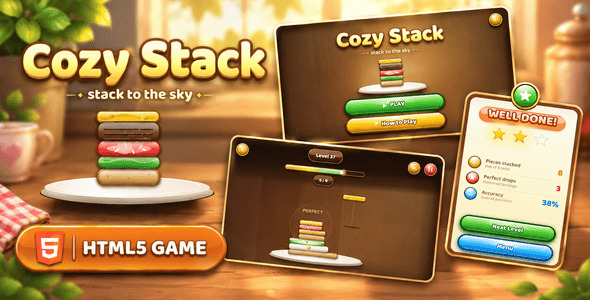

Cozy Stack is a self-contained HTML5 stacking arcade game built with HTML5, CSS3, and vanilla JavaScript. It needs no engine, build step, installation, or server-side service. Open main_file/index.html directly, or upload the complete main_file folder to a static host.
Players tap to drop swinging food pieces onto a growing stack, aiming for perfect centered landings while off-center drops slice off overhanging edges. With 200 progressively harder levels, 15 procedurally drawn ingredients, a combo system, real-time audio feedback, and a warm wood-and-ceramic aesthetic, Cozy Stack turns a one-button tap into a quietly addictive test of timing and precision.
How to Play
Tap anywhere to release the swinging piece at the top of the screen. The piece falls under gravity and lands on top of the stack — if it lands centered within the perfect window, you trigger a gold ring, spark burst, and a PERFECT popup. Off-center drops slice the piece; the overhanging portion flies away with its own physics, and the remaining slice becomes your new stack top. Stack every piece for the level to clear it. Miss the stack entirely and the level ends — tap Try Again to restart the exact same layout.
Core Gameplay
- 200 progressive stages — piece count grows smoothly from 5 at Level 1 up to 16 at Level 200 using a single formula, so late levels feel harder without a sharp difficulty cliff.
- Fifteen food ingredients — toast, cheese, tomato, lettuce, patty, egg, bacon, onion, mushroom, pickle, salmon, avocado, ham, pineapple, and corn — each drawn procedurally in code with its own shape, texture, and decorative detail. No image files.
- Zero audio files — every tone is synthesized live with the Web Audio API (oscillator + envelope). No MP3s or audio downloads are needed.
- Perfect drop detection — landing within a tolerance band triggers sparks, rings, and a floating popup. The window shrinks from 1.45× at Level 1 to 1.0× at Level 25+, so early levels feel forgiving and late levels demand precision.
- Overhang slicing physics — off-center drops cut the piece in two. Only the overlap stays on the stack; the sliced portion flies off with rotation and gravity.
- Combo system — chaining perfect drops builds a live combo counter shown above the HUD. Any non-perfect drop resets it to zero.
- 1–3 star rating per level based on what fraction of your drops were perfect — 60%+ earns 3 stars, 30–59% earns 2, under 30% earns 1.
- Pause, restart, or jump to Level Select at any time from the in-game menu.
- Animated feedback — expanding gold rings, particle sparks, floating score popups, piece squash on landing, and camera shake that scales with how far off-center the drop landed.
- Loading screen on every visit with a pulsing logo, warm radial glow, and gradient progress bar.
Progression & Replayability
- Stage-by-stage unlock — each level unlocks only after the previous one is cleared, with Level 1 always available.
- Best-star tracking — replaying a level with a lower star rating never overwrites your saved best.
- Persistent progress — unlocked level, star ratings, total stars, and mute preference are saved via
localStorage. - Smooth difficulty curve — the piece-count formula
round(5 + 11 × pow(level / 199, 0.85))means early levels gain pieces quickly while the last levels gain only one at a time, giving players a long, gentle tail rather than a hard wall. - Capped swing speed — the swinging piece accelerates up to Level 40 and then holds steady, so late-level difficulty comes from piece count and precision, never from twitchy controls.
Visual Presentation
- Warm cozy theme — a procedural wood-plank background with plank lines, grain, and lighting; a ceramic plate beneath the stack; gold, terracotta, and sage accents throughout.
- Everything drawn in code — the wood background, ceramic plate, all 15 food pieces, every button, every modal, and every icon is generated procedurally on a single canvas. There are no image assets to upload.
- Animated stack feedback — pieces squash briefly on landing, the stack wobbles on impact, and gold rings + sparks fire on perfect drops.
- Canvas-rendered UI — menus, level cards, pause/win/lose modals, and the HUD all draw onto the same canvas with rounded corners, gradients, and soft shadows, matching the arcade aesthetic without any DOM elements.
- Responsive layout — the canvas fills the viewport, and
layout()recalculates button sizes, HUD positions, grid cells, and modal dimensions on every resize or orientation change. Test on your target devices before release. - Baloo 2 + Nunito typefaces — loaded via Google Fonts CDN on first visit.
Technical Specifications
- Built with: Pure HTML5, CSS3, and vanilla JavaScript (Canvas 2D rendering)
- Runtime libraries: None. Baloo 2 and Nunito are third-party fonts loaded from the Google Fonts CDN; the project does not bundle font files.
- Responsive: Designed for phones, tablets, and desktop; portrait and landscape both supported; test your target devices
- Browser support: Minimum supported version floors: Chrome 90+ (desktop & Android), Safari 14+ (macOS & iOS), Firefox 88+ (desktop & Android), Edge 90+, and Opera 76+. Requires modern browser support for HTML5, CSS3, JavaScript (ES6+), Canvas 2D, Local Storage, the Web Audio API, and Pointer Events.
- Touch & mouse support: Both work seamlessly — a single unified
pointerdownlistener handles mouse, pen, and touch with no separate code path. Body setstouch-action: noneso taps never scroll or pinch-zoom the page. - Internet requirement: Needed to request Google Fonts unless you self-host those fonts. If unavailable, system fonts are used. Gameplay itself has no other network dependency.
- Storage:
localStorage(~1–3 KB) under the keycozystack_v1(unlocked level, per-level star ratings, total stars, and mute preference). Inspect or clear via browser DevTools (Application > Local Storage). - Audio: All sounds synthesized with the Web Audio API. No external audio files.
- Performance: Each food type is pre-rendered once into an offscreen canvas and blitted every frame (sprite caching), so per-frame cost stays low even on mid-range phones with a tall stack.
Setup & Customization
- Keep
index.htmlbeside itsassetsfolder. - Open the HTML file in a browser, or upload the entire
main_filefolder to a static web host. If local-file restrictions cause missing styles or scripts, run it from a local web server. - For basic branding, edit the color constants (
PandBTNobjects) and theFOODSarray (ingredient colors and slice heights) inscript.js, or change the game title strings indrawLoading()anddrawLobby(). Game content, functionality, and visual styling can be customized through the project files. JavaScript customization requires development knowledge — the game logic, food definitions, level progression, and audio engine all live in the JavaScript file.
Third-Party Services & Licensing
- Google Fonts (CDN): Baloo 2 and Nunito are third-party resources delivered through Google’s CDN, outside the author’s control. An internet connection is required to fetch them unless they are replaced with local copies.
- Font Licensing: The fonts are under the SIL Open Font License (OFL), which permits commercial use and redistribution with software subject to its terms. Font files may not be sold by themselves; include their copyright notice and OFL text when redistributing the font files, and follow any Reserved Font Name restrictions for modified fonts.
- Other Dependencies: No Chart.js, jsPDF, three.js, html2canvas, or external API is included.
- Third-Party Ad & Sponsor Disclaimer: If you choose to integrate third-party ad networks (such as Google AdSense, Google AdMob, ironSource, or Unity Ads) or external sponsor services, note that these are independent third-party services outside of our control. They require their own account registration, compliance review, and approval, and may have associated costs or policies. This product provides the game and integration infrastructure only; buyers are solely responsible for creating and maintaining their own accounts.
Buyer FAQ
- Can I embed it in an iframe? The game has no built-in iframe restriction. Embedding depends on the host’s frame/security headers and the parent page; test on your target host.
- Does it work on phones and tablets? The layout responds to screen size and accepts touch and mouse input through a single unified pointer handler. Portrait and landscape are supported; no specific orientation is required.
- Does it work offline? The game logic works locally, but Google Fonts are normally requested online. Self-host the fonts for fully offline use.
- Can I disable a screen or feature? There is no built-in feature switch. Edit the game logic in
script.js; development knowledge is recommended. - Are there any image assets to upload? No. Every visual — wood background, food pieces, buttons, icons, and modals — is drawn in code on a single canvas.
- How does the third-party ad network approval process work? Ad network accounts (such as Google AdSense or Google AdMob) require formal registration and approval by the third-party provider. Approval is handled entirely by the respective ad network and is not guaranteed by the product or author. Review times vary by provider, and buyers are solely responsible for satisfying the provider’s eligibility criteria, content guidelines, and terms of service. This product provides the technical integration infrastructure only.
No build tools, no installation, nothing to compile.


