ConvertiX - React Native Expo Unit & Currency Converter | iOS & Android | i18n | AdMob | TypeScript
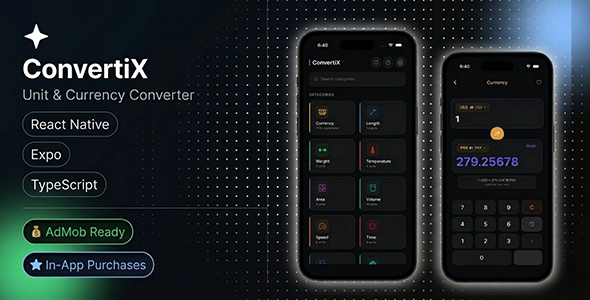

ConvertiX is a beautifully designed, production-ready unit and currency converter app built with React Native + Expo + TypeScript . 15+ conversion categories, 170+ live currencies, 8 fully translated languages with complete RTL support, AdMob, RevenueCat IAP, and full favorites & history — all offline. Ship your own converter app to Google Play and App Store in hours, not weeks.

————————————————————
App Screenshots


————————————————————
⚡ Key Features
Unit Conversion
✅ 15+ categories: Length, Weight, Temperature, Area, Volume, Speed, Time, Data Storage, Pressure, Energy, Angle, Frequency, Fuel Economy & Cooking
✅ Instant real-time conversion as you type
✅ High-precision results across all categories
✅ Works 100% offline — no internet required
Live Currency Converter
✅ 170+ world currencies supported
✅ Real-time exchange rates fetched automatically
✅ Cached rates for full offline functionality
✅ Includes USD, EUR, GBP, PKR, AED, SAR, CNY, INR and more
8 Languages + Full RTL Support
✅ English, Spanish, Urdu, Sindhi, Hindi, Arabic, Chinese, Bengali
✅ Full right-to-left layout for Arabic and Urdu
✅ Auto-detects device language on first launch
✅ Easy to add new languages — copy one JSON file, register, done
◑ Dark / Light / System Theme
✅ Three theme modes built in
✅ Follows device setting automatically
✅ User can override and lock their preference
✅ Designed to look premium in both modes
⭐ Favorites & History
✅ Pin conversion pairs as favorites for one-tap access
✅ Full conversion history with automatic date grouping
✅ All data stored locally — never sent to any server
▶ AdMob Integration
✅ Banner and interstitial ads pre-wired
✅ Enable globally with a single config flag: enableAds: true
✅ Interstitial frequency configurable (default: every 5 conversions)
✅ Test ad IDs used automatically in development
$ RevenueCat In-App Purchases
✅ RevenueCat SDK fully integrated
✅ Ready for subscriptions, one-time purchases, or premium unlocks
✅ Enable premium features with a single config flag
✅ Payment handled entirely by Apple / Google
Privacy First — 100% On-Device
✅ All user data stored locally using MMKV (fastest RN storage)
✅ No account required. No login. No server. No tracking.
✅ Users can wipe all data from Settings at any time
————————————————————
What’s Included
✅ Full React Native + Expo source code
✅ TypeScript throughout — clean, maintainable architecture
✅ 8 locale JSON files (EN, ES, UR, SD, HI, AR, ZH, BN)
✅ HTML documentation with step-by-step setup guide
✅ AdMob pre-wired (banner + interstitial)
✅ RevenueCat IAP integration
✅ Expo Router navigation setup
✅ MMKV on-device storage layer
✅ Dark / Light / System theme system
✅ Favorites & history screens
✅ Settings screen with language picker and theme toggle
✅ Live currency rate fetching hook (useCurrency)
✅ Privacy policy & terms pages included
————————————————————
Tech Stack
⚡ React Native 0.81
⚡ Expo SDK (Expo Router)
⚡ TypeScript
⚡ MMKV Storage
⚡ i18next + react-i18next
⚡ React Native Google Mobile Ads (AdMob)
⚡ RevenueCat
⚡ React Navigation
————————————————————
Requirements
▪ Node.js 18 or higher
▪ Expo CLI (npm i -g expo-cli)
▪ EAS CLI for production builds (npm i -g eas-cli)
▪ Android Studio (for Android builds)
▪ Xcode 15+ on macOS (for iOS builds)
▪ Basic knowledge of React Native / Expo
▪ Google AdMob account (only if enabling ads)
▪ RevenueCat account (only if enabling IAP)
————————————————————
❓ FAQ
Can I publish this on both Google Play and App Store?
Yes. Built with Expo so it targets both platforms from a single codebase.
Do I need coding knowledge?
Basic React Native knowledge is recommended. The documentation walks through every step from setup to publishing.
How do I enable AdMob?
Set enableAds: true in constants/config.ts and replace the placeholder IDs in constants/admob.ts with your real IDs. That’s it.
Can I add my own language?
Yes. Copy locales/en.json, translate the values, import it in i18n/index.ts and add it to the LANGUAGES array. Full steps in the docs.
Is any user data collected?
No. All data is stored on-device via MMKV. The only third-party data collection is through AdMob and RevenueCat per their own privacy policies.
————————————————————
Changelog
Version 1.0.0 — March 22, 2026
✅ Initial release
✅ 15+ conversion categories
✅ 170+ live currencies with offline fallback
✅ 8 languages: EN, ES, UR, SD, HI, AR, ZH, BN
✅ Full RTL support for Arabic and Urdu
✅ Dark / Light / System theme
✅ Favorites and conversion history
✅ AdMob banner + interstitial integration
✅ RevenueCat IAP integration
✅ MMKV on-device storage
✅ HTML documentation included
————————————————————
Note: For questions or issues, use the CodeCanyon comments section. I typically respond within 24 hours. If you enjoy ConvertiX, please leave a rating — it helps a lot. Thank you!
$33 |
Download |
0 average based on 0 ratings.

| Last Update | 2026-03-31 |
| Created | 2026-03-31 |
| Sales | 0 |
| Discussion | Comments |
| Software Version | ReactJS iOS 15 iOS 14 iOS 13 iOS 12 Android 15.0 Android 12.0 Android 11.0 Android 10.0 Android 9.0 |
| Files Included | JavaScript JSON JavaScript JS HTML |
| Software Framework | |
| Video Preview Resolution |


