Contact Form 7 Multi Step - Split Long Form into Multi Step
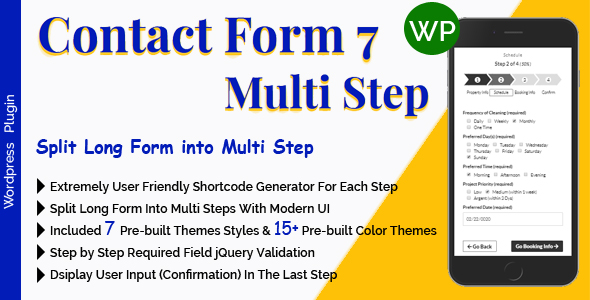

WordPress Contact Form 7 Multi Step Addon. Split Long Form into Multi Step (Upto 100 Steps). Contact Form 7 Multi Step Add-ons is Extremely easy Configurable. Contact Form 7 Multi Step Add-ons Split your long form into step by step UI.


Contact Form 7 Multi Step plugin requires active plugin Contact Form 7

Support: Premium Support from the plugin Author
Latest Version
----- V 2.3.4 Released: 10 March 2026 ----- - Fixed: Fixed PHP Notice - Upgraded: Upgraded Fontawesome to the most latest version 7.2.0


Features
- Extremely easy Configuration
- Break down long forms into easy-to-manage multiple steps
- Robust and visually appealing UI/UX design with multi-step forms
- Progress bar for form steps accessibility
- Generate each step tag/shortcode for your form with the shortcode generator
- Easy to customize the text for buttons and step titles with the shortcode generator
- Split Long Form into Multi Step (Upto 100 Steps)
- Display option available for User Input (Confirmation) in the last step
- Included 7 Pre-built Themes Styles (each style included 15+ Pre-built Color Themes)
- Included 15+ Pre-built Color Themes
- Step by Step Required field jQuery validation
- Translate Ready – Compatible With: WPML/Loco Translate etc
- 100% Responsive & Mobile-Friendly Layout
- Well Documented ( proper help instructions for setup )
- Dedicated Support
- No recurring fees. Lifetime access to all future versions—free of charge
- and Much More!
Online Documentation
Copy the link and check in a new browser tab: https://docs.mgscoder.com/mgscf7multistep-visitor-doc/
Video Tutorials

Features of this CF7 Multi-Steps plugin
How to Convert/Migrate a long Form into CF7 Multi-Steps
How to Add Step Title of the CF7 Multi-Steps
How to Change Step Title of the CF7 Multi-Steps
How to Change Button Text of the CF7 Multi-Steps
How to Change Theme of the CF7 Multi-Steps
How to Change Theme Color of the CF7 Multi-Steps
How to Change ‘Are You Ready!’ Button Text and Hide that Button
How to Hide Progress Percentage of the CF7 Multi-Steps
How to Set Display Validation Error position of the CF7 Multi-Steps
Extra Features of this CF7 Multi-Steps plugin
How to Display Input (Confirmation) Data of this CF7 Multi-Steps
How to Purchase this CF7 Multi-Steps
How to Change Tagline Text of the CF7 Multi-Steps
How to Disable Auto-Scroll of the CF7 Multi-Steps

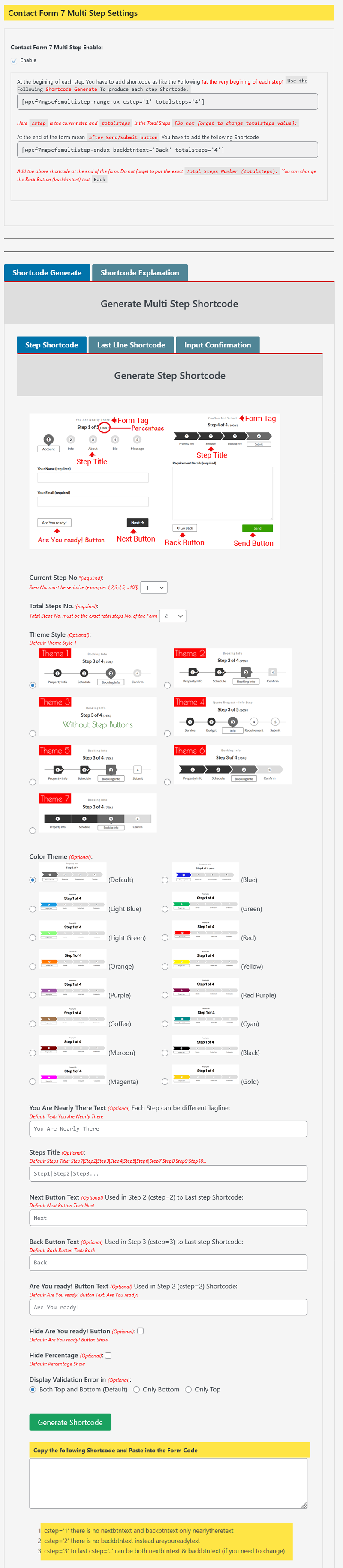
User Friendly Step Shortcode Generator

Save 70%
This add-on (Contact Form 7 Multi Step) is also available in the Contact Form 7 Add-ons Bundle. Purchasing every Add-ons individually you would spend at least $215+. Bundle Price – Only $64. Purchase Now


Note: All images are just used for Preview Purpose Only. They are not part of the template and NOT included in the final purchase files.
CHANGELOG
----- V 2.3.4 Released: 10 March 2026 ----- - Fixed: Fixed PHP Notice - Upgraded: Upgraded Fontawesome to the most latest version 7.2.0
----- V 2.3.3 Released: 8 January 2026 ----- - Updated: Very minor tweak in shortcode configurator - Upgraded: Upgraded Fontawesome to the most latest version 7.1.0
----- V 2.3.2 Released: 13 September 2025 ----- - Fixed: Plugin Settings Tab display.
----- V 2.3.1 Released: 20 May 2024 ----- - Updated: Very minor tweak - Upgraded: Upgraded Fontawesome to the most latest version 6.5.1
----- V 2.3.0 Released: 28 April 2023 ----- - Updated: Very minor tweak - Upgraded: Upgraded Fontawesome to the most latest version 6.4.0
----- V 2.2.1 Released: 18 March 2022 ----- - Fix: Fix php Notice
----- V 2.2.0 Released: 13 March 2022 ----- - Updated: Design minor updated - Upgraded: Upgraded Fontawesome to latest version 5.15.4
----- V 2.1.0 Released: 7 September 2021 ----- - Fixed: One Validation issue fixed and updated Validation process
----- V 2.0.0 Released: 23 August 2021 ----- - Updated: Plugin settings updated - Added: Added Shortcode generator (Now the settings are the best user friendly) - Added: Added More Control in the Shortcode generator - Added: Added 16 Pre-built Color Themes
----- V 1.9.0 Released: 13 July 2021 ----- - Updated: Plugin settings updated and added auto scroll (scroll to top of the Step button) on/off option
----- V 1.8.3 Released: 2 April 2021 ----- - Updated: css minor updated - Upgraded: Upgraded Fontawesome to latest version 5.15.3
----- V 1.8.2 Released: 8 January 2021 ----- - Updated: Plugin js minor updated for fixing conditional field
----- V 1.8.1 Released: 11 August 2020 ----- - Updated: Minor update in form step animation has done - Updated: Form step progress floating number has replaced with full round integer
----- V 1.8.0 Released: 8 July 2020 ----- - Updated: Last Step Button style has updated - Updated: Plugin Documentation Updated
----- V 1.7.6 Released: 12 June 2020 ----- - Updated: User Input data display for Confirmation style has updated - Updated: Plugin Documentation Updated
----- V 1.7.5 Released: 23 May 2020 ----- - Updated: Plugin css minor updated
----- V 1.7.4 Released: 2 May 2020 ----- - Improved: Plugin validation Improved - Updated: Plugin css minor Updated
----- V 1.7.3 Released: 24 April 2020 ----- - Updated: Form scroll animation improved. On next/prev button click form scrolling to top of the form. - Updated: Plugin Documentation Updated
----- V 1.7.2 Released: 15 February 2020 ----- - Added: Added 2 new themes. - Updated: Little Updated design to improve UI - Updated: Plugin Documentation Updated
----- V 1.7.1 Released: 1 January 2020 ----- - Added: Added few themes to improve UI. - Updated: Plugin Documentation Updated
----- V 1.7.0 Released: 4 December 19 ----- - Added: Confirmation (Display Form input Values) Added in the last Step. - Added: More Steps Added, now possible upto 100 steps. - Updated: Plugin Documentation Updated
----- V 1.6.0 Released: 28 November 19 ----- - Improved: UI has Improved.
----- V 1.5.0 Released: 22 November 19 ----- - Added: More Steps Added, now possible upto 50 steps.
----- V 1.4.0 Released: 20 November 19 ----- - Improved: Plugin validation error display UI Improved - Updated: Plugin Language File Updated
----- V 1.3.2 Released: 13 November 19 ----- - Improved: Plugin validation Improved
----- V 1.3.1 Released: 12 November 19 ----- - Fixed: Plugin validation fixed
----- V 1.3 Released: 11 November 19 ----- - Added: More 10 Steps Added, now possible upto 20 steps. - Updated: Plugin settings updated
----- V 1.2 Released: 4 October 19 ----- - Added: Plugin more features Added - Updated: Plugin settings updated
----- V 1.1 Released: 22 September 19 ----- - Updated: Plugin Language file updated
----- Initial Released: 19 September 19 ----- - Initial Released
$25 |
Download |
5 average based on 9 ratings.

| Last Update | 2026-03-10 |
| Created | 2019-09-19 |
| Sales | 128 |
| Discussion | Comments |
| Compatible Browsers | Firefox Safari Opera Chrome Edge |
| Software Version | WordPress 7.0.x WordPress 6.9.x WordPress 6.8.x WordPress 6.7.x WordPress 6.6.x WordPress 6.5.x WordPress 6.4.x WordPress 6.3.x WordPress 6.2.x WordPress 6.1.x WordPress 6.0.x WordPress 5.9.x WordPress 5.8.x WordPress 5.7.x WordPress 5.6.x WordPress 5.5.x WordPress 5.4.x WordPress 5.3.x WordPress 5.2.x WordPress 5.1.x WordPress 5.0.x WordPress 4.9.x |
| Compatible With | Contact Form 7 Elementor Elementor Pro WooCommerce 9.x.x WooCommerce 8.x.x WPML |
| Gutenberg Optimized | Yes |
| High Resolution | Yes |
| Files Included | JavaScript JS HTML CSS PHP |
| Video Preview Resolution |


