AI Auto Comment Reply and other Tools with Auto Moderation, Spam Protection, Attachment
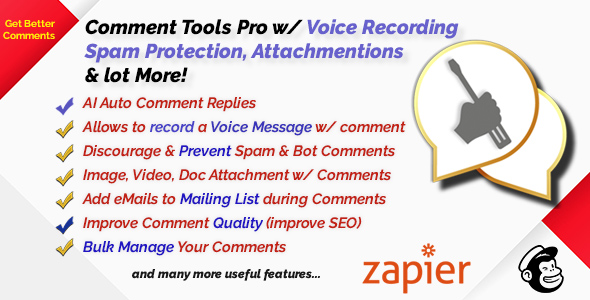

Empower your Blog Comments with AI and More!
Comment Tools Pro adds an arsenal of practical tools for your WordPress Blog’s comment section including an AI auto reply feature!
NOTE: Try our FREE ChatBot for WordPress – WPBot
NOTE: Try our Free ChatBot for WooCommerce – WoowBot


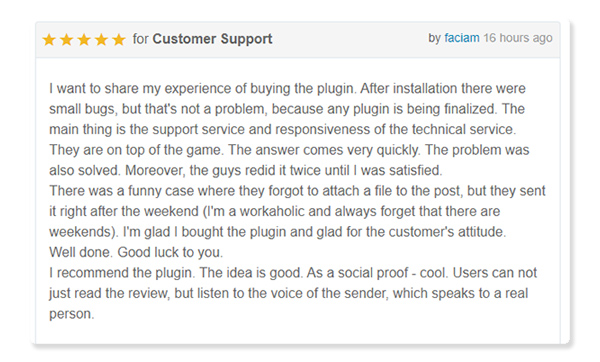
UpVote/DownVote comments is also supported.
Site admins can send eMail notifications and reminders to the commenters to create a more intimate relationship with the website users.Automatically Remove or Manage links in comments, set minimum time interval or required comment length. Notify a user when their comment is approved or email a commentator directly. Export eMail addresses of all the commentators in CSV to use in your marketing campaign. Redirect to a Page after Comments. Show All Comments on a single page with shortcode, add a Read More button to long comments and more!
AI Auto Comment Reply
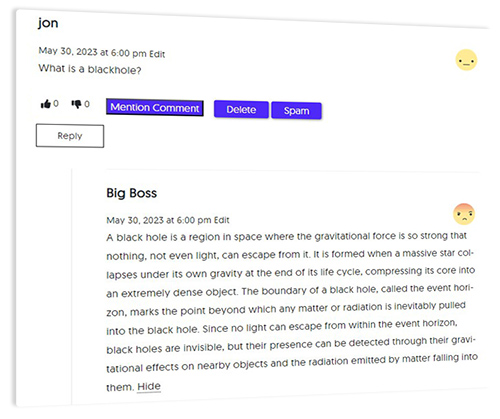
Never have a comment go unanswered! Use ChatGPT AI to automatically reply to your user comments.
Just add your OpenAI API key to the comment tools settings and it can reply to all Approved comments automatically from now on. You can set it to Auto reply to only the top comments or all the child comments. You can control the length, imagination and verboseness of the AI comments.Analyze the sentiment of a Comment – discern and moderate commentator’s emotion automatically. User UpVote/DownVote also available!
Grow your eMail List from Comments!
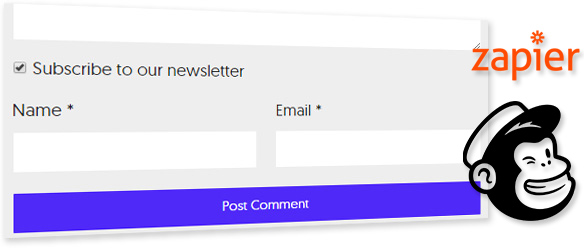
Get more out of your blog users. They love your blog and leave comments on your articles. Why not give them the option to subscribe to your newsletter while they are leaving a comment? You can do just that with Comment tools pro.Subscribed users’ name and emails can be exported as CSV or you can directly integrate with a MailChimp List! You can also use Zapier to integrate with almost any major mailing List platform! Create new Zap on your Zapier Account and connect with this plugin.
Stop Spammers
Tired of deleting useless, spammy or profane comments from your WordPress blog posts? How do you prevent a human who is willing to put in a moment to pass the Captcha and write a spam comment just to push a link in your website or harass you or your community?Comment tools pro Discourages Human comment spamming by removing the incentive to get a free link.
Comment tools pro completely Prevents Bot comment spamming with cookies
Increase Quality of Comments
Comments Tools Pro also gives you a collection of handy tools to engage with your loyal followers like Notify a user when their comment is approved or email a commentator directly.
Comment Tools Pro allows your visitors to attach images, videos, audios, documents and other files with their comments. They will also be able to automatically embed links from Youtube, Facebook, Twitter and other services in the comment text.Export eMail addresses of all the commentators. You can also Show All your blog Comments on a single page with just a shortcode, Add Read More to comments and more!
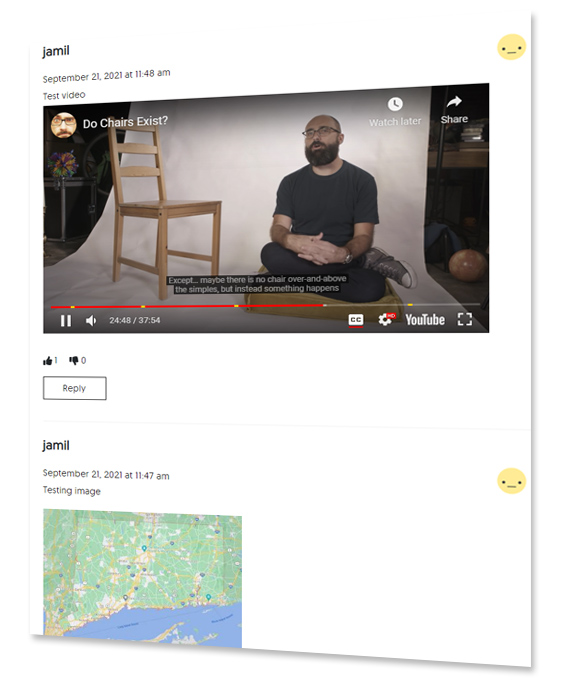
Discourage Low Quality/Spammy Comments
Comment tools pro discourages and prevents comment spammers and also gives you a collection of handy tools to engage with your loyal followers like Notify a user when their comment is approved or email a commentator directly. Export eMail addresses of all the commentators.Better Communication with Your Users
Notify a user when their comment is approved by email. Redirect First Time Commenters to a Page for a special offer or thank you message. Send a private email to an individual commenter from Dashboard. A button in the WP toolbar to email all the commenters on a post. All these features help you create a better rapport with your loyal followers.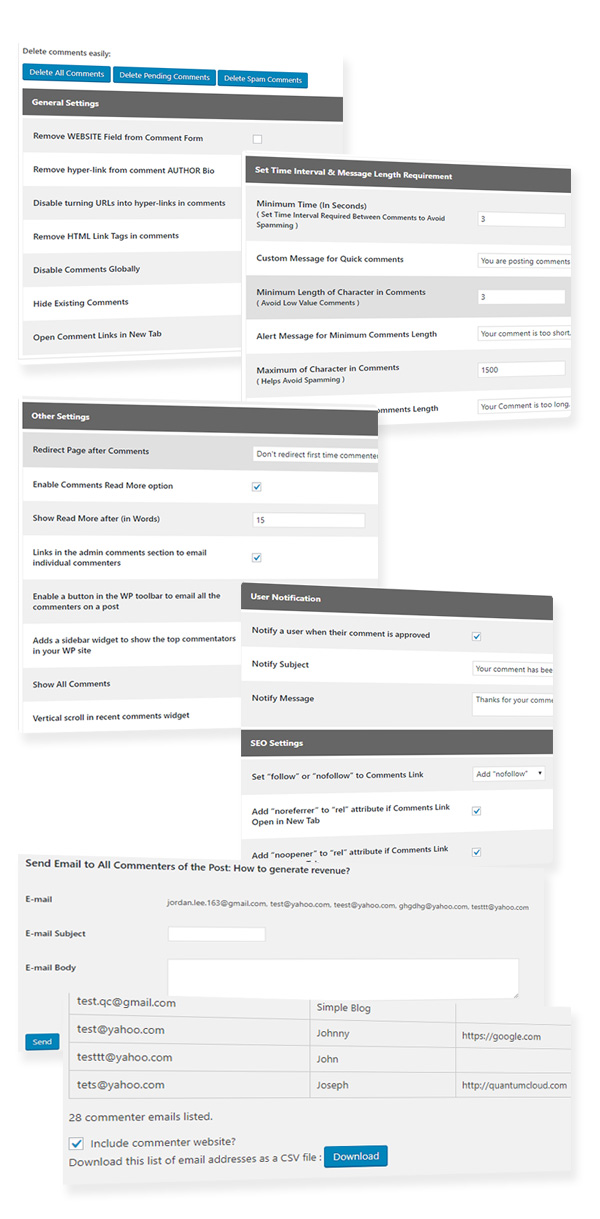
Improve and Moderate Comments Automatically!
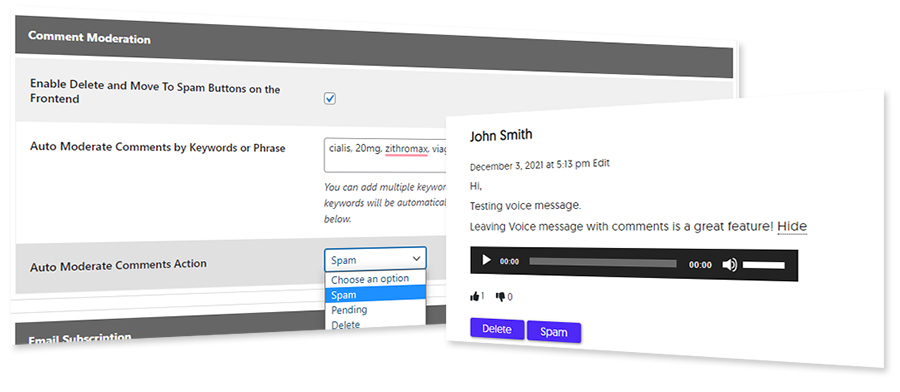
Auto Moderate Comments with keywords or keyphrases. Define a list of keywords. When any new comment include any of these keywords, it will be automatically marked as Spam or Deleted. Comment tools pro also adds option for admin to Delete or Mark a comment as spam from the front end so that you can take immediate action when reading through your comments. Very handy!
Enable Comment Sentiment settings to Show the commenter’s Emotion with emojis. Filter comments by Emotion (positive, negative or neutral)! Auto moderate comments for profanity by setting a threshold for negative comments! Commenter will be shown a warning message you define and asked to rephrase her comments to adhere to the community rules!
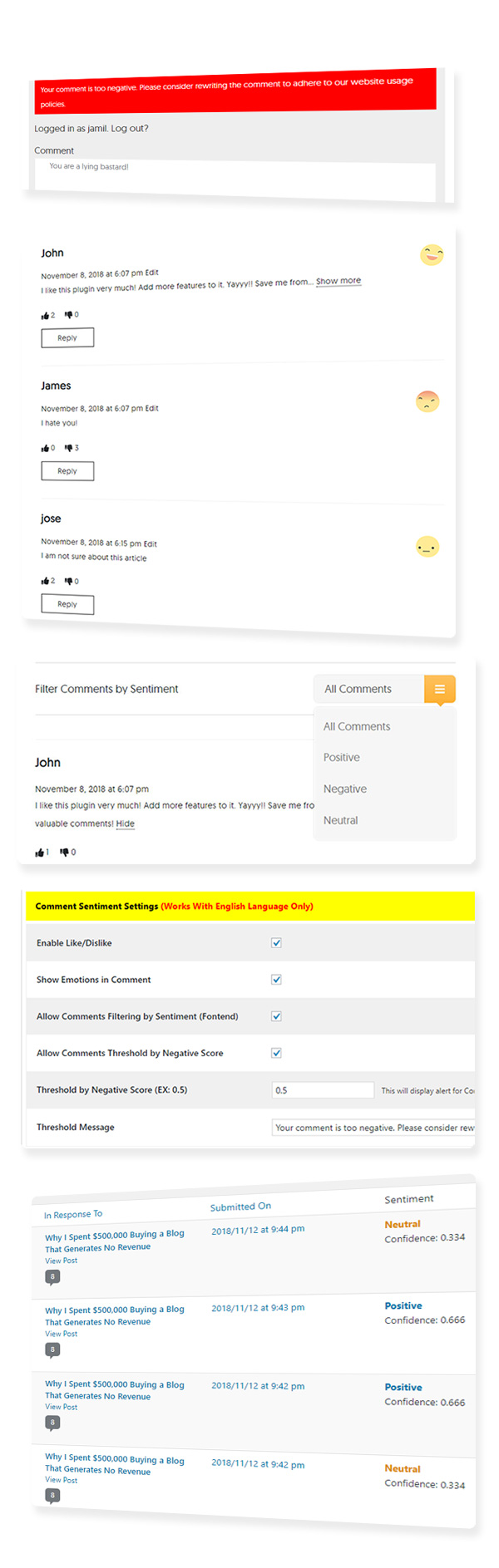
The Sentiment or Emotion analysis tool uses a comprehensive Dictionary of English words to score the text in the comments and display an icon and drop down filter to classify comments as Positive, Negative or Neutral. The dictionary of words is categorised as positive, negative or neutral, and a naive bayes algorithm to calculate sentiment. To improve accuracy, it removes ‘noise’ words.
**Currently sentiment analysis works for the English Language only. We are actively working on integrating this feature with some AI and Machine Learning API.
Comment Tools Pro with Mailing List Opt-in, Sentiment Analysis Features
Comment Tools
- Remove WEBSITE Field from Comment Form
- Remove hyper-link from comment AUTHOR Bio
- Disable turning URLs into hyper-links in comments
- Remove HTML Link Tags in comments
- Disable Comments Globally
- Hide Existing Comments
- Open Comment Links in New Tab
- Delete or Mark Comments as Spam from the front end (for users with Privilege)
AI Auto Reply to User Comments
- Supports OpenAI GPT 3, 4 and ChatGPT
- Auto Reply only for Approved Comments
- Reply only to the Top Comment or all the Child Comments also
- Options to Select Max Tokens, Temperature, Presence Penalty, and Frequency Penalty
Discourage Human Spam Comments
- Remove WEBSITE Field from Comment Form
- Remove hyperlink from comment AUTHOR
- Disable turning URLs into hyperlinks in comments
- Remove HTML Link Tags in comments
- Open Links in Comment on New Tab
- Minimum Time Between Comments ( Set Time Interval Required Between Comments by same user to Avoid Spamming )
- Custom Message for too quick comments
Prevent Bot Spam Comments
Comment Tools Pro provides an advanced feature to completely prevent commenting by Spam Bots by adding a stylesheet or image to the source code. When a Human loads your blog in a browser that stylesheet or image a cookie is added. If that user then leaves a comment the cookie is checked. If the cookie does not exist the comment is marked as spam by Bots.Get eMail Subscriptions from Comments
- eMail subscription opt-in checkbox in comment field
- Edit subscribe Language
- List of subscribed users in the plugin back end
- Export subscribed user list as CSV file
- Integrate with your MailChimp account and add emails directly to your mailing list
- Integrate with your Zapier account and create new zap for all major mailing platforms like aweber, drip, getresponse, contact contact etc. and dozens more!
Discourage Low Quality Comments
- Define Minimum Length of Comments ( Avoid Low Value Comments )
- Alert Message for Minimum Comments Length
- Maximum Length of Comments – (Prevent lengthy copy pastes)
- Define Alert Message for Maximum Comments Length
Sentiment Analysis to Prevent Spams and Improve Quality
- Sentiment and Emotion analysis for English Language
- Show Comment Sentiment Icons by each comment
- Filter comments by Sentiment (positive, negative or neutral)
- Automatically prevent comments with Profanity or too many negative words based on a score you define
- User Upvote/Downvote a comment
- Comment emotion and score display in the backend for admin
Improve Interactivity with Your Followers
- Notify a user when their comment is approved by email
- Redirect First Time Commenters to a Page for a special offer or thank you message
- Send a private email to an individual commenter from Dashboard
- A button in the WP toolbar to email all the commenters on a post
Image, Video, Document Attachment with Comments
Comment Tools Pro allows your visitors to attach images, videos, audios, documents and other files with their comments. They will also be able to automatically embed links from Youtube, Facebook, Twitter and other services in the comment text.- Limit the maximum file upload size.
- Make an attachment required.
- Specify whether the attachment will be embedded or displayed as a link.
- Enable/Disable autoembed links (like Youtube, Facebook, Twitter, etc.) in the comment text.
- Select an attachment image size from thumbnails available in your WordPressl.
- Link a thumbnail to a full-size image with lightbox plugins support
- Open a full-size image in a new tab or link thumbnail to the attachment page.
- Enable/Disable multiple upload.
- Combine images to gallery.
- Select an attachment image size for the images gallery.
- Restrict attachment file types.
- Decide who will be able to upload attachments: all users or only logged users.
- Manually moderate comments with attachments.
- Add, replace or delete an attachment from a comment on Edit Comment screen.
- Attach an unlimited number of attachments to the comment in the admin panel.
- Delete an attachment on Comments screen.
Bulk Manage Your Comments
- Disable Comments Globally
- Hide Existing Comments
- Show All Comments on a single page with a convenient shortcode.
- Delete all pending comments with one click.
- Delete All Spam Comments in One Click.
Other Features
- Sidebar Widget to Display the Top Commenters
- Add Vertical scroll in recent comments widget
- Enable Read More option in Comments (show more comments at once)
- Set rel = UGC, “follow” or “nofollow” to Comments Link
- Display post update date in blog post.
Upcoming Feature
The Comment Tools plugin is under active development. We want to work with you as we expand the plugin features so it becomes truly useful to you. If you have any feature request, let us know in the comments. We will try our very best to accommodate all reasonable feature requests.Why Comment Tools Pro?
- Developed by a company with 15+ years of experience. You can rely on us
- Always up to date and under active development for new features
- Extended documentation
- Easy and Flawless Setup
- Fully Responsive Templates
- Unique Features
- Quick, Reliable, No-nonsense and Friendly One-on-One Support
Version History
======Version 5.3.1 ================= # attachment on User Comments some css issue fixed. # some php bug fixed. # Comment Attachment file # Comments for Cookies Configuration # wp_verify_nonce added for Delete comments. # fontawesome icon issue fixed. # deleting the free version when pro version is install bug fixed. ======Version 5.2.7 ================= # deleting the free version when pro version is install. # comment link remove author url -- issue fixed # Enable nofollow sponsored and ugc in the contents. # Add “ugc” to “rel” attribute created separate option. # Remove WEBSITE Field from Comment Form -- bug fixed. # mailchamp api ajax request bug fixed. ========Version 5.2.5 =============== # Minimum Length of Character in Comments admin input field bug fixed. # plugin allows you to manage the values of the "rel" attribute in comment links "ugc". # antispambot function checking email when sending mail. # comment link added when send new comment mail. # Allow Comments Threshold by Negative Score ajax bug fixed. ======Version 5.2.1 ================= # when Filter Comments by Sentiment form submit, then redirect same location. ======Version 5.2.0 ================= # CheckBox to Subscribe to Newsletter during comment, # Subscribe to Newsletter Save info in DB table # Export as CSV Subscribe contacts # Subscribe to Newsletter integrate with Zapier # Subscribe to Newsletter integrate with mailchamp ======Version 5.1.1 ================= # Notify All Commenters of the Post when There is a New Comment # Notify All User of the Post when There is a New Comment Version 5.1 Added support for Google's new ugc tag rel=ugc for links in comments Version 5.0 Improved usability Added mailing list subscription feature Added mailchimp and zapier integration Version 4.5 Inception
$20 |
Download |
0 average based on 2 ratings.

| Last Update | 2023-06-05 |
| Created | 2018-11-18 |
| Sales | 16 |
| Discussion | Comments |
| Compatible Browsers | IE11 Firefox Safari Opera Chrome Edge |
| Software Version | WordPress 7.0.x WordPress 6.9.x WordPress 6.8.x WordPress 6.7.x WordPress 6.6.x WordPress 6.5.x WordPress 6.4.x WordPress 6.3.x WordPress 6.2.x WordPress 6.1.x WordPress 6.0.x WordPress 5.9.x WordPress 5.8.x WordPress 5.7.x WordPress 5.6.x WordPress 5.5.x WordPress 5.4.x WordPress 5.3.x WordPress 5.2.x WordPress 5.1.x WordPress 5.0.x WordPress 4.9.x |
| Compatible With | Elementor Elementor Pro |
| Gutenberg Optimized | Yes |
| High Resolution | Yes |
| Files Included | JavaScript JS JavaScript JSON HTML XML CSS PHP |
| Video Preview Resolution |


