CLEVER - HTML5 Radio Player With History - Shoutcast and Icecast - Elementor Widget Addon
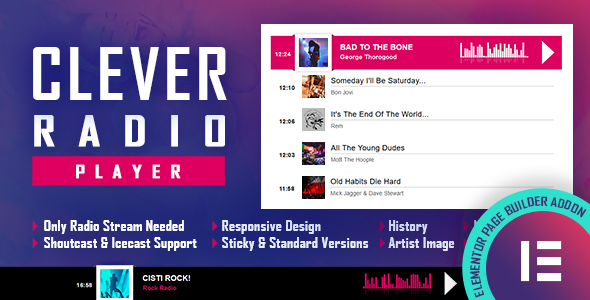



Elementor Widget / AddOn – A smooth and efficient radio player with history support which will play ShoutCast and IceCast streams. It can be used as fixed width & centered player, as a full width player or as footer & sticky player.

IF YOU NEED THE STANDARD WORDPRESS PLUGIN FOR THIS PRODUCT, YOU CAN DOWNLOAD IT FROM HERE : https://codecanyon.net/item/clever-html5-radio-player-with-history-shoutcast-and-icecast-wordpress-plugin/23950259

How to install plugin – https://www.youtube.com/watch?v=t3EcicIMM3c
How to use the plugin – https://www.youtube.com/watch?v=alZSVx8q9L8
FEATURES:
 Shoutcast & Icecast Support
It supports Shoutcast and Icecast radio streaming. The radio stream should be MP3 type. It will also play AAC streams but only on browsers which support AAC
Only Radio Stream Needed
Just add the radio stream and the player will get the current playing song and artist photo.
Responsive Design
The radio player can be used in websites which are responsive.
Full Width Option
The radio player width can cover the full width of the parent div.
Mobile Compatible
It is compatible with IOS and Android operating systems.
Artist Image
The player will display the photo of the current playing singer, if it is present in the database.
Highly Customizable
Over 35 parameters from where you can customize the player, having the possibility to integrate it in any design.
Sticky Version
Parameter to set the radio player in sticky version.
History
It will automatically get the history for ShoutCast streams. For IceCast streams it will generate the history as the radio plays.
Show/Hide History
Parameter to load the player with history or without history.
Multiple Instances
You can insert multiple radio players on your website or on the same page (maximum 2 on the same page). Only one can be set as ‘sticky’.
Notes for IOS/Android (restrictions imposed by Apple/Google):
1. The autoplay will not work because IOS/Android disables autoplay feature and it can’t be controlled from JS
2. Volume controllers will not work on IOS/Android. You’ll have to adjust the volume with physical buttons of the mobile device.
3. ShoutCast version below 2.0 doesn’t function on iOS 11. Please update ShoutCast server to at least v2.0
4. Icecast 2.4 kh4/kh5 do not function on iOS 11. Older versions (2.3.3 KH11) and standard Icecast 2.4.1 do function correctly. Please update IceCast server to latest version.
Note for Safari, Chrome & Firefox (restrictions imposed by Apple & Google):
1. Starting with Safari 11, Chrome 66 and Firefox 66 the autoplay will not work because Apple & Google disabled autoplay feature and it can’t be controlled from JS.
2. Chrome no longer accepts mixed requests. Please check this link: https://blog.chromium.org/2019/10/no-more-mixed-messages-about-https.html. In case you have a HTTPS website you’ll need to use a HTTPS radio link.

ELEMENTOR WIDGETS


NEW PRODUCT

Other Recommended Players


elementor, elementor addon, elementor plugin, elementor widget, history, html5, icecast, mobile, player, radio, shoutcast, sticky, streaming, widget, wordpress
If you need additional information don’t hesitate to contact us at HERE. We’ll try to answer you as quickly as possible.
Enjoy!
UPDATES / RELEASE LOG
***Version 2.5.1 Release Date: March 25, 2026 - patch applied ***Version 2.5 Release Date: April 18, 2025 - modifications to now_playing.php & history.php files ***Version 2.4 Release Date: April 11, 2025 - modifications to history.php file ***Version 2.3 Release Date: February 20, 2025 - replaced 'scheme' with 'global' to fix compatibility issue ***Version 2.2 Release Date: January 31, 2024 - images fixes ***Version 2.1 Release Date: March 18, 2023 - added jQuery dependency for wp_register_script() ***Version 2.0.2 Release Date: May 07, 2022 - updates for 2022 ***Version 2.0.1 Release Date: March 04, 2022 - code improvements for now playing reading file ***Version 2.0 Release Date: September 19, 2021 - new parameter added 'The MSCP PRO json Api URL ( OPTIONAL )' which can be used if you want to display the song cover image from MSCP PRO radio server - new optional 'Optional Shoutcast Sid' added. If you are using a ShoutCast stream and on the ShoutCast server you run multiple radio streams, you can set the 'sid' number so that the history will be displayed correctly. ***Version 1.9 Release Date: September 01, 2021 - replaced '_content_template()' with 'content_template()' - replaced '_register_controls()()' with 'register_controls()' - replaced font awesome widget icon with eicons ***Version 1.8 Release Date: July 20, 2021 - replaced '\Elementor\Scheme_Color' with '\Elementor\Core\Schemes\Color' ***Version 1.7 Release Date: April 21, 2021 - code improvements for now playing reading file ***Version 1.6 Release Date: February 12, 2021 - replaced musicbrainz api with audiodb api ***Version 1.5 Release Date: January 22, 2021 - code improvements ***Version 1.4 Release Date: January 14, 2021 - moved html5 audio tag inside the script so that it will not be affected by the incorrect usage of mediaelement library ***Version 1.3 Release Date: December 10, 2020 - code improvements ***Version 1.2 Release Date: December 05, 2020 - history file improvements ***Version 1.1 Release Date: November 27, 2020 - new parameters added 'Path to the artist images/album covers folder' ***Version 1.0 Release Date: May 15, 2020
$15 |
Download |
0 average based on 2 ratings.

| Last Update | 2026-03-25 |
| Created | 2020-05-15 |
| Sales | 77 |
| Discussion | Comments |
| Compatible Browsers | IE9 IE10 IE11 Firefox Safari Opera Chrome Edge |
| Software Version | WordPress 6.9.x WordPress 6.8.x WordPress 6.7.x WordPress 6.6.x WordPress 6.5.x WordPress 6.4.x WordPress 6.3.x WordPress 6.2.x WordPress 6.1.x WordPress 6.0.x WordPress 5.9.x WordPress 5.0.x WordPress 4.9.x |
| Compatible With | Elementor Elementor Pro |
| Gutenberg Optimized | No |
| High Resolution | No |
| Files Included | JavaScript JS HTML CSS PHP |
| Video Preview Resolution |


