Checkout on WhatsApp for WooCommerce


What is it:
This plugin adds “Buy on WhatsApp” button in product, cart & checkout pages. Clicking on that button let your customers contact you on WhatsApp with products info. You can customize the button text.
Why use this extension:
Now a days, text messaging is replaced by WhatsApp. Everyone is using WhatsApp for quick communication. So, we thought, it would be a nice thing to connect store owners and customers with WhatsApp. So that if customers wants to do the purchase via WhatsApp or if they have any presale questions, they can contact the store manager by clicking a simple button called “Buy on WhatsApp”(of course, button text is customizable by admin) in product, cart & checkout page and contact the store admin. Thus store admin can interact with their customers and clarify the queries or process the orders. This results in increase of sales.
Let’s say your customer has some presale questions regarding your products or he/she wants to complete the purchase via WhatsApp. In these cases, your customer can simply click on “Buy on WhatsApp” button which sends you a personalized message on WhatsApp with product info such as name, price, product link etc. You can customize this message like how you want. Your customers can also share the products with their friend and family on WhatsApp. With this awesome feature, you can convert all your presale questions into sales. Thus this plugin creates an added advantage to your WooCommerce store which boosts sales of your store.
So why wait, Install this awesome plugin and relax. You will receive orders / presale questions from your customers to your WhatsApp. You can drive all of them into sales.
Benefits:
By allowing the store’s customers to contact the store owner/manager via WhatsApp, this plugin gives more genuine feel to the store and a convenient way to resolve customer’s pre sale questions.
What’s included:
- Enable / Disable the WhatsApp button
- Display WhatsApp button on product, cart & checkout pages
- WhatsApp share button
- Floating WhatsApp chat button throughout the site
- Only display WhatsApp button on mobile
- Option to make the mandatory checkout fields optional
- Option to remove the add to cart button
- Option to remove the price
- Redirect the cart / checkout pages
- Own button text
- Customize WhatsApp message
- Enable / Disable floating WhatsApp Button
- Remove unnecessary fields in checkout page
How it works:
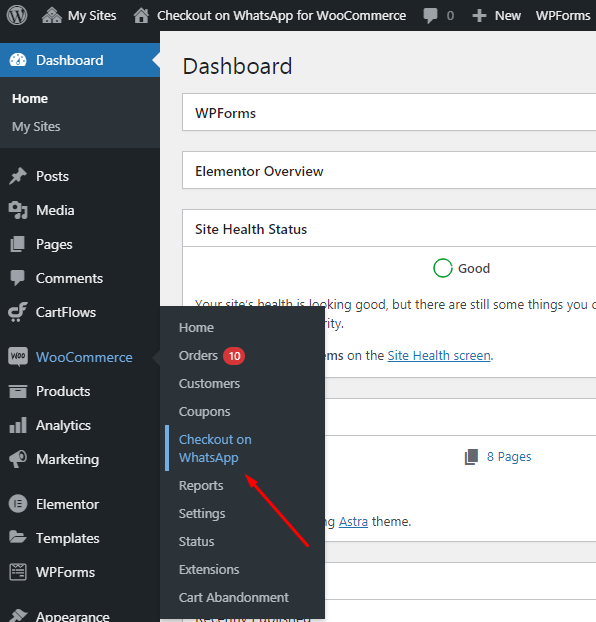
To make it work, just follow the installation instructions and activate the plugin. Post installation, navigate to WP Admin Dashboard > WooCommerce > Settings > Checkout on WhatsApp and configure your settings. No coding is required.
Setup and Configuration
General
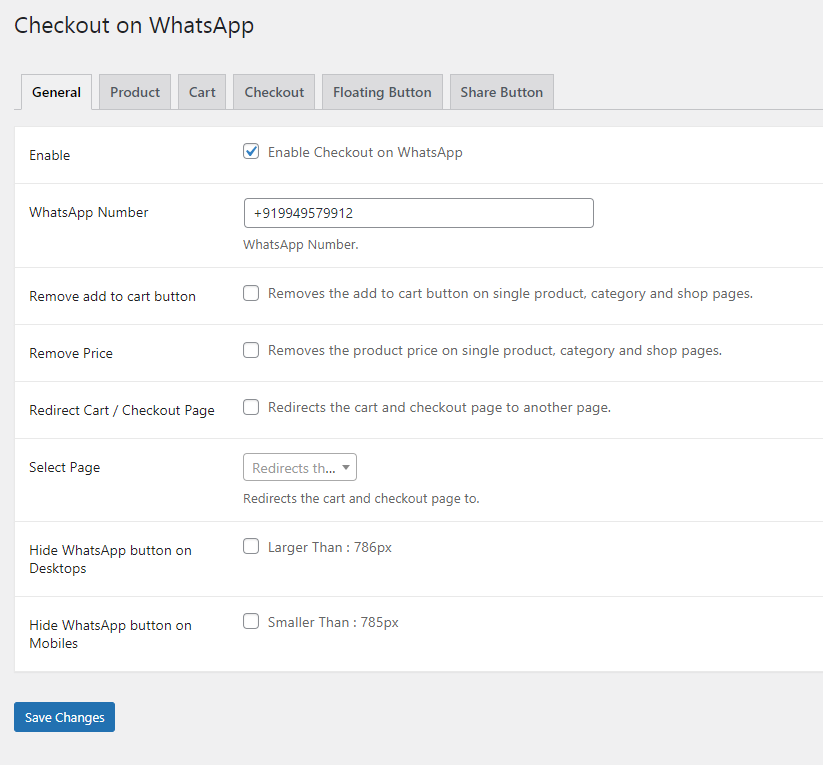 To set up your store with Checkout on WhatsApp for WooCommerce:
 - Go to: WooCommerce > Checkout on WhatsApp.
- Enable: Tick the checkbox to Enable Checkout on WhatsApp.
- WhatsApp Number: Input the Store Admin / Manager WhatsApp number to which the customer messages should reach.
- Remove add to cart button: Enabling this will remove add to cart button
- Remove price: Enabling this will remove the price
- Redirect cart / checkout page: Enable this to redirect cart / checkout page to a custom page
- Select page: Select the page to which the above redirection should happen.
- Hide whatsapp button on desktop: Enable this to hide whatsapp button on desktop
- Hide whatsapp button on mobiles: Enable this to hide whatsapp button on mobile
- Save changes.
Product

- Default Message: Input the your custom default message here. This will be received at your WhatsApp number, when the customer clicks “Buy on WhatsApp” button on single product page
- Button text: Input your custom text for the WhatsApp button on single product page
Cart

- Enable WhatsApp Cart Enable WhatsApp button on cart page.
- Add to cart button text Give your custom text to the button.
- Buy on WhatsApp button text Give your custom text to show in place of checkout button in cart page.
- WhatsApp cart message prefix text Input your custom message before the product details in the message.
- WhatsApp cart product details includes Choose the product details to include in the above message.
- WhatsApp cart message suffix text Input your custom message after the product details in the message.
- Remove Coupons from Cart Enable this to remove coupon box from the cart page.
- Remove Cart Cross Sells Enable this to remove cross sells from the cart page.
- Empty cart Enable this to empty the cart post user clicks on “Buy on WhatsApp” button on cart page.
- Select Page to redirect Select a page to redirect user post clicking on the “Buy on WhatsApp” button
Checkout

- Enable WhatsApp Checkout Enable WhatsApp button on checkout page.
- Remove Checkout Fields Select fields to remove from checkout page.
- Remove Required option Select fields to make them optional.
- Order button text Input custom text to display for Order Button
- WhatsApp checkout message prefix text Input your custom message before checkout data in the message.
- WhatsApp checkout message suffix text Input your custom message after checkout data in the message.
- Disable customer order emails Enable this to stop customer order emails.
- Disable admin order emails Enable this to stop admin order emails
Floating Button

- Display floating button: Check this to enable floating button.
- Floating button WhatsApp number: Input the WhatsApp number to which the button click trigger to.
- Floating button position: Choose a position for the button.
- Default Message: Input your default message to receive.
- Hide Floating button on Desktops: Check this to hide this button on desktops.
- Hide Floating button on Mobiles: Check this to hide this button on mobiles.
Share Button
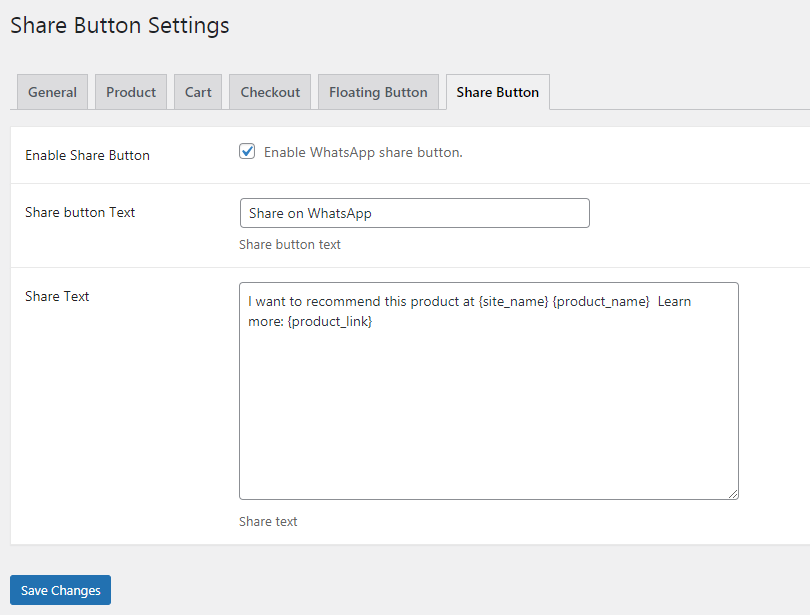
- Enable Share Button: Check this to enable WhatsApp share for products.
- Share button Text: Input your custom text to show on button.
- Share Text: Input your custom message text to receive.
Usage
After successful installation and activation of the plugin, your customers will see “Buy on WhatsApp” button in product single page, cart and checkout pages. Clicking on that button will take your customers to WhatsApp app or web.whatsapp with message to send to the store admin / manager. Customers can also contact the store manager, by clicking on the floating WhatsApp button. This plugin also adds a WhatsApp share button for the products. Your customers can share the product with their friends and family on WhatsApp.Troubleshooting
WordPress / WooCommerce troubleshooting.FAQs
How to add store admin / manager WhatsApp number?
To add the number navigate to WooCommerce > Checkout on WhatsApp > General > “WhatsApp Number” and input your WhatsApp number.
Can i customize the messages?
Yes, you can customize the messages with inbuilt placeholders.
Can i use WhatsApp cart and normal cart at the same time?
No. You can use one at a time. If you want to use WhatsApp cart, you need to enable it by navigating to Woocommerce > Checkout on WhatsApp > Cart. By enabling this, your normal woocommerce will be disabled and the customers can add the products to WhatsApp cart and can able to checkout via WhatsApp.
$29 |
Download |
0 average based on 2 ratings.

| Last Update | 2021-08-11 |
| Created | 2021-08-11 |
| Sales | 26 |
| Discussion | Comments |
| Compatible Browsers | IE10 IE11 Firefox Safari Opera Chrome Edge |
| Software Version | WordPress 5.8.x WordPress 5.7.x WordPress 5.6.x WordPress 5.5.x WordPress 5.4.x WordPress 5.3.x WordPress 5.2.x WordPress 5.1.x WordPress 5.0.x WordPress 4.9.x WordPress 4.8.x WordPress 4.7.x WordPress 4.6.1 WordPress 4.6 WordPress 4.5.x WordPress 4.5.2 WordPress 4.5.1 WordPress 4.5 WordPress 4.4.2 WordPress 4.4.1 WordPress 4.4 WordPress 4.3.1 WordPress 4.3 WordPress 4.2 WordPress 4.1 WordPress 4.0 |
| Compatible With | WooCommerce 5.1.x WooCommerce 5.0.x WooCommerce 4.9.x WooCommerce 4.8.x WooCommerce 4.7.x WooCommerce 4.6.x WooCommerce 4.5.x WooCommerce 4.4.x WooCommerce 4.3.x WooCommerce 4.2.x WooCommerce 4.1.x WooCommerce 4.0.x |
| Gutenberg Optimized | |
| High Resolution | |
| Files Included | JavaScript JS HTML CSS PHP |
| Video Preview Resolution |


