Captionify — AI Video Caption Generator & Subtitle Editor Flutter App
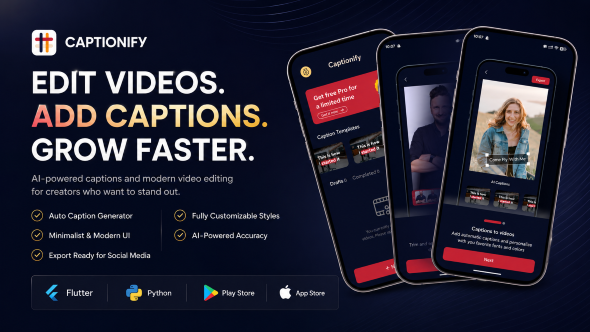

Captionify – AI Video Subtitle Generator Flutter App
Flutter Mobile App + Python Backend for AI Video Subtitles
Captionify is a complete Flutter mobile app with a Python backend that allows users to upload videos, generate subtitles, translate subtitle text, customize subtitle styles, and export a final MP4 video with burned-in subtitles.
This item includes the Flutter mobile app source code, Python Flask backend source code, and setup documentation.
Live Preview / APK Preview
You can install the APK directly on your Android device and preview the Captionify workflow before purchase.
Note: The buyer receives the full Flutter source code and Python backend source code in the purchase package. Buyers can build the release APK from source using the included setup guide.
App Preview
A complete end-to-end workflow from importing a video to exporting a subtitle-added MP4 video with custom styled subtitles.

Main Highlights
- AI-powered video subtitle generation
- 99+ transcription languages supported by Whisper
- 130+ subtitle translation target languages supported by Google Translate integration
- Flutter mobile app source code included
- Python Flask backend source code included
- One-time purchase
- APK preview available before purchase
Key Features
- AI Transcription: Generate subtitles from video or audio using faster-whisper.
- Subtitle Translation: Translate generated subtitle text into multiple languages using Google Translate integration.
- Subtitle Styling: Customize font size, subtitle color, background color, opacity, position, bold style, and italic style.
- MP4 Export: Export final videos with burned-in styled subtitles.
- Flutter Mobile App: Android and iOS source code with onboarding, Firebase authentication, profile, history, and editor screens.
- Python Backend: Flask REST API with FFmpeg audio extraction, transcription, translation, and SRT subtitle generation.
- Local History: Keep previously generated subtitle projects in the app.
- Light and Dark Mode: Clean UI with theme support.
How It Works
- Upload Video: Select a video from the gallery or record a new video using the camera.
- Process Video: FFmpeg extracts audio and faster-whisper generates subtitle text.
- Customize Subtitle Style: Adjust subtitle colors, size, opacity, and position.
- Export MP4: Save the final video with burned-in subtitles.
What Is Included
Flutter Mobile App
- Full Flutter source code for Android and iOS
- Onboarding screens
- Firebase authentication
- User profile screens
- Video import workflow
- Subtitle preview and customization
- Subtitle template presets
- Light and dark theme support
- MP4 export using FFmpeg Kit
Python Backend
- Flask REST API source code
- FFmpeg audio extraction
- faster-whisper AI transcription
- Google Translate subtitle translation integration
- SRT subtitle generation
- Windows and Linux/server setup documentation
Language Support
Whisper supports 99 transcription languages, and Google Translate supports 130+ translation targets.
Popular languages include: Arabic, English, French, German, Hindi, Dutch, Japanese, Korean, Spanish, Chinese Simplified, Chinese Traditional, and more.
Technology Stack
- Flutter
- Dart
- Firebase Authentication
- Cloud Firestore
- Python
- Flask
- faster-whisper
- FFmpeg
- Google Translate integration
Requirements
Flutter App Requirements
- Flutter SDK and compatible Dart SDK
- Android Studio or VS Code
- Android SDK API 21+
- Xcode and CocoaPods for iOS builds
- Firebase project for authentication and app configuration
Python Backend Requirements
- Python 3.10 or 3.11
- FFmpeg installed on the server or local machine
- Windows or Linux server/environment
- Disk space for the Whisper model and temporary video processing files
- Valid CodeCanyon purchase code for item activation
Important Notes About Third-Party Services and Extra Costs
This item uses third-party services and server-side processing. Buyers are responsible for setting up their own accounts, server, and configuration where required.
- Firebase: A Firebase project is required for authentication and app configuration. Firebase may have free and paid usage limits depending on your usage.
- Google Translate Integration: Translation features may depend on the selected Google Translate package/API or translation service configuration. Any related API/service cost is not included in the item purchase price.
- Server Hosting: The Python Flask backend must be hosted on the buyer’s own server, VPS, or local environment. Hosting cost is not included in the item purchase price.
- FFmpeg and AI Processing: Video processing and transcription can require server CPU, RAM, and storage resources depending on video size and usage.
- App Store / Play Store Accounts: Apple Developer and Google Play Console accounts are not included.
Note: The item purchase price only includes the source code and documentation. Third-party services, hosting, API usage, store accounts, and deployment charges are not included.
Security and Production Notes
- The backend source code is provided for buyer installation and configuration.
- For production use, buyers should run the Flask backend with debug mode disabled.
- Buyers should configure proper environment variables for server URLs, Firebase configuration, and production settings.
- Buyers should avoid exposing sensitive keys, server paths, raw exception messages, or debug information in production.
- Use a production-ready server setup such as Nginx/Apache reverse proxy with a suitable WSGI server where required.
Support
Please read the included setup guide before installation. For item-related support, you can contact us through the CodeCanyon support tab.
Support includes help with installation, configuration, and item-related issues related to the included source code.
Support does not include third-party service fees, custom feature development, app store submission fees, server hosting charges, or paid API usage costs.
Changelog
Version 1.0.0
- Initial release
- Flutter mobile app included
- Python Flask backend included
- AI transcription included
- Subtitle translation included
- Subtitle styling included
- MP4 export included
- Firebase authentication included
- CodeCanyon license activation included
Captionify by Dcodax Technologies


