BMA - WordPress Appointment Booking Plugin for Enterprise


BMA Pro (Book My Appointment) is a WordPress appointment booking and scheduling plugin. Customers choose a service, a staff member, a location and a free time slot on your site. Payment is on arrival or online with Stripe or PayPal.
It is built for businesses that sell time with a person: clinics, salons and spas, tutors and consultants. Every booking is checked against working hours, breaks, holidays and existing bookings: a one-to-one appointment cannot be double-booked, and a group session accepts bookings only while places remain. You can send email and SMS reminders and, optionally, send each booking to a Google Calendar you connect.
BMA Pro needs the free BMA Lite plugin from WordPress.org. Install and activate BMA Lite first, and keep it active: BMA Pro runs on top of it.
Try it before you buy in the live demo. For setup help, see the documentation or open a support ticket.
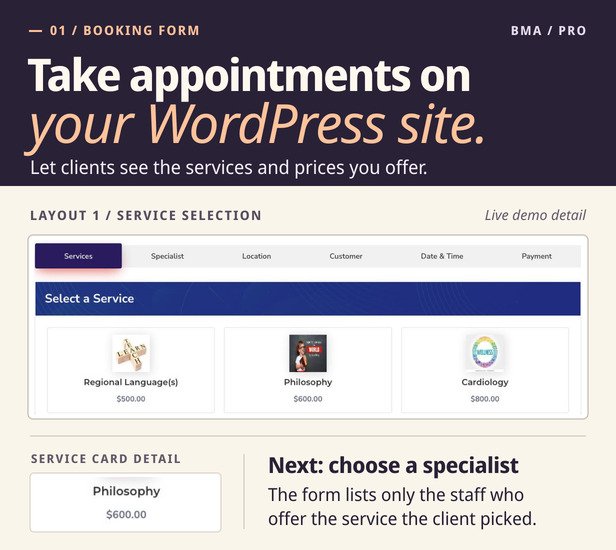
Layout 1 service selection in BMA Pro. Try the live demo.
How a booking works
- Service. The customer picks a service from your categories and sees its price and length.
- Staff member. Only the people who offer that service are listed, each with their own price if you set one.
- Location. The customer chooses one of your locations.
- Details. Name, email and phone number, plus any questions you add, such as “Is this your first visit?”
- Date and time. The form offers only free times: inside the staff member’s working hours, outside breaks and holidays, and not already booked. A group session stays on offer until it is full.
- Payment. Pay on arrival, by card through Stripe, or with PayPal. Customers can enter a coupon code.
- Confirmation. The form shows the booking reference, date, time, location, total and payment status, with links to add the appointment to Google Calendar, Apple Calendar or Outlook.
New bookings can wait for your approval or be approved automatically. With online payment, you can have a booking approved as soon as it is paid.
Seven booking form layouts
There are four form designs. Three of them come in two field styles, boxed or underlined, which makes seven layouts. Every layout takes the same bookings; they differ in how the steps are shown. Each layout name below opens it in the live demo.
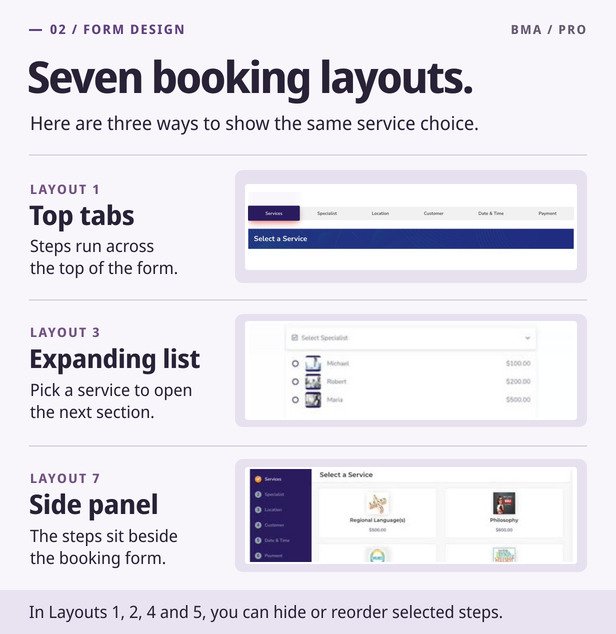
Layout 1: tabs, boxed fields. The steps are tabs across the top, and a blue bar names the step the customer is on. Services and staff members are cards in a grid.
Layout 2: progress bar, boxed fields. A rounded bar across the top fills in as the customer moves on, with a tick on each finished step. Services and staff members are cards in a grid.
Layout 3: service list with expanding sections, boxed fields. Services are a list with a Book Now link on each row. After the customer picks one, the remaining steps open one below another in a single column, so the form can sit in a narrow part of the page.
Layout 4: tabs, underlined fields. The same tabs and blue bar as Layout 1, with underlined fields.
Layout 5: progress bar, underlined fields. The same progress bar as Layout 2, with underlined fields.
Layout 6: service list with expanding sections, underlined fields. The same list and sections as Layout 3, with underlined fields.
Layout 7: steps in a side panel. The steps are listed in a dark panel beside the form and ticked off one by one.
- Each form you save has its own shortcode, [BookMyAppointmentForm id=”...”], with its own layout and step order. Several forms can share one page.
- You can choose a different layout for phones, tablets and desktops.
- In layouts 1, 2, 4 and 5 you can reorder the service, staff and location steps, or remove the ones you do not need.
- The form’s styles apply only to the form, so your theme keeps its own look.
- The shortcode works in the block editor and in page builders that accept shortcodes. There is no separate Elementor widget or block.
Services, staff and opening hours
- Services in categories, each with a price, a length in minutes and, for group sessions, a minimum and maximum number of people.
- Prices per booking or per person.
- Staff members with their own weekly working hours, breaks, services and prices.
- Several locations, business holidays, and a slot interval that sets the start times offered (every 15 minutes, for example).
- Times follow your site’s time zone.
Double-booking protection
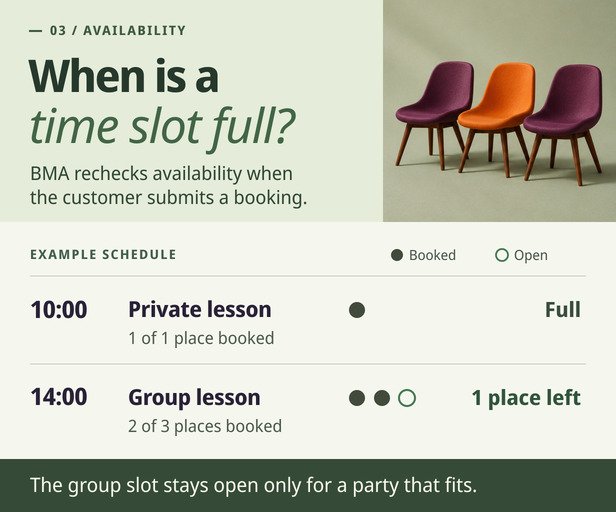
The form shows only free times, and BMA Pro checks again at the moment a booking is saved.
- Individual appointments: a staff member’s time slot can be booked once. If two customers confirm the same slot at the same moment, one booking is saved; the other customer sees a message and can choose another time.
- Group bookings: a service with a maximum number of people keeps the same time open until its places are taken. BMA Pro counts the people already booked and accepts a new booking only if it fits in the places that remain.
- Bookings you enter yourself: when you add or move an appointment and it clashes with another, BMA Pro asks before saving.
Payments: Stripe, PayPal or pay on arrival
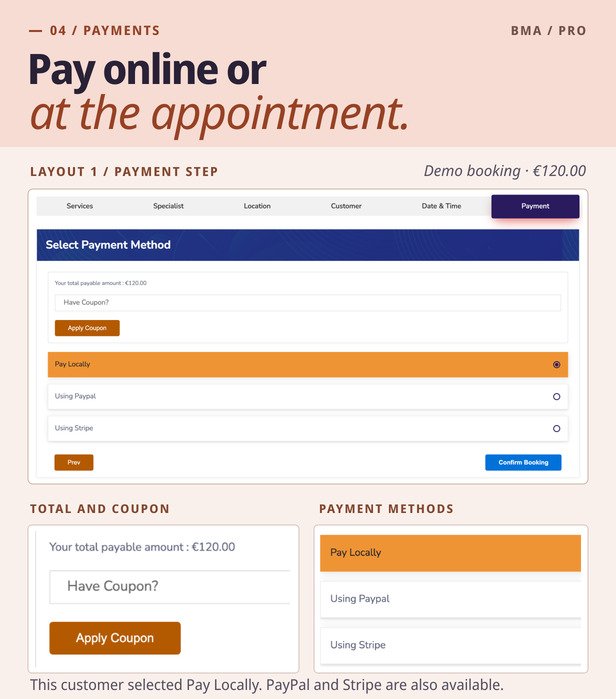
- Stripe Checkout: customers pay by card on Stripe’s own page, with 3-D Secure when their bank asks for it.
- PayPal Checkout: customers approve the payment on PayPal.
- Pay on arrival: for customers who settle at the appointment.
- Money goes straight to your own Stripe or PayPal account. A booking is marked paid only after Stripe or PayPal confirms the full amount to your site.
- Totals, coupons and per-person prices are calculated on your server, so the amount charged is the amount shown.
- Full refunds you make in Stripe or PayPal are recorded against the booking.
Confirmation and Add to Calendar
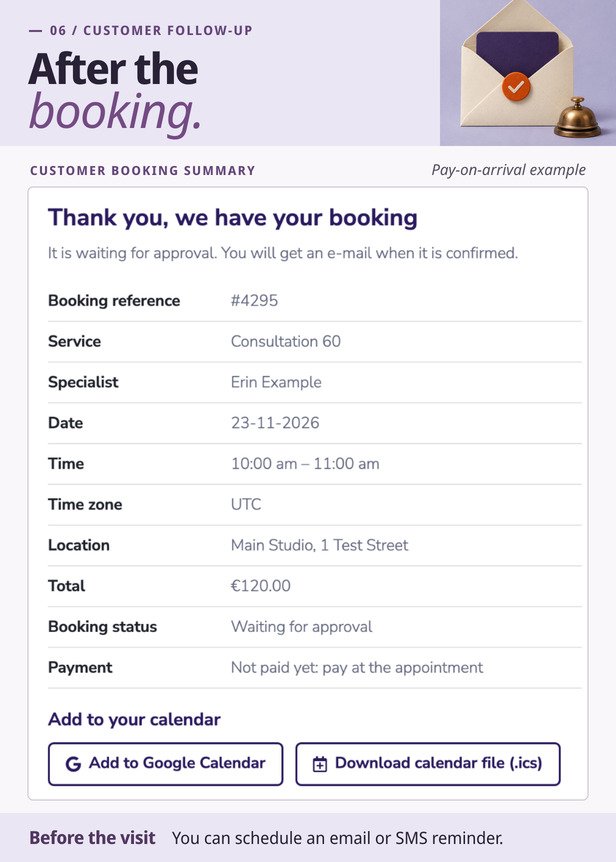
- After booking, the form shows a confirmation with the reference, service, staff member, date, time, time zone, location, total, booking status and payment status. It also appears when the customer returns from Stripe or PayPal. A booking that is still waiting for approval or payment is never shown as confirmed or paid.
- Customers can add the appointment to their own calendar with an “Add to Google Calendar” link or an .ics file for Apple Calendar, Outlook and other calendar apps. Both are on the confirmation and in the customer’s appointment list. Booking emails can carry them too: put the placeholders {google_calendar_url} and {calendar_file_url} in an email template, and each email is sent with that booking’s own links. None of this needs a Google connection on your site.
Google Calendar (optional): what syncs and what does not
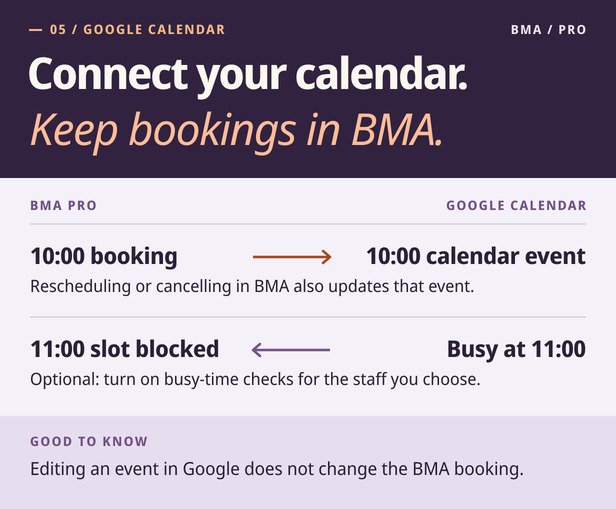
Google Calendar sync is optional: BMA Pro takes bookings without it, and you turn it on in the settings when you want it. BMA sends booking updates to Google and can read busy times to block availability. Changes in Google do not edit BMA bookings.
- Bookings to Google: each booking becomes an event in the Google Calendar you connect. The event is updated when the booking is rescheduled and removed when it is canceled. If Google cannot be reached, BMA Pro tries again later.
- Busy times from Google (optional): times that are busy in that calendar are not offered for the staff members you choose.
- Guests (optional): the staff member and the customer can be added to the event as guests, and Google can email them the invitation.
- Not two-way sync: moving or deleting an event in Google does not move or cancel the booking in BMA. One Google account is connected per site.
Reminders and notifications
- Email and SMS templates for booking events, such as a new booking, an approval or a cancellation.
- Scheduled reminders: an email or text message a set number of days before the appointment, at the time of day you choose.
- Text messages are sent through your own Twilio or MSG91 account.
- Placeholders for the customer, service, staff member, location, total, cancellation link, calendar links and the customer’s answers.
Customer and staff pages
- Customers can book as guests or sign in. On their page they see their appointments, add them to their calendar, and cancel up to the notice period you set, from 1 minute to 3 days before the appointment.
- Staff members sign in to approve, cancel or reject their own bookings.
- Cancellation links in emails are signed, so a link cannot be altered to cancel someone else’s booking.
Coupons and booking questions
- Coupons: a fixed amount or a percentage, with start and end dates, a usage limit, and the services, categories or staff members you exclude.
- Booking questions: add your own fields to the form. The answers are stored with the booking and can be included in emails.
Admin tools
A dashboard with charts, an appointment list with filters, a calendar view, and screens for customers, payments, coupons, booking questions, email and SMS templates and the form’s labels. BMA Pro is translation-ready (POT file included), supports WordPress’s personal data export and erasure tools, and can be network-activated on multisite.
Requirements
- BMA Lite – Appointment Booking and Scheduling, free on WordPress.org, installed and active.
- WordPress 6.5 or later, PHP 8.1 or later, and MySQL or MariaDB.
- Your purchase code, entered when the plugin asks for it.
- Only for the features you use: a Stripe account, a PayPal REST app, a Twilio or MSG91 account for SMS, and a Google Cloud OAuth client for Google Calendar.
- Tested with WordPress 7.1 on PHP 8.4 and 8.5.
Setup in five steps
- Install and activate BMA Lite from WordPress.org (Plugins, Add New, search for “BMA Lite”).
- Upload the BMA Pro ZIP from your CodeCanyon downloads, activate it, and enter your purchase code.
- Add your services, your staff members and their working hours.
- For online payments, enter your Stripe keys and webhook signing secret, or your PayPal REST app details. The settings screen shows the webhook address to copy.
- Put the form’s shortcode on a page and make a test booking.
Limits to know before you buy
- Google Calendar is not two-way sync, and each site connects one Google account.
- BMA Pro has no WooCommerce checkout, no video-meeting links and no mobile app.
- Partial refunds: Stripe Checkout and PayPal Checkout log a partial refund and leave the payment as it is. Under PayPal Payments Standard, any refund notice, partial or full, marks the payment unpaid.
- Stripe is not offered when your shop currency is BHD, JOD, KWD, OMR or TND. PayPal is not offered in currencies PayPal does not accept.
- Reminders are sent by WordPress’s scheduler (WP-Cron), which runs when your site has visits unless your host runs it on a timer.
- SMS delivery depends on your Twilio or MSG91 account.
Frequently asked questions
Do I need BMA Lite, and does it cost anything?
You need it, and it is free. BMA Lite is on WordPress.org. BMA Pro is installed on top of it and WordPress will not activate BMA Pro without it, so keep Lite active. If you already use BMA Lite, your services, staff, customers and appointments stay as they are.
Is the Google Calendar integration two-way sync?
No. BMA sends booking updates to Google and can read busy times to block availability. Changes in Google do not edit BMA bookings. The connection is optional: BMA Pro works without Google Calendar.
How does it prevent double bookings?
Each booking is checked on your server when it is saved, against the staff member’s hours, breaks, holidays and other bookings. A one-to-one appointment can be booked once, even when two customers confirm the same slot at the same moment. A group session stays open until its remaining places are taken.
Which payment methods can my customers use?
Pay on arrival, card payments through Stripe Checkout, and PayPal Checkout. Payments go to your own Stripe or PayPal account.
Is this a one-time purchase?
Yes. You pay once on CodeCanyon for a license that includes future updates and 6 months of support from the author, which you can extend. The plugin runs on your own WordPress site.
Does it send appointment reminders?
Yes. You create email or SMS reminder templates and choose how many days before the appointment, and at what time, each one is sent. Text messages need your own Twilio or MSG91 account.
Can customers add the appointment to Apple Calendar or Outlook?
Yes. The confirmation and the customer’s appointment list offer an .ics file that those apps open, beside an “Add to Google Calendar” link. Your emails can carry both links too, through the placeholders {calendar_file_url} and {google_calendar_url} in the email templates.
Can customers cancel an appointment?
Yes, from their appointment list or from the link in their emails, up to the notice period you set. To move an appointment to another time, edit it on the admin screens.
Will it work with my theme, Elementor or another page builder?
The booking form is a shortcode, so it goes into the block editor or any page builder that accepts shortcodes, and its styles do not change your theme. There is no dedicated Elementor widget.
Can I use it for several staff members and locations?
Yes. Each staff member has their own working hours, breaks, services and prices, and customers choose the location in the form.
Can customers book without creating an account?
Yes. A guest books with a name, email and phone number. If your site allows registration, BMA Pro also creates a WordPress account for that email, so the customer can see and cancel their bookings later.
Does the booking form work with a caching plugin?
Yes. If phones, tablets and desktops get different layouts, turn on your cache’s separate cache for mobile devices. Do not cache wp-admin/admin-ajax.php or the booking page’s payment and cancellation return addresses. The readme inside the plugin lists them.
I am updating from 1.7.9. What should I check?
Version 1.8.0 needs PHP 8.1, WordPress 6.5 and BMA Lite. Card payments with Stripe stay off until you save a webhook signing secret. PayPal keeps using Payments Standard until you enter your PayPal REST credentials. Email templates saved with earlier versions lost their paragraphs and line breaks: open each one, format it again and save it.
Support and updates
Your purchase includes future updates and 6 months of support from RedefiningTheWeb, which you can extend on this page. For help, open a support ticket or read the documentation.
Changelog
**05.11.2026 - Version 1.8.0** - Booking confirmation: Replaced the success popup across all seven booking forms with a confirmation showing the booking reference, service, specialist, date, time, location, total and payment status. - Add to Calendar: Customers can now add an appointment to Google Calendar or download an `.ics` file for Apple Calendar and Outlook. Links are available on the confirmation screen, in the customer’s appointment list and through booking email placeholders. - Double-booking protection: BMA checks availability again when a booking is submitted, including when two customers request the same slot at the same time. Group bookings respect the remaining capacity. - Google Calendar availability: Busy times from the connected Google Calendar can now block booking slots for selected employees. This also applies when an admin adds, edits or moves an appointment. - Google Calendar sync: Improved invitations, rescheduling and cancellations. Temporary sync failures are retried without creating duplicate events. - Payments and pricing: Updated Stripe Checkout and PayPal Checkout integration. Fixed per-person and specialist pricing, and automatic appointment approval after successful payment. - Appointment reminders: Added scheduled email and SMS reminders. Fixed Twilio phone-number formatting and an issue where saving MSG91 settings could switch off Twilio. - Booking forms: Fixed fresh-install defaults that could prevent a first booking. Improved mobile layouts, keyboard navigation and tablet template selection. - Admin and security: Fixed appointments appearing twice or going missing when paging through the admin list. Improved permission checks and input handling. Saved Google and Twilio secrets are no longer included in the settings page HTML. Upgrade notes - Requires WordPress 6.5 or later and PHP 8.1 or later. Keep the free BMA Lite plugin active. - Stripe: Save your webhook signing secret to enable card payments after upgrading. - PayPal: Existing Payments Standard setups continue to work until you enter REST credentials for PayPal Checkout. 08.02.2024 - Version 1.7.9 - Fixed: Google calendar issue during appointment from admin side - Fixed: Coupon Issue during verification - Fixed: Working & Break hour of employee during employee registration - Fixed: Time picking issue of selected date for booking - Fixed: Appointment display table on admin side - Fixed: Other Minor Bugs 08.05.2023 - Version 1.7.8 - Fixed: Bugs In Form Template Section - Fixed: Bugs in Appointment Booking Form - Fixed: Other Minor Bugs 13.03.2023 - Version 1.7.7 - Fixed: Increment Decrement no. of people issue during appointment booking from front-end - Fixed: Bugs in appointment booking (custom fields details were not saving) - Fixed: Other Minor Bugs 02.02.2023 - Version 1.7.6 - Fixed: Bugs in Template Section (regarding Set Position of Panels issues) - Fixed: Bugs in regarding CSS issues - Fixed: Other Minor bug 22.12.2022 - Version 1.7.5 - Fixed: Bugs in Appointment Edit Form(appointment status was not showing) - Fixed: Bug in Edit Customer Form - Fixed: Other Minor bug 19.11.2022 - Version 1.7.4 - Fixed: Bug (Once the purchase code was removed, the verify form did not show up again) - Fixed: Bug in Settings Tab( other tabs not clickable) - Fixed: Bug in Template Section some fields ans save button did not showing - Fixed: Other Minor bug 01.11.2022 - Version 1.7.3 - Modify: Show extra details of customer in table - Modify: Some design part in Forms - Fixed: Other Minor bug 29.09.2022 - Version 1.7.2 - Fixed: Bugs in Coupons - Modify: Add company image button in settings - Fixed: Bugs in Company in details section - Fixed: Other Minor bug 26.08.2022 - Version 1.7.1 - Added: New feature custom css option for border radius on front-end booking form - Fixed: Bugs in templates - Fixed: Bugs in Custom fields - Fixed: Other Minor bug 22.06.2022 - Version 1.7.0 - Added: A feature for show more information on payment tab - Fixed: Minor bugs - Fixed: related select2 issues 04.02.2022 - Version 1.6.0 - Added: A feature to make service per person chargeable or per service chargeable - Fixed: Minor bug of Panels Positioning - Fixed: Number of customer issue on date and time panel 19.10.2021 - Version 1.5.1 - Fixed: Minor Bugs Fixed 30.09.2021 - Version 1.5.0 - Added: Admin can remove the Panels(except date/time and payment) in Templates(1,2,4,5) - Fixed: Minor Bugs Fixed 17.07.2021 - Version 1.4.5 - Added: Remove Puchase Code button - Fixed: Services section issue 31.05.2021 - Version 1.4.4 - Fixed: Minor Bug 06.05.2021 - Version 1.4.3 - Fixed: Minor Bug 04.04.2021 - Version 1.4.2 - Added: A setting to approve appointment after successful payment - Fixed: Minor bug 28.02.2021 - Version 1.4.1 - Fixed: Minor bug of PayPal payment gateway 08.01.2021 - Version 1.4.0 - Added: Admin can create shortcodes for each template - Added: Each template can be seen at a time by using different shortcodes - Fixed: Minor bug of Payments showing section 27.09.2020 - Version 1.3.2 - Added: Admin can remove the number of people field - Fixed: Minor Bug 12.09.2020 - Version 1.3.1 - Fixed: Minor Bug of the Previous Update 09.08.2020 - Version 1.3.0 - Added: Admin can change panel positions in Templates (1,2,4,5) - Fixed: Minor Bugs Fixed 03.06.2020 - Version 1.2.3 - Updated: Increase the booking cancellation time up to 3 days - Fixed: Minor Bug of Holidays Setting 11.05.2020 - Version 1.2.2 - Added: Admin, as well as Specialist, can Approve, Cancel, or Reject appointments - Fixed: Minor Bug of service price listing on the front page 02.04.2020 - Version 1.2.1 - Fixed: Minor Bug of Email Notification Section 09.02.2020 - Version 1.2.0 - Added: Admin can add custom fields for customer details - Fixed: Minor Bugs of Specialist Section 03.01.2020 - Version 1.1.2 - Fixed: Minor bug of Google Calendar Settings 24.12.2019 - Version 1.1.1 - New: Coupon Module - New: Template 7 - Updated: Each template have a new look - Fixed: Minor Bug of Employee Section 05.12.2019 - Version 1.0.0 - Initial Release
$69 |
Download |
4 average based on 8 ratings.

| Last Update | 2026-11-13 |
| Created | 2019-12-06 |
| Sales | 225 |
| Discussion | Comments |
| Compatible Browsers | IE9 IE10 IE11 Firefox Safari Opera Chrome Edge |
| Software Version | WordPress 7.1.x WordPress 7.0.x WordPress 6.9.x WordPress 6.8.x WordPress 6.7.x WordPress 6.6.x WordPress 6.5.x WordPress 6.4.x WordPress 6.3.x WordPress 6.2.x WordPress 6.1.x WordPress 6.0.x WordPress 5.9.x WordPress 5.8.x WordPress 5.7.x WordPress 5.6.x WordPress 5.5.x WordPress 5.4.x WordPress 5.3.x WordPress 5.2.x WordPress 5.1.x WordPress 5.0.x |
| Compatible With | Elementor Elementor Pro Gravity Forms WooCommerce 10.x.x WooCommerce 9.x.x WooCommerce 8.x.x WooCommerce 7.x.x WooCommerce 6.x.x WooCommerce 5.x.x WPML |
| Gutenberg Optimized | Yes |
| High Resolution | Yes |
| Files Included | JavaScript JS HTML CSS PHP |
| Video Preview Resolution |


