Block Bloom | HTML5 Block Puzzle Game
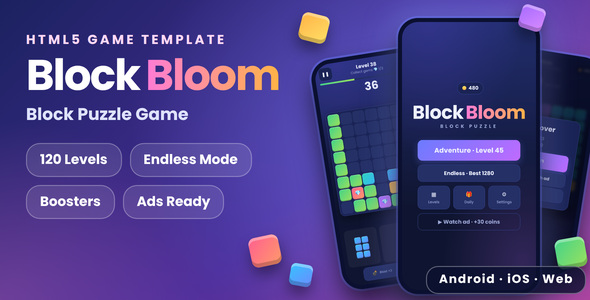

Block Bloom – HTML5 Block Puzzle Game
Block Bloom is a polished HTML5 block puzzle game featuring an 8×8 board, satisfying line clears, combo bonuses, adventure levels, and endless gameplay. Players drag and place blocks to complete rows and columns, earn rewards, and progress through increasingly challenging puzzles.
Built with plain HTML, CSS, and JavaScript, Block Bloom requires no build tools, frameworks, database, or server-side code. Upload the game files to a compatible web host to get started. The game also supports offline play and installation on supported devices through Progressive Web App (PWA) functionality.
Game Features
- 120 Adventure Levels: Complete levels with three rotating goal types: reach a target score, clear a required number of lines, or collect gems hidden in blocks.
- Endless Mode: Keep playing and try to beat your saved high score.
- 12 Block Shapes: Place a variety of block shapes with automatic rotations.
- Smart Block Generation: The generator provides at least one fitting block and can offer smaller pieces when the board becomes crowded.
- Drag-and-Drop Controls: Smooth block placement with a live placement preview, supporting mouse and touch input.
- Combo System: Chain line clears to earn combo bonuses and enjoy animated clearing effects.
- Power-Up Boosters: Use Blast to clear a 3×3 area or Reroll to generate a new set of blocks.
- Level Star Ratings: Earn one to three stars based on level performance.
- Daily Rewards: Claim daily gifts and build a reward streak.
- Level Selection: Review level progress and earned stars.
- Audio and Vibration Settings: Toggle sound effects, background music, and vibration independently.
- Automatic Saving: Preserve supported game progress in browser storage.
- Complete Game Flow: Includes a loading screen, pause menu, victory screen, game-over screen, and revive option.
Designed for Mobile and Desktop
Block Bloom is designed for touchscreens and desktop browsers. Its drag-and-drop interaction makes block placement intuitive across supported devices. Players can also install the game on compatible devices using its PWA manifest and service worker.
- Touch and mouse controls
- Responsive game interface
- PWA installation support
- Offline play after the required files have been cached
- Potential Android and iOS packaging through Capacitor or Cordova
Easy Customization
The source code is organized to make common changes straightforward, whether you want to customize the appearance, adjust gameplay, or prepare the game for your own project.
- js/config.js: Configure the game name, level count, starting coins, booster quantities, booster prices, and block colors.
- css/style.css: Customize interface colors through CSS variables.
- js/ads.js: Connect your own advertising network through the designated ad integration functions.
- Block Shapes: Add or modify block shapes using the project’s simple text-row definitions.
- Level Goals: Customize adventure objectives using the documented level configuration.
Advertising and Monetization Integration
Block Bloom includes placeholder hooks for integrating advertising and rewarded gameplay features into a supported platform.
- Rewarded Ads: Integration points for revive opportunities, extra coins, and boosters.
- Interstitial Ads: A placeholder flow intended for ads after every third completed game or level.
- Flexible Integration: Adapt the functions in js/ads.js to your chosen advertising solution.
Important: No advertising SDK or network is included or connected. Advertising requires your own implementation, platform configuration, and provider accounts. The advertised reward must only be granted after the ad provider confirms successful completion.
Technical Details
- Technology: HTML5, CSS3, and vanilla JavaScript
- Framework Dependencies: None required
- Build Process: No build step required
- Backend: No server-side code or database required
- Progress Storage: Browser storage
- Offline Support: Service worker and web manifest
- Graphics: CSS-drawn blocks and interface elements; no image assets required for the core presentation
- Typography: Poppins from Google Fonts with a system-font fallback
What’s Included
- Complete HTML, CSS, and JavaScript source code
- Offline service worker and PWA web manifest
- SVG application icon
- Documentation/ index.html covering setup, configuration, level goals, block shapes, ad integration, and publishing
- README and changelog
- License notes
Testing and Quality Assurance
According to the development test report, the game was exercised in a headless Chromium browser. Reported checks covered drag and drop, line clearing, victory and game-over flows, pause controls, settings, and boosters. An automated player reportedly completed all 120 levels within 15 attempts per level.
Actual results may vary by browser, device, and configuration. The automated results do not guarantee that every possible piece sequence is solvable.
Important Notes and Limitations
- Level Solvability: Piece sets are randomized, so levels are not mathematically guaranteed to be winnable. Blast and Reroll boosters can help players recover from difficult situations.
- Emoji Appearance: Gem and bomb icons use system emoji, whose appearance may vary by device and operating system.
- External Font: Poppins loads from Google Fonts when an internet connection is available; a system font is used as a fallback.
- Mobile App Packaging: Android and iOS applications must be built separately using a suitable wrapper such as Capacitor or Cordova. Developer accounts, store submissions, signing credentials, and advertising accounts are not included.
- Browser Storage: Saved progress is local to the browser and may be lost if the user clears site data. Cross-device synchronization is not included.
Getting Started
- Extract the downloaded package.
- Read the included documentation and setup instructions.
- Upload the game files to a compatible web host.
- Test gameplay, PWA installation, and offline behavior on your target devices.
- Configure any optional advertising integrations before publishing.
Support
Need help with setup or customization? Please use the item comments page to ask your questions. Support is provided for the supplied package and its documented features.
Developed by Md Shunam Al Anam
0 average based on 0 ratings.


