Arrow Out | HTML5 Grid Clear Puzzle Game

Arrow Out | HTML5 Grid Clear Puzzle Game
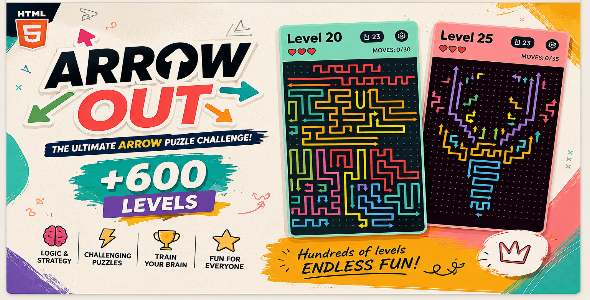
Arrow Out is an HTML5 puzzle game with 645 included levels. Each board contains winding, multi-cell arrows. Players must study the paths, find arrows with a clear route to the edge, and remove them in the right order to clear the grid.
The controls are simple, but each move matters. A blocked arrow collides with another path and costs a life. Players can use hints, an eraser, direction guides, and board zoom when a puzzle becomes difficult.
Key Features
- 645 playable JSON levels included with the game
- Winding arrows that follow their bends as they leave the board
- Tap-to-move puzzle gameplay with collision detection
- Three lives per level
- Move-based ratings of one, two, or three stars
- Scrollable level selection map with locked and unlocked levels
- Saved level progress and best star ratings
- Hint, eraser, and direction-guide tools
- Pinch, mouse-wheel, and on-screen board zoom controls
- Dark and light visual themes
- Sound-effect on/off control
- Animated level entrances, arrow movement, and win celebration
- Dedicated win and lose screens
- Mouse, touch, and keyboard support
- Responsive portrait layout for desktop and mobile browsers
- Native JavaScript with no game engine or external JavaScript library
How the Game Works
Each level is built from several colored arrows that may bend around the grid. Tap an arrow to send it in the direction of its head. Its head leads the way while the rest of the path follows around the original corners.
If the route to the board edge is clear, the arrow leaves the puzzle. If another arrow blocks that route, the arrow collides and the player loses one life. Clear every arrow to complete the level. Lose all three lives and the level can be replayed.
Because arrows can block one another, players must choose their order carefully. The board may be zoomed and moved to inspect dense puzzles more closely.
645 Included Levels
The package contains 645 individual level files. Levels are loaded when opened, so the browser does not need to parse the complete collection at startup. The level selection screen shows a connected, scrolling path through the available levels.
Completing a level unlocks the next one. The game saves the best star rating earned on each level and displays the total on the level map.
Stars, Lives, and Helpful Tools
- Stars: Complete a level in one move per arrow for three stars. Up to two extra moves earns two stars; additional moves earns one star.
- Lives: Each level begins with three lives. Colliding with a blocked arrow costs one life.
- Hint: Highlights an arrow that currently has a clear exit.
- Eraser: Removes a selected idle arrow from the board.
- Direction guides: Shows exit routes and indicates whether they are currently blocked.
- Restart: Resets the current level and replays its entrance animation.
New players begin with 2 hints and 1 eraser. A new hint is awarded after every tenth newly completed level.
Animations and Interface
Levels open with a screen fade and a staggered tail-to-head reveal of their arrows. When the final arrow is cleared, the grid dots disappear in a center-out wave before the win panel appears. Stars pop into place and confetti celebrates the result.
The game includes a main menu, level map, puzzle screen, settings panel, shop panel, win panel, and lose panel. The win panel offers the next level; the lose panel offers Replay and Home.
Controls
- Mouse or touch: Click or tap an arrow to move it.
- Zoom: Use the on-screen zoom control, mouse wheel, or a two-finger pinch.
- Pan: Drag the board while zoomed in.
- H: Use a hint.
- R: Restart the current level.
- U: Undo the latest cleared arrow.
- Escape: Open or close settings.
Designed for Customization
The game is organized into separate HTML, CSS, JavaScript, level, and asset files. Menu buttons, panels, level-map elements, and other interface graphics are supplied as replaceable PNG or SVG images. Sound effects and fonts are also stored in separate asset folders.
Level layouts can be edited in their JSON files. JavaScript modules separate puzzle rules, level loading, Canvas rendering, animations, and the rewarded-ad adapter. The source includes inline documentation to help developers find and change the relevant behavior.
Technical Details
- Technology: HTML5, CSS3, and native JavaScript modules
- Rendering: HTML5 Canvas 2D
- Game engine: Custom JavaScript implementation
- Frameworks and external JavaScript libraries: None
- Build step: None
- Levels: 645 JSON files
- Input: Pointer events, touch gestures, mouse wheel, and keyboard shortcuts
- Progress storage: Browser LocalStorage
- Layout: Responsive, portrait-friendly interface
- Audio: Bundled sound effects with an on/off setting
Included Files
index.html— main game pagestyles.css— responsive page and interface stylingjs/— game rules, rendering, levels, animations, and ad adapterassets/levels/— 645 editable level filesassets/images/— game and interface artworkassets/audio/— sound effectsassets/fonts/— bundled fontsREADME.md— setup, controls, and customization guidance
Installation
Upload the game folder to a static HTTP host, then open index.html. No database, server-side application, package manager, or build process is required.
Important: The game fetches level JSON files. Opening index.html directly from a file:// address is not supported; use a local or hosted HTTP server.
Rewarded Ads
The package includes a demo rewarded-ad flow for hints and erasers, plus a JavaScript adapter point for connecting a web ad provider. The demo is a local simulation and does not show real advertisements or generate revenue.
A real ad network, SDK, and ad account are not included. Buyers who want live rewarded ads must connect their chosen provider through the documented adapter.
Progress and Audio Notes
Unlocked levels, best stars, item counts, theme, and sound settings are stored in the player’s browser. Progress belongs to that browser and may be lost if its site data is cleared. Sound effects are included; background music is not included.
Suitable For
- HTML5 game portals
- Casual and logic puzzle websites
- Mobile web game collections
- Developers seeking a customizable Canvas puzzle game
- Projects that need a large collection of ready-to-play levels
Summary
Arrow Out combines 645 levels, winding arrow puzzles, responsive Canvas gameplay, saved progression, stars, lives, useful puzzle tools, and replaceable artwork in one lightweight HTML5 game package. It runs on modern web browsers without a third-party game engine or JavaScript framework.


