AppShot AI— AI-powered App Store & Play Store Screenshot Generator (SaaS + Self-Hosted)


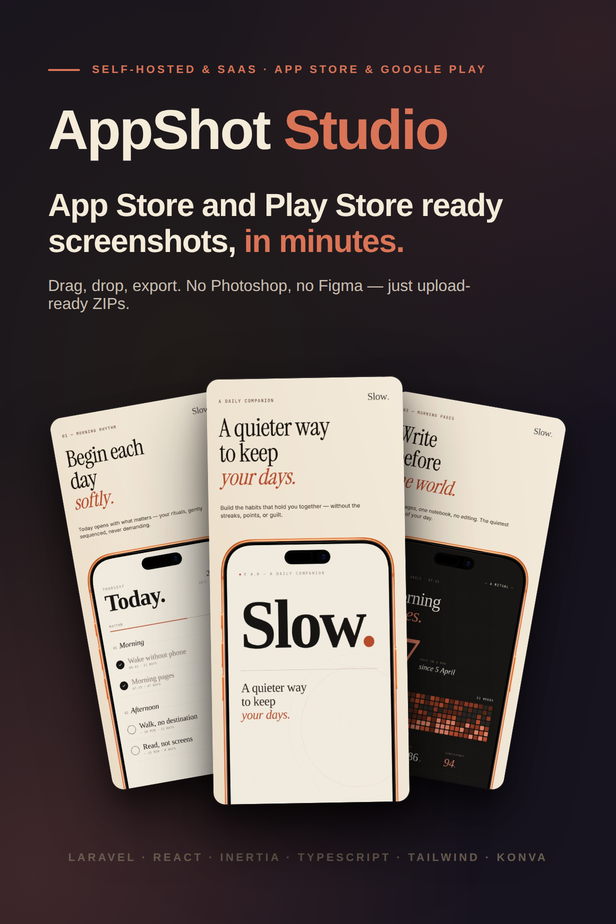
AppShot AI is an AI-powered App Store and Google Play screenshot maker built with Laravel and React. Describe your app and let AI generate a complete, on-brand set of store screenshots – headlines, backgrounds, colors, and layout – then fine-tune everything in a fast, visual editor. Export pixel-perfect screenshots for iPhone, iPad, Android phone and tablet – portrait and landscape – plus the Play Store feature graphic, in as many languages as you need (left-to-right and right-to-left), organized into a clean ZIP ready to upload.
It ships in two modes from a single codebase: a multi-tenant SaaS (with Stripe, Razorpay and PayPal billing, plans, AI token quotas, and a full admin dashboard) and a single-tenant self-hosted install that runs on shared hosting with zero SSH access. Plug in your own AI provider key, set per-plan token limits, and you’re running your own AI screenshot SaaS. No Node.js, Redis, or headless browser required on the server – a guided web installer does the rest.
 |  |  |
Live demo
Try it now: https://appshot.froiden.com — a live showcase.
Key highlights
- AI screenshot generation – describe your app and generate a full, on-brand screenshot set; bring your own AI key and meter usage with per-plan token quotas.
- Visual editor – drag, drop, type, and export.
- Every device size – design once; each device variant is authored with smart anchors.
- Photoreal device frames – drop your screenshot into crisp iPhone, iPad, Pixel, Galaxy and Tab frames.
- Project template kits – start from a finished, multi-screen design and ship in minutes.
- Multi-language & RTL – localize screenshots per language, including right-to-left scripts.
- One-click ZIP export – exact store pixel dimensions, organized per device and language, generated in-browser.
- SaaS billing built in – Stripe, Razorpay & PayPal, multi-currency, plans, proration, refunds, tax.
- Full admin dashboard – users, tenants, subscriptions, invoices, plans, audit log, and more.
- Marketing CMS + SEO – admin-editable landing, pricing, and legal pages with per-page SEO.
- Switchable storage – Local, Amazon S3, DigitalOcean Spaces, Wasabi or Minio.
- Social login – let users sign in with Google or GitHub; enable either from the admin panel with no code changes.
- Team collaboration – invite teammates with roles, a safe single-editor lock with take-over, and optional live editing.
- Privacy & GDPR – users can export their data or delete their account from account settings; cookie consent banner and signup consent built in.
- Dual mode – hosted SaaS or self-hosted, same features, one codebase.

Recommended Hosting Partners
1. DigitalOcean

2. Hostinger

Full feature list
AI screenshot generation
- Generate a complete, on-brand screenshot set from a short description of your app — AI writes the headlines and builds backgrounds, color palette, and layout
- Two modes: start a brand-new project from a template kit, or drop AI-generated designs onto your existing screens
- Upload your app screenshots and logo; the AI composes them into finished store artwork across the device sizes you pick
- Everything lands as normal, fully editable layers — tweak any text, color, or position in the visual editor afterwards
- Bring your own AI provider key — set it once in the admin panel; nothing is hard-coded
- Per-plan AI token quotas (SaaS mode) with a shared workspace pool the owner funds
- Owners can allocate a monthly AI token budget per teammate, right from the members screen and at invite time
- Live usage meter on the account page with upgrade prompts as quota runs low
Screenshot editor
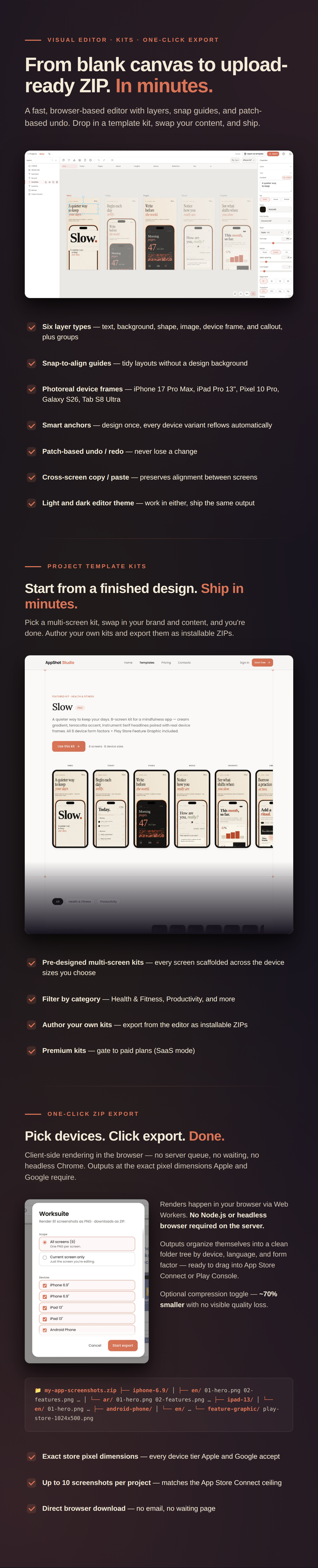
- Fast canvas workspace with pan, zoom, and grid
- Patch-based undo / redo
- Six layer types: text, background, shape, image, device frame, and callout, plus layer groups
- Capability-driven properties panel — only the controls relevant to the selected layer
- Inline text editing — click to retype, drag to move
- Snap-to-align guides for tidy layouts without a design background
- Text fit modes: auto-fit, fixed, and min/max font size
- Shape system with gradient presets, multi-shadow stacking, blend modes, and a freehand pen-path tool
- Image-masked-by-shape clipping
- Image color overlay (tint) and alpha-aware drop shadow that follows both transparency and rounded corners
- Photoshop-style crop overlay with 8 handles
- Drag images straight from your desktop onto the canvas
- Cross-screen copy / paste that preserves alignment
- Toast notifications with live upload progress
- Up to 10 screenshots per project (App Store Connect ceiling)
- Light and dark editor theme
Device frames
- Photorealistic frames for iPhone 17 Pro Max, iPad Pro 13” (M5), Pixel 10 Pro, Galaxy S26, and Galaxy Tab S8 Ultra – multiple colors each
- Procedural-bezel fallback for any device
- Real-frame tilt up to ±15° per axis, with automatic downgrade to procedural beyond the cap
- Drop a raw screenshot into a frame and reposition / fit it inside the screen area
Multi-device
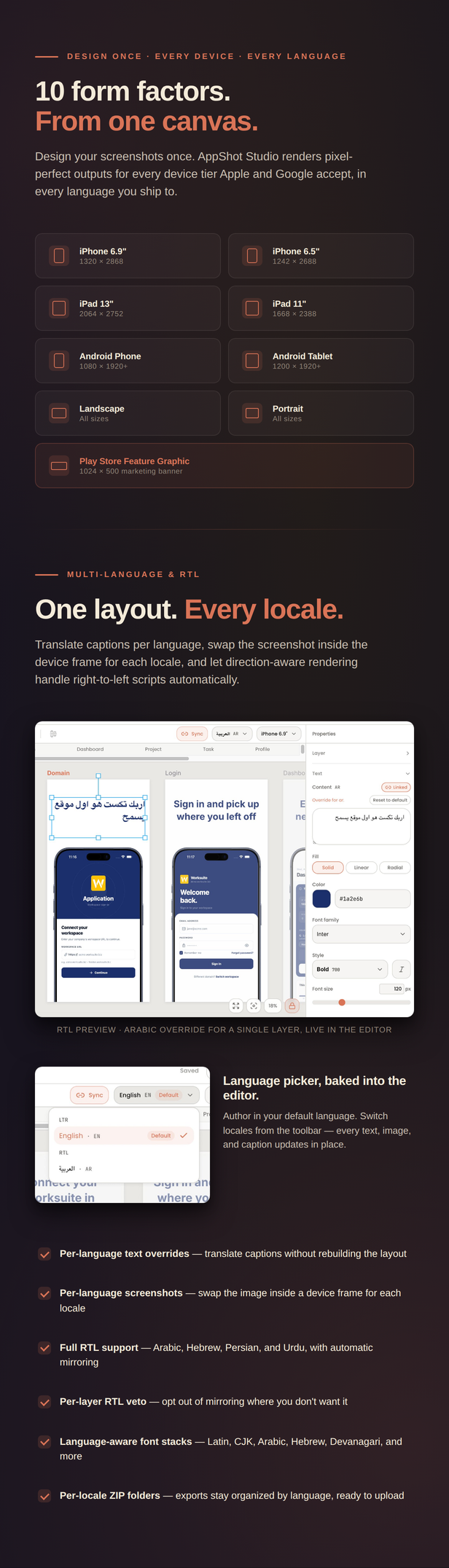
- 10 form factors: iPhone, iPad, Android phone, and Android tablet — each in portrait and landscape — plus the Play Store feature graphic (1024×500 marketing banner)
- Design every factor explicitly, or stamp from one factor to the rest in a single action
- Per-property linking — shared content and styling stay in sync across factors via a shared layer id
- Frame device family linking — pick an iPhone frame and the iPad / Android factors swap to matching devices
- Percent-based anchors and safe-area insets so layouts hold up across sizes
Localization & RTL
- Author screenshots in multiple languages per project, with a default-language fallback
- Per-language text overrides — translate captions without rebuilding the layout
- Per-language screenshots — swap the image inside a device frame for each locale
- Full right-to-left (RTL) support for Arabic, Hebrew, Persian, and Urdu, with direction-aware canvas rendering
- Automatic RTL mirroring, with a per-layer override to veto it where you don’t want it
- Language-aware font stacks (Latin, CJK, Arabic, Hebrew, Devanagari, and more)
- Export organized per language — pick which locales to include in the ZIP
- Language picker in the editor and at project creation
Export
- Client-side ZIP export via the browser — no server render queue, no waiting
- Exports at the exact pixel dimensions Apple and Google require for each device tier
- Clean folder structure per device, language, and form factor
- Optional compression toggle — typically about 70% smaller with no visible quality loss
- Direct browser download
Project templates (kits)
- Pre-designed, multi-screen kits — pick one, swap your content and brand, and ship
- Each kit scaffolds every screen across the device sizes you choose
- Author your own kits in the editor and export them as installable ZIPs
- Admin kit management: upload, feature, mark premium, edit metadata, delete
- Premium kits can be gated to paid plans (SaaS mode)
SaaS billing (SaaS mode)
- Three payment providers built in: Stripe, Razorpay, and PayPal
- Multi-currency pricing — the same plan can show different amounts per provider / region
- Plans with feature limits (project count, export, premium kits, storage quota)
- Plan upgrades / downgrades with proration, monthly to yearly switching
- Refunds (full and partial) from the admin panel
- Provider-managed tax (Stripe Tax / Razorpay GST / PayPal)
- Pricing page doubles as the change-plan surface
- Encrypted credential storage; webhook handling with idempotency and replay
Admin dashboard (SaaS mode)
- Dashboard — MRR, active subscriptions, users, projects, signups sparkline, and a guided onboarding checklist
- Users — search, filters, detail view, edit, impersonation
- Tenants — list and drill-in
- Subscriptions — filters, timeline, cancel / resume / change-plan, test-data tools
- Invoices — list, filters, refund modal
- Webhook events — masked-payload viewer and replay
- Plans & providers — create / edit / delete plans, wire per-provider prices
- Settings — SMTP, branding, signup policy, kit-author allowlist, and more, with a send-test-email tool
- Audit log — every state-changing admin action recorded
- Maintenance — run scheduled cleanup sweeps on demand
Marketing CMS & SEO
- Admin-editable marketing across every public page (Welcome, Pricing, Templates, About, Contact, Privacy, Terms, Refund, and custom pages)
- Typed content sections (hero, features, logo wall, stats, how-it-works, testimonials, FAQ, final CTA) plus atomic blocks for custom layouts
- WYSIWYG editing for headlines and body copy
- Landing-mode toggle: show the bundled marketing site, redirect to your own, or send visitors straight to login
- Per-page publish toggle and SEO overrides
- SEO: title templates, canonical URLs, robots.txt, sitemap.xml, Organization / FAQ / Product JSON-LD, and server-side pre-render so crawlers and link scrapers see real content
- Appearance editor — colors, fonts, corner radius, and density apply across the whole app and marketing site
- Logo, favicon, and brand controls
Storage
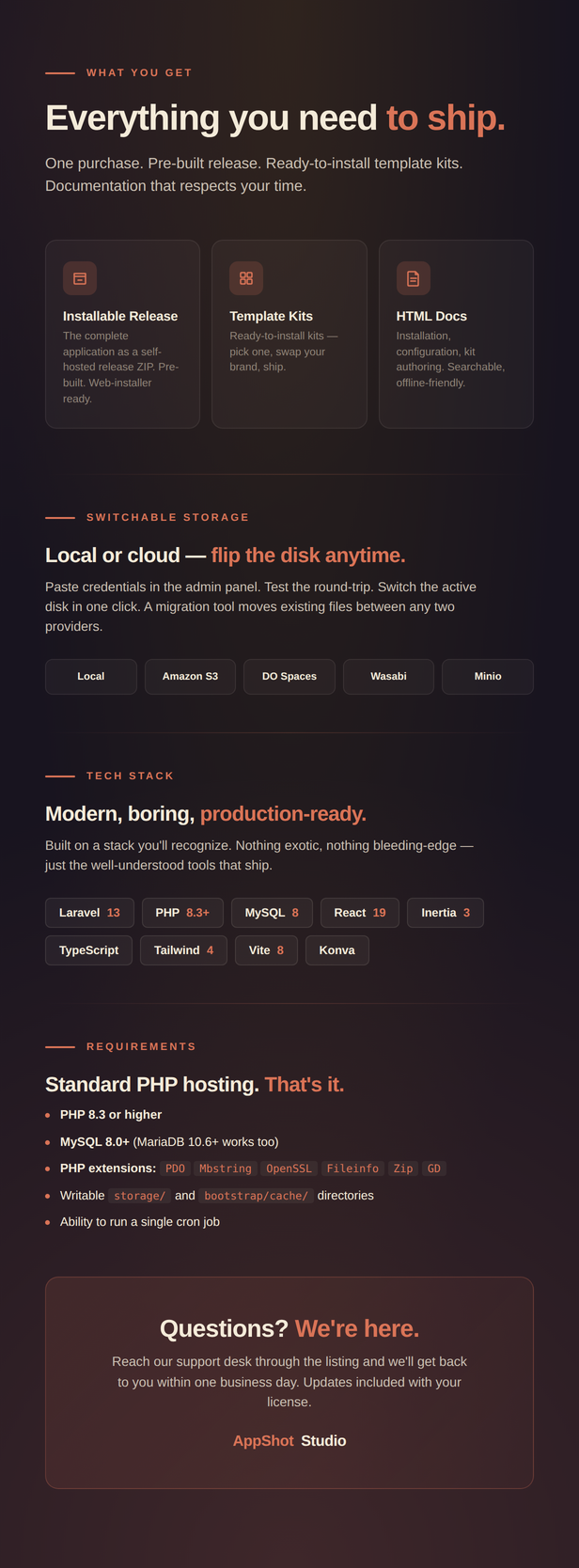
- Switchable per-file storage: Local, Amazon S3, DigitalOcean Spaces, Wasabi, or Minio
- Paste credentials in the admin panel; flip the active disk anytime
- Test-upload round-trip and a direction-agnostic migration tool to move existing files
- Per-plan storage quotas (SaaS mode)
Notifications
- In-app notification bell with unread count and a full history page at
/notifications - Email on project share / revoke, workspace invite accepted, and role changes
- Transactional and admin email notifications (welcome, billing, webhook failures, and more)
- Branded email templates that inherit your appearance settings
- Admin preview and test-send
Social login
- Sign in with Google and Sign in with GitHub — both built in, both optional
- Enable either provider independently from Admin → Settings → Social login; no code or
.envchanges needed - Client ID and secret encrypted at rest in the database
- Existing email-password accounts linked automatically on first social sign-in — no duplicate accounts
- Social-only users (no password) can set a password anytime from their profile
- Works in both SaaS and self-hosted modes
Team & collaboration
- Invite teammates by email with role-based access
- Four roles: Owner, Admin, Editor, and read-only Viewer (viewers can still export)
- Figma-style multi-workspace membership with an in-app switcher, plan-based seat limits, and per-project sharing (SaaS mode)
- Self-hosted: a shared team pool with admin-invited members and the same Admin / Editor / Viewer roles
- Pessimistic edit lock — one editor per project at a time with instant take-over, so teammates never overwrite each other; works on any hosting (no websockets)
- Optional live editing on VPS — Reverb-powered live presence and instant sync, with a choice of locked or concurrent editing
- In-app notifications (bell) plus emails for project shares, invites, and role changes
Privacy & GDPR
- Users can request a ZIP export of all their data (account details, projects, screens, invoices) from account settings
- Self-serve account deletion with immediate subscription cancellation and media cleanup
- Cookie consent banner shown to new visitors; links to your editable
/privacypage - Terms & privacy consent checkbox at signup
- No third-party cookie or tracking scripts required
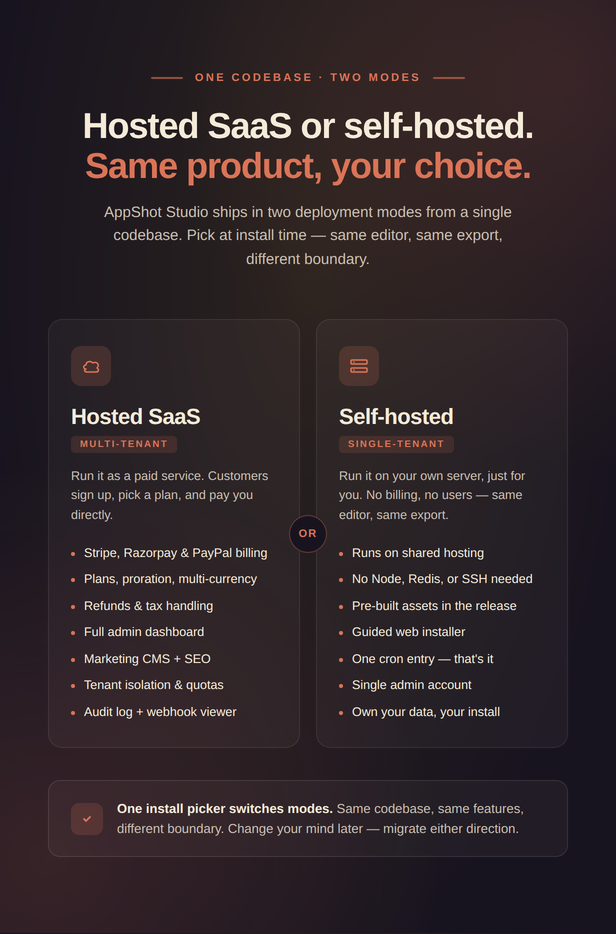
Two deployment modes
- SaaS — multi-tenant, with billing, plans, and the full admin dashboard
- Self-hosted — single-tenant for your own use, no billing, same editor and export
- One codebase, switched at install time
Built for shared hosting
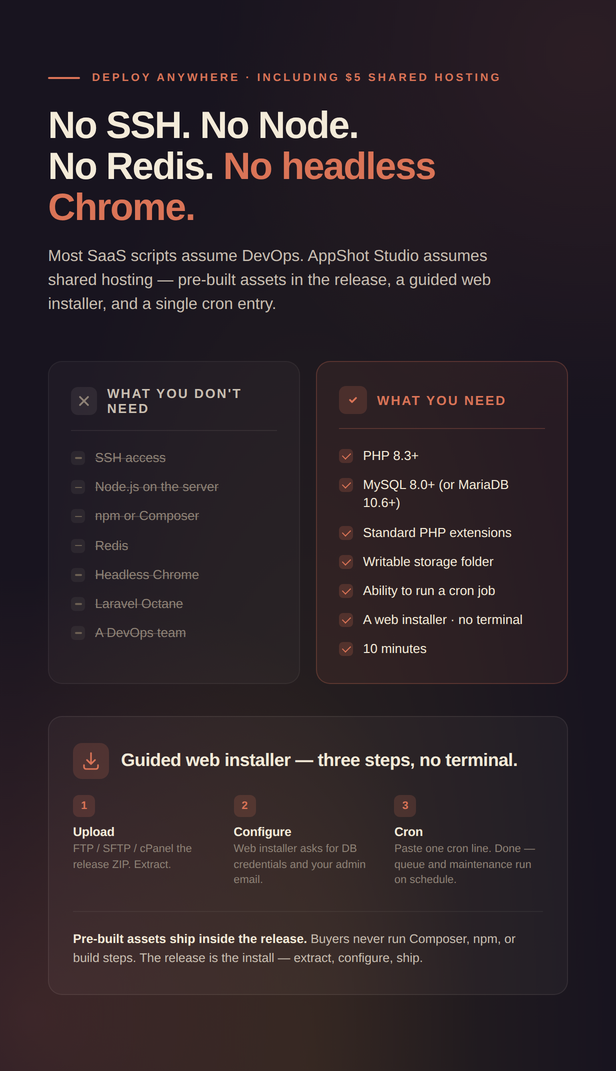
- No Node.js, Redis, Octane, or headless Chrome required on the server
- Assets are pre-built and shipped inside the release — buyers never run Composer or npm
- A guided web installer handles database setup, the admin account, and cron instructions
- A single cron entry drives the queue and all scheduled maintenance
Tech stack
- Backend: Laravel 13 (PHP 8.3+), MySQL 8
- Frontend: React 19 + Inertia.js 3 + TypeScript, Tailwind CSS 4, Vite 8
- Canvas: Konva
- Billing: Stripe, Razorpay, PayPal
Requirements
- PHP 8.3 or higher
- MySQL 8.0+ (MariaDB 10.6+ also works)
- PHP extensions: PDO, Mbstring, OpenSSL, Fileinfo, Zip, GD
- Writable storage/ and bootstrap/cache/ directories
- Ability to run a cron job
No SSH, Composer, or Node.js required on the server — the release ships pre-built and the web installer does the rest.
What’s included
- The complete installable application (self-hosted release ZIP)
- Ready-to-install template kits
- Full HTML documentation covering installation, configuration, and kit management
Sources & Credits
AppShot AI is built on these open-source projects — thanks to their authors and communities: Laravel, Inertia.js, React, Konva, Tailwind CSS, Vite, Zustand & Immer, JSZip, TipTap, DOMPurify, Lucide Icons, and the Stripe / Razorpay / PayPal SDKs.
Device frames
The photorealistic device-frame artwork is used under each vendor’s marketing guidelines, restricted to the App Store / Play Store promotional use AppShot AI exists to serve:
- Apple (iPhone, iPad) frames — used under the Apple Marketing Guidelines. iPhone, iPad and related marks are trademarks of Apple Inc.
- Google (Pixel) frames — used under the Google Play Console asset library terms. Pixel and related marks are trademarks of Google LLC.
- Samsung (Galaxy) frames — used under Samsung’s press / marketing resource terms. Galaxy and related marks are trademarks of Samsung Electronics Co., Ltd.
Bundled template kits are © ajay138 and provided for use within AppShot AI.
Change Log
v1.0.05 — 2 July 2026
- AI screenshot generation — describe your app and generate a complete, on-brand screenshot set (headlines, backgrounds, colors, layout) as fully editable layers; new-project and add-to-existing-screens modes; bring your own AI provider key
- AI token quotas — per-plan limits with a shared workspace pool; owners allocate a monthly token budget per teammate from the members screen and at invite time; live usage meter on the account page
- In-dashboard upgrade & change-plan modal — upgrade prompts open a plan picker in place instead of routing to the pricing page
- Plan cards now show workspace member (seat) limits
v1.0.04 — 16 June 2026
- Social login — Sign in with Google and Sign in with GitHub; enable either provider from the admin panel; existing accounts linked by email automatically; social-only users can set a password from their profile
v1.0.03 — 15 June 2026
- Team workspaces & collaboration — invite teammates with Owner / Admin / Editor / Viewer roles; SaaS multi-workspace membership with a switcher, plan-based seat limits, and per-project sharing; self-hosted shared team pool with admin invites
- Edit lock — one editor per project at a time with instant take-over; works on any hosting with no websockets
- Optional live editing (VPS) — Reverb-powered live presence and instant sync, with a choice of locked or concurrent editing; built-in Test connection button and step-by-step setup guide
- In-app notifications — bell with project-share, invite, and role-change alerts, full history at
/notifications, plus matching emails - Privacy & GDPR — user data export, self-serve account deletion, cookie consent banner, and signup consent checkbox
v1.0.02 — 10 June 2026
- Customization & rebuild — The package now ships the full front-end source
- Hardened installer — the setup wizard now guards step order (you can’t skip ahead and leave a half-finished install), and its buttons show progress and can’t be double-submitted
v1.0.01 — 10 June 2026
- License activation
- One-click updates
- Manual update & recovery — update via FTP.
- Storage — user uploads now serve directly from public/user-uploads
- Minor bug fixes
v1.0.0 — Initial release
- Visual screenshot editor with six layer types, groups, snap-align, undo/redo, and inline text editing.
- Multi-device support — iPhone, iPad, Android phone & tablet (portrait + landscape) plus the Play Store feature graphic.
- Photoreal device frames (iPhone, iPad, Pixel, Galaxy, Tab) with procedural fallback and tilt.
- Multi-language & RTL localization — per-language text and screenshots, direction-aware rendering.
- Project template kits with in-editor authoring and export.
- Client-side ZIP export at exact App Store / Google Play pixel dimensions.
- SaaS mode: Stripe, Razorpay and PayPal billing, multi-currency, plans, proration, refunds and tax.
- Admin dashboard: users, tenants, subscriptions, invoices, webhook events, plans, audit log, maintenance.
- Marketing CMS with typed sections, SEO, sitemap and robots.txt.
- Switchable storage (Local / S3 / DigitalOcean Spaces / Wasabi / Minio) with per-plan quotas.
- Guided web installer for shared hosting — no SSH, Node.js or Composer required on the server.
Support
Questions beyond this listing? Reach us through our support desk and we’ll be happy to help.


