AndroCity | Flutter Windows Android App Builder and APK Generator
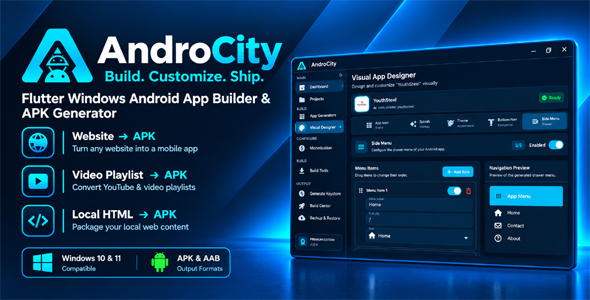

AndroCity
Build. Customize. Ship.
Universal App Builder for Windows
AndroCity is a Flutter-based Windows desktop application for configuring and building Android applications from websites, video playlists, and local HTML projects.
Create and manage multiple Android app projects from one Windows workspace, configure the app content, customize the generated application’s icon, splash screen, colors, navigation, and other settings, configure Google AdMob, manage Android signing, and generate APK or AAB packages.
What Is AndroCity?
AndroCity provides a Windows-based workflow for creating configurable Android application projects without manually starting a new Android project for every supported app type.
The application currently supports three Android app generators:
- Website → APK
- Video Playlist → APK
- Local HTML → APK
After creating a project, you can configure its content, visual design, monetization, Android version information, signing configuration, and build options before generating the Android package.
Core Features
- Windows desktop application built with Flutter
- Local project management
- Website → APK generator
- Video Playlist → APK generator
- Local HTML → APK generator
- Visual App Designer
- App icon customization
- Splash screen customization
- Theme color customization
- Bottom navigation configuration
- Side menu / drawer configuration
- Google AdMob configuration
- Android version name and version code management
- Custom Android keystore generation or existing keystore selection
- Release signing configuration
- APK building
- AAB building
- Build logs and generated-file path display
- Managed Android build environment
- Project backup and restore
- Generated Android source templates
1. Website → APK
The Website generator creates an Android application around a website using the included Android WebView-based template.
Website Configuration
- Website URL
- Enable JavaScript
- Pull to Refresh
- Show Loading Indicator
- Open External Links in Browser
The generated Android project includes the required WebView configuration and Android source files. The website itself remains externally hosted and controlled by the buyer.
For production use, test the target website on real Android devices and make sure the website, content, external services, and network requirements are compatible with the generated application.
2. Local HTML → APK
The Local HTML generator allows you to package an existing local HTML application into a generated Android project.
Local HTML Workflow
- Select the root folder containing the HTML application
- Select the entry HTML file
- Package the selected local HTML content into the generated Android application
- Configure JavaScript
- Configure Pull to Refresh
- Configure Loading Indicator
- Configure External Link handling
Relative files contained inside the selected HTML project can be packaged with the generated Android application. The entry path must remain inside the selected project folder.
External services or resources referenced by the HTML application may still require an internet connection when the generated Android application runs.
3. Video Playlist → APK
The Video Playlist generator is designed for creating configurable video and course-oriented Android applications.
You can organize content using categories and subcategories, add individual video entries, configure video metadata, choose video sources, and customize the generated application’s video experience.
Supported Video Source Types
- YouTube
- Local Video
- M3U8
Supported Content Types
- Video
- Short
- Movie
- Live
- Playlist
- Music
- Podcast
- Course
Video Content Fields
- Title
- Category
- Content type
- Video source type
- Video source
- Thumbnail
- Icon
- Duration
- View count
- Like count
- Featured status
- Enabled/disabled status
Video Categories
- Create categories
- Create subcategories
- Category icons
- Order categories
- Assign videos to categories
- Move videos between categories
4. Video Player Settings
The Video Playlist generator includes configurable player behavior for generated video applications.
- Auto Play
- Picture-in-Picture
- Remember Position
- Allow Fullscreen
- Show Related Videos
- Auto Rotate in Fullscreen
5. Video App Home Screen
The generated video application can selectively display different home screen sections.
- Featured Videos
- Latest Videos
- Trending Videos
- Categories
- Continue Watching
- Favorites
Each of these sections can be enabled or disabled from the AndroCity configuration interface.
6. Video App Search & Favorites
The generated video application template includes dedicated areas for searching and saving video content.
- Search screen
- Search title and search hint customization
- Favorites / saved courses
- Continue watching
- Related video support
- Course/lesson navigation
7. Custom Video App Text
AndroCity provides a large set of editable UI text values for the generated video application. This allows the generated application to be adapted to different brands, audiences, and languages without changing every text string manually in the Android source.
Home Text
- Home eyebrow
- Home greeting
- Featured badge
- Start learning
- See all
- Continue watching
- Explore categories
- Featured videos
- Latest videos
- Trending videos
- Saved videos
- Empty library message
Category & Search Text
- Categories title
- Search title
- Search hint
- Favorites title
Video Card Text
- Course label
- Self-paced label
- Views text
- Thousands-of-views text
- Millions-of-views text
- Save course text
- Remove saved course text
Player Text
- Back
- Course lesson
- Now playing
- Lesson
- Video
- Not started
- Up next
- Completed
- Percentage complete
- Remaining
- Video playback error
- Player initialization error
Navigation Drawer Text
- Drawer subtitle
8. Visual App Designer
The Visual App Designer allows you to customize important parts of a generated Android application’s appearance and navigation from the Windows application.
App Icon
- Choose an application icon
- Replace an existing icon
- Remove an icon
- Preview icon artwork
Splash Screen
- Choose splash artwork
- Configure splash display
- Choose splash duration
- 1 second
- 2 seconds
- 3 seconds
- 4 seconds
- 5 seconds
- 7 seconds
Theme
The Theme Designer provides configurable color settings for the generated Android application.
- Primary Color
- Secondary Color
- Background Color
Bottom Navigation
Configure the bottom navigation of supported generated applications.
- Enable or disable bottom navigation
- Add navigation items
- Remove navigation items
- Reorder navigation items
- Navigation label
- Full URL / Route
- Navigation icon
Side Menu / Drawer
Configure the side navigation menu of supported generated applications.
- Enable or disable the side menu
- Add menu items
- Remove menu items
- Reorder menu items
- Menu label
- Full URL
- Menu icon
9. Google AdMob
AndroCity includes optional Google AdMob configuration for generated Android applications.
AdMob Settings
- Enable / Disable AdMob
- AdMob App ID
- Banner Ad Unit ID
- Interstitial Ad Unit ID
AndroCity validates the configured AdMob identifiers before building when AdMob is enabled.
If AdMob identifiers are left empty, the application uses Google’s Android test identifiers. These test identifiers must be replaced with the buyer’s own AdMob identifiers before production release.
Third-Party AdMob Notice: Google AdMob is an external third-party service and is not included as a paid service with AndroCity. Using AdMob requires the buyer to maintain an eligible Google AdMob account and comply with Google’s current account, publisher, advertising, privacy, consent, payment, and other applicable requirements. AdMob monetization may involve revenue-sharing arrangements, payment thresholds, invalid-traffic policies, and other conditions established by Google, which may change over time. Additional costs may apply to third-party services used with generated applications, and such charges are the buyer’s responsibility. AndroCity does not provide an AdMob account or advertising budget and does not guarantee account approval, ad serving, revenue, or marketplace acceptance. Buyers are responsible for reviewing and complying with all applicable third-party terms and policies.
10. Android App Version Management
Each project includes Android application version settings.
- Version Name
- Version Code
The application validates these values before saving. Increase the Android version code when preparing a new store release.
11. Android Release Signing
AndroCity includes a dedicated signing configuration for Android release builds.
Keystore Features
- Generate a new keystore
- Browse and select an existing keystore
- Enable or disable custom signing
- Store Password
- Key Alias
- Key Password
Signing credentials are handled separately from normal project configuration and are stored using Windows secure storage.
Always keep production keystores and signing credentials securely backed up. Losing a production signing key can affect your ability to update an already-published Android application.
12. Build Center
The Build Center is the main build workflow for generating Android packages from configured projects.
Available Build Formats
- APK — suitable for Android device testing and direct distribution workflows.
- AAB — suitable for Google Play upload workflows.
The Build Center displays build progress and logs and provides the generated output path after a successful build.
- Project generation
- Gradle build execution
- APK generation
- AAB generation
- Build status
- Build logs
- Generated file path
- Copy Path functionality
Generated Android projects and build outputs are stored under the configured AndroCity build directory in the Windows user’s Documents folder.
13. Managed Android Build Tools
AndroCity includes a Build Tools section for setting up the Android build environment required by the generated projects.
The current project documentation specifies the following managed components:
- Eclipse Temurin JDK 17
- Android Command-line Tools
- Android Platform Tools
- Android API 36
- Android Build Tools 36.0.0
- Gradle 8.13
The Build Tools screen checks the environment and reports its current status.
Internet access is required when the managed tools and Android/Gradle dependencies need to be downloaded.
14. Generated Android Projects
AndroCity uses included Android project templates to generate the application source.
The package contains templates for:
- WebView-based applications
- Local HTML applications
- Video player applications
Generated projects contain Android/Kotlin source code, resources, application assets, Gradle configuration, and a Gradle Wrapper.
Generated Android projects can be opened separately in Android Studio when additional Android-specific source customization is required.
15. Project Management
AndroCity stores project records locally and allows you to create and manage multiple Android app projects from the Windows desktop application.
Project configuration includes information such as:
- Project name
- Application type
- Android package name
- Version name
- Version code
- Application icon
- Theme configuration
- Splash configuration
- Navigation configuration
- Monetization configuration
- Content configuration
- Signing configuration
- Video application configuration where applicable
16. Backup & Restore
The Backup & Restore feature allows project records to be exported and imported using AndroCity’s .acb backup format.
Backup Includes Project Configuration Such As
- Projects
- Design configuration
- Settings
- Build configuration
- Keystore configuration
Production signing passwords and keystore files are not included in normal project JSON backup data. Local media and other externally referenced files should be backed up separately.
17. Local Data & Build Locations
AndroCity stores project records and selected-project information in the Windows user’s application data/documents environment.
The current documentation specifies these locations:
- Managed tools:
<Documents>\androcity_tools - Generated projects/builds:
<Documents>\androcity_builds
Signing credentials are stored separately using Windows platform secure storage.
18. Source Code Included
The source package includes the Flutter Windows application source and the Android generation templates used by AndroCity.
Major Source Areas
lib/build_engine/— Android template generation and build workflowlib/core/— core application infrastructure, theme, providers, utilities and widgetslib/data/— project and video data models, data sources and repositorieslib/features/— application screens and feature moduleslib/services/— Android SDK, build tools and keystore servicesassets/templates/— generated Android application templatesassets/branding/— AndroCity branding assetsassets/fonts/— bundled font fileslicenses/— bundled third-party license files
19. Technology Stack
- Flutter — Windows desktop application
- Dart — application source
- Riverpod — state management
- Kotlin — generated Android application source
- Android — generated mobile applications
- Gradle — Android builds
- AndroidX — Android application framework components
- Google Mobile Ads — optional AdMob integration
20. Requirements
Running the Windows Application
- Windows 10 64-bit
- Windows 11 64-bit
Building AndroCity from Source
- Flutter with Dart SDK 3.7.2 or later
- Visual Studio
- Visual Studio Desktop development with C++ workload
Generated Android Applications
The current Android templates are configured to compile and target Android API 36 and require Android 7.0 / API 24 or later.
Internet Connection
Internet access may be required for Flutter package retrieval, initial Android build-tool installation, Android/Gradle dependency downloads, remote website content, remote video/media, and configured advertising services.
21. Documentation Included
The package includes HTML documentation covering the installation and usage workflow.
The documentation covers:
- Requirements
- Installation from source
- First-run Android build-tool setup
- Project creation
- Website generator
- Video Playlist generator
- Local HTML generator
- Visual Designer
- Source customization
- AdMob configuration
- APK/AAB building
- Release signing
- Backup and restore
- Local data and network access
- Third-party software and licenses
- Troubleshooting
22. Important Limitations & Responsibilities
- AndroCity is a Windows desktop application; the builder itself is not an Android application.
- AndroCity generates Android projects and packages; it does not automatically publish applications to Google Play.
- Google Play acceptance is not guaranteed.
- AdMob approval is not guaranteed.
- Buyers are responsible for their own websites, HTML content, video content, images, icons and other media.
- Buyers are responsible for having the necessary rights and licenses for content distributed through generated applications.
- Remote websites and media require the appropriate network access when the generated application uses them.
- Production AdMob identifiers must be replaced with the buyer’s own identifiers.
- Production Android signing keys and credentials must be securely maintained by the buyer.
- Third-party services remain subject to their respective terms, licenses and policies.
23. Third-Party Software & Licenses
AndroCity uses third-party Flutter packages, Android components, fonts, icons, build tools and other dependencies.
Relevant bundled license files are included in the licenses directory. Buyers should review the included licenses and the upstream licenses applicable to the dependencies they distribute.
Third-party names and services remain the property of their respective owners. Inclusion of an integration does not imply endorsement or guarantee approval by Google, Android, AdMob, or any application marketplace.
24. What’s Included
- AndroCity Windows application
- Complete Flutter source code
- Android generation templates
- Website → APK generator
- Video Playlist → APK generator
- Local HTML → APK generator
- Visual App Designer
- AdMob configuration
- Android build workflow
- Android signing configuration
- Backup & Restore
- HTML documentation
- Video tutorials
- Bundled fonts and relevant license files
Build. Customize. Ship.
AndroCity brings project creation, Android app configuration, visual customization, monetization setup, signing, and APK/AAB generation together in one Windows desktop workflow.
Create your project, configure your content, customize the experience, and build your Android application.
AndroCity — Universal App Builder.
0 average based on 0 ratings.

| Last Update | 2026-10-21 |
| Created | 2026-10-21 |
| Sales | 0 |
| Discussion | Comments |
| Application Runtime | Native |
| High Resolution | |
| Compatible OS Versions | Windows 11 Windows 10 |
| Video Preview Resolution | 1920x1080 |


