AI Image Editor Flutter App | Background Remover, Cleanup, Upscale
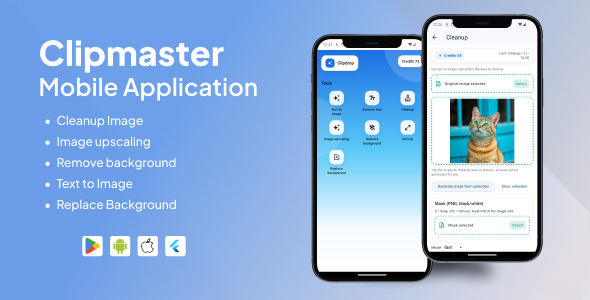

Flutter AI Image Editor App (Provider) – ClipDrop API Integration
A production-ready Flutter application built with Provider state management that integrates ClipDrop APIs to deliver AI-powered image editing features such as Cleanup (object removal), background removal, upscaling, text removal, and more.
✅ Third-Party API Used
This app uses the official ClipDrop APIs (third-party service) for AI image processing.
- Cleanup API Docs: https://clipdrop.co/apis/docs/cleanup
- ClipDrop API Pricing: https://clipdrop.co/apis/pricing
Note: ClipDrop APIs require an API Key. API usage is credit-based and pricing/plans may change over time. Always check the official pricing page for the latest details.
Main Features
- AI Cleanup: Remove unwanted objects/people/text/defects from images
- Background Removal: Instantly cut out subject with clean edges
- Image Upscaler: Enhance photo quality and resolution
- Text Removal: Remove text from images cleanly
- Modern Flutter UI: Clean screens + simple workflow
- Provider State Management: Scalable and easy-to-maintain architecture
- Error Handling: API errors and validations handled gracefully
- Loading States: Progress indicators for smooth UX

How You Will Benefit
- Save Development Time: Ready architecture + clean code to extend quickly
- Monetization Ready: Perfect base for subscriptions / credits / ads
- Scalable Structure: Add more ClipDrop endpoints without refactoring
- Real AI Value: Users love “one-tap” AI photo enhancement features
- Best for Startups & Agencies: Build an AI photo editor fast
Tools & Packages Used
- provider – state management
- http – API requests (multipart supported)
- image_picker – select image from camera/gallery
- path_provider – save processed outputs locally
- permission_handler – runtime permissions (optional)
- flutter_dotenv – store API key safely (recommended)
⚙️ Setup
- Get your API key from ClipDrop
- Put the API key in
.env(recommended) or constants file - Run
flutter pub getand start the app
Security Tip: Do not hardcode production keys in the client app. Use a backend proxy for production apps.
0 average based on 0 ratings.

| Last Update | 2026-01-27 |
| Created | 2026-01-27 |
| Sales | 2 |
| Discussion | Comments |
| Software Version | Flutter 3.x Flutter 2.x Flutter 1.x Other |
| Files Included | Dart YAML .kotlin |
| Video Preview Resolution |
Search plugins
Browse Categories


