AI Hospital - Complete AI Powered Healthcare / Hospital Management System (HMS) | Node JS
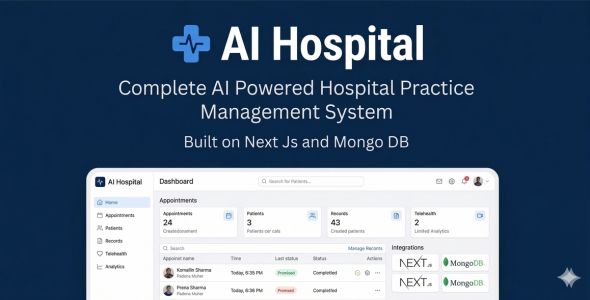

AI Hospital – Complete AI Powered Healthcare / Hospital Management System (HMS) | Node JS
One complete platform for hospitals and clinics
AI Hospital brings the public face of your organisation and the day-to-day work of your team into one system. Patients get a professional website and a clear way to request appointments; doctors, nurses, and administrators get a secure portal for patients, schedules, clinical documents, laboratory and imaging, pharmacy, stock, billing, emergency and ward care, telemedicine, ambulance bookings, and more—without stitching together separate software for each department.
AI is there to support your staff, not to replace clinical judgment. In settings you connect the AI provider you already use (OpenAI). The product includes helpers for notes, reports, scheduling insight, safety checks, analytics, and optional analysis of medical images where your model supports it.
The application is built with Node.js, Next.js, React, and TypeScript—a modern, maintainable stack suitable for serious deployments. Optional links to laboratory equipment (LIS-style workflows) and imaging equipment (DICOM) are available when you want results and studies to flow in automatically.
Live demo
Public website (landing, booking, patient-facing):
https://aidoc-roan.vercel.app/
Staff app & backend (same deployment — sign in for dashboard):
https://aidoc-roan.vercel.app/login
Demo Credentials:
- Admin: admin@aidoc.com / password123
- Doctor: doctor@aidoc.com / password123
- Patient (portal): patient@aidoc.com / password123
Key features
Below is a tour of the product by topic. Each part works with the others so you can run front-office and back-office care on one platform.
Authentication & Security
- Secure login system with email/password authentication
- Protected routes – all sensitive pages require authentication
- Session management with persistent login state
- Password hashing with bcrypt (no plaintext passwords)
- Role-based access control (Admin, Doctor, Staff, Patient)
- Secure cookie handling and JWT tokens
Patient Management
- Complete patient records with comprehensive medical history
- Contact information and insurance details management
- Search and filter patients by name, ID, or contact information
- Patient status tracking and management
- Quick access to patient details and case notes
- Edit and update patient information with audit trail
- Delete patient records (with confirmation)
Appointment Management
- Advanced appointment scheduling system
- Time slot management and availability tracking
- Daily, weekly, and monthly calendar views
- Appointment status tracking (scheduled, completed, cancelled)
- Quick rescheduling options with conflict detection
- Patient assignment and doctor scheduling
- Appointment notes and reminders
- Role-based visibility (doctors see their assigned appointments; patients see their own)
- Per-doctor schedules feed public availability on the online booking form
Public Website & Online Booking
- Your hospital’s front door online: Edit your marketing site from Settings—hero message, services, trust content, visiting information, map, announcements, FAQs, and more—so the website matches how you really work.
- Clean, clinical look that works on phones and desktops; simple navigation; multiple languages (English, Spanish, French, Arabic, and room to add more).
- Staff sign-in opens in a new browser tab so visitors stay on the public pages.
- Online appointment requests when you turn them on: visitors choose who to book with and see times that reflect each doctor’s schedule in the system.
- Optional public help chat: One assistant visitors can use—it reads your site text, who is bookable, and notes you add (general guidance only; not a replacement for medical advice).
- Phone numbers, email, and web links in your text turn into tap-to-call and tap-to-open links for mobile users.
- Returning patients can confirm identity with a one-time text message code when you enable SMS in Notification Settings (using a provider such as Twilio).
- Phone numbers for SMS and forms are handled in a standard international format based on your notification and organisation settings.
Medical Reports
- Comprehensive reporting system for test results
- Medical documentation and findings
- Report status tracking (draft, completed, reviewed)
- Priority-based organization
- Search and filter reports by patient, date, or type
- Download reports as PDF
- Print and share capabilities
Doctors & Staff
- Dedicated Doctors module (doctor-only list; staff are managed separately)
- Extended doctor profile fields (phone, specialization, department, license, qualifications, experience, bio, address, DOB, gender)
- Dedicated edit page for doctors (stable full-form workflow)
- Per-doctor schedules for generating public appointment slots
- Staff management module with create/delete workflows
Laboratory Management with LIS Integration
- Lab test orders and result entry
- Test status tracking (pending, in progress, completed)
- LIS (Laboratory Information System) Integration: Full bi-directional interface with laboratory analyzers
- Device Registration: Register and manage connected lab devices (hematology, biochemistry, immunoassay, coagulation analyzers)
- HL7/ASTM Protocol Support: Industry-standard messaging for seamless analyzer communication (optional standalone HL7/ASTM servers via npm scripts)
- Secure API Keys: Generate unique API keys for each device for secure, authenticated result transmission
- Incoming Results Queue: Review, validate, and accept results from connected devices with automatic patient/order mapping
- Real-time Device Monitoring: Connection status, last communication timestamp, and result counts per device
- Auto-flagging: Critical and abnormal values automatically flagged for immediate attention
Inpatient Management
- Ward management (list/create/edit)
- Bed management (list/edit with status/type and ward assignment)
- Admissions management with patient assignment
Radiology and Imaging with DICOM Integration
- Radiology studies: create, view, and report
- Image attachment and referring doctor assignment
- Full DICOM Compliance: Industry-standard medical imaging integration (DICOM 3.0)
- Modality Worklist (MWL): Push scheduled exams to imaging devices automatically
- DICOM STOW-RS: Receive images via web-based STOW protocol from modern equipment
- Multi-Modality Support: Register CR, DR, CT, MRI, US, mammography, PET-CT, and other DICOM-compliant devices
- AE Title Configuration: Configure Application Entity titles for proper DICOM network routing
- Incoming Images Queue: Review and assign incoming images to studies and patients with DICOM tag parsing
- Device Dashboard: Real-time connection status, last communication, and image counts per modality
- PACS-Ready Architecture: Designed for integration with Picture Archiving and Communication Systems
Pharmacy
- Medicine management with full view/edit pages
- Track stock and expiry-related details
Inventory
- Supplier management (view/edit)
- Items management (medical supplies/equipment)
- Purchase orders (dedicated view page with items, totals, status)
Billing & Invoices
- Invoices and payments management
- Dedicated invoice edit page for a stable editing experience
Document Management
- Upload and store documents (consent forms, certificates, referrals)
- Link documents to patients; categories and search
- View details and download files
Emergency Department
- Emergency case creation and triage (priority classification)
- Quick patient lookup using existing registration
- Chief complaint, vital signs, triage notes, attending doctor
- Case list and status tracking
Telemedicine
- Virtual consultations: video, audio, or chat
- Session scheduling (patient, doctor, type, date/time)
- Waiting room; join consultation and in-session chat
- E-prescriptions during or after session
- Session status tracking (scheduled, waiting, in-progress, completed)
Ambulance Services
- Ambulance booking (patient, pickup/destination, date/time, priority)
- Booking list and status management
- Fleet management: register ambulances, driver assignment
- Service charges and notes
AI-Powered Features
Your AI, your rules: Add your API keys in AI Settings and pick the active model. Typical setups use OpenAI, Anthropic, or Google; other providers appear in settings when supported. You pay your AI provider directly according to their pricing.
- AI Medical Assistant: Intelligent assistant for medical queries, symptom analysis, treatment suggestions, and clinical decision support
- AI Treatment Plans: Generate comprehensive, evidence-based treatment plans tailored to patient conditions
- AI Drug Interaction Checker: Safely check for potential drug interactions before prescribing medications with severity ratings
- AI Medical Image Analysis: Analyze medical images (X-rays, CT scans, MRIs, ultrasounds) with multimodal / vision-capable models
- AI Voice Input: Voice-to-text transcription for hands-free medical notes and patient data entry
- AI Appointment Optimizer: Optimize appointment schedules using AI to maximize efficiency and patient satisfaction
- AI Risk Assessment: Assess patient risk factors and potential complications using AI-powered analysis
- AI Health Trends: Track and analyze health trends across patient population
- AI Health Analytics: Advanced analytics and insights powered by AI to improve practice outcomes
- AI Symptom Analyzer: Analyze patient symptoms to assist in diagnosis and treatment planning
- AI Report Generator: Automatically generate comprehensive medical reports using AI assistance
Medical Device Integration (DICOM & LIS)
- Enterprise-Grade Integration: Connect your existing medical devices directly to the HMS
- DICOM Standard: Full compliance with DICOM 3.0 for radiology/imaging equipment integration
- LIS Connectivity: Laboratory Information System integration for automated result capture
- Supported Lab Analyzers: Hematology, biochemistry, immunoassay, coagulation, urinalysis, and more
- Supported Imaging Modalities: X-ray (CR/DR), CT, MRI, Ultrasound, Mammography, PET-CT, C-Arm
- Bi-directional Communication: Send orders to devices and receive results/images automatically
- Secure Authentication: API key-based device authentication with per-device access control
- Vendor Agnostic: Works with equipment from major manufacturers (Siemens, GE, Philips, Roche, Abbott, Beckman, Sysmex, etc.)
- Middleware Compatible: Can integrate via middleware solutions for legacy equipment
- Audit Trail: Complete logging of all device communications for compliance
Dashboard & Analytics
- Real-time practice statistics and key metrics
- Total patients, appointments, and reports tracking
- Recent activity feed
- Upcoming appointments overview
- Quick actions for common tasks
- Analytical Reports dashboards with interactive charts (Recharts) and CSV export
Settings & Configuration
- User profile management
- Password change functionality
- AI: Choose provider, enter API keys, run a test, and set the active model.
- Notifications: Connect SMS for booking codes (for example Twilio); set your default country and sender details in one place.
- Hospital website: Turn features on or off (online requests, optional visitor chat, welcome text) and edit content visitors see.
- Visitor help topics: A simple editor for short reference notes the optional public assistant can use.
- Languages and on-screen wording are managed in translation files; English is always available as a fallback.
- Display preferences
Technology Stack
Core Runtime & Framework
- Node.js (18+) – JavaScript runtime for the Next.js server, API routes, and build tooling
- Next.js 15.5 – App Router, API routes, production builds (Turbopack optional)
- React 19.2 – Latest stable UI library
- TypeScript – Full type safety
Authentication & Database
- NextAuth.js 4.24.13 – Secure authentication (MongoDB adapter)
- Mongoose 9 – MongoDB ODM
- MongoDB 6 – NoSQL database
UI & Styling
- Tailwind CSS 4 – Utility-first CSS
- Lucide React – Icon library
- Responsive Design – Mobile-first approach
Charts, Messaging & i18n
- Recharts 3.7 – Interactive charts for analytical dashboards
- next-intl 4.3 – Internationalization utilities
- Staff & public UI strings loaded from locale JSON via API; bundled English fallback avoids raw translation keys (e.g. on first paint)
- Twilio – SMS for optional booking OTP
- libphonenumber-js – Phone normalization (E.164), detection in auto-linked text
Security Status
Dependencies are maintained with security-conscious versioning; run npm audit in your environment for current advisory status.
- Security-focused package updates recommended as part of deployment
- Latest stable line where practical for production
Responsive Design
- Fully responsive – works on desktop, tablet, and mobile devices
- Mobile-optimized sidebar with collapsible menu
- Touch-friendly interface
- Adaptive layouts for all screen sizes
Security Features
- Secure authentication with NextAuth.js
- Protected routes and API endpoints
- Input sanitization and XSS protection
- Secure session management
- Data encryption in transit
- bcrypt password hashing
What you receive
- Complete source code you can host yourself
- Documentation in HTML format
- Database structure and data models
- Ready-made API routes and reusable interface components
- Example environment configuration
- Step-by-step installation guide
Getting started (quick)
- Install Node.js 18+ and MongoDB on your machine or server.
- Unzip the package and run
npm installin the project folder. - Copy the sample settings into
.env.localand fill in your database URL and secrets. - Run
npm run devto try the app locally. - In the admin area, open AI Settings and add your AI key if you plan to use AI features.
Documentation
Full documentation ships with the product. It walks you through installation, configuration, everyday use, and common questions.
- Installation and setup
- Configuration and environment variables
- Feature usage and best practices
- Troubleshooting common issues
- API integration guide
Common use cases
- Hospitals that need wards, emergency, outpatient booking, and specialist departments on one platform
- Private practices and clinics of any size
- Telemedicine and virtual consultation programmes
- Laboratories that want organised orders and optional automated intake from analysers
- Imaging and radiology services that work with standard medical imaging formats
- Any organisation that wants a complete hospital-management foundation rather than a single-purpose app
Who it is for
- Hospitals and multi-department clinics that want patient-facing web presence and internal operations in one product
- Administrators who prefer one connected system instead of separate booking tools, spreadsheets, and add-ons
- Healthcare teams ready to digitize appointments, records, lab and imaging, pharmacy, and billing behind a single sign-on
- Technical teams who value a clear Node.js / Next.js codebase for customization and long-term ownership
Regular updates
This product is actively maintained with:
- Regular security updates
- Feature enhancements
- Bug fixes
- Performance optimizations
Changelog
Version 1.1.3 – 6 May 2026
Polish and fixes on top of the March release. The largest public-website update is described in version 1.1.2 below.
- Optional public chat assistant: When turned on, visitors get a small help widget on your public site that uses your written content, who is open for bookings, and the guidance notes you provide—general, careful suggestions only, not medical advice. It arrived with the March site release; this update makes answers feel more natural as they appear (where your AI provider supports it), fixes cases where the assistant did not fully see your hospital and booking context, and makes availability feel quicker to refresh.
- Clickable contact details: On your public website, phone numbers, emails, and web addresses turn into normal links so visitors can tap to call, write an email, or open a website.
- Staff dashboard languages: When the system is still loading or a phrase is missing in the selected language, you now see clear English text instead of confusing internal codes on buttons and labels.
- Smoother setup: Behind-the-scenes changes make the public website and installation process more dependable for teams deploying the product.
Version 1.1.2 – 28 March 2026
Big step forward for your public-facing hospital site after the February dashboard language update.
- New public website layout: A fresh, modern one-page hospital site you control from Hospital website in Settings. It includes a strong first impression at the top, quick navigation, space for news or announcements, sections for trust, services, about your mission and values, departments, how care works step-by-step, visiting hours, patient stories, questions and answers, a clear path to book online if you turn it on, contact details with optional map, an urgent-help notice, and a full footer. The look is calm and clinical with a teal accent, works well on phones (including a mobile menu), highlights the section visitors are reading as they scroll, and can be shown in several languages. Staff login can open in a new browser tab so visitors do not lose the public page.
- Request appointments online: When enabled, visitors can ask for an appointment on a dedicated booking page. Which doctors appear and which appointment times are offered follow each doctor’s schedule you set in the system.
- Returning patients and text messages: You can ask returning patients to confirm their identity with a code sent by SMS when you use a supported text-message provider; sending settings are configured in Settings → Notifications. Phone numbers are handled in a consistent international format.
- Instructions for buyers updated (public website, text messaging, and environment setup).
Version 1.1.1 – 18 February 2026
- Complete dashboard internationalization: all sections now fully translatable (EN/ES/FR)
- Added translations for Critical Alerts section with proper pluralization
- Added translations for Operational Stats grid (Bed Occupancy, Inpatients, Laboratory, Emergency, Blood Bank, Pharmacy, Telemedicine, Billing)
- Added translations for Quick Actions buttons
- Fixed language switching: dashboard stats now update reactively when changing language
- Improved translation architecture: critical alerts use translation keys for dynamic content
Version 1.1.0 – February 2026
- Document management: upload, categorize, link to patients, download
- Emergency department: cases, triage, vital signs, attending doctor
- Telemedicine: video/audio/chat consultations, waiting room, e-prescriptions
- Ambulance services: bookings and fleet management
- Lab device integration: connected devices, API keys, incoming results from analyzers
- Imaging device integration: connected modalities, DICOM/STOW, incoming images
Version 1.0.0 – 26 January 2026
- Multi doctor system
- Staff portal / authentication
- Patient login
- Laboratory management
- Inpatient
- Radiology
- Pharmacy
- Inventory
- Analytical reports
- Billing
Support
If you need help after purchase, use the CodeCanyon item support channel so we can assist in one place.
Important notes before you buy
- AI features need at least one AI account and API key you manage; your AI provider bills you for usage.
- You need a MongoDB database (on your server or in the cloud).
- Node.js 18 or newer is required to run the application.
- The staff portal needs internet access when using cloud-hosted AI.
- Text-message codes for returning patients are optional and use an SMS provider (for example Twilio) that you configure.
- Run
npm run seedafter setup to create demo logins and sample data for testing.
AI Hospital is built to be the operating system for your hospital or clinic—from the first click on your website to the last signature on a bill. If you want breadth, security, and modern AI assistance in one purchase, you are in the right place.


