AgenPrompt | AI Prompts Organizer and Generator Windows App
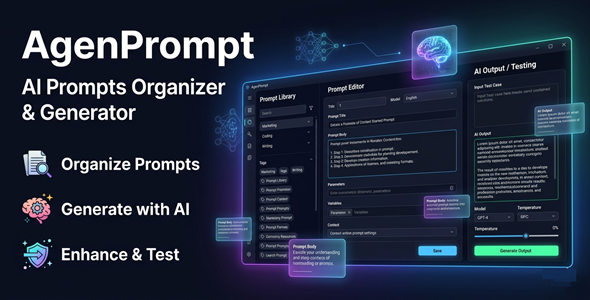

Stop Losing Your Best AI Prompts
Most AI users spend hours repeating the same prompts, tweaking, losing, and forgetting them.
That changes today.
AgenPrompt is a powerful Windows desktop app that lets you organize, generate, enhance, and test your AI prompts — all in one place.
100% local. 100% private. Built for speed.
Why You Need This
❌ Losing great prompts because they’re scattered in notes, files, and chats
❌ Wasting time rewriting similar prompts from scratch every day
❌ Getting inconsistent results because you can’t track what worked
❌ Switching between tools to generate, test, and compare outputs
AgenPrompt solves all of this.
One desktop app. Every prompt tool you need. Nothing stored in the cloud.
Perfect For
✔ Digital marketers
✔ Content creators
✔ Developers and coders
✔ Freelancers and agencies
✔ SEO specialists
✔ Anyone who uses AI daily
Features
 | Prompt Manager System Create, edit, tag, and categorize all your prompts in one clean workspace. Mark favorites and find anything instantly with fast search. |
| AI Prompt Generator Turn simple ideas into high-quality, structured prompts in seconds. Customize tone, format, and creativity level for better outputs. |
| Prompt Enhancer Tool Take a basic prompt and transform it into something powerful. Improve clarity, structure, and performance automatically. |
| Built-in Tester Module Run and test your prompts directly inside the app — no switching tools. Connect your own OpenAI or Claude API key to compare results live. |
| Ready-to-Use Template Library Access pre-built prompts for marketing, coding, SEO, and more. Import and use templates in seconds. |
| Version Control System Track every change and improvement to your prompts over time. Restore any previous version with one click. |
| Multiple Variations Generate several prompt versions at once. Pick the best one or combine ideas for maximum performance. |
| 100% Local Storage All your data stays on your device — no cloud, no subscriptions, no leaks. Full privacy guaranteed. |
| Fast Search and Filtering Filter prompts by category, tag, or favorite status instantly. Find exactly what you need without scrolling endlessly. |
How You Can Profit
✔ Build a personal prompt library that saves hours every week
✔ Sell prompt packs to clients as a freelancer or agency
✔ Speed up content production and take on more paid projects
✔ Deliver higher-quality AI outputs to clients consistently
✔ Create and sell AI-powered services using your optimized prompts
Your prompts are your competitive edge.
AgenPrompt turns them into a professional system that earns.
⚡ Fast Results
Install the app and start in minutes.
No complex setup. No learning curve.
Organize your existing prompts on day one.
Generate new high-quality prompts immediately.
Test and compare results without leaving the app.
Example:
Build a full organized prompt library in under an hour.
Generate 10+ prompt variations in under a minute.
Simple 3-Step Setup
 | Step 1 – Download and Install Run the .exe installer on Windows 10 or 11. Make sure .NET 8 Runtime is installed (free download from Microsoft). |
 | Step 2 – Add Your API Key (Optional) Paste your OpenAI or Claude API key into settings. Required only for the Generator, Enhancer, and Tester features. |
 | Step 3 – Start Organizing and Generating Create categories, add prompts, and use the built-in tools. Your workflow is now faster, cleaner, and more powerful. |
Installation Guide
Requirements before installing:
✔ Windows 10 or Windows 11 (64-bit)
✔ .NET 8 Runtime — free download from Microsoft
✔ Minimum 4 GB RAM (8 GB recommended)
✔ At least 200 MB free disk space
✔ Internet connection only needed for AI API features
How to install:
1. Download the installer from your Envato purchase.
2. Run the .exe file.
⚠️ API Key Notice:
Features like the Generator, Enhancer, and Tester require your own API key.
Supported providers: OpenAI and Anthropic (Claude).
API usage costs are billed directly by those services and are not included in this purchase.
Troubleshooting
 | App won’t launch or crashes on startup Make sure .NET 8 Runtime is installed. Download it free from the official Microsoft website and restart after installing. |
| API connection errors Double-check your API key is entered correctly in Settings. Confirm your key is active and has available credits with your provider. |
| Local storage or permission errors Try running AgenPrompt as Administrator (right-click → Run as administrator). Ensure your antivirus or Windows Defender is not blocking the app folder. |
| Prompts not saving Check that the app has write permissions to its installation folder. Move the app to a folder outside of Program Files if the issue persists. |
- Version 1.0.0 – Initial release with full prompt management, AI generation, enhancement, testing, library, and version control features.
| Do I need an API key to use AgenPrompt? No. The Manager, Library, and Version Control features work without any API key. An API key is only needed for the Generator, Enhancer, and Tester modules. |
| Which AI providers are supported? AgenPrompt supports OpenAI (GPT models) and Anthropic (Claude models). You use your own key — no subscription fees are included in this purchase. |
| Is my data safe? Yes. All prompts and data are stored locally on your own device. Nothing is sent to external servers unless you use the AI API features. |
| What .NET version do I need? AgenPrompt requires the .NET 8 Runtime. It is free to download directly from Microsoft’s official website. |
| Does this work on Mac or Linux? No. AgenPrompt is a Windows-only desktop application. It is fully compatible with Windows 10 and Windows 11. |
| Can I get updates after purchase? Yes. All future updates are included with your purchase. Check the changelog above for the latest version history. |
0 average based on 0 ratings.

| Last Update | 2026-05-07 |
| Created | 2026-05-07 |
| Sales | 0 |
| Discussion | Comments |
| Application Runtime | Native |
| High Resolution | |
| Compatible OS Versions | Windows 11 Windows 10 |
| Video Preview Resolution |


