Advanced Activecampaign integration with ARForms


Advanced Active Campaign integration with ARForms
Advanced Active Campaign integration with ARForms addon allows you to send additional field’s data to Active Campaign other than just basic fields. With this addon, you can map additional fields with Active Campaign fields and it will send all mapped field’s values to Active Campaign after form submission of ARForms.
Features

Active Campaign Configuration
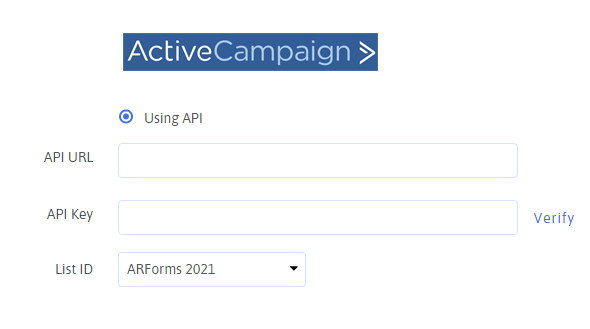
From General settings of ARForms, you can configure Active Campaign by following below steps: - You just need to add API URL and API KEY of Active Campaign and click on “Verify”.
- After verifying successfully, you will get all lists from Active Campaign in List ID dropdown. Select your desired subsciber list there and please do not forget to save your changes.
After completed general settings and select default subscriber list, you need to map fields from ARForms’ form. You can get this setting from “Opt-in” tab from form editor.
Advanced Active Campaign Option
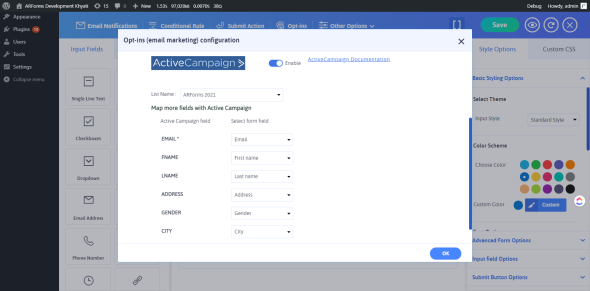
Now, When user submits this form, it will subscribed to Aweber with all the details which fields are mapped with Aweber fields.
$10 |
Download |
0 average based on 1 ratings.

| Last Update | 2026-06-30 |
| Created | 2021-03-09 |
| Sales | 13 |
| Discussion | Comments |
| Compatible Browsers | |
| Software Version | WordPress 6.1.x WordPress 6.0.x WordPress 5.9.x WordPress 5.8.x WordPress 5.7.x WordPress 5.6.x WordPress 5.5.x WordPress 5.4.x WordPress 5.3.x WordPress 5.2.x WordPress 5.1.x WordPress 5.0.x |
| Compatible With | |
| Gutenberg Optimized | Yes |
| High Resolution | |
| Files Included | JavaScript JS HTML CSS PHP |
| Video Preview Resolution |
Search plugins
Browse Categories


