AdSpot TV - Digital Signage Player for Android TV
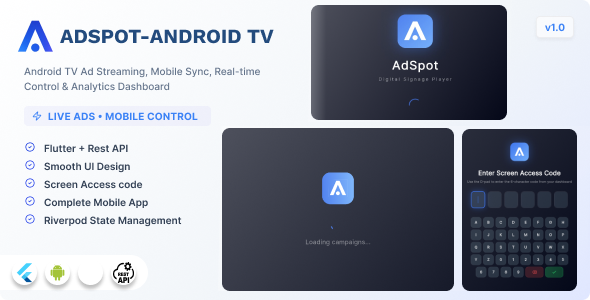

AdSpot TV – Digital Signage Player for Android TV (Flutter)
AdSpot TV is a professional digital signage and advertising display application built with Flutter for Android TV devices. It connects to a backend server to receive and manage advertising campaigns, plays image and video content in a continuous scheduled loop on TV screens, and reports detailed analytics back to the server. The application includes full offline support, real-time campaign updates via WebSocket, and a clean fullscreen TV-optimized interface.
Designed for out-of-home advertising networks, retail stores, restaurants, hotels, airports, and any environment where managed digital signage is required on Android TV or Amazon Fire TV hardware.
This project requires the AdSpot Pro backend for API endpoints, campaign management, and analytics. The backend is available separately on CodeCanyon: AdSpot Pro – Digital Signage and Advertising Platform.
Key Features
Device Management
- Pair the TV device with a 6-character access code from the admin panel
- Secure encrypted token storage for authentication persistence across reboots
- Automatic device registration with hardware metadata (model, manufacturer, OS version)
Campaign Playback
- Supports image campaigns (JPEG, PNG, WebP) and video campaigns (MP4)
- Configurable display duration per campaign
- Campaign scheduling with start and end time rules and timezone support
- Automatic campaign rotation and looping
- Smooth fade transitions between campaigns
- Idle screen displayed when no campaigns are scheduled
Real-Time Updates and Connectivity
- Live campaign updates delivered via WebSocket and Socket.IO with no manual refresh required
- Automatic reconnection on network drop with exponential backoff
- Offline media caching so playback continues without internet access
- Connection status indicator overlay
- Graceful degradation when the server is unreachable
Analytics and Reporting
- Per-campaign view duration tracking
- Heartbeat service sending device status to the server every 30 seconds
- Batched analytics event upload to minimize network overhead
- Local SQLite database for event queuing when offline
TV-Optimized Interface
- Fullscreen immersive display with system UI hidden
- Landscape-only orientation lock
- Always-on screen wake lock for 24/7 signage operation
- D-pad compatible navigation on the pairing screen
- Dark theme with gradient design
Developer and Debug Tools
- Hidden debug overlay activated by the Konami code sequence
- Live display of playback state, current campaign index, and offline status
- Structured logging system
- Environment-based API configuration for production, staging, and local development
Tech Stack
- Framework: Flutter 3.41 with Dart 3
- State management: Riverpod 2 with code generation
- Navigation: go_router
- HTTP client: Dio
- Real-time communication: Socket.IO client
- Video playback: video_player
- Media caching: flutter_cache_manager
- Local database: sqflite
- Secure storage: flutter_secure_storage
- Network monitoring: connectivity_plus
- Data models: Freezed and JSON serializable
- Device info: device_info_plus
- Wake lock: wakelock_plus
Requirements
- Flutter SDK 3.41.0 or later
- Dart 3.0.0 or later
- Android SDK API level 21 or higher (Android 5.0+)
- Target device: Android TV or Amazon Fire TV
- Backend: AdSpot Pro REST API server with Socket.IO support (sold separately)
Use Cases
- Digital advertising networks managing multiple TV screens remotely
- Retail store digital signage and product promotion displays
- Restaurant menu boards and promotional content
- Hotel lobby and corridor advertising screens
- Airport or transit lounge information and advertising displays
- Corporate office digital notice boards
What is Included
- Full Flutter source code (42 Dart files, clean MVVM-like architecture)
- Riverpod state management with code generation
- REST API and Socket.IO integration layer
- Local SQLite analytics database
- Media caching and offline playback system
- Heartbeat and analytics sync services
- Pairing screen, playback screen, idle screen, and debug overlay
- HTML documentation file
Notes
- A backend API server with REST and Socket.IO endpoints is required. The backend is not included in this item.
- After purchase, set your server URL in
lib/core/config/app_config.dartand rundart run build_runner buildbefore building. - The application is designed exclusively for Android TV and Fire TV. It is not intended for use on phones or tablets.
0 average based on 0 ratings.

| Last Update | 2026-04-15 |
| Created | 2026-04-15 |
| Sales | 19 |
| Discussion | Comments |
| Software Version | Flutter 3.x |
| Files Included | Dart .java .kotlin |
| Video Preview Resolution |


