Recall AI – Flutter Flashcard App with AI Generation, Spaced Repetition & In-App Subscriptions
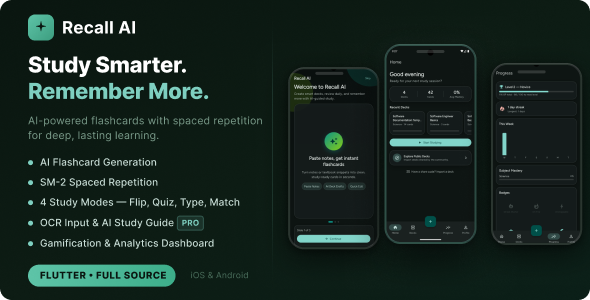

Recall AI — AI-Powered Flashcard & Spaced Repetition App
Recall AI is a complete, production-ready Flutter application that helps users learn anything faster using AI-generated flashcards and the proven SM-2 spaced repetition algorithm. Built with clean architecture, Riverpod state management, Firebase backend, OpenAI card generation, and RevenueCat subscriptions — everything you need to launch your own study app on Android and iOS.
✨ Key Features
- AI Flashcard Generation — Paste notes, type a topic, or upload an image of your notes. OpenAI (GPT-4o-mini) generates a full deck of flashcards in seconds.
- SM-2 Spaced Repetition — The same algorithm used by Anki. Cards are scheduled at the optimal interval for long-term retention (New → Learning → Review → Mastered).
- 4 Study Modes — Flashcard flip, Multiple Choice (MCQ) with explanations, True/False, and Typing mode (Pro).
- OCR Input (Pro) — Upload a photo or image of your notes. Google ML Kit extracts the text, then AI turns it into a study deck.
- AI Study Guide — Per-deck AI-generated overview with key concepts, common mistakes, and memory tips.
- Gamification — XP, levels, daily streak tracking with 2× XP multiplier, badges, and mastery percentage per deck.
- Analytics Dashboard — Weekly study chart, subject mastery breakdown, level progress bar, and badge showcase.
- Deck Sharing & Explore — Share decks with a 6-character code. Browse and import from a public community feed.
- Study Reminders — scheduled local notifications tell users how many cards are due, with optional streak-protection alerts. No backend required; works offline.
- In-App Subscriptions — Free, Monthly, Yearly, and Lifetime tiers managed via RevenueCat with a built-in paywall screen.
- Dark & Light Theme — Material 3 design with dynamic color scheme. Fully customizable brand color.
- 4 Auth Providers — Email/password, Google Sign-In, Sign in with Apple, and anonymous guest mode.
- Offline / Guest Mode — Guests study locally via SharedPreferences. Authenticated users sync via Firestore.
- Portrait-only, phone-first UI — Pixel-perfect Material 3 design with Figtree font.
Screens Included
- Splash Screen with brand animation
- Onboarding carousel (3 slides)
- Sign In / Sign Up (Email, Google, Apple, Guest)
- Home Overview — stats card, recent decks, quick start
- Deck List — search, sort, filter by subject & mastery
- Deck Method Selection — 4 creation modes
- Deck Creation — AI generation form with subject, difficulty, card count
- Deck Detail — 3 tabs: Flashcards, Stats, AI Study Guide
- Deck Edit — add, edit, reorder, delete cards
- Study Session — 4 modes with progress header
- Study Summary — results, XP earned, mastered cards
- Progress / Analytics — level, streak, weekly chart, badges
- Profile — account info, subscription status, quick stats
- Settings — theme toggle, study goals, reminder time and streak alerts, sign out
- Explore — browse community-shared decks
- Import Deck — 6-character share code lookup
- Paywall — subscription plans with feature comparison
Tech Stack
- Framework: Flutter 3 / Dart 3
- State Management: flutter_riverpod
- Routing: go_router with route guards
- Backend: Firebase Auth, Cloud Firestore, Firebase Remote Config
- AI: OpenAI GPT-4o-mini (key stored in Remote Config — no hardcoding)
- Monetization: RevenueCat (purchases_flutter)
- OCR: Google ML Kit Text Recognition
- Design: Material 3 · Figtree font · Teal seed color (#0D9488)
- Architecture: Clean architecture per feature (presentation / application / domain / data)
- Testing: Unit tests + policy tests included
Subscription Tiers
Plans: Free · Monthly ($4.99) · Yearly ($29.99) · Lifetime ($49.99). Every paid plan unlocks the same Pro feature set — only the billing period differs.
- Max decks — Free: 5 · Pro: unlimited
- AI generations per day — Free: 3, plus one more for each optional rewarded video · Pro: unlimited
- Cards per generation — Free: 15 · Pro: 50
- Character input limit — Free: 2,000 · Pro: 20,000
- Image upload (OCR) — Free: ✗ · Pro: ✓
- Deck sharing — Free: 1 deck · Pro: unlimited
- Analytics history — Free: 7 days · Pro: all time
- Ads — Free: optional rewarded videos · Pro: none
⚙️ Requirements to Launch
- Flutter SDK 3.x
- Firebase project (free tier works fine)
- OpenAI API key (added to Firebase Remote Config — no code change needed)
- RevenueCat account (free up to $2,500 MRR)
- Google Play Console ($25 one-time) for Android
- Apple Developer account ($99/year) for iOS + Sign in with Apple
What’s Included
- Complete Flutter source code (Android + iOS)
- Full offline HTML documentation (
docs/documentation.html) - Quick Start Guide (
docs/quick-start.html) - Unit tests + policy tests
- Clean architecture, well-commented and ready to customise
Changelog
Version 1.1.0 — Reminders, Rewarded Ads & Toolchain Upgrade
Upgrade note: this release raises the minimum toolchain to Flutter 3.44 / Dart 3.12, JDK 17 and Android Gradle Plugin 9.
- New — Study Reminders. Opt-in daily notification at a time the user picks, showing how many cards are due, plus an optional alert when a streak is about to break. Local notifications, so no backend is required and they work offline and in guest mode.
- New — Rewarded video ads. Free users get 3 AI generations per day, then can watch an optional rewarded ad to earn one more. Pro subscribers are never gated and see no ads.
- New — Release signing via
android/key.properties, with an example file included. Release builds were previously debug-signed, which Google Play rejects. - New — Privacy policy draft (
docs/privacy-policy.md) plus tappable Terms / Privacy links on the sign-up screen and in Settings. - New — Play Store release guide (
docs/play-store-release.md) with Data Safety form answers and a submission checklist. - Upgraded Riverpod to 3.4.2, go_router to 17.5.0, RevenueCat to 10.8, Google Sign-In to 7.2, Sign in with Apple to 8.1, fl_chart to 1.2, google_fonts to 8.2, ML Kit to 0.16, and the Firebase suite to current.
- Upgraded the Android toolchain to Gradle 9.1.0, AGP 9.0.1, Kotlin 2.3.20 and google-services 4.4.4.
- Fixed a silent failure where a release build without a RevenueCat key shipped with an empty key and failed every purchase with no error shown.
- Fixed the iOS Google Sign-In URL scheme, which was missing and prevented the sign-in callback from returning.
- Documentation corrected — previous versions described banner ads and push reminders that were not present in the code. Those features now exist, and the docs describe what actually ships.
Version 1.0.1 — Bug Fixes
- Fixed the flashcard answer side sometimes being unreadable — the answer now uses guaranteed-contrast Material 3 colors in both light and dark themes, with a clear placeholder when a card has no answer.
- Fixed newly imported or created decks occasionally showing no flashcards — the deck’s cards now appear immediately (stale cached card list is refreshed after save/import).
- Renamed the “Upload PDF / Image” creation option to “Upload Image” to accurately reflect image-based OCR input.
- Added the iOS photo library usage description (
NSPhotoLibraryUsageDescription) for App Store compliance when importing images for OCR.
Version 1.0.0 — Initial Release
- AI flashcard generation via OpenAI GPT-4o-mini (paste notes, topic, OCR)
- SM-2 spaced repetition engine with 4 card states
- 3 study modes: Flashcard, MCQ, True/False
- AI-generated per-deck Study Guide
- Gamification: XP, levels, streaks, badges
- Analytics dashboard with weekly chart and subject breakdown
- Deck sharing with 6-character codes and public Explore feed
- RevenueCat subscriptions: Monthly, Yearly, Lifetime
- 4 auth providers: Email, Google, Apple, Anonymous
- Dark / Light theme toggle
- Full offline guest mode
- iOS arm64 simulator support (MLKit 0.15.1 + platform 15.6)
Support
We provide dedicated support for all CodeCanyon buyers. Please include your purchase code when reaching out.
- Email: devsnack26@gmail.com
- WhatsApp: +855 967 413 911
Response time: within 24–48 hours on business days.
0 average based on 0 ratings.

| Last Update | 2026-08-13 |
| Created | 2026-04-02 |
| Sales | 4 |
| Discussion | Comments |
| Software Version | Flutter 3.x Flutter 2.x Flutter 1.x Other |
| Files Included | Dart YAML .java .kotlin .h .storyboard .plist .swift |
| Video Preview Resolution |


