SalePro SaaS – Multi-Tenant POS Add-on
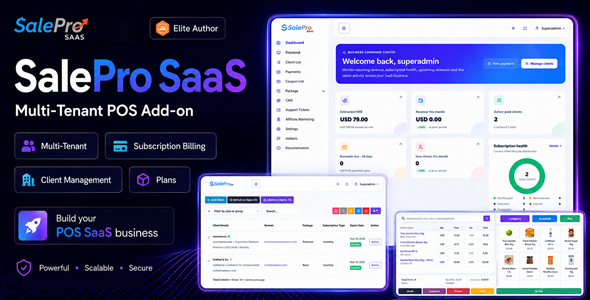

SalePro SaaS — Launch Your Own POS, Inventory & eCommerce SaaS
Turn SalePro into your own multi-tenant SaaS platform and sell business software as recurring subscriptions.
SalePro SaaS Add-on converts a compatible SalePro installation into a subscription-based multi-tenant platform where multiple businesses can register, choose a package and operate independently from their own tenant environment.
Create monthly and yearly plans, free trials, resource limits, tenant databases, subdomains, custom domains, subscription payments, coupons and feature-based packages — then manage the SaaS business from one centralized Super Admin panel.
Your customers can use the SalePro capabilities you enable for them, including POS, inventory, purchasing, warehouses, accounting, HRM, reporting, Restaurant workflows, online selling and other compatible SalePro modules.
You provide the platform. Your customers run their businesses. You build recurring SaaS revenue.
✅ True Multi-Tenant Architecture ✅ Separate Tenant Databases ✅ POS + Inventory + eCommerce SaaS ✅ Subscription Packages ✅ 15+ Subscription Payment Methods ✅ Custom Tenant Domains
Built on SalePro — 3,100+ Envato sales • Envato Elite Author • Developed since 2018


Important — SalePro Is Required
This product is a SaaS add-on for SalePro. It is not a standalone application.
You must have a compatible SalePro installation before installing this add-on.
The add-on adds the multi-tenant SaaS layer, tenant provisioning, packages, subscriptions, SaaS administration and related SaaS workflows on top of SalePro.
If you already own SalePro and want to transform it into a subscription platform for multiple business customers, this add-on is designed for that purpose.
Live Demo
Explore both sides of the platform before you buy.
SaaS Website
Super Admin
Open Super Admin Demo →
Username: superadmin
Password: superadmin
Regular Tenant
Open Regular Tenant Demo →
Username: admin
Password: admin
eCommerce Tenant
Open eCommerce Tenant Storefront →
Open eCommerce Tenant Admin →
Username: admin
Password: admin
What Can You Build with SalePro SaaS?
Retail POS SaaS
Offer subscription-based POS software to retailers, supermarkets, pharmacies, electronics shops, mobile stores, wholesalers and other businesses.
Inventory Management SaaS
Provide businesses with products, warehouses, purchasing, suppliers, stock transfers, stock counts, stock adjustments, Stock Ledger visibility and reporting through recurring subscription plans.
eCommerce SaaS
Offer online-selling capability alongside POS and inventory so tenant businesses can manage physical and online sales from the same SalePro ecosystem.
Business Management SaaS
Depending on the modules enabled in a package, tenants can use broader SalePro workflows for accounting, HRM, Restaurant operations, manufacturing, repair, projects, reporting and other compatible business functions.
Recent SalePro Capabilities You Can Bring to Tenants
Because SalePro SaaS is built on the SalePro ecosystem, recent SalePro development also strengthens what SaaS operators can package for tenants when the relevant module is enabled and the installed versions are compatible.
- 4 eCommerce storefront layouts / demo profiles — Default, Electronics, Fashion and Grocery
- Stock Ledger for clearer tenant stock-movement history
- Sales Agent / Service Staff assignment
- Field Payment Collection Approval
- Accounting Health Center and improved Periodic Inventory Close
- Expanded localization with 11 new SalePro language packs
- Improved Restaurant POS, eCommerce, WooCommerce and AI Assistant workflows
- vCard / NFC functionality where the relevant module is enabled
Recent SalePro payment expansion also includes OPay and Paymob Oman for tenant-side business payment workflows in compatible configurations.
Important: tenant-side SalePro payment gateways are separate from the SaaS subscription-payment methods used by the SaaS owner to collect subscription fees. The subscription methods are listed later on this page.
How the SaaS Business Works
- Install SalePro and the SalePro SaaS Add-on on your server.
- Create subscription packages and define pricing, limits and available modules.
- A customer registers through your SaaS website or you create the client from Super Admin.
- The platform provisions the tenant environment and tenant database.
- The tenant receives its own subdomain and login.
- The tenant operates its SalePro business environment independently.
- You manage subscriptions, packages, payments, tenants and SaaS settings from Super Admin.
- You collect recurring subscription revenue according to your own pricing model.
From signup to tenant provisioning and subscription management, SalePro SaaS gives you the foundation for operating your own software-as-a-service business.
True Multi-Tenant Architecture
SalePro SaaS is designed around tenant separation rather than simply adding a company selector to one shared business dataset.
Each tenant is provisioned with its own tenant database environment, helping keep operational records separated between businesses.
Tenant Businesses Can Maintain Their Own
- Users
- Products, categories and brands
- Customers and suppliers
- Warehouses
- Inventory
- Purchases
- Sales and POS transactions
- Payments
- Expenses and income
- Employees
- Reports
- Business settings
- Other enabled SalePro modules
Your Super Admin manages the SaaS platform while each client manages its own business environment.
Separate Tenant Databases
Every SaaS customer can operate from a separately provisioned tenant database instead of placing the operational records of every business into one shared company dataset.
Tenant Database Administration
- Client database provisioning
- Client database backup
- Tenant database update workflow
- Super Admin database update workflow
Automatic Tenant Provisioning
Create tenants manually from Super Admin or allow businesses to register through your SaaS website.
A tenant can be created with its own business account, administrator login, subscription package, subscription type, tenant database, subdomain, enabled modules and limits.
Example tenant URLs:
shop1.yourdomain.com
shop2.yourdomain.com
company3.yourdomain.com
Custom Domains for Tenants
Tenants are not limited to your wildcard subdomain structure.
You can assign a compatible custom domain or hostname to a tenant, allowing customers to access their environment through an address such as:
pos.customercompany.com
DNS and SSL configuration for each custom domain must be completed correctly on the hosting side.
Create Your Own SaaS Packages
Different businesses have different requirements and budgets. SalePro SaaS lets you create multiple packages and decide what each level of customer receives.
Package Pricing
- Free packages
- Free trials
- Monthly subscriptions
- Yearly subscriptions
Package Resource Limits
- Number of warehouses
- Number of products
- Number of invoices
- Number of users
- Number of employees
Feature & Module Access
Choose the modules available in each package and create plans that match different customer segments.
- Starter — essential POS and inventory
- Retail — POS, more users and multiple warehouses
- Commerce — POS, inventory and online selling
- Business — broader SalePro business-management modules
- Unlimited — higher or unlimited resource allowances
Free Trials, Free Plans & Subscription Changes
- Trial-enabled packages
- Configurable trial duration
- Free plans
- Renew subscriptions
- Change tenant packages
- Switch subscription type
- Activate or deactivate tenants
- Change tenant passwords
- Manage tenant domains
More Than POS SaaS — Offer eCommerce SaaS
SalePro now combines physical selling and online-selling capability inside the broader SalePro ecosystem, so your SaaS business does not have to be positioned only as a POS subscription service.
You can build packages for businesses that want to sell from a physical POS counter, manage inventory, control purchasing and stock, sell online and manage online orders.
4 eCommerce Storefront Layouts
For compatible eCommerce-enabled tenant packages, the current SalePro eCommerce experience includes four storefront layouts / demo profiles:
- Default
- Electronics
- Fashion
- Grocery
Use these layouts to demonstrate different retail styles while keeping tenant products, inventory, customers and orders connected to their SalePro environment.
Position your platform as POS SaaS, Inventory SaaS, eCommerce SaaS — or a combined retail-management SaaS.
Give Tenants the Power of SalePro
Sales & POS
- Fast POS sales
- Barcode workflows
- Multiple payment methods
- Customer management
- Sales returns
- Quotations
- Invoices and receipts
- Sales Agent / Service Staff assignment where enabled
Inventory
- Products and variants
- Multiple warehouses
- Warehouse-specific stock
- Stock transfers
- Stock adjustments
- Stock counts
- Stock Ledger
- Batch and expiry workflows
- IMEI / serial-number workflows
Purchasing
- Supplier management
- Purchases
- Purchase returns
- Supplier payments
- Supplier balances
Accounting & Financial Management
Where enabled in the tenant package and supported by the installed SalePro version, tenants can use SalePro’s full double-entry accounting workflows, Trial Balance, General Ledger, Balance Sheet, Profit & Loss, Cash Flow, receivables, payables and Accounting Health controls.
HRM
Tenant plans can provide employee, department, attendance, leave and payroll-related SalePro workflows.
Restaurant, Manufacturing, Repair & Projects
Create higher-value packages by enabling broader SalePro operational modules where appropriate for your market and customer segment.
Reports
Tenants can access the operational, stock, due, profitability and business reports available through their enabled SalePro modules.
Powerful SaaS Super Admin
Manage Clients
- Create tenants
- View active, trial and expired clients
- Activate or deactivate tenants
- Change packages
- Renew subscriptions
- Change tenant passwords
- Manage tenant domains
Manage Packages
- Create packages
- Set monthly prices
- Set yearly prices
- Offer free plans
- Offer free trials
- Configure resource limits
- Select included features and modules
Manage Subscription Payments
- Review subscription payments
- Search payment history
- Track payment method
- Review transaction references
- Export payment records
SaaS Dashboard & Subscription Analytics
Monitor the health of your SaaS business instead of managing clients blindly.
- Estimated Monthly Recurring Revenue
- Revenue this month
- Active paid clients
- Renewals due
- New clients
- Revenue and client growth
- Subscription health
- Plan performance
- Recent payments
- Newest clients
15+ Subscription Payment Methods
SalePro SaaS supports a broad mix of international and regional payment methods for collecting SaaS subscription payments.
- PayPal
- Stripe
- Razorpay
- Paystack
- Paydunya
- Pesapal
- JazzCash
- bKash
- SSLCommerz
- PayHere
- Mollie
- Xendit
- M-Pesa
- Monnify
- MTN MoMo
- Manual payment
Gateway availability, merchant eligibility and transaction charges depend on the payment provider and country.
Coupons & Promotions
- Coupon codes
- Percentage discounts
- Flat discounts
- Coupon expiry dates
- Subscription checkout discounts
Built-In SaaS Website & CMS
SalePro SaaS includes a customer-facing SaaS website with CMS controls so you can present your software, pricing and business under your own platform identity.
Manage Website Content
- Hero section
- Module / feature section
- Testimonials
- Statistics
- FAQ
- Mobile App section
- Blog
- Contact section
- Social links
- Calls to action
- Footer
- Tenant signup content
- Custom pages
Multi-Language SaaS Website
The SaaS CMS supports multiple languages for public website content and translation management, while compatible SalePro tenant builds can use the multilingual interface available in SalePro.
The latest SalePro localization cycle adds 11 language packs: Simplified Chinese, Urdu, Thai, Filipino, Persian, Burmese, Nepali, Hausa, Polish, Dutch and Portuguese, alongside existing language support including Arabic with RTL.
SEO, AEO & Marketing Controls
- Meta title
- Meta description
- Open Graph title
- Open Graph description
- Open Graph image
- Localized public content
- FAQ content
- Blog content
- Custom pages
- Google Analytics settings
- Facebook / Meta Pixel settings
- Chat integrations
- Other supported tracking scripts
Built-In Affiliate Marketing
- Affiliate registration
- Affiliate approval
- Referral links
- Referral tracking
- Conversion tracking
- Commission percentages
- Commission records
- Pending / approved / paid / rejected commission statuses
- Affiliate payout records
- Affiliate earnings history
Tenant Support Ticket System
- Tenants can create support tickets
- Super Admin can review conversations
- Reply from the centralized support workspace
- Search support tickets
- Export ticket records
- Disable the ticket feature when you prefer another support system
Branding & Theme Controls
- Light / dark appearance
- Primary colors
- Fonts
- Logos
- Button styles
- Sidebar appearance
- Chart colors
- Authentication background
- Website background
- Dashboard appearance
Built for Different SaaS Markets
- Retail POS SaaS
- Inventory management SaaS
- eCommerce SaaS
- Retail management SaaS
- Supermarket POS SaaS
- Pharmacy management SaaS
- Electronics and mobile-shop SaaS
- Wholesale management SaaS
- Distributor management SaaS
- Warehouse management SaaS
- Multi-location business SaaS
- Business-management SaaS
Who Should Buy SalePro SaaS Add-on?
- Existing SalePro owners who want to convert a compatible SalePro platform into a multi-tenant subscription business
- SaaS entrepreneurs launching POS, inventory, eCommerce or business-management SaaS
- POS resellers moving from one-time installations toward recurring subscriptions
- Software companies building a commercial SaaS offering around the SalePro ecosystem
- Agencies & developers providing independent business environments to multiple customers
- Regional software providers creating localized packages, pricing and payment options
Self-Hosted & Source Code Included
SalePro SaaS is self-hosted. You deploy the application on infrastructure you control and receive the PHP / Laravel source code included with the licensed product.
Custom development is not included in standard CodeCanyon item support.
Optional SaaS Extensions
Depending on the current SalePro SaaS version and the extensions available for your installation, the SaaS ecosystem can also be extended with compatible products such as mobile applications and specialized integrations.
Optional extensions are separate products unless their functionality is explicitly stated as included with the SalePro / SalePro SaaS version you are using.
Server Requirements
SalePro SaaS uses automated tenant database and domain provisioning, so its hosting requirements are more demanding than a normal single-business SalePro installation.
Required Environment
- PHP 8.3 or newer within the supported PHP 8.x dependency range
- A compatible current SalePro installation
- MySQL-compatible database environment
- Ability to provision separate tenant databases
- Wildcard DNS / wildcard subdomain support
- HTTPS / SSL coverage for the main domain and tenant hostnames
- Required PHP extensions enabled
- Writable Laravel storage and cache directories
Important Domain Requirement
The main SalePro SaaS installation must use the root domain.
Example: yourdomain.com
Tenant businesses then use wildcard subdomains such as client1.yourdomain.com and client2.yourdomain.com, or configured custom domains.
VPS / Dedicated Server
A VPS or dedicated server is recommended for greater control over database provisioning, wildcard DNS, SSL and SaaS hosting requirements.
Shared Hosting
Some compatible hosting-control-panel environments can work when they provide the APIs and permissions required for automated tenant database creation and domain provisioning. Do not assume every shared-hosting plan supports this.
Licensing
SalePro SaaS Add-on is sold under Envato Market licensing.
Regular License
For one end product where end users are not charged to access the end product, subject to the current Envato Regular License terms.
Extended License
If your business model charges end users to access the SaaS product, review and select the Envato license that permits that commercial use.
Practical example: if you launch a subscription SaaS and charge tenant businesses for access to the software, that is different from a business merely using SalePro internally to sell its own goods or services.
Please review the current Envato license terms before launching your SaaS business.
What You Receive
- ✅ SalePro SaaS Laravel / PHP add-on source code
- ✅ Multi-tenant SaaS functionality
- ✅ Separate tenant database architecture
- ✅ Tenant provisioning workflow
- ✅ Package management
- ✅ Subscription management
- ✅ SaaS Super Admin
- ✅ SaaS frontend / CMS functionality
- ✅ Subscription payment integrations
- ✅ Coupon management
- ✅ Affiliate-management functionality
- ✅ Tenant support-ticket system
- ✅ Theme and platform settings
- ✅ Documentation
- ✅ Future product updates provided through the CodeCanyon purchase
- ✅ 6 months item support as provided with the CodeCanyon purchase
Regular SalePro is required and is purchased separately.
Important Scope Notes
- SalePro required: this add-on does not replace the required SalePro core product.
- Hosting: wildcard domains, tenant database provisioning and appropriate server access are required.
- eCommerce: tenant online-selling availability depends on the compatible SalePro SaaS configuration and the modules enabled for the relevant package.
- Tenant payment gateways: operational payment gateways available inside a tenant come from the compatible SalePro modules and are separate from SaaS subscription-payment gateways.
- Optional extensions: specialized SaaS integrations not explicitly listed as included may require separate compatible products.
- Custom domains: tenant custom domains require correct DNS and SSL configuration outside the application.
- Taxes & legal compliance: SaaS billing, taxation, privacy, invoicing and other legal requirements vary by jurisdiction.
- Customization: source code is included, but custom development is not part of standard CodeCanyon item support.
Frequently Asked Questions
What is SalePro SaaS Add-on?
SalePro SaaS Add-on converts a compatible SalePro installation into a multi-tenant subscription platform where multiple businesses can operate independently while the SaaS owner manages packages, subscriptions, tenants, payments and global settings.
Is this a standalone application?
No. This CodeCanyon product requires a compatible regular SalePro installation.
Can I launch POS, inventory and eCommerce SaaS?
Yes. You can create packages around the SalePro modules enabled for your tenant plans, including POS, inventory and compatible online-selling functionality.
Does each tenant have a separate database?
Yes. SalePro SaaS provisions separate tenant database environments rather than storing the operational data of every customer in one shared company dataset.
Can I create different subscription plans?
Yes. Create packages with monthly or yearly pricing, free-plan or free-trial options, resource limits and enabled modules.
Can customers register themselves?
Yes. Public SaaS signup can be enabled, and Super Admin can also create tenants manually.
Can tenants use custom domains?
Yes. Compatible tenants can be mapped to supported custom hostnames. DNS and SSL must also be configured correctly.
Can tenants use the four SalePro eCommerce layouts?
Where the compatible eCommerce module is enabled for that tenant package, the current SalePro eCommerce experience includes Default, Electronics, Fashion and Grocery storefront layouts / demo profiles.
Do OPay and Paymob collect SaaS subscription fees?
OPay and Paymob Oman are part of recent SalePro tenant-side payment expansion. The SaaS owner’s subscription-payment methods are configured separately and currently include the methods listed in the 15+ Subscription Payment Methods section above.
Which payment methods can I use for SaaS subscriptions?
Current SalePro SaaS subscription-payment settings include Manual Payment, PayPal, Stripe, Razorpay, Paystack, Paydunya, Pesapal, JazzCash, bKash, SSLCommerz, PayHere, Mollie, Xendit, M-Pesa, Monnify and MTN MoMo.
Does SalePro SaaS support multiple languages?
Yes. The public SaaS website supports multilingual content, and compatible SalePro tenant builds use SalePro’s multilingual interface. The latest SalePro localization cycle adds 11 language packs including Simplified Chinese, Urdu, Thai, Filipino, Persian, Burmese, Nepali, Hausa, Polish, Dutch and Portuguese.
Does it include coupons?
Yes. Create percentage or flat-value coupon codes with expiry dates for SaaS subscription promotions.
Does it include an affiliate system?
Yes. SalePro SaaS includes affiliate registration and management, referral tracking, conversions, commissions and payout records.
Does it have a tenant support-ticket system?
Yes. Tenants can submit support tickets and Super Admin can review and reply from the SaaS administration area. The feature can also be disabled.
Does SalePro SaaS include a public website?
Yes. It includes a customer-facing SaaS website and CMS for managing marketing sections, FAQs, testimonials, blog content, contact details, pages and calls to action.
Can I configure SEO and analytics?
Yes. The SaaS website includes metadata and Open Graph controls, CMS content, Google Analytics settings, Meta Pixel settings and supported tracking-script areas.
Can I change the branding and theme?
Yes. SalePro SaaS includes platform identity and theme controls covering logos, colors, fonts, light / dark appearance and supported application / website presentation settings.
Can I customize SalePro SaaS?
Yes. The PHP / Laravel source code supplied with the licensed product can be customized by developers. Custom development is not included in standard item support.
What hosting is recommended?
A VPS or dedicated server is recommended because SaaS hosting requires tenant database provisioning, wildcard subdomains, SSL and greater server-level control.
Can it work on shared hosting?
Some compatible hosting-control-panel environments can work when they provide the required database-provisioning APIs, wildcard subdomain support and SSL capabilities. Verify these requirements with your hosting provider before purchase.
Can I install the main SaaS platform in a subfolder or subdomain?
The supported setup uses the root domain for the main SaaS application. Tenant businesses then use wildcard subdomains or configured custom domains.
Which Envato license do I need to charge customers?
If end users will be charged to access your SaaS end product, review the current Envato licensing terms and select the license that permits that commercial use.
Are future updates included?
Yes. Future product updates supplied through your CodeCanyon purchase are included.
Start Building Your SaaS Business
SalePro SaaS gives you the multi-tenant, package, subscription, tenant-management and marketing foundation needed to turn the broader SalePro ecosystem into your own recurring-revenue software business.
POS SaaS • Inventory SaaS • eCommerce SaaS • Multi-Tenant Business Software
Need Help? Open LionCoders Support →


